
Buildkite pipeline converter overview
The Buildkite pipeline converter serves as a compatibility layer, allowing you to try conversion of your existing CI configurations into a format compatible with Buildkite's pipeline definitions.
Rather than serving as a complete automated migration solution, the Buildkite pipeline converter demonstrates how configurations from these other CI/CD platforms could be structured in a Buildkite pipeline configuration format.
An AI Large Language Model (LLM) is used to achieve the best results in the translation process. The AI model does not use any submitted data for its own training.
CLI Buildkite pipeline converter
The Buildkite CLI provides the bk pipeline convert command, which lets you convert CI configurations from supported providers directly from your terminal. This is the recommended way to use the pipeline converter as part of a migration workflow.
Compatibility
The Buildkite pipeline converter Supports the following CI providers:
- GitHub Actions
- CircleCI
- Bitbucket Pipelines
- Jenkins
- Bitrise (beta)
- GitLab CI (beta)
- Harness (beta)
Example conversion
The following GitHub Actions workflow:
name: Node.js CI

on:
  push:
    branches: [ main, develop ]
  pull_request:
    branches: [ main ]

jobs:
  build:
    runs-on: ubuntu-latest

    strategy:
      matrix:
        node-version: [18.x, 20.x]

    steps:
    - uses: actions/checkout@v4

    - name: Use Node.js ${{ matrix.node-version }}
      uses: actions/setup-node@v4
      with:
        node-version: ${{ matrix.node-version }}
        cache: 'npm'

    - name: Install dependencies
      run: npm ci

    - name: Run linter
      run: npm run lint

    - name: Run tests
      run: npm test

    - name: Build application
      run: npm run build
Will be converted by the Buildkite pipeline converter into the following Buildkite pipeline:
# ============================================================================
# Translated from: Node.js CI
# ============================================================================
#
# TRIGGERS: Configure in Buildkite UI → Pipeline Settings → GitHub
#   - Push to branches: main, develop
#   - Pull requests to: main
#
# AGENT CONFIGURATION REQUIRED
# ============================================================================
# The original workflow used the following GitHub Actions runners:
#
#   Job                  | runs-on
#   ---------------------|----------------
#   build                | ubuntu-latest
#
# You must configure Buildkite agents to handle these workloads. Add an
# `agents` block to each step once your queues are set up. Example:
#
#   agents:
#     queue: "linux"
#
# Required tools on agents: Node.js 18.x, 20.x, npm
# Alternatively, use the Docker plugin with appropriate images.
# ============================================================================

steps:
  - label: ":nodejs: Build & Test node-{{matrix.node}}"
    key: "build-node-{{matrix.node}}"
    # Assumes Node.js is installed on the agent.
    # If not available, use the Docker plugin:
    #   plugins:
    #     - docker#5.13.0:
    #         image: "node:{{matrix.node}}"
    #         propagate-environment: true
    plugins:
      - cache#1.8.1:
          manifest: package-lock.json
          path: node_modules
          restore: pipeline
          save: pipeline
    command: |
      npm ci
      npm run lint
      npm test
      npm run build
    matrix:
      setup:
        node:
          - "18.x"
          - "20.x"
How to use the CLI Buildkite pipeline converter
To convert an existing CI configuration, use the bk pipeline convert command from the Buildkite CLI.
-
Install the Buildkite CLI if you haven't already:
brew install buildkite/buildkite/bk -
Run the
bk pipeline convertcommand, specifying the path to your CI configuration file with--fileand the originating CI provider with--vendor:# For a GitHub Actions workflow bk pipeline convert -F .github/workflows/ci.yml # Alternatively bk pipeline convert --file .github/workflows/ci.yml --vendor github # If you want to specify a custom output path and filename bk pipeline convert --file .github/workflows/ci.yml --vendor github -o .buildkite/custom-converted-pipeline-name.ymlYou can also pipe a configuration file from stdin instead of using the
--fileflag. When piping from stdin, you must specify the--vendorflag and the converted output is printed to stdout by default:cat .github/workflows/ci.yml | bk pipeline convert --vendor githubTo save piped output to a file, use the
--output(-o) flag:cat .github/workflows/ci.yml | bk pipeline convert --vendor github -o .buildkite/pipeline.ymlSupported vendors:
github,bitbucket,circleci,jenkins,gitlab,harness,bitrise.If the converter can detect the vendor from the file path or name, you can omit the
--vendorflag. If you see the following error:Error: could not detect vendor from file path. Please specify vendor explicitly with --vendor, you need to specify the vendor. -
On a successful conversion, by default, the output is saved to
.buildkite/. When reading from stdin, the output is printed to stdout instead:Submitting conversion job... Job submitted. Processing conversion... ✅ conversion completed successfully! Output saved to: .buildkite/pipeline.github.yml
In addition to the --vendor and --output (-o), other flags supported by the Buildkite pipeline converter are --timeout and --debug.
For more information and flag usage examples, see the CLI reference for the bk pipeline convert command.
Interactive web version
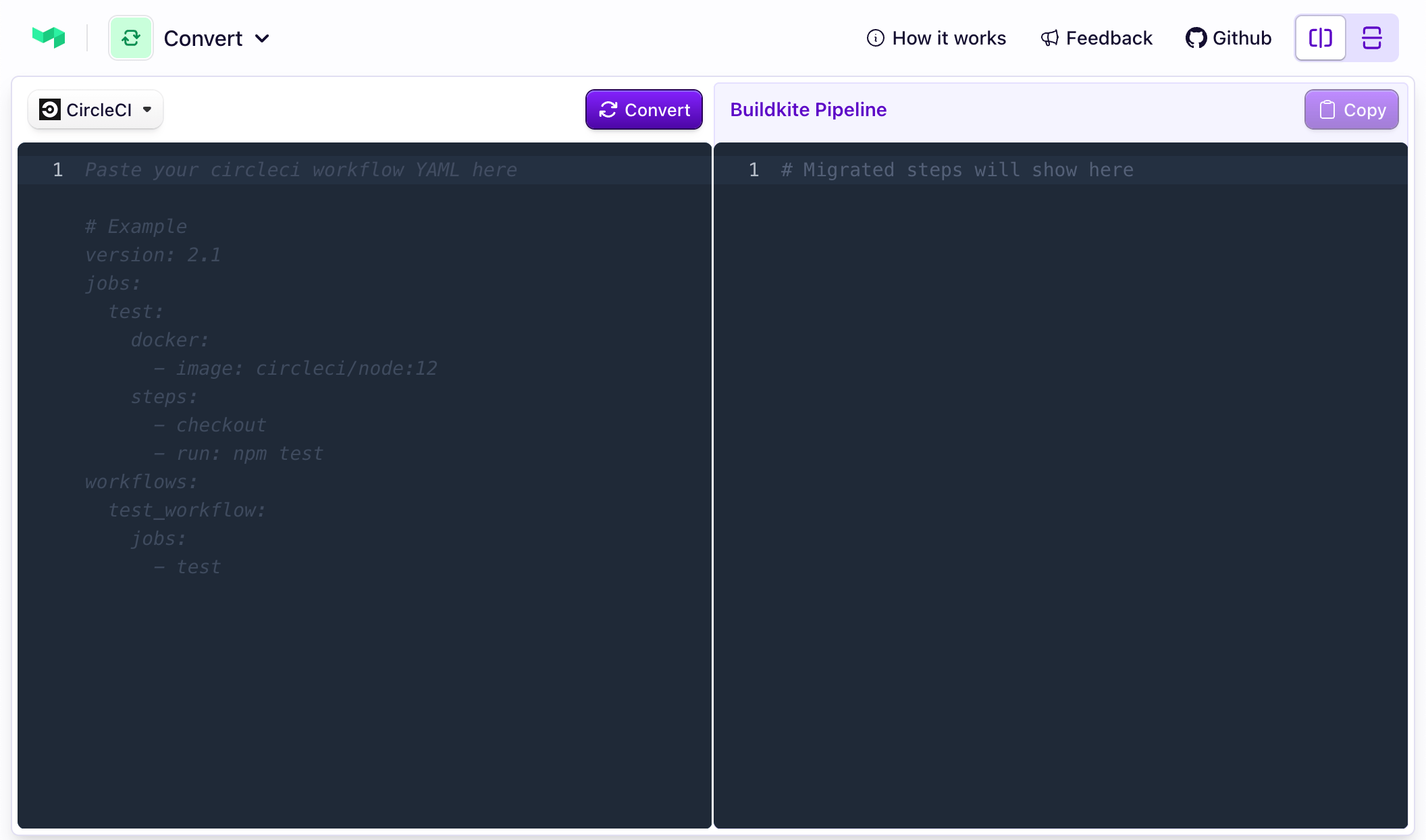
For a quick try of the Buildkite pipeline converter, you can also use the interactive web version.
How to use the web Buildkite pipeline converter
To start translating your existing pipeline or workflow configuration into a Buildkite pipeline using the web version:
- Open the Buildkite pipeline converter in a new browser tab.
- Select your CI/CD platform from the dropdown list.
- In the left panel, enter the pipeline definition to translate into a Buildkite pipeline definition.
- Click the Convert button to reveal the translated pipeline definition in the right panel.
- Copy the resulting Buildkite pipeline YAML configuration on the right and create a new Buildkite pipeline with it.
If the pipeline configuration you are trying to convert to a Buildkite pipeline contains syntax or other errors or is not a valid pipeline configuration, you will see an error message "This doesn't look like valid YAML. Please paste your pipeline configuration." In this case, ensure that the original pipeline configuration you are translating to a Buildkite pipeline is a valid pipeline definition for the CI/CD platform you are migrating from.
Next steps
The Buildkite pipeline converter can be used as a standalone tool or potentially integrated into your Buildkite Migration Services process, offering a way to leverage existing CI configurations within the Buildkite ecosystem.
For more tools and recommendations regarding migrating from your existing CI/CD platform to Buildkite, see: