
Audit log
The Audit Log is an interactive track record of all organization activity.
Enterprise plan feature and storage period
The audit/activity log feature is only available to Buildkite customers on the Enterprise plan, and is only accessible to Buildkite organization administrators.
Audit Log events are stored indefinitely and can be accessed in the Buildkite Pipelines web interface for up to 12 months. After 12 months, Audit Log events can be accessed using GraphQL.
You can also retrieve audit log events programmatically using the REST API, or query them using the GraphQL API.
To access the Audit Log feature:
Select Settings in the global navigation to access the Organization Settings page.
Select Audit > Audit Log to access your organization's Audit Log page.
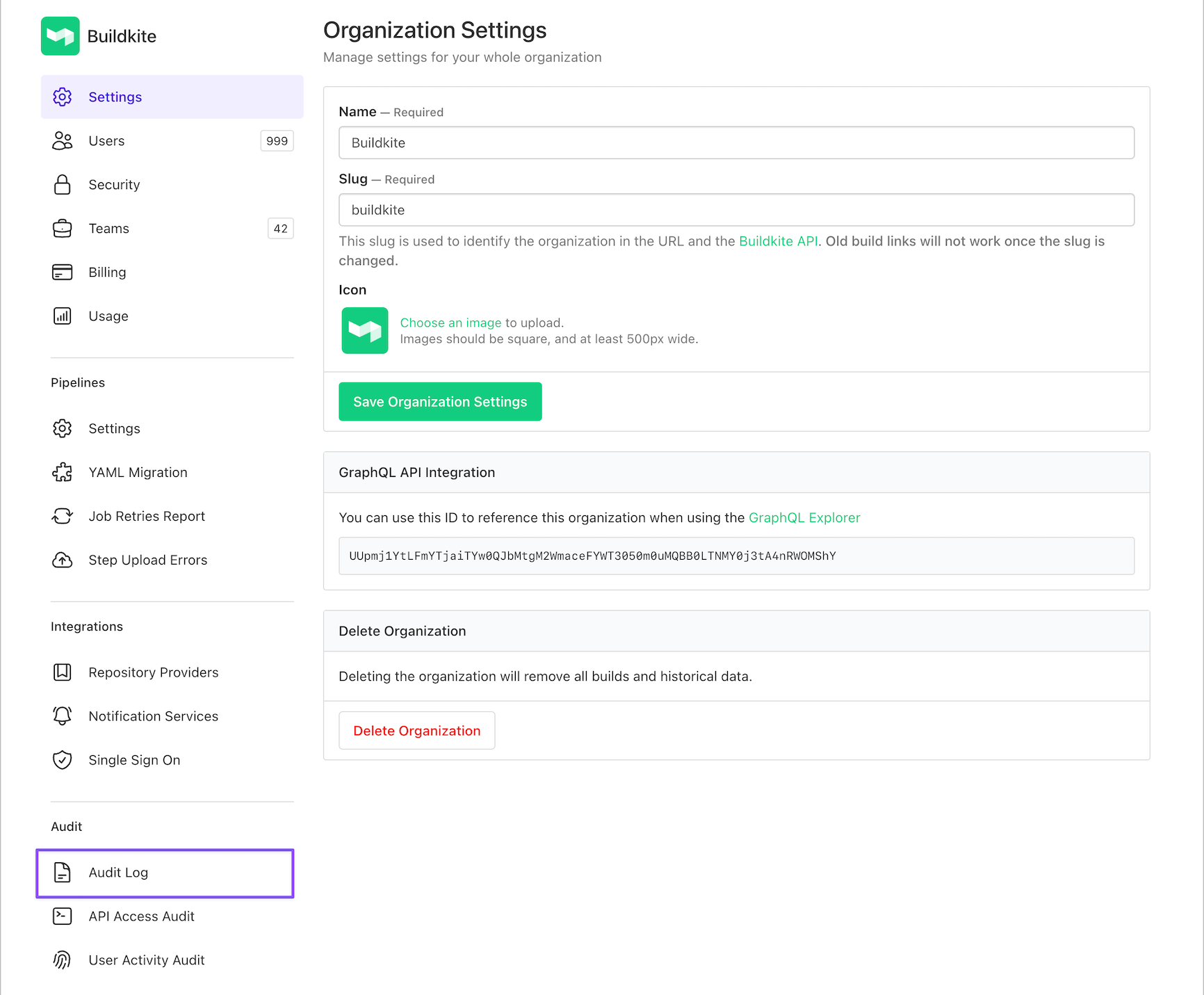
The Audit Log contains two tabs:
-
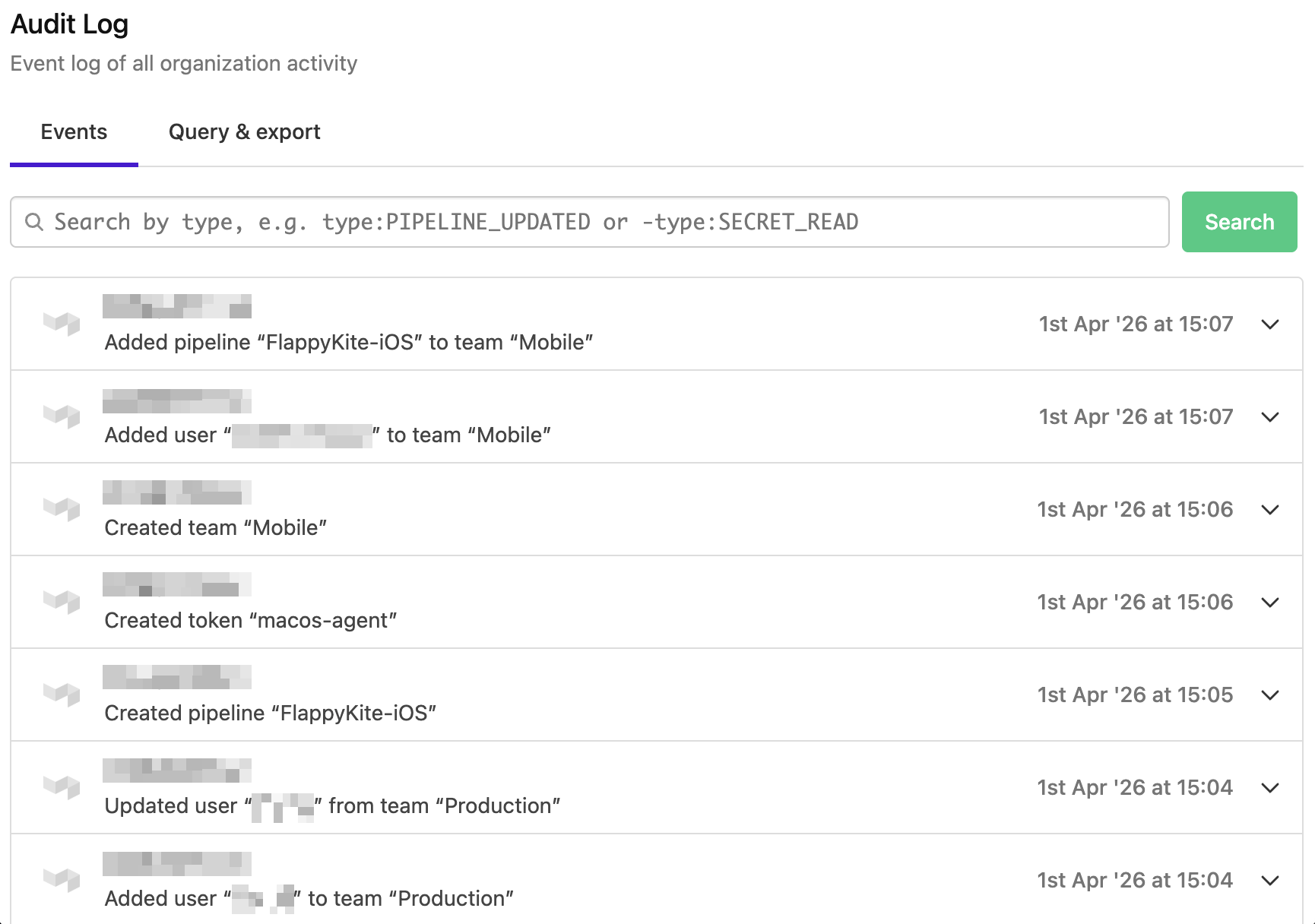
Events - lists all the events that take place within your Buildkite organization. Learn more about which events are logged in Logged events.
-
Query & Export - allows you to query and export your Buildkite organization's audit log using GraphQL API.
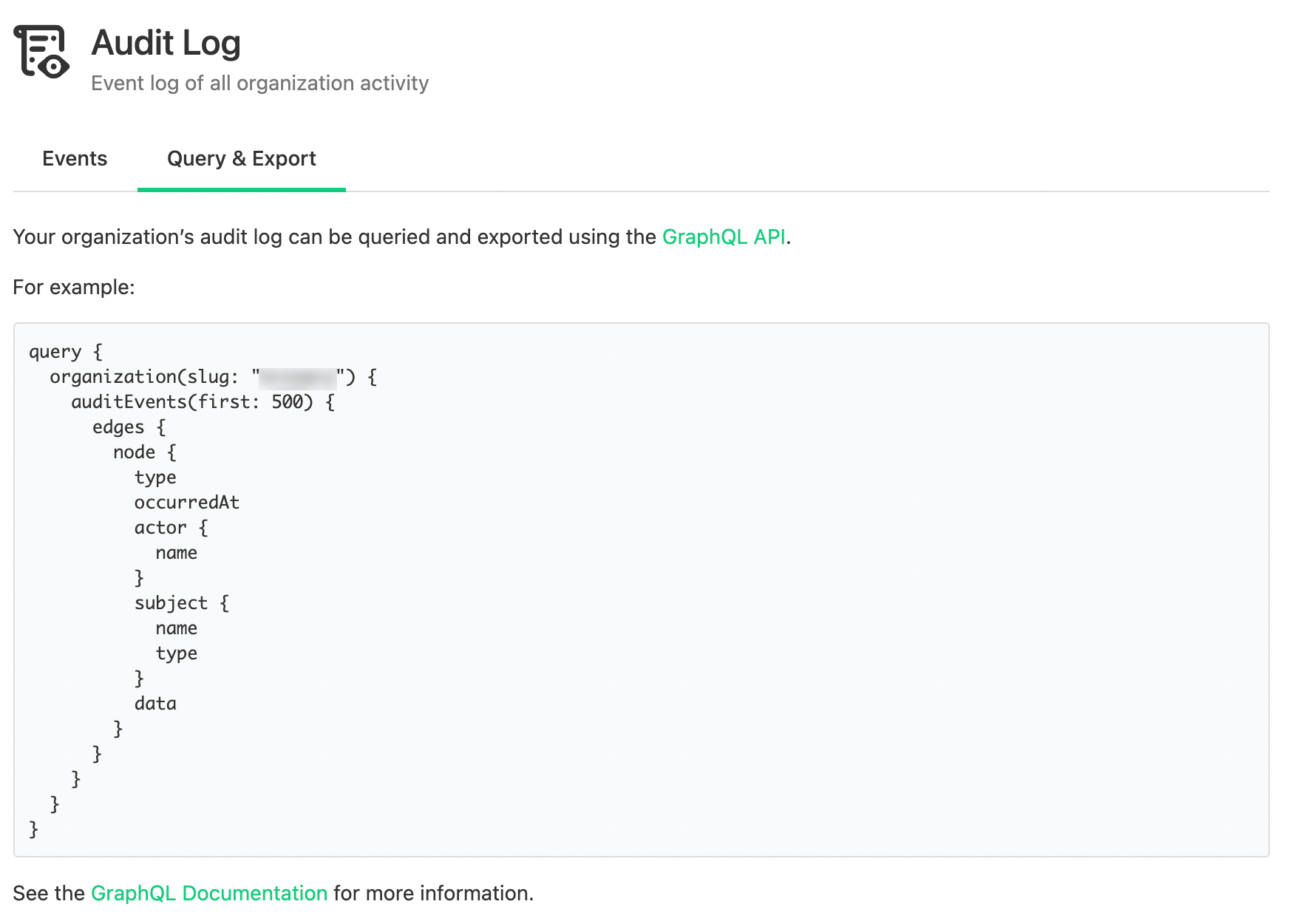
The following GraphQL Audit Event types are available and you can find more details about them in the GraphQL explorer.
Search events
The Events tab has a search bar to filter events by type, pipeline, actor, and subject. The search supports the following syntax:
- Use
type:EVENT_TYPEto include events of a specific type. For example:type:PIPELINE_CREATED. Event type values are matched case-insensitively. - Use
-type:EVENT_TYPEto exclude events of a specific type. For example:-type:SECRET_READ. - Use
pipeline:PIPELINE_SLUGto only return events for a specific pipeline. For example:pipeline:my-app. You can use a pipeline UUID in place of its slug. - Use
-pipeline:PIPELINE_SLUGto exclude the events for a specific pipeline. For example:-pipeline:my-app. - Use
actor:EMAIL_OR_UUIDto only return events performed by a specific user. For example:actor:sam@example.com. You can use a user UUID in place of an email address. - Use
-actor:EMAIL_OR_UUIDto exclude the events performed by a specific user. For example:-actor:sam@example.com. - Use
subject:SUBJECT_TYPEto only return events about a specific kind of record. For example:subject:CLUSTER. Subject type values are matched case-insensitively. - Use
-subject:SUBJECT_TYPEto exclude the events about a specific kind of record. For example:-subject:SECRET. - Combine multiple space-separated terms to narrow a search. Repeating
type:,pipeline:,actor:, orsubject:usesORlogic, matching any of the values given, while negative terms useAND-NOTlogic, excluding all of them. Terms with different keys (for example, atype:term and apipeline:term) together return only the events matching both.
For example, type:TEAM_CREATED type:TEAM_DELETED -type:TEAM_UPDATED returns events where the type is either TEAM_CREATED or TEAM_DELETED, but not TEAM_UPDATED. The query type:PIPELINE_UPDATED pipeline:my-app returns only the configuration changes made to the my-app pipeline.
A pipeline: term matches the events that the pipeline is the subject of, so events about something belonging to it, such as one of its schedules, aren't included. The slug of a deleted pipeline still resolves, which is how you find the event recording the deletion. Where more than one pipeline has used the same slug, the search returns the events of the pipeline using it now, or of the last pipeline to use it.
An actor: term matches user actors only. Events performed by an agent or an API application are not matched or excluded by an actor: term. An email address matches against current and removed members of the organization, so you can still search for events performed by someone who has since lost access. A user UUID is matched as given, without checking that it belongs to a member of the organization. An unrecognized UUID returns no events rather than an error.
A subject: term works like pipeline:, but matches a kind of record rather than an individual one. Where pipeline:my-app returns events for a single pipeline, subject:PIPELINE returns events for all of them. Subject type values match the AuditSubjectType GraphQL enum, for example CLUSTER, PIPELINE, or SCM_SERVICE.
The search has the following constraints:
- Maximum of three unique terms (positive and negative combined)
- Maximum of 250 characters for the query string
- Only events from the last 90 days are returned
Buildkite returns an error instead of results when it cannot understand a search query. This happens when the query contains free text, an unsupported term, or a term with no value.
If a type: or -type: value doesn't match a known event type, the search returns an error instead of any results. When the value is close to a valid event type, the error names the closest match. For example, type:PIPLINE_UPDATED returns the error Unknown event type "PIPLINE_UPDATED". Did you mean PIPELINE_UPDATED?.
A pipeline: or -pipeline: value that doesn't match a pipeline in the Buildkite organization returns the error Unknown pipeline "my-app", with no results returned.
An actor: or -actor: email address that doesn't match a member of the organization returns the error Unknown user "sam@example.com" and no results. An actor: term with a user UUID that doesn't match any actor in the organization's events returns no results and no error. A -actor: term with that UUID excludes no events.
If a subject: or -subject: value doesn't match a known subject type, the search returns an error instead of any results. When the value is close to a valid subject type, the error names the closest match. For example, subject:CLUSTR returns the error Unknown subject type "CLUSTR". Did you mean CLUSTER?.
To discover available event type names, select Browse available event types below the search bar. Types are grouped by category. Selecting a type inserts it into the search field. The full list of event types is also available in Logged events below.
To discover available subject type names, select Browse available subjects below the search bar. Selecting a subject inserts it into the search field.
Logged events
This section lists the events that are currently logged by Buildkite.
Unclustered agent tokens
AGENT_TOKEN_CREATED
AGENT_TOKEN_REVOKED
AGENT_TOKEN_UPDATED
Access tokens
API_ACCESS_TOKEN_CREATED
API_ACCESS_TOKEN_DELETED
API_ACCESS_TOKEN_ORGANIZATION_ACCESS_REVOKED
API_ACCESS_TOKEN_UPDATED
USER_API_ACCESS_TOKEN_ORGANIZATION_ACCESS_ADDED
USER_API_ACCESS_TOKEN_ORGANIZATION_ACCESS_REMOVED

AUTHORIZATION_CREATED
AUTHORIZATION_DELETED
OAuth applications
OAUTH_APPLICATION_AUTHORIZED
Records a successful OAuth authorization-code exchange, including browser-based authorization for remote MCP and the Buildkite CLI. Device login and token refresh do not create this event. See OAuth audit visibility for event details and coverage.
User account management
USER_EMAIL_CREATED
USER_EMAIL_DELETED
USER_EMAIL_MARKED_PRIMARY
USER_EMAIL_VERIFIED

USER_PASSWORD_RESET
USER_PASSWORD_RESET_REQUESTED

USER_TOTP_ACTIVATED
USER_TOTP_CREATED
USER_TOTP_DELETED

USER_UPDATED
Notifications
NOTIFICATION_SERVICE_BROKEN
NOTIFICATION_SERVICE_CREATED
NOTIFICATION_SERVICE_DELETED
NOTIFICATION_SERVICE_DISABLED
NOTIFICATION_SERVICE_ENABLED
NOTIFICATION_SERVICE_UPDATED
Organization management
ORGANIZATION_CREATED
ORGANIZATION_DELETED
ORGANIZATION_TEAMS_DISABLED
ORGANIZATION_TEAMS_ENABLED
ORGANIZATION_UPDATED

ORGANIZATION_BANNER_CREATED
ORGANIZATION_BANNER_DELETED
ORGANIZATION_BANNER_UPDATED

ORGANIZATION_INVITATION_ACCEPTED
ORGANIZATION_INVITATION_CREATED
ORGANIZATION_INVITATION_RESENT
ORGANIZATION_INVITATION_REVOKED

ORGANIZATION_MEMBER_CREATED
ORGANIZATION_MEMBER_DELETED
ORGANIZATION_MEMBER_UPDATED

ORGANIZATION_BUILD_EXPORT_UPDATED
Buildkite subscriptions
SUBSCRIPTION_PLAN_CHANGED
SUBSCRIPTION_PLAN_CHANGE_SCHEDULED

SUBSCRIPTION_PLAN_ADDED
Pipelines
PIPELINE_CREATED
PIPELINE_DELETED
PIPELINE_UPDATED
PIPELINE_WEBHOOK_URL_ROTATED

PIPELINE_SCHEDULE_CREATED
PIPELINE_SCHEDULE_DELETED
PIPELINE_SCHEDULE_UPDATED

PIPELINE_TEMPLATE_CREATED
PIPELINE_TEMPLATE_DELETED
PIPELINE_TEMPLATE_UPDATED

PIPELINE_VISIBILITY_CHANGED

JOB_TERMINAL_SESSION_STARTED
JOB_TERMINAL_SESSION_STARTED records SSH and VNC access to a running job from the Buildkite interface or Buildkite CLI.
Team management
TEAM_CREATED
TEAM_DELETED
TEAM_UPDATED

TEAM_MEMBER_CREATED
TEAM_MEMBER_DELETED
TEAM_MEMBER_UPDATED
For Buildkite Pipelines
TEAM_PIPELINE_CREATED
TEAM_PIPELINE_DELETED
TEAM_PIPELINE_UPDATED
For Buildkite Package Registries
TEAM_REGISTRY_CREATED
TEAM_REGISTRY_UPDATED
TEAM_REGISTRY_DELETED
For Buildkite Test Engine
TEAM_SUITE_CREATED
TEAM_SUITE_UPDATED
TEAM_SUITE_DELETED
Single-sign on provider
SSO_PROVIDER_CREATED
SSO_PROVIDER_DELETED
SSO_PROVIDER_DISABLED
SSO_PROVIDER_ENABLED
SSO_PROVIDER_UPDATED
Source control management
SCM_SERVICE_CREATED
SCM_SERVICE_DELETED
SCM_SERVICE_UPDATED

SCM_REPOSITORY_HOST_UPDATED
SCM_REPOSITORY_HOST_CREATED
SCM_REPOSITORY_HOST_DESTROYED

SCM_PIPELINE_SETTINGS_CREATED
SCM_PIPELINE_SETTINGS_DELETED
SCM_PIPELINE_SETTINGS_UPDATED
Test Engine
SUITE_API_TOKEN_REGENERATED_EVENT
SUITE_CREATED
SUITE_DELETED
SUITE_UPDATED
SUITE_VISIBILITY_CHANGED

SUITE_MONITOR_CREATED
SUITE_MONITOR_DELETED
SUITE_MONITOR_UPDATED

SUITE_WORKFLOW_CREATED
SUITE_WORKFLOW_DELETED
SUITE_WORKFLOW_UPDATED
SUITE_WORKFLOW_CREATED, SUITE_WORKFLOW_UPDATED, and SUITE_WORKFLOW_DELETED record the workflow's condition thresholds, actions, notification templates, and tag filters. Send webhook notification action endpoints are redacted in the recorded snapshot.
Buildkite secrets
SECRET_CREATED
SECRET_DELETED
SECRET_QUERIED
SECRET_READ
SECRET_UPDATED
Cluster management
CLUSTER_CREATED
CLUSTER_DELETED
CLUSTER_UPDATED

CLUSTER_QUEUE_CREATED
CLUSTER_QUEUE_DELETED
CLUSTER_QUEUE_UPDATED

CLUSTER_QUEUE_MIGRATION_CREATED
CLUSTER_QUEUE_MIGRATION_UPDATED

CLUSTER_TOKEN_CREATED
CLUSTER_TOKEN_DELETED
CLUSTER_TOKEN_UPDATED

CLUSTER_QUEUE_TOKEN_CREATED
CLUSTER_QUEUE_TOKEN_UPDATED
CLUSTER_QUEUE_TOKEN_DELETED

CLUSTER_PERMISSION_CREATED
CLUSTER_PERMISSION_DELETED
Buildkite Package Registries
REGISTRY_CREATED
REGISTRY_UPDATED
REGISTRY_DELETED

STORAGE_CREATED
Other systems
You can also set up Amazon EventBridge to stream Audit Log events.