
Limits
This page outlines usage limits designed to protect your builds from unintentional resource issues and ensure reliable service for all customers. Limits vary across plans and the All Access Trial:
- Free plan
- Pro plan
- Enterprise plan
- All Access Trial
You can find out more about the available plans and what is included in them in Pricing.
The Usage page is available on every Buildkite plan and shows a breakdown of usage metrics across the Buildkite platform and all products for your Buildkite organization.
Viewing your organization's service quotas
Buildkite organization administrators can view the service quotas that apply to their organization on the Service Quotas page in Organization Settings.
To access your organization's service quotas:
Select Settings in the global navigation to access the Organization Settings page.
-
Select Quotas to open the Service Quotas page.
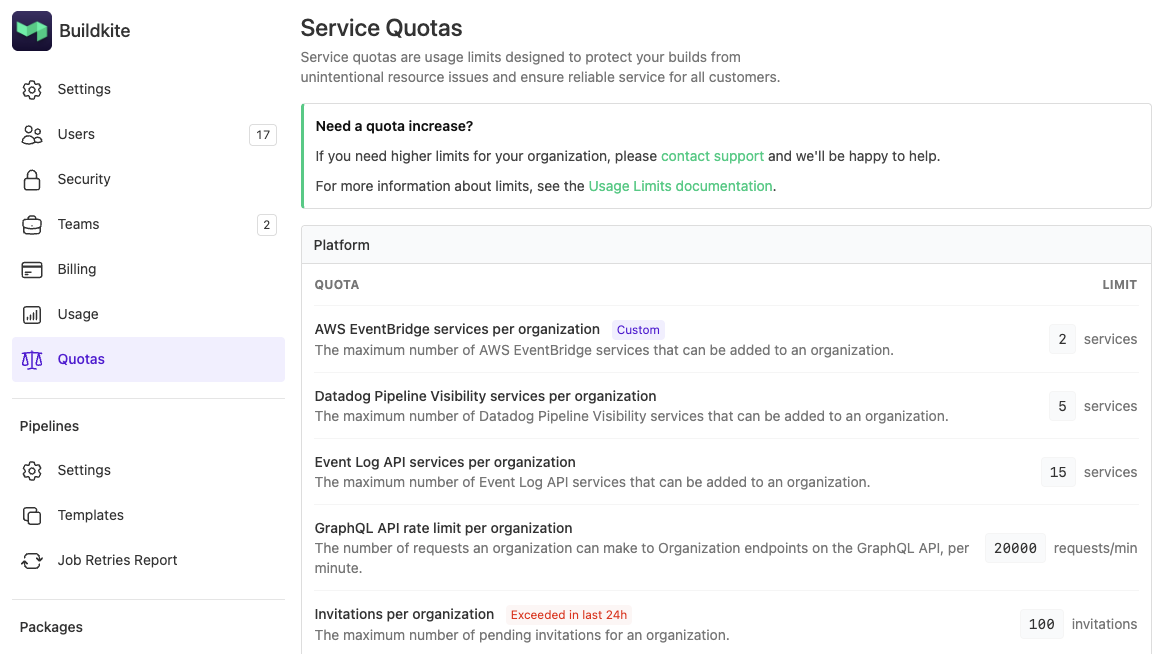
The Service Quotas page displays your organization's current limits grouped by product area. Each quota shows the limit that applies to your organization, which may differ from the defaults listed on this page.
A Custom badge next to a quota indicates that your organization has a limit that differs from the default for your plan. An Exceeded in last 24h badge indicates that your organization reached this limit within the past 24 hours.
Some organization-level limits can be increased on request depending on your plan. Contact Buildkite support at support@buildkite.com with details about your use case, or contact your Technical Account Manager if you have one.
Platform and organization-level limits
Platform and organization-level limits apply to all Buildkite products. These limits protect your organization from unintentional resource exhaustion and ensure reliable service for all customers. These limits are scoped to your organization.
| Service limit type | Description and default limit |
|---|---|
| Organizations per day |
The maximum number of organizations a user can create per day. Default: 4 organizations |
| Organizations per user |
The maximum total number of organizations a user can create. Default: 20 organizations |
| Unverified emails per user |
The maximum number of unverified emails per user. Default: 5 emails |
| Invitations per organization |
The maximum number of pending invitations for an organization. Default: 20 invitations |
| Teams per organization |
The maximum number of teams that an organization can have. Default: 250 teams |
| REST API rate limit per organization |
The number of requests an organization can make to Organization endpoints on the REST API, per minute. Default: 200 requests per minute |
| GraphQL API rate limit per organization |
The total actual complexity points an organization can consume on the GraphQL API within a 5-minute window. Default: 20,000 complexity points per 5 minutes |
| Portal API rate limit per organization |
The number of requests an organization can make to Organization endpoints on the Portal API, per minute. Default: 200 requests per minute |
| REST API rate limit per user |
The default number of per-user requests a single user can make to the REST API, per minute. This limit applies in addition to the organization-wide REST API rate limit. Default: 50 requests per minute |
| GraphQL API rate limit per user |
The default per-user complexity points a single user can consume on the GraphQL API within a 5-minute window. This limit applies in addition to the organization-wide GraphQL API rate limit. Default: 5,000 complexity points per 5 minutes |
| Remote MCP server rate limit per user |
The number of REST API requests a user can make through the remote Buildkite MCP server, per minute. This limit is separate from the organization-wide REST API rate limit. Default: 50 requests per minute |
| GraphQL query complexity |
The maximum complexity score for GraphQL queries. Default: 50,000 |
| GraphQL query depth |
The maximum nesting depth for GraphQL queries. Default: 15 levels |
| Audit search terms |
The maximum number of search terms for audit logs. Default: 3 terms |
| IP addresses per token |
The maximum number of IP allowlist entries per token. Default: 24 addresses |
| Maximum OIDC lifetime |
The default maximum lifetime for OIDC. Default: 2 hours |
Pipelines limits
The following table lists the default service limits for Pipelines.
| Service limit type | Description and default limit |
|---|---|
| Jobs per build |
The maximum number of jobs that can be created in a single pipeline build (including job retries). Default: 4,000 jobs |
| Jobs created per pipeline upload |
The maximum number of jobs that can be created in a single pipeline upload. Default: 500 jobs |
| Job timeout |
The maximum time before a running job will time out. Default: 4 hours on the Free plan. Unlimited on Pro and Enterprise plans |
| Pipeline uploads per build |
The maximum number of pipeline uploads that can be performed in a single build. Default: 500 pipeline uploads |
| Triggers per pipeline |
The maximum number of webhook triggers per pipeline. Default: 10 |
| Trigger build depth per pipeline |
The maximum depth of a chain of trigger builds. Default: 10 builds |
| Concurrency key length |
The maximum length for concurrency group keys. Default: 200 characters |
| Build retention |
The time period builds are stored in Buildkite after running. Default: 30 days on the Free plan, 90 days on the Pro plan, and 365 days on the Enterprise plan |
| Teams per block step |
The maximum number of allowed teams for manual unlock steps. Default: 100 teams |
| Matrix jobs per step |
The maximum number of matrix jobs in a pipeline step. Default: 50 jobs |
| Annotation replacements |
The maximum number of image or link replacements per annotation. Default: 10 replacements |
| Artifacts per job |
The maximum number of artifacts that can be uploaded to Buildkite per job. Default: 5000 artifacts |
| Artifact file size |
The maximum size of an artifact that can be uploaded to Buildkite from an agent. Default: 10 GiB |
| Artifact batch total file size |
The maximum cumulative size of artifacts that can be uploaded to Buildkite from an agent in a single job using the |
| Multipart upload artifacts |
The maximum number of artifacts per upload batch. Default: 30 artifacts |
| Artifact retention |
The maximum number of days artifacts are stored. See Artifacts billing for how retention relates to storage usage. Default: 30 days on the Free, Personal, and Pro plans, 90 days on the Enterprise plan and during trials, and 180 days on earlier paid plans, such as Pro and Enterprise plans from before 2026 |
| Log size per job |
The maximum file-size of a job's log. Default: 1,024 MiB |
| Number of clusters |
The maximum number of clusters that can be created in a Buildkite organization. Default: 1 on the Free plan, unlimited on Pro and Enterprise plans |
| Number of queues per cluster |
The default number of queues that can be created on a single cluster. Default: 50 |
| Portal secrets |
The maximum number of secrets per portal. Default: 2 secrets |
| Number of stacks per organization |
The default number of stacks that can be created per organization. Default: 30 |
| Cache size for hosted agents |
The maximum cache size for hosted agents. Default: 128 GB |
| Artifact Create/Update API calls |
The number of Create or Update requests for artifacts per minute per organization. Default: 600 |
| Slack services per organization |
The maximum number of Slack services that can be added to an organization. Default: 50 services |
| Webhook services per organization |
The maximum number of Webhook services that can be added to an organization. Default: 15 services |
| Event Log API services per organization |
The maximum number of Event Log API services that can be added to an organization. Default: 15 services |
| OpenTelemetry Tracing services per organization |
The maximum number of OpenTelemetry Tracing services that can be added to an organization. Default: 5 services |
| Datadog Pipeline Visibility services per organization |
The maximum number of Datadog Pipeline Visibility services that can be added to an organization. Default: 5 services |
| AWS EventBridge services per organization |
The maximum number of AWS EventBridge services that can be added to an organization. Default: 1 service |
| Anthropic spend |
Model provider spend limits for Anthropic, per month in USD. Default: $50 during the All Access Trial, $1,000 on Pro and Enterprise |
| OpenAI spend |
Model provider spend limits for OpenAI, per month in USD. Default: $50 during the All Access Trial, $1,000 on Pro and Enterprise |
Hosted agents limits
Buildkite hosted agent concurrency is the maximum combined vCPU capacity that the hosted agent machines allocated to an organization can use at once. Each machine runs one job and consumes the vCPU capacity specified by its instance shape. A machine consumes concurrency from the time it starts booting to acquire a job until it is released.
| Limit type | All Access Trial | Free | Pro | Enterprise |
|---|---|---|---|---|
| Linux vCPU concurrency | 24 vCPU | 20 vCPU | 256 vCPU | Custom |
| M4 Mac vCPU concurrency | 12 vCPU | Not available | 48 vCPU | Custom |
| Linux vCPU minutes per month | 4,000 included | Up to 2,000 | 4,000 included | Volume discounts |
| M4 Mac vCPU minutes per month | 3,000 included | Not available | Pay as you go | Volume discounts |
Adjusting hosted agents limits
All Access Trial and Enterprise hosted agents limits can be increased on request. Contact Buildkite support at support@buildkite.com with details about your use case, or contact your Technical Account Manager if you have one.
To calculate the maximum number of jobs that can run concurrently when they all use the same instance shape, divide the vCPU concurrency limit by the shape's vCPU count. For example, the Free plan's 20-vCPU Linux limit supports up to 10 Small Linux machines at 2 vCPU each. The Pro plan's 256-vCPU Linux limit supports up to 128 Small machines, 64 Medium machines at 4 vCPU each, or 32 Large machines at 8 vCPU each. When jobs use a mix of shapes, the sum of the machines' vCPU capacity must remain within the limit. Jobs that would exceed the limit remain queued until sufficient capacity becomes available.
The following default storage quotas apply to hosted agent cache volumes:
| Storage quota | Default |
|---|---|
| Container cache volume | 50 GB |
| Git mirror volume | 5 GB |
vCPU minute allowances and usage pricing are separate from concurrency limits. See Pricing for current usage rates, available Linux and macOS shapes, and hosted agent features included with each plan.
Test Engine limits
The following table lists the default service limits for Test Engine.
| Service limit type | Description and default limit |
|---|---|
| Test Engine workflows per suite |
The maximum number of Test Engine workflows per suite. Default: Not available on the Free plan, 3 workflows on the Pro and Enterprise plans |
| Test Engine workflow events per minute |
The maximum number of Test Engine workflow events per minute. Default: 500 events |
| Test Splitting API rate limit |
The number of requests that can be made to the Test Splitting API. Default: 10,000 requests per minute |
| Test ownership file size |
The maximum size for CODEOWNERS files. Default: 1 MB |
| Linear services per organization |
The maximum number of Linear integrations that can be added to an organization. Default: 1 service |
Package Registries limits
The following table lists the default service limits for Package Registries. The limits in Package Registries are based on the subscription tier:
| Service limit type | Description and default limit |
|---|---|
| Free plan |
Allocated storage and bandwidth volume (combined). Default: 1 GB per month (hard limit) |
| Pro plan |
Allocated storage and bandwidth volume (combined). Default: 20 GB included per organization per month, then usage-based billing |
| Enterprise plan |
Allocated storage and bandwidth volume (combined). Default: Custom allocation with volume pricing |