
Security overview
Securing your Buildkite organization means controlling who can change your builds, what code your agents run, and which credentials and systems that code can access. This section helps you plan those protections, configure them, and check that they work.
Buildkite secures its services. Your organization configures access and protects its workloads. The shared responsibilities below explain how that division changes between Buildkite hosted and self-hosted agents.
If you suspect an active compromise, go directly to Incident response.
Find your starting point
- Plan your controls: Choose controls for your risk profile to prioritize protections based on the code, data, and systems each workload can reach.
- Configure a new pipeline: Follow Secure your first production pipeline for a starting configuration with a verification check after each step.
- Review an existing setup: Work through the Security checklist, starting with baseline controls across nine security areas. It includes separate hosted and self-hosted agent controls.
- Make controls mandatory: Use Enforcing security controls to place restrictions outside repository-controlled pipeline definitions and test that they cannot be bypassed.
- Manage credentials: Use Token security to identify token types, limit their access, and plan expiry and revocation. Use Secrets management to provide credentials to builds.
- Prepare for an incident: Use Incident response to assign responders, prepare a runbook, and rehearse recovery.
Shared responsibility
Buildkite secures the control plane that schedules builds and stores build data. Your organization controls user and token access, source repositories, pipeline definitions, plugins, and the credentials and systems your builds can access. These responsibilities apply to both hosting models.
The following diagram shows who is responsible for securing each system involved in a build. Agent infrastructure responsibilities depend on the hosting model, and artifact storage responsibilities depend on your storage choice.
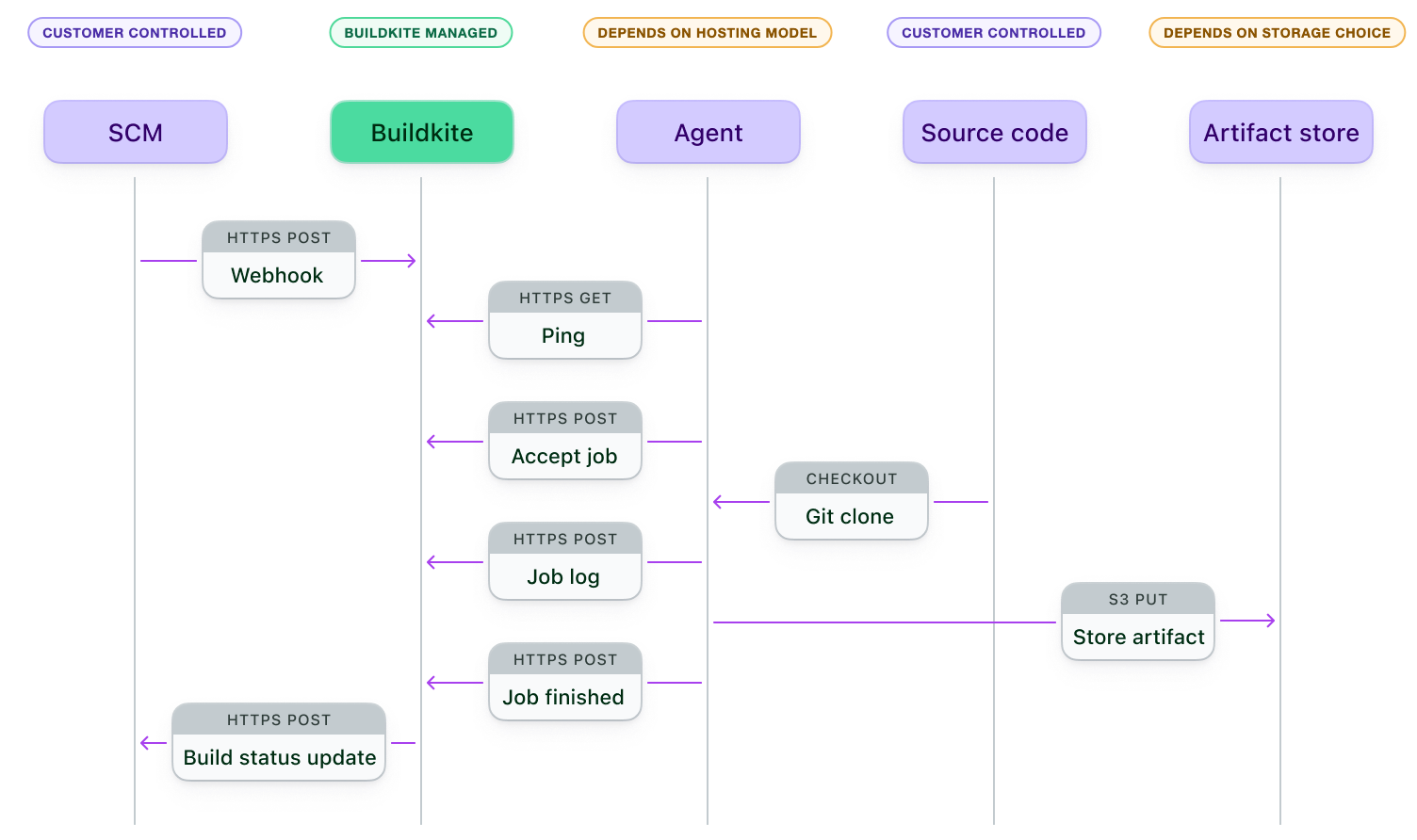
During a build:
- Buildkite Pipelines receives a webhook from your source control system when code changes.
- An agent, hosted by Buildkite or by your organization, receives and accepts a job.
- The agent checks out source code and runs the job with the access you've configured.
- The agent sends job logs to Buildkite and uploads artifacts to Buildkite-managed storage or your configured artifact store.
- The agent reports the result, and Buildkite Pipelines posts a status update to your source control system.
Use the Security checklist to review the controls your organization manages in each hosting model.