
Getting started with managing pipelines
The Buildkite Terraform provider supports managing pipelines, including their steps, pipeline templates, repository settings, repository webhooks, team access, and schedules as Terraform resources. This page covers how to define and configure these resources in your Terraform configuration files.
This process assumes that you already have the required Buildkite clusters and teams configured in your Buildkite organization, so that you can start configuring and managing your pipelines in Terraform. Before proceeding, ensure you have the following:
Cluster name/s: Required so that Terraform can determine which Buildkite cluster/s your pipelines are associated with.
Team name/s (optional): Required if teams is enabled in your Buildkite organization, and so that Terraform can determine which teams should be granted access to your pipelines, along with each team's permissions.
Be aware that you'll be able to later modify the configurations you'll create on this page, by bringing your cluster-related and team resources into Terraform.
Define your initial pipeline resources
Define Buildkite pipeline resources for the pipelines in your Buildkite organization that you want to manage in Terraform, again in HCL (for example, pipelines.tf).
In the following example, two pipelines are defined (Frontend pipeline and Backend pipeline), which will be part of the pre-existing Buildkite cluster (Default cluster), and a pre-existing team, whose name is Engineering (along with all of its members) will be made the initial owner of these pipelines. The steps for both of these pipelines use those from a pipeline template definition named Standard pipeline.
The configuration settings for all pipeline-related resources in this example are accessible in the Buildkite interface through the URL path portions (appended to https://buildkite.com/<your-buildkite-org-slug>/), indicated in the comments of the pipeline template (Standard pipeline) and first pipeline (named Frontend pipeline) of this pipelines.tf example.
# Data source for existing cluster (name) to assign pipelines to
data "buildkite_cluster" "default" {
  name = "Default cluster"
}

# Data source for existing team (name) to assign as the initial pipeline owner
data "buildkite_team" "engineering" {
  slug = "engineering"
}

# Define a reusable pipeline template (through 'pipeline-templates')
resource "buildkite_pipeline_template" "standard" {
  name          = "Standard pipeline"
  description   = "Default step configuration for all pipelines."
  configuration = <<-YAML
    steps:
      - label: ":pipeline:"
        command: "buildkite-agent pipeline upload"
  YAML
}

# Define the frontend pipeline
resource "buildkite_pipeline" "frontend" {

  # General and infrastructure (through 'frontend-pipeline/settings')
  name                 = "Frontend pipeline"
  description          = "Builds and tests the frontend application."
  default_branch       = "main"
  emoji                = ":react:"
  color                = "#6B6B6B"
  cluster_id           = data.buildkite_cluster.default.id
  pipeline_template_id = buildkite_pipeline_template.standard.id

  # Build behavior (through 'frontend-pipeline/settings/builds')
  cancel_intermediate_builds               = true
  cancel_intermediate_builds_branch_filter = "!main"
  allow_rebuilds                           = true
  default_timeout_in_minutes               = 15
  maximum_timeout_in_minutes               = 30

  # Repository (through 'frontend-pipeline/settings/repository')
  repository      = "git@github.com:my-org/frontend.git"

  # Initial pipeline owner (through 'frontend-pipeline/settings/teams')
  default_team_id = data.buildkite_team.engineering.id
}

# Define the backend pipeline
resource "buildkite_pipeline" "backend" {

  # General and infrastructure
  name                 = "Backend pipeline"
  description          = "Builds and tests the backend server."
  default_branch       = "main"
  emoji                = ":gear:"
  color                = "#4A4A4A"
  cluster_id           = data.buildkite_cluster.default.id
  pipeline_template_id = buildkite_pipeline_template.standard.id

  # Build behavior
  allow_rebuilds             = true
  default_timeout_in_minutes = 30
  maximum_timeout_in_minutes = 60

  # Repository
  repository      = "git@github.com:my-org/backend.git"

  # Initial pipeline owner
  default_team_id = data.buildkite_team.engineering.id
}
Learn more about the following Terraform provider components used above from the official documentation:
Resources for pipelines in the
buildkite_pipelineresource documentation, as well as the equivalent for pipeline templates in thebuildkite_pipeline_templateresource documentation.Data sources for clusters in the
buildkite_clusterdata source, as well as teams in thebuildkite_teamdata source.
In the pipeline examples above, the actual pipeline YAML steps for each pipeline are uploaded to Buildkite Pipelines from the .buildkite/pipeline.yml file in each pipeline's respective repository, which is the recommended approach for storing and managing your pipeline steps as code.
If you did want to manage some of these pipeline steps through your pipelines' https://buildkite.com/<your-buildkite-org-slug>/<pipeline-slug>/settings/steps pages in the Buildkite interface, you'd need to include these steps in steps definition blocks (containing your YAML steps) of the respective pipelines in your pipelines.tf file. However, this approach is not recommended.
Add your repository provider settings
Add the required provider_settings blocks for each pipeline definition in this file.
For example, assuming both pipelines are configured to build a repository in GitHub with the following GitHub Settings accessed through https://buildkite.com/<your-buildkite-org-slug>/<pipeline-slug>/settings/repository, of which the last two are not shown in this screenshot:
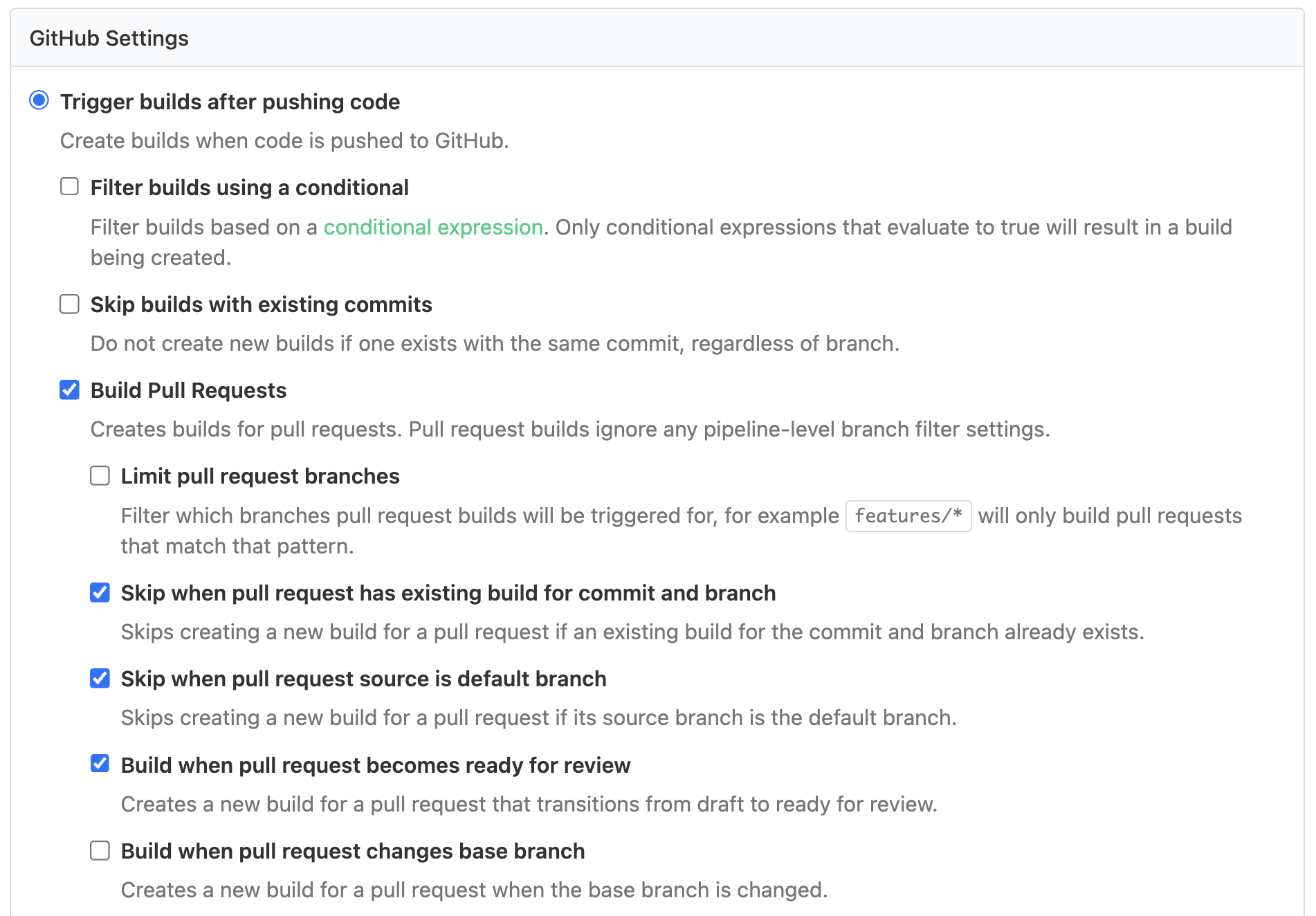
Add the following repository_provider blocks to each pipeline of your pipelines.tf file:
...

# Define the frontend pipeline
resource "buildkite_pipeline" "frontend" {

  ...

  # Repository (through 'frontend-pipeline/settings/repository')
  repository      = "git@github.com:my-org/frontend.git"

  provider_settings = {
    trigger_mode                                  = "code"
    build_pull_requests                           = true
    skip_pull_request_builds_for_existing_commits = true
    ignore_default_branch_pull_requests           = true
    build_pull_request_ready_for_review           = true
    build_branches                                = true
    publish_commit_status                         = true
  }

  ...

}

# Define the backend pipeline
resource "buildkite_pipeline" "backend" {

  ...

  # Repository
  repository      = "git@github.com:my-org/backend.git"

  provider_settings = {
    trigger_mode                                  = "code"
    build_pull_requests                           = true
    skip_pull_request_builds_for_existing_commits = true
    ignore_default_branch_pull_requests           = true
    build_pull_request_ready_for_review           = true
    build_branches                                = true
    publish_commit_status                         = true
  }

  ...

}
Learn more about each available provider_settings configuration in the Buildkite Terraform provider's Nested Schema for provider_settings documentation.
Add required repository webhooks
Add the required repository webhooks to trigger builds of these pipelines automatically (that is, when changes are pushed to these repositories). This is done using buildkite_pipeline_webhook resource blocks.
Terraform does not create repository webhooks automatically
By default, when you create a pipeline through the Buildkite interface, the repository webhook is created automatically for repositories connected through the GitHub App. The Terraform provider does not create the repository webhook for you. Add a buildkite_pipeline_webhook resource for each pipeline. Otherwise, pushes to the repository won't trigger builds.
In this example, add the following buildkite_pipeline_webhook resource blocks to each pipeline of your pipelines.tf file, bearing in mind that the Terraform identifiers you use in these blocks (that is, frontend and backend) must match their respective buildkite_pipeline pipeline Terraform identifiers:
...

# Define the frontend pipeline
resource "buildkite_pipeline" "frontend" {

  ...

}

# Repository webhook to trigger frontend pipeline builds automatically
resource "buildkite_pipeline_webhook" "frontend" {
  pipeline_id = buildkite_pipeline.frontend.id
  repository  = buildkite_pipeline.frontend.repository
}

# Define the backend pipeline
resource "buildkite_pipeline" "backend" {

  ...

}

# Repository webhook to trigger backend pipeline builds automatically
resource "buildkite_pipeline_webhook" "backend" {
  pipeline_id = buildkite_pipeline.backend.id
  repository  = buildkite_pipeline.backend.repository
}
Learn more about this Terraform provider resource in the buildkite_pipeline_webhook resource documentation.
Add any other teams to your pipelines
Add any other teams who need access to these pipelines and define their permissions on these pipelines. This is done using buildkite_pipeline_team resource blocks.
In this example, the pre-existing Design team in your Buildkite organization is granted full access to Frontend pipeline, which is the same level of access as the pipeline's initial owner team (Engineering).
To do this, add the following buildkite_team data source and buildkite_pipeline_team resource blocks for this team, and apply it to the frontend pipeline in your pipelines.tf file.
Bear in mind that the Terraform identifiers for the buildkite_pipeline resource and buildkite_team data source blocks (that is, frontend and design_team, respectively) must match those you use for the pipeline_id and team_id argument values in your buildkite_pipeline_team resource block. Therefore, the syntax for referencing these values would be data.buildkite_team.design_team.id and buildkite_pipeline.frontend.id, respectively, where the team's access_level of MANAGE_BUILD_AND_READ grants full access to the pipeline:
...

# Data source for existing team (name) to assign pipeline access
data "buildkite_team" "design_team" {
  slug = "design-team"
}

...

# Define the frontend pipeline
resource "buildkite_pipeline" "frontend" {

  ...

}

...

# Additional team with full access to 'frontend'
resource "buildkite_pipeline_team" "design" {
  pipeline_id  = buildkite_pipeline.frontend.id
  team_id      = data.buildkite_team.design_team.id
  access_level = "MANAGE_BUILD_AND_READ"
}

# Define the backend pipeline
resource "buildkite_pipeline" "backend" {

  ...

}

...
Learn more about this Terraform provider resource in the buildkite_pipeline_team resource documentation.
Add appropriate schedules to your pipelines
It might be sufficient that your pipelines are built using repository webhooks only. However, you may wish to run a regular scheduled build of your pipeline, for example, to ensure the project's resources are kept up to date, with dynamically run steps that create a new pull- or merge-request with updated resources.
In this example, add a daily re-build of the Backend pipeline that runs at midnight on the backend project's default branch (that is, main, which can be accessed through default_branch of the pipeline's Terraform resource).
To do this, add the following buildkite_pipeline_schedule resource block for this schedule, and apply it to the backend pipeline in your pipelines.tf file. Bear in mind that the Terraform identifier for the buildkite_pipeline resource block (that is, backend) must match that of the pipeline_id argument value in your buildkite_pipeline_schedule resource block. Therefore, the syntax for referencing this value would be buildkite_pipeline.backend.id.
...

# Define the frontend pipeline
resource "buildkite_pipeline" "frontend" {

  ...

}

...

# Define the backend pipeline
resource "buildkite_pipeline" "backend" {

  ...

}

...

# Schedule a build of the 'backend' pipeline at midnight every day
resource "buildkite_pipeline_schedule" "nightly" {
  pipeline_id = buildkite_pipeline.backend.id
  label       = "Nightly build"
  cronline    = "@midnight"
  branch      = buildkite_pipeline.backend.default_branch
}
Learn more about this Terraform provider resource in the buildkite_pipeline_schedule resource documentation.
Verify your completed pipelines.tf file
Confirm that your Terraform pipeline resources configuration (pipelines.tf) file is now complete:
# Data source for existing cluster (name) to assign pipelines to
data "buildkite_cluster" "default" {
  name = "Default cluster"
}

# Data source for existing team (name) to assign as the initial pipeline owner
data "buildkite_team" "engineering" {
  slug = "engineering"
}

# Data source for existing team (name) to assign access to pipelines
data "buildkite_team" "design_team" {
  slug = "design-team"
}

# Define a reusable pipeline template (through 'pipeline-templates')
resource "buildkite_pipeline_template" "standard" {
  name          = "Standard pipeline"
  description   = "Default step configuration for all pipelines."
  configuration = <<-YAML
    steps:
      - label: ":pipeline:"
        command: "buildkite-agent pipeline upload"
  YAML
}

# Define the frontend pipeline
resource "buildkite_pipeline" "frontend" {

  # General and infrastructure (through 'frontend-pipeline/settings')
  name                 = "Frontend pipeline"
  description          = "Builds and tests the frontend application."
  default_branch       = "main"
  emoji                = ":react:"
  color                = "#6B6B6B"
  cluster_id           = data.buildkite_cluster.default.id
  pipeline_template_id = buildkite_pipeline_template.standard.id

  # Build behavior (through 'pipeline-slug/settings/builds')
  cancel_intermediate_builds               = true
  cancel_intermediate_builds_branch_filter = "!main"
  allow_rebuilds                           = true
  default_timeout_in_minutes               = 15
  maximum_timeout_in_minutes               = 30

  # Repository (through 'pipeline-slug/settings/repository')
  repository      = "git@github.com:my-org/frontend.git"

  provider_settings = {
    trigger_mode                                  = "code"
    build_pull_requests                           = true
    skip_pull_request_builds_for_existing_commits = true
    ignore_default_branch_pull_requests           = true
    build_pull_request_ready_for_review           = true
    build_branches                                = true
    publish_commit_status                         = true
  }

  # Initial pipeline owner (through 'pipeline-slug/settings/teams')
  default_team_id = data.buildkite_team.engineering.id

}

# Repository webhook to trigger frontend pipeline builds automatically
resource "buildkite_pipeline_webhook" "frontend" {
  pipeline_id = buildkite_pipeline.frontend.id
  repository  = buildkite_pipeline.frontend.repository
}

# Additional team with full access to the 'frontend' pipeline
resource "buildkite_pipeline_team" "design" {
  pipeline_id  = buildkite_pipeline.frontend.id
  team_id      = data.buildkite_team.design_team.id
  access_level = "MANAGE_BUILD_AND_READ"
}

# Define the backend pipeline
resource "buildkite_pipeline" "backend" {

  # General and infrastructure
  name                 = "Backend pipeline"
  description          = "Builds and tests the backend server."
  default_branch       = "main"
  emoji                = ":gear:"
  color                = "#4A4A4A"
  cluster_id           = data.buildkite_cluster.default.id
  pipeline_template_id = buildkite_pipeline_template.standard.id

  # Build behavior
  allow_rebuilds             = true
  default_timeout_in_minutes = 30
  maximum_timeout_in_minutes = 60

  # Repository
  repository      = "git@github.com:my-org/backend.git"

  provider_settings = {
    trigger_mode                                  = "code"
    build_pull_requests                           = true
    skip_pull_request_builds_for_existing_commits = true
    ignore_default_branch_pull_requests           = true
    build_pull_request_ready_for_review           = true
    build_branches                                = true
    publish_commit_status                         = true
  }

  # Initial pipeline owner
  default_team_id = data.buildkite_team.engineering.id

}

# Repository webhook to trigger backend pipeline builds automatically
resource "buildkite_pipeline_webhook" "backend" {
  pipeline_id = buildkite_pipeline.backend.id
  repository  = buildkite_pipeline.backend.repository
}

# Schedule a build of the 'backend' pipeline at midnight every day
resource "buildkite_pipeline_schedule" "nightly" {
  pipeline_id = buildkite_pipeline.backend.id
  label       = "Nightly build"
  cronline    = "@midnight"
  branch      = buildkite_pipeline.backend.default_branch
}
Applying the configuration
Before you apply your Terraform configurations to your Buildkite organization, you may also want to manage your clusters and queues, teams and Buildkite organization's settings in Terraform too. If you do this, ensure your pipelines.tf file has been modified to account for the additional resources you've configured for your cluster- and queue-related resources (clusters.tf) and team-related resources (teams.tf) before proceeding.
Before applying your changes to your Buildkite organization with Terraform, it is recommended that you perform the following safeguards:
Temporarily disable pipeline deletion permissions. You can access this feature by selecting Settings in the global navigation > Security > Pipelines tab, and clear the Delete Pipelines checkbox.
If you're a Buildkite customer on the Enterprise plan, create a child Buildkite organization to test your Terraform configuration first before applying them into production.
Once your pipelines.tf file is completed (including clusters.tf, teams.tf, and organization.tf if you've configured these too), you can apply all of these configurations to your configured Buildkite organization:
terraform plan
terraform apply
Terraform will apply all the resources you've configured in all of your .tf files to your Buildkite organization.
Managing secrets and improving maintainability
Once you have securely stored you secrets' values and Terraform has successfully applied these configurations to your Buildkite organization, delete your Terraform variable file terraform.tfvars which has been temporarily storing these values, such as those of your API access token (and if so, agent token).
You can maintain a copy of these .tf files in source control, should you wish to reapply these pipelines and other resources to the same or any other Buildkite organization again in future, bearing in mind that you'll need to manually keep any configuration changes you make to these pipelines through the Buildkite interface or APIs in sync with your pipelines.tf (including the other .tf) file/s.
To improve maintainability, however, you can import your existing pipeline configurations from the Buildkite platform into Terraform, which will account for almost all current updates made to these pipeline configurations. See Import existing Buildkite resources to Terraform for details.
For greater visibility across your organization, it is strongly recommended that you create a Buildkite pipeline to manage the application of your Buildkite organization's resources from Terraform to your Buildkite organization itself. To do this, manage your Terraform Buildkite resources in source control, store your secrets in a secrets manager, and to access their values, use a secrets manager resource within your Terraform configuration, such as AWS Secrets Manager or HashiCorp Vault.
Further reference
For the full list of supported resources, data sources, and their configuration options, see the Buildkite provider documentation on the Terraform Registry.