
Annotations
Buildkite Pipelines' annotations feature lets you add custom content to a build page (known as build annotations), which you can create from your pipeline steps or using the REST or GraphQL APIs.
Build annotations appear on the build page's main Annotations tab. See Build page for more information about navigating this interface.
You can also add annotations to individual jobs (known as job-scoped annotations), which you can create from your relevant pipeline steps or using the REST or GraphQL APIs.
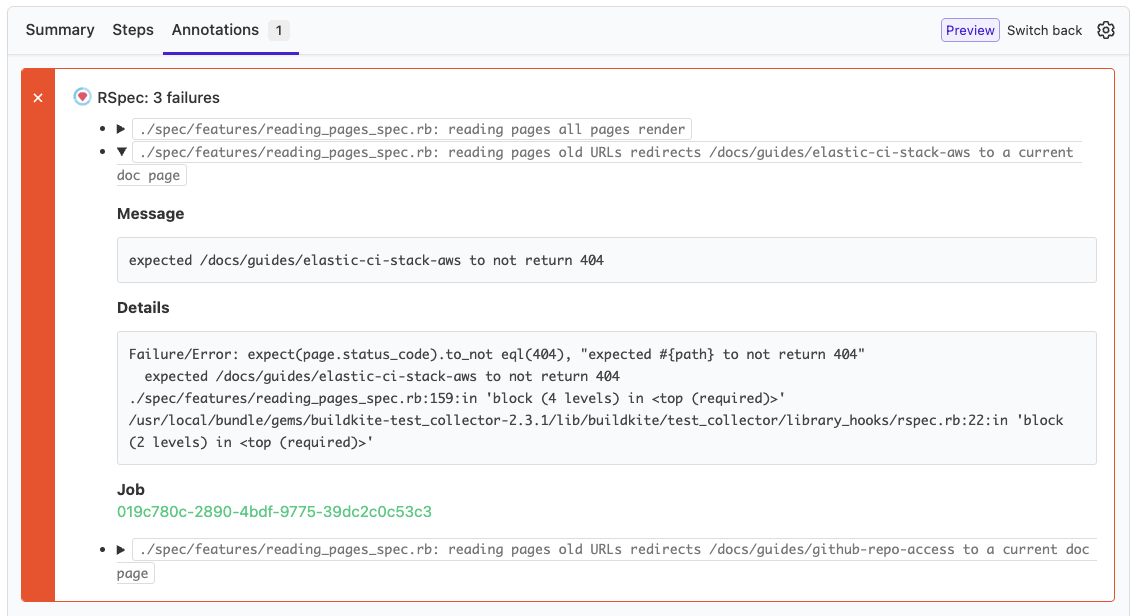
Adding annotations can be useful for a variety of purposes, such as summarizing a build's job results to make them easier to read, for example, presenting key failure components in a failed step's job execution:
Create a build annotation
Build annotations can be created from within a build's job, as well as externally using Buildkite's REST API and GraphQL API.
There is no limit to the amount of annotations you can create, but the maximum body size of each annotation is 1MiB. The size is measured in bytes, accounting for the underlying data encoding, where the specific encoding used can affect the size calculation. For example, if UTF-8 encoding is implemented, some characters may be encoded using up to 4 bytes each.
From within a build's job
To create an annotation from within a build's job, use the buildkite-agent annotate command within the step definition for this job.
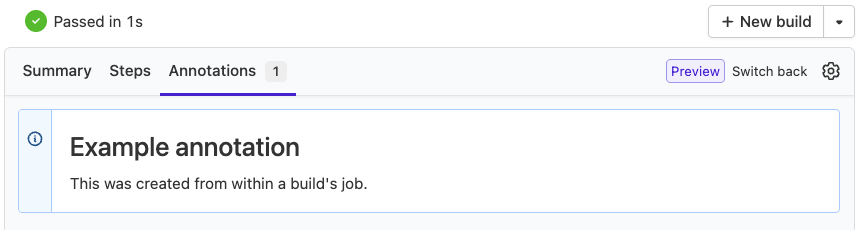
For example, a step like this:
steps:
  - label: ":writing_hand: Example"
    command: |
      cat << 'EOF' | buildkite-agent annotate --style "info" --context "agent-cli-example"
      ### Example annotation

      This was created from within a build's job.
      EOF
Generates this annotation on the build page's main Annotations tab:
Creating annotations like this is the most common approach, as these steps run as part of your pipeline's builds.
See Formatting annotations for more information on how to use this Buildkite agent command to create annotations.
Externally using the REST API
To create a build annotation using the REST API, run the following example curl command:
curl -H "Authorization: Bearer $TOKEN" \
  -X POST "https://api.buildkite.com/v2/organizations/{org.slug}/pipelines/{pipeline.slug}/builds/{build.number}/annotations" \
  -H "Content-Type: application/json" \
  -d '{
    "body": "### Example annotation\n\nThis was created using the REST API.",
    "style": "info",
    "context": "rest-api-example"
  }'
where:
-
$TOKENis an API access token scoped to the relevant Organization and REST API Scopes that your request needs access to in Buildkite.
-
{org.slug}can be obtained:- From the end of your Buildkite URL, after accessing Pipelines in the global navigation of your organization in Buildkite.
-
By running the List organizations REST API query to obtain this value from
slugin the response. For example:curl -H "Authorization: Bearer $TOKEN" \ -X GET "https://api.buildkite.com/v2/organizations"
-
{pipeline.slug}can be obtained:- From the end of your Buildkite URL, after accessing Pipelines in the global navigation > your specific pipeline.
-
By running the List pipelines REST API query to obtain this value from
slugin the response. For example:curl -H "Authorization: Bearer $TOKEN" \ -X GET "https://api.buildkite.com/v2/organizations/{org.slug}/pipelines"
-
{build.number}can be obtained:- From the number after
builds/in your Buildkite URL, after accessing Pipelines in the global navigation > your specific pipeline > your specific pipeline build. -
By running the List builds for a pipeline REST API query to obtain this value from
numberin the response. For example:curl -H "Authorization: Bearer $TOKEN" \ -X GET "https://api.buildkite.com/v2/organizations/{org.slug}/pipelines/{pipeline.slug}/builds"
- From the number after
- For more information on how to use the
body,style, andcontextfields, see Formatting annotations for details on how to use these fields in relation to how they're used by thebuildkite-agent annotatecommand.
Externally using the GraphQL API
To create a build annotation using the GraphQL API, run the following example mutation:
mutation {
  buildAnnotate(input: {
    buildID: "build-id",
    body: "### Example annotation\n\nThis was created using the GraphQL API.",
    style: INFO,
    context: "graphql-api-example"
  }) {
    annotation {
      uuid
      style
      context
      body {
        html
      }
    }
  }
}
where:
-
buildID(required) can be obtained by running the Get builds GraphQL API query and obtain this value from theidin the response associated with the number of your build (specified by thenumbervalue in the response). For example:query GetBuilds { pipeline(slug: "organization-slug/pipeline-slug") { builds(first: 10) { edges { node { id number url } } } } }Tip: You can associate the build number with the annotation on the Buildkite interface by accessing Pipelines in the global navigation > your specific pipeline > your specific pipeline build, and then checking the build number after
builds/in your Buildkite URL. stylecan beDEFAULT,ERROR,INFO,SUCCESSorWARNING.For more information on how to use the
body,style, andcontextfields, see Formatting annotations for details on how to use these fields in relation to how they're used by thebuildkite-agent annotatecommand.
Create a job-scoped annotation
A build's job-scoped annotations appear alongside build annotations on the build page's main Annotations tab, as well as within the Annotations tab of the specific job's details page. Use the Build and Job scope filters on the main Annotations tab to narrow the list to one type. This makes it easier to view contextual information directly alongside the specific job that generated the annotation. For more about navigating the build interface, see the build page documentation.
Use cases where job-scoped annotations are particularly useful:
- Test failures specific to individual jobs in a test matrix
- Job-specific deployment information or Terraform plans
- Results from parallel jobs that need to be viewed separately
- Build matrices where each job produces different output
Job-scoped annotations can be created from within a build's job, as well as externally using Buildkite' REST API and GraphQL API.
Job-scoped annotations require Buildkite agent v3.112 or newer and are not available in the classic build page experience.
From within a build's job
To create a job-scoped annotation from within a build's job, use the buildkite-agent annotate command within the step definition for this job, along with the --scope job flag for this command.
For example, a step like this:
steps:
  - label: ":writing_hand: Example"
    command: |
      cat << 'EOF' | buildkite-agent annotate --scope job "Job-specific information" --style "info" --context "agent-cli-example"
      ### Example job-scoped annotation

      This was created from within a build's job.
      EOF
By default, the annotation is associated with the current job using the $BUILDKITE_JOB_ID environment variable. To associate the annotation with a different job, use the --job flag:
buildkite-agent annotate --scope "job" --job "job-id" "Annotation for a specific job"
The $BUILDKITE_JOB_ID environment variable value can be obtained by running the Get a build REST API query to obtain this value from the id of the relevant job in the jobs array of the response.
To annotate a previously executed job from a subsequent job, use buildkite-agent meta-data to pass the job ID between steps. For example:
steps:
  - label: "First job"
    command:
      - "buildkite-agent meta-data set 'job_uuid' $$BUILDKITE_JOB_ID"
      - "buildkite-agent annotate --scope 'job' 'The first job'"
    key: "first_job"
  - label: "Second job"
    command:
      - "JOB_UUID=$$(buildkite-agent meta-data get 'job_uuid');"
      - "buildkite-agent annotate --scope 'job' --job $$JOB_UUID --append ' with more content'"
    depends_on: ["first_job"]
This method only works for steps that have already been executed. To annotate a pending step, use the REST API or GraphQL API instead.
Externally using the REST API
To create a job-scoped annotation using the REST API, run the following example curl command:
curl -H "Authorization: Bearer $TOKEN" \
  -X POST "https://api.buildkite.com/v2/organizations/{org.slug}/pipelines/{pipeline.slug}/builds/{build.number}/jobs/{job.id}/annotations" \
  -H "Content-Type: application/json" \
  -d '{
    "body": "### Job-scoped annotation\n\nThis was created using the REST API.",
    "style": "info",
    "context": "job-rest-api-example"
  }'
where:
-
$TOKENis an API access token scoped to the relevant Organization and REST API Scopes that your request needs access to in Buildkite.
-
{org.slug}can be obtained:- From the end of your Buildkite URL, after accessing Pipelines in the global navigation of your organization in Buildkite.
-
By running the List organizations REST API query to obtain this value from
slugin the response. For example:curl -H "Authorization: Bearer $TOKEN" \ -X GET "https://api.buildkite.com/v2/organizations"
-
{pipeline.slug}can be obtained:- From the end of your Buildkite URL, after accessing Pipelines in the global navigation > your specific pipeline.
-
By running the List pipelines REST API query to obtain this value from
slugin the response. For example:curl -H "Authorization: Bearer $TOKEN" \ -X GET "https://api.buildkite.com/v2/organizations/{org.slug}/pipelines"
-
{build.number}can be obtained:- From the number after
builds/in your Buildkite URL, after accessing Pipelines in the global navigation > your specific pipeline > your specific pipeline build. -
By running the List builds for a pipeline REST API query to obtain this value from
numberin the response. For example:curl -H "Authorization: Bearer $TOKEN" \ -X GET "https://api.buildkite.com/v2/organizations/{org.slug}/pipelines/{pipeline.slug}/builds"
- From the number after
-
{job.id}can be obtained by running the Get a build REST API query to obtain this value from theidof the relevant job in thejobsarray of the response. For example:curl -H "Authorization: Bearer $TOKEN" \ -X GET "https://api.buildkite.com/v2/organizations/{org.slug}/pipelines/{pipeline.slug}/builds/{build.number}"
- For more information on how to use the
body,style, andcontextfields, see Formatting annotations for details on how to use these fields in relation to how they're used by thebuildkite-agent annotatecommand.
Externally using the GraphQL API
To create a job-scoped annotation using the GraphQL API, run the following example mutation:
mutation {
  jobAnnotate(input: {
    jobId: "job-id",
    body: "### Example job-scoped annotation\n\nThis was created using the GraphQL API.",
    style: INFO,
    context: "graphql-api-example"
  }) {
    annotation {
      uuid
      scope
      style
      context
      body {
        html
      }
    }
    job {
      id
    }
  }
}
where:
-
jobId(required) can be obtained by querying a build's jobs. For example:query GetBuildJobs { build(slug: "organization-slug/pipeline-slug/build-number") { jobs(first: 10) { edges { node { ... on JobTypeCommand { id label } } } } } } stylecan beDEFAULT,ERROR,INFO,SUCCESSorWARNING.For more information on how to use the
body,style, andcontextfields, see Formatting annotations for details on how to use these fields in relation to how they're used by thebuildkite-agent annotatecommand.
Formatting annotations
Build annotations support a number of different styles, Markdown syntaxes, as well as CSS classes.
You can also embed and link to artifacts from within your build annotations too.
Annotation styles
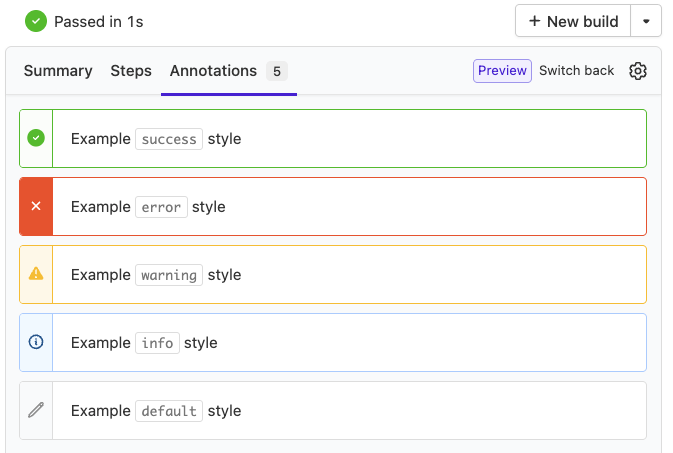
You can change the visual style of annotations using the --style option.
This is an example pipeline showcasing the different styles of annotations:
steps:
  - label: ":console: Annotation Test"
    command: |
      buildkite-agent annotate 'Example `default` style' --context 'ctx-default'
      buildkite-agent annotate 'Example `info` style' --style 'info' --context 'ctx-info'
      buildkite-agent annotate 'Example `warning` style' --style 'warning' --context 'ctx-warn'
      buildkite-agent annotate 'Example `error` style' --style 'error' --context 'ctx-error'
      buildkite-agent annotate 'Example `success` style' --style 'success' --context 'ctx-success'
Supported Markdown syntax
Buildkite Pipelines uses CommonMark with GitHub Flavored Markdown extensions to provide consistent, unambiguous Markdown syntax.
See GitHub's Basic writing and formatting syntax guide (to start with) and GitHub Flavoured Markdown Spec for more details on how to implement this Markdown syntax.
Annotations do not support GitHub-style syntax highlighting, task lists, user mentions, or automatic links for references to issues, pull requests or commits.
CommonMark supports HTML inside Markdown blocks, but will revert to Markdown parsing on newlines. For more information about how HTML is parsed and which tags CommonMark supports please refer to the CommonMark spec.
Annotations are sanitized for security. Only a subset of HTML tags are allowed, including <span>, <div>, <p>, <a>, <img>, <pre>, <code>, <table>, <details>, <summary>, <h1> through <h6>, and list elements. Arbitrary tags such as <script>, <style>, and <iframe> are stripped.Attributes are also restricted. The open attribute is allowed on <details>. The class attribute is allowed but only for a specific allowlist of CSS class names (see Supported CSS classes below). Link href values are limited to http, https, mailto, itms-services, and relative URL schemes.Inline styles (for example, style="margin-top: 0;") are stripped. Some CSS classes may not work on certain HTML elements due to CSS specificity. Use the supported Basscss classes listed below instead.
Use <details> and <summary> to collapse long content such as failure output. By default, <details> starts collapsed. <details open> starts expanded. The content of <summary> is the label that users select to expand or collapse the section. This native behavior doesn't require <script> tags or Basscss classes.
For example, this command creates an annotation with collapsed failure output:
cat <<'EOF' | buildkite-agent annotate --style "error" --context "failure-details"
<details>
<summary>Failure details</summary>

~~~text
... long failure output ...
~~~

</details>
EOF
Supported CSS classes
A number of CSS classes are accepted in annotations. These include a subset of layout and formatting controls based on Basscss, and colored console output.
Basscss
Basscss is a toolkit of composable CSS classes which can be combined to accomplish many styling tasks. Annotations in Buildkite Pipelines accept the following parts of version 8.0 of Basscss within annotations:
- Align
- Border
- Button
- Background Colors
- Colors
-
Flexbox
- All except
sm-flex,md-flexandlg-flex
- All except
- Margin
-
Layout
- All except Floats (Please use Flexbox instead)
- Padding
-
Typography
-
bold,regular,italic,caps -
left-align,center,right-align,justify -
underline,truncate list-reset
-
- Type Scale
An exhaustive list of classes that annotations support can be found below:
bold regular italic caps underline
left-align center right-align justify
align-baseline align-top align-middle align-bottom
list-reset truncate fit

inline block inline-block table table-cell
overflow-hidden overflow-scroll overflow-auto

ml-auto mr-auto mx-auto
flex flex-column flex-wrap flex-auto flex-none
items-start items-end items-center items-baseline items-stretch
self-start self-end self-center self-baseline self-stretch
justify-start justify-end justify-center justify-between justify-around
content-start content-end content-center content-between content-around content-stretch
order-0 order-1 order-2 order-3 order-last

border border-top border-right border-bottom border-left border-none rounded
border-black border-gray border-silver border-white border-aqua border-blue border-navy border-teal
border-green border-olive border-lime border-yellow border-orange border-red border-fuchsia border-purple border-maroon

h1 h2 h3 h4 h5 h6

m0 mt0 mr0 mb0 ml0 mx0 my0 m1
mt1 mr1 mb1 ml1 mx1 my1
m2 mt2 mr2 mb2 ml2 mx2 my2
m3 mt3 mr3 mb3 ml3 mx3 my3
m4 mt4 mr4 mb4 ml4 mx4 my4
mxn1 mxn2 mxn3 mxn4

p0 pt0 pr0 pb0 pl0 px0 py0
p1 pt1 pr1 pb1 pl1 py1 px1
p2 pt2 pr2 pb2 pl2 py2 px2
p3 pt3 pr3 pb3 pl3 py3 px3
p4 pt4 pr4 pb4 pl4 py4 px4

col-1 col-2 col-3 col-4 col-5 col-6
col-7 col-8 col-9 col-10 col-11 col-12

sm-col-1 sm-col-2 sm-col-3 sm-col-4 sm-col-5 sm-col-6
sm-col-7 sm-col-8 sm-col-9 sm-col-10 sm-col-11 sm-col-12

md-col-1 md-col-2 md-col-3 md-col-4 md-col-5 md-col-6
md-col-7 md-col-8 md-col-9 md-col-10 md-col-11 md-col-12

lg-col-1 lg-col-2 lg-col-3 lg-col-4 lg-col-5 lg-col-6
lg-col-7 lg-col-8 lg-col-9 lg-col-10 lg-col-11 lg-col-12

black gray silver white aqua blue navy teal green olive lime
yellow orange red fuchsia purple maroon muted

btn btn-sm btn-lg btn-primary

bg-black bg-gray bg-silver bg-white bg-aqua bg-blue
bg-navy bg-teal bg-green bg-olive bg-lime bg-yellow
bg-orange bg-red bg-fuchsia bg-purple bg-maroon bg-muted
Colored console output
Console output in annotations can be displayed with ANSI colors when wrapped in a Markdown block marked as term or terminal syntax. There is a limit of 10 blocks per annotation.
```term
\x1b[31mFailure/Error:\x1b[0m \x1b[32mexpect\x1b[0m(new_item.created_at).to eql(now)

\x1b[31m  expected: 2018-06-20 19:42:26.290538462 +0000\x1b[0m
\x1b[31m       got: 2018-06-20 19:42:26.290538000 +0000\x1b[0m

\x1b[31m  (compared using eql?)\x1b[0m
```
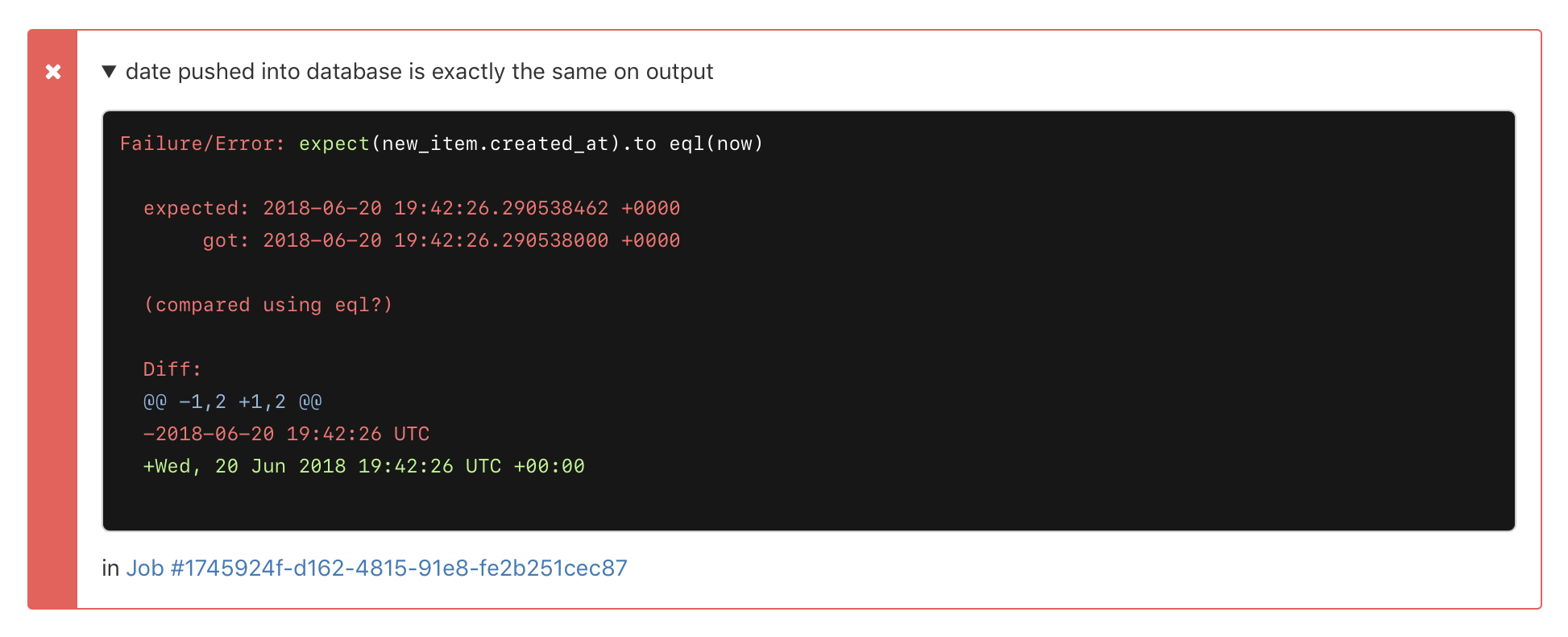
Make sure you escape the backticks (`) that demarcate the code block if you're echoing to the terminal, so it doesn't get interpreted as a shell interpreted command.
The following pipeline prints an escaped Markdown block, adds line breaks using \n and formats test using the red ANSI code \033[0;31m before resetting the remainder of the output with \033[0m. Passing -e to the echo commands ensures that the backslash escapes codes are interpreted (the default is not to interpret them).
steps:
  - label: "Annotation Test"
    command:
      - echo -e "\`\`\`term\nThis is a \033[0;31mtest\033[0m\n\`\`\`" | buildkite-agent annotate
The results are piped though to the buildkite-agent annotate command:
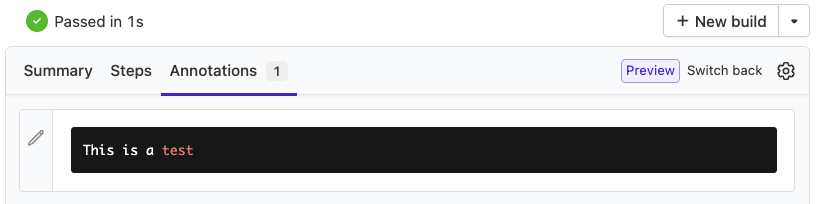
Or for more complex annotations, pipe an entire file to the buildkite-agent annotate command:
printf '%b\n' "$(cat markdown-for-annotation.md)" | buildkite-agent annotate
If you're using our terminal to HTML tool, wrap the output in <pre class="term"><code></code></pre> tags, so it displays the terminal color styles but won't process it again:
<pre class="term">
  <code>
    terminal-to-html output
  </code>
</pre>
Embedding and linking artifacts in annotations
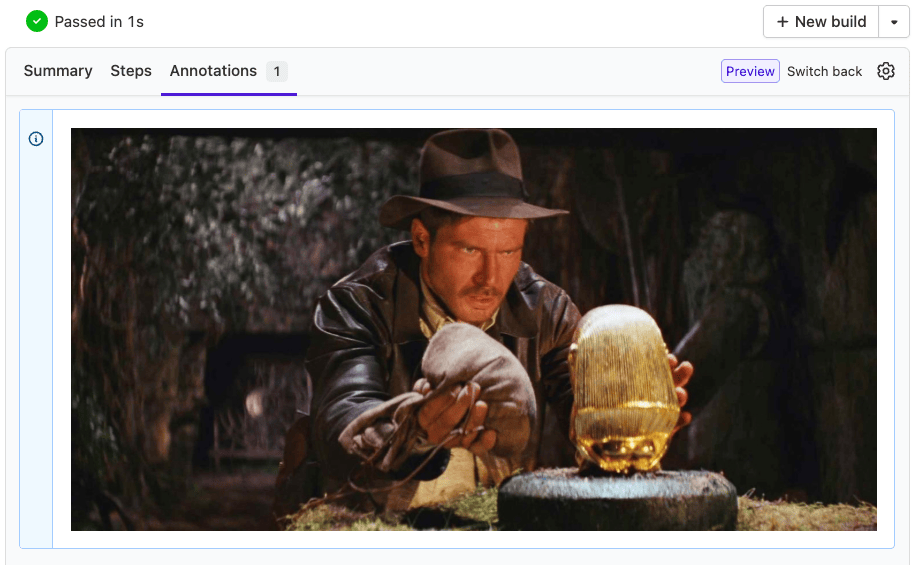
Uploaded artifacts can be embedded in annotations by referencing them using the artifact:// prefix in your image source.
steps:
  - label: ":console: Annotation Test"
    command: |
      buildkite-agent artifact upload "indy.png"
      cat << EOF | buildkite-agent annotate --style "info"
        <img src="artifact://indy.png" alt="Belongs in a museum" height=250 >
      EOF
You can also link to uploaded artifacts as a shortcut to important files:
steps:
  - label: "Upload Coverage Report"
    command: |
      buildkite-agent artifact upload "coverage/*"
      cat << EOF | buildkite-agent annotate --style "info"
        Read the <a href="artifact://coverage/index.html">uploaded coverage report</a>
      EOF
List annotations for a build
All build and job-scoped annotations for a build can be retrieved using the REST API or GraphQL API.
Using the REST API
To list build and job-scoped annotations for a build using the Buildkite REST API.
curl -H "Authorization: Bearer $TOKEN" \
  -X GET "https://api.buildkite.com/v2/organizations/{org.slug}/pipelines/{pipeline.slug}/builds/{build.number}/annotations"
where:
-
$TOKENis an API access token scoped to the relevant Organization and REST API Scopes that your request needs access to in Buildkite.
-
{org.slug}can be obtained:- From the end of your Buildkite URL, after accessing Pipelines in the global navigation of your organization in Buildkite.
-
By running the List organizations REST API query to obtain this value from
slugin the response. For example:curl -H "Authorization: Bearer $TOKEN" \ -X GET "https://api.buildkite.com/v2/organizations"
-
{pipeline.slug}can be obtained:- From the end of your Buildkite URL, after accessing Pipelines in the global navigation > your specific pipeline.
-
By running the List pipelines REST API query to obtain this value from
slugin the response. For example:curl -H "Authorization: Bearer $TOKEN" \ -X GET "https://api.buildkite.com/v2/organizations/{org.slug}/pipelines"
-
{build.number}can be obtained:- From the number after
builds/in your Buildkite URL, after accessing Pipelines in the global navigation > your specific pipeline > your specific pipeline build. -
By running the List builds for a pipeline REST API query to obtain this value from
numberin the response. For example:curl -H "Authorization: Bearer $TOKEN" \ -X GET "https://api.buildkite.com/v2/organizations/{org.slug}/pipelines/{pipeline.slug}/builds"
- From the number after
Using the GraphQL API
To list build and job-scoped annotations for a build using the GraphQL API, run the following example query:
query GetBuildAnnotations {
  build(uuid: "build-uuid") {
    number
    annotations(first: 10) {
      edges {
        node {
          uuid
          context
          style
          body {
            text
            html
          }
          createdAt
        }
      }
    }
  }
}
where build-uuid (required) can be obtained by running the Get builds GraphQL API query and obtaining this value from the uuid in the response associated with the number of your build (specified by the number value in the response). For example:
query GetBuilds {
  pipeline(slug: "organization-slug/pipeline-slug") {
    builds(first: 10) {
      edges {
        node {
          uuid
          number
        }
      }
    }
  }
}
List annotations for a job
Job-scoped annotations for a specific job can be retrieved using the REST API or GraphQL API.
Using the REST API
To list job-scoped annotations for a specific job using the REST API, run the following example curl command:
curl -H "Authorization: Bearer $TOKEN" \
  -X GET "https://api.buildkite.com/v2/organizations/{org.slug}/pipelines/{pipeline.slug}/builds/{build.number}/jobs/{job.id}/annotations"
where:
-
$TOKENis an API access token scoped to the relevant Organization and REST API Scopes that your request needs access to in Buildkite.
-
{org.slug}can be obtained:- From the end of your Buildkite URL, after accessing Pipelines in the global navigation of your organization in Buildkite.
-
By running the List organizations REST API query to obtain this value from
slugin the response. For example:curl -H "Authorization: Bearer $TOKEN" \ -X GET "https://api.buildkite.com/v2/organizations"
-
{pipeline.slug}can be obtained:- From the end of your Buildkite URL, after accessing Pipelines in the global navigation > your specific pipeline.
-
By running the List pipelines REST API query to obtain this value from
slugin the response. For example:curl -H "Authorization: Bearer $TOKEN" \ -X GET "https://api.buildkite.com/v2/organizations/{org.slug}/pipelines"
-
{build.number}can be obtained:- From the number after
builds/in your Buildkite URL, after accessing Pipelines in the global navigation > your specific pipeline > your specific pipeline build. -
By running the List builds for a pipeline REST API query to obtain this value from
numberin the response. For example:curl -H "Authorization: Bearer $TOKEN" \ -X GET "https://api.buildkite.com/v2/organizations/{org.slug}/pipelines/{pipeline.slug}/builds"
- From the number after
-
{job.id}can be obtained by running the Get a build REST API query to obtain this value from theidof the relevant job in thejobsarray of the response. For example:curl -H "Authorization: Bearer $TOKEN" \ -X GET "https://api.buildkite.com/v2/organizations/{org.slug}/pipelines/{pipeline.slug}/builds/{build.number}"
Using the GraphQL API
To list job-scoped annotations for a specific job using the GraphQL API, run the following example query:
query GetJobAnnotations {
  job(uuid: "job-uuid") {
    ... on JobTypeCommand {
      annotations(first: 10) {
        edges {
          node {
            uuid
            scope
            context
            style
            body {
              text
              html
            }
          }
        }
      }
    }
  }
}
where job-uuid is the UUID of the job, which can be obtained by querying a build's jobs. For example:
query GetBuildJobs {
  build(slug: "organization-slug/pipeline-slug/build-number") {
    jobs(first: 10) {
      edges {
        node {
          ... on JobTypeCommand {
            uuid
            label
          }
        }
      }
    }
  }
}
Remove an annotation
Build and job-scoped annotations can be removed from within a build's job, as well as externally using the REST API. Removing an annotation using the GraphQL API is not supported.
From within a build's job
To remove a build or job-scoped annotation from within a build's job, use the buildkite-agent annotation remove command within the step definition for this job.
For example:
steps:
  - label: ":exploding-death-star: Remove annotation"
    command: buildkite-agent annotation remove --context "agent-cli-example"
Removing annotations like this is the most common approach, as these steps run as part of your pipeline's builds.
Externally using the REST API
To remove a build or job-scoped annotation using the REST API, run the following example curl command:
curl -H "Authorization: Bearer $TOKEN" \
  -X DELETE "https://api.buildkite.com/v2/organizations/{org.slug}/pipelines/{pipeline.slug}/builds/{build.number}/annotations/{annotation.uuid}"
where:
-
$TOKENis an API access token scoped to the relevant Organization and REST API Scopes that your request needs access to in Buildkite.
-
{org.slug}can be obtained:- From the end of your Buildkite URL, after accessing Pipelines in the global navigation of your organization in Buildkite.
-
By running the List organizations REST API query to obtain this value from
slugin the response. For example:curl -H "Authorization: Bearer $TOKEN" \ -X GET "https://api.buildkite.com/v2/organizations"
-
{pipeline.slug}can be obtained:- From the end of your Buildkite URL, after accessing Pipelines in the global navigation > your specific pipeline.
-
By running the List pipelines REST API query to obtain this value from
slugin the response. For example:curl -H "Authorization: Bearer $TOKEN" \ -X GET "https://api.buildkite.com/v2/organizations/{org.slug}/pipelines"
-
{build.number}can be obtained:- From the number after
builds/in your Buildkite URL, after accessing Pipelines in the global navigation > your specific pipeline > your specific pipeline build. -
By running the List builds for a pipeline REST API query to obtain this value from
numberin the response. For example:curl -H "Authorization: Bearer $TOKEN" \ -X GET "https://api.buildkite.com/v2/organizations/{org.slug}/pipelines/{pipeline.slug}/builds"
- From the number after
-
{annotation.uuid}can be obtained by listing annotations for a build and extracting theidvalue from the response. This value is not available from the Buildkite interface.
Using annotations to report test results
Annotations are a great way of rendering test failures that occur in different steps in a pipeline.
The junit-annotate plugin converts all the junit.xml artifacts in a build into a single annotation:
steps:
  - command: test.sh
    parallelism: 50
    artifact_paths: tmp/junit-*.xml
  - wait: ~
    continue_on_failure: true
  - plugins:
      - junit-annotate#v2.7.0:
          artifacts: tmp/junit-*.xml
If you use Bazel as your build tool, see Creating dynamic pipelines and build annotations using Bazel for a tutorial on generating annotations from Bazel build events.