
Hosted agents terminal access
The Buildkite hosted agents feature provides you with terminal/console access to jobs running on hosted agents. This feature is useful in allowing you to:
- Understand what components are installed, as you set up your pipeline.
- Test the behavior of different scripts (because they may not be well-documented).
- Debug issues that are not reproducible in your local environment.
This can be useful when migrating your pipelines across to queues on Buildkite hosted agents.
Use terminal access in the Buildkite interface
Assuming that remote access is active across your Buildkite organization, you can access this terminal access feature from a currently building pipeline, when the job of the relevant step is being built.
The terminal access feature is available to users who have/are any of the following:
- build permissions on the pipeline that created the job
- a maintainer of the cluster containing this pipeline
- a Buildkite organization administrator of this cluster
As a pipeline is being built, expand the relevant step and as its job is being built, select its Open Terminal button. A new browser window will open with terminal you can use to execute commands to investigate your hosted agent's environment, test script behavior and debug other issues.
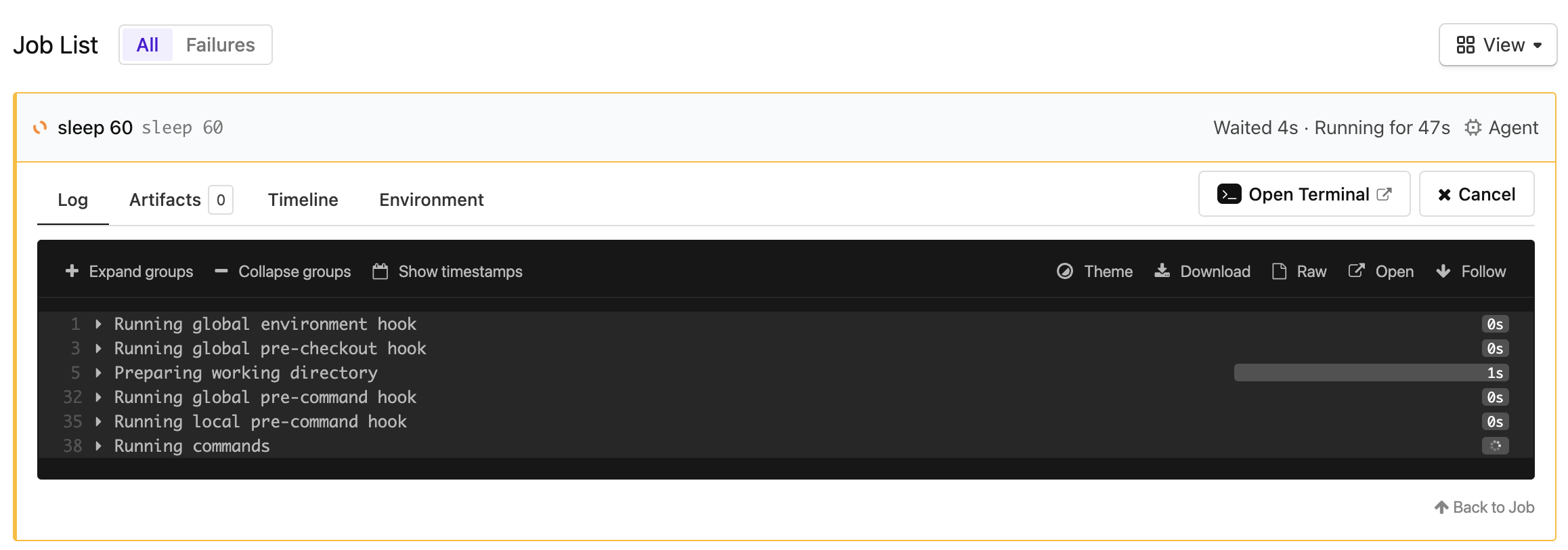
The Open Terminal button only appears for jobs running on Linux or macOS hosted agents. Windows hosted agents don't support terminal access.
To extend the terminal session time, it is recommended that you include a sleep command within your job steps. This can help maintain an active terminal connection and prevent the session from timing out too quickly, allowing you to debug your job or investigate the environment the job is running in.
In the example below, the job will pause for 10 minutes before continuing. Adjust the sleep duration according to your specific needs.
steps:
  - label: "Extend Terminal Session"
    command: |
      echo "Starting job..."
      sleep 600  # Sleep for 10 minutes
      echo "Job complete."
Use terminal access from the Buildkite CLI
SSH access from the Buildkite CLI for Linux and macOS hosted jobs is being rolled out to Buildkite organizations. If the bk job ssh command described below isn't available for your organization, contact Buildkite Support at support@buildkite.com.
To use the bk job ssh command, install Buildkite CLI version 3.55.1 or later. You can connect to running Linux or macOS hosted jobs:
bk job ssh 0190046e-e199-453b-a302-a21a4d649d31
The command requests a short-lived access token and opens an interactive shell in your current terminal. The CLI securely proxies the connection and keeps the ephemeral SSH private key in memory.
Before running the command:
-
Configure the Buildkite CLI with your Buildkite organization and an API access token that has the
write_buildsscope. - Confirm that remote access is active for your Buildkite organization.
- Find the UUID of a running command job on a Linux or macOS hosted agent.
- Confirm that you have permission to manage hosted agents for the job.
The bk job ssh command does not support Windows hosted jobs or self-hosted jobs.
Deactivate and reactivate remote access on hosted agents
The same organization-wide setting controls remote access across all clusters. When active, the setting enables SSH access to Linux and macOS hosted agents, and VNC access to supported macOS hosted jobs. Windows hosted agents don't support SSH or VNC access. By default, remote access is active.
Reactivating or deactivating remote access requires Buildkite organization administrator permissions.
To deactivate or reactivate remote access for hosted agents:
- Select Settings in the global navigation to access the Organization Settings page.
- Select Pipelines > Settings to access your organization's Pipeline Settings page.
- Scroll down to Hosted Agents Remote Access (SSH and VNC) and to:
- Deactivate this feature, select the Disable Remote Access button, followed by Disable Hosted Agents Remote Access in the confirmation message.
- Reactivate this feature, select the Enable Remote Access button, followed by Enable Hosted Agents Remote Access in the confirmation message.
Deactivating the setting removes SSH access from Linux and macOS hosted agents across all clusters in your Buildkite organization. Reactivating it makes SSH access available again. These actions also remove or make VNC access available for supported macOS hosted jobs.
When this feature is active, be aware that users require either:
- Build permissions on relevant pipelines to use this feature on these pipelines' jobs.
- Cluster maintainer permissions on the cluster the pipeline belongs to, or Buildkite organization administrator permissions.