
GitHub Actions Compatibility
GitHub Actions Compatibility runs supported GitHub Actions workflows as native Buildkite Pipelines jobs. Keep your workflow files in .github/workflows/ and create a GitHub Actions pipeline in the Buildkite interface. Buildkite Pipelines matches incoming GitHub events against your workflows and creates one build per matching workflow.
You don't need to install or configure a plugin, write Buildkite pipeline YAML, or install the buildkite-gha runtime. Buildkite Pipelines prepares the runtime and manages job scheduling, logs, retries, and cancellation.
GitHub Actions Compatibility is currently in public preview. Review the compatibility reference before running your workflows. To report a compatibility issue, open an issue in the buildkite-gha repository. For setup or migration help, contact the Buildkite Support team at support@buildkite.com.
Add a GitHub Actions workflow to a pipeline
Create a pipeline from your existing GitHub repository, add the secrets your workflows need, and run a workflow. Your repository must contain workflow files on its default branch.
Create a GitHub Actions pipeline
Connect your repository using the full-access GitHub repository provider, which gives Buildkite Pipelines access to workflow files. GitHub (Limited Access) and GitHub Enterprise Server aren't supported for server-side dispatch.
- From the Buildkite dashboard, select New Pipeline.
- Under Git scope, select your GitHub account or organization. Then select your repository.
- When Buildkite Pipelines detects your workflows, it selects Run GitHub Actions workflows on Buildkite automatically. Expand the workflow count to review workflow names, paths, and triggers. If you previously switched to regular setup, select Use workflows.
- Review Pipeline name, Description, Default Branch, Teams (if shown), and Cluster. The cluster must contain compatible queues for your workflows'
runs-onlabels. - Select Create GitHub Actions pipeline.
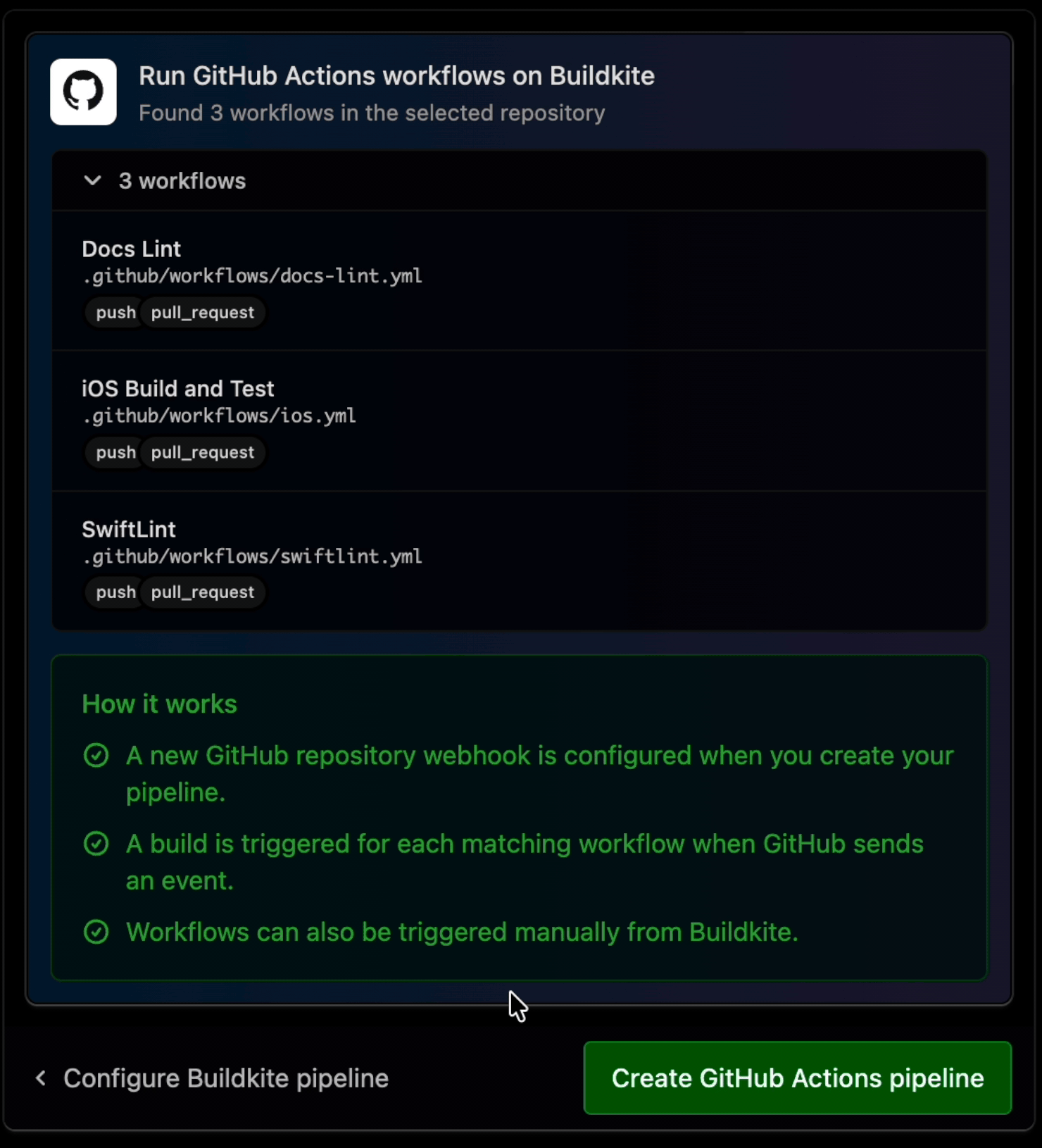
GitHub Actions setup stays alongside the pipeline settings, even when the repository also contains Buildkite pipeline configuration. Select Configure Buildkite pipeline to use regular setup instead. Switching between modes preserves your entered YAML. Checkout using and Build Triggers appear only in regular setup.
Buildkite Pipelines creates the pipeline and one enabled GitHub Actions pipeline trigger together, then provisions a dedicated signed repository webhook. This path skips traditional GitHub webhook setup. The server selects workflows from each event's commit; you don't maintain a list of workflow paths in the pipeline configuration. Don't add a traditional GitHub repository webhook for the same pipeline, because it can create duplicate builds.
If trigger validation fails, no pipeline is created. Correct the displayed error and retry. If webhook provisioning fails after creation, the pipeline and trigger remain. Select Review GitHub connection to recover the existing connection rather than creating another pipeline or trigger.
The pipeline enables Allow workflow-authorized GitHub access tokens and disables pipeline-level commit status publishing. Review token permissions and trust boundaries, and disable workflow access tokens in the pipeline's GitHub settings if your workflows don't need them.
GitHub Actions setup isn't available to organizations that require pipeline templates, or that use the legacy new pipeline page. Use the equivalent manual setup, respecting your organization's template requirements.
Add secrets
Buildkite Pipelines doesn't automatically copy GitHub secrets. Before running a workflow, create the Buildkite secrets that its ${{ secrets.NAME }} expressions reference:
- Open the pipeline's Secrets tab.
- Select New secret.
- Enter the secret's Key and Value, and configure its access policy for the intended pipeline.
- Select Create secret.
You can also migrate GitHub Actions repository secrets using the Buildkite CLI. GitHub environment secrets use prefixed names in Buildkite secrets; see Deployment environments and variables.
Don't copy GITHUB_TOKEN into a Buildkite secret. Buildkite Pipelines issues this token separately according to the workflow's permissions and the pipeline's settings.
Run a workflow manually
Manual runs currently require a workflow that declares push without workflow_dispatch. Its branch or tag filters must match the selected ref.
To run a matching workflow without waiting for a GitHub event:
- Open the pipeline and select New Build to open Run a workflow.
- Select Branch and, optionally, a Commit. Leave the commit as
HEADto use the selected branch's latest commit. - Select Workflow. If only one workflow is eligible, it is selected automatically.
- Optionally, expand Options to set Environment Variables or use Clean checkout.
- Select Run workflow.
Before the pipeline's first build, you can also select a workflow and use Run workflow directly from the pipeline page. The selector shows each workflow's name and file path:
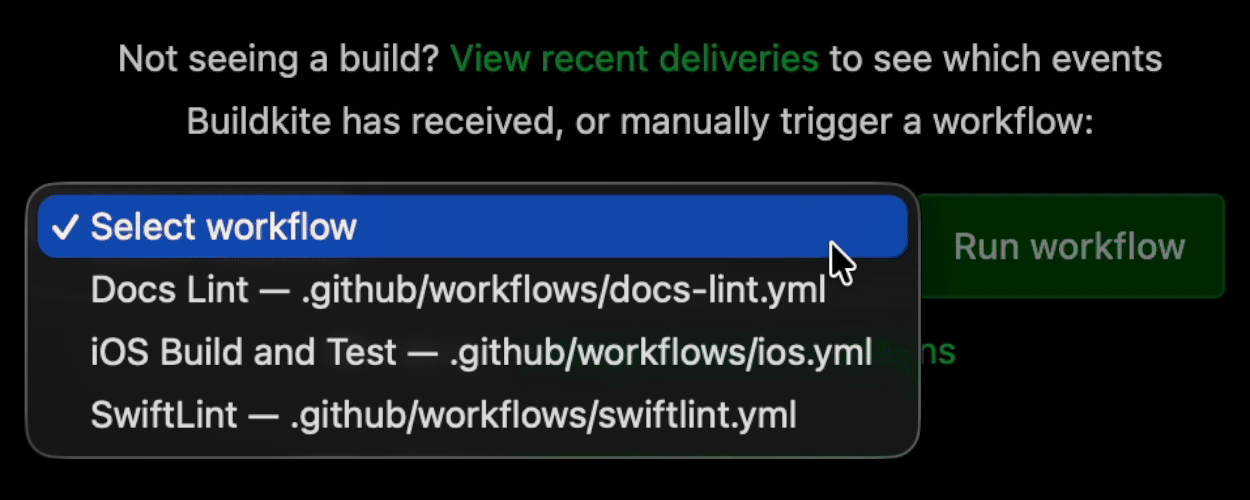
Buildkite Pipelines discovers workflows at the selected commit. For a tag run, enter refs/tags/<tag> in Branch and provide a full commit SHA in Commit instead of HEAD.
With the released buildkite-gha v0.105.3 runtime, native manual runs that select workflow_dispatch fail during workflow preparation. The server selects this event whenever the workflow declares it, even if it also declares push. A matching GitHub push can still run the workflow as a push event.
The interface doesn't collect dispatch inputs. Environment Variables aren't dispatch inputs.
Manual branch runs don't provide the linked webhook evidence required for paths or paths-ignore. Run those workflows from a matching GitHub event.
Trigger builds from workflow events
A GitHub Actions pipeline trigger reads top-level workflow files under .github/workflows/ and matches their on declarations against each incoming GitHub event before creating builds. Each matching workflow gets its own build. If a delivery produces more than 100 workflow candidates, the entire delivery is rejected before any builds are created.
For example, push a change that matches a workflow's push trigger and filters. Inspect Recent Deliveries in the pipeline trigger and open the resulting build to view its jobs and logs.
The trigger handles supported branch_protection_rule, create, delete, deployment, deployment_status, discussion, discussion_comment, fork, gollum, issue_comment, issues, label, merge_group, milestone, page_build, public, pull_request, pull_request_review, pull_request_review_comment, push, release, and watch declarations.
Server-side dispatch isn't the same as GitHub's workflow_dispatch event. The webhook trigger doesn't start builds for standalone workflow_dispatch, schedule, or workflow_call declarations. Use manual runs for eligible workflows. A workflow_call-only file is a reusable workflow, not an independently runnable workflow. A GitHub schedule declaration doesn't create a Buildkite schedule.
The pull_request_target event is intentionally unsupported because its privileged execution model would expose base-repository authority to untrusted contributions. The repository_dispatch, workflow_run, check_run, and check_suite events aren't supported yet.
The trigger supports branch and tag pushes, plus same-repository pull requests. Supported filters include branches, branches-ignore, tags, and tags-ignore. Without an explicit types filter, a pull request workflow triggers on opened, reopened, and synchronize. Pull request builds use the head branch and commit. Fork pull requests, unsupported activity types, and unsupported filter patterns fail closed and appear in Recent Deliveries.
Fork pull requests are rejected before a build exists. There is no build to approve or unblock. See Fork pull requests for the approval limitation and security boundaries.
For push and pull request workflows, the server accepts paths and paths-ignore but evaluates path matching during workflow preparation. A candidate build can exist before the runtime determines that the workflow should be skipped. Path matching requires a verified linked webhook and matching diff evidence from the checkout. See Workflow names and triggers for event-specific limits.
Workflow matching decides which builds to create. Traditional GitHub provider build filters and duplicate-commit settings don't restrict these builds. Configure supported filters in your workflow files instead. Leave Cancel Intermediate Builds and Skip Intermediate Builds disabled: these branch-wide settings can cancel or skip sibling workflow builds from the same event.
Configure an equivalent pipeline manually
Use the interface for new pipelines unless you need CLI, API, or agent-based automation. Programmatic setup requires two requests: create the pipeline with the settings below, then create its GitHub Actions pipeline trigger. Uploading YAML alone doesn't provision either resource or its repository webhook.
Use an API access token with the write_pipelines scope, permission to create pipelines, and Full Access to manage the pipeline's triggers. The repository must use the full-access GitHub repository provider, with GitHub App access to read workflows and manage repository webhooks.
-
Save the following request body as
github-actions-pipeline.json. ReplaceYOUR_CLUSTER_ID, the repository URL, andmainwith your cluster, repository, and default branch. Add team permissions if your organization requires them.{ "name": "GitHub Actions", "repository": "https://github.com/acme-inc/example.git", "cluster_id": "YOUR_CLUSTER_ID", "default_branch": "main", "configuration": "steps:\n - label: \":github: Prepare workflow · ${GITHUB_WORKFLOW}\"\n plugin: github-actions\n", "branch_configuration": null, "skip_queued_branch_builds": false, "cancel_running_branch_builds": false, "provider_settings": { "github_actions_mode": true, "github_workflow_access_tokens_enabled": true, "publish_commit_status": false, "build_branches": true, "build_pull_requests": true, "build_tags": true, "filter_enabled": false, "filter_condition": null, "pull_request_branch_filter_enabled": false, "pull_request_branch_filter_configuration": null, "ignore_default_branch_pull_requests": false, "skip_builds_for_closed_pull_requests": false, "skip_builds_for_existing_commits": false, "skip_pull_request_builds_for_existing_commits": false, "trigger_mode": "none" } }The configuration has no
workfloworworkflowsselector. Settingtrigger_modetononedisables traditional GitHub triggering without disabling GitHub Actions pipeline triggers. The other settings match the behavior of in-product setup. Setgithub_actions_modetotrueto enable the Run a workflow interface and workflow selection for manual builds. This setting doesn't provision the pipeline trigger or its webhook; create those separately below.If your organization requires pipeline templates, use an approved template containing this selector-free configuration. Replace
configurationwith itspipeline_template_uuid; don't send both fields. Keep the provider settings and create the trigger separately. -
Create a YAML pipeline using the saved request body:
curl -H "Authorization: Bearer $TOKEN" \
  -H "Content-Type: application/json" \
  -X POST "https://api.buildkite.com/v2/organizations/{org.slug}/pipelines" \
  --data-binary @github-actions-pipeline.json
Using the returned pipeline slug, create a GitHub Actions pipeline trigger with
type: "github_actions",label: "GitHub Actions",enabled: true, andcreate_webhook: true. Don't sendbuildorfilter, or create a traditional repository webhook.Save the trigger's returned
endpoint_urlsecurely and checkwebhook_creation.status.201 Createdconfirms trigger creation, not successful webhook provisioning. If provisioning fails, inspect GitHub for an existing webhook and repair the same trigger's connection as described in the API reference. Don't repeat the creation request.Send a supported GitHub event. Inspect Recent Deliveries and confirm one build per matching workflow, without extra builds from traditional triggering.
With the Buildkite CLI, select the intended organization and use bk api for the same two requests:
bk api --method POST /pipelines --data - < github-actions-pipeline.json
bk api --method POST /pipelines/{pipeline.slug}/triggers \
  --data '{"type":"github_actions","label":"GitHub Actions","enabled":true,"create_webhook":true}'
Agent-based automation can run the same REST requests with an API access token stored securely. An agent token isn't an API access token. Neither buildkite-agent pipeline upload nor buildkite-gha upload creates a pipeline or trigger; both upload jobs into an existing build. These two API requests are separate, unlike the combined pipeline-and-trigger transaction in the interface.
Migrate to server-side dispatch
If an older pipeline runs GitHub Actions workflows through a manually configured plugin, create a new GitHub Actions pipeline for the same repository using the setup above. This replaces customer-managed workflow selection with server-side dispatch.
- Review your workflow events, filters, secrets, and required queues against the compatibility reference.
- Create the new pipeline and configure secret access for it.
- Verify that matching events create the expected builds and that your workflows pass. Both pipelines can run during this transition.
- Update required GitHub checks to use the new workflow checks before retiring the old pipeline.
- Disable triggering for the old pipeline, or delete it when you no longer need its build history. Don't disable repository webhooks used by other pipelines.
If the old pipeline uses custom runner mappings, private reusable-workflow access, OIDC options, scheduled builds, or a mixture of native steps and imported workflows, contact the Buildkite Support team before replacing it. Don't assume that plugin-specific configuration transfers to the new pipeline.
To retain the existing pipeline instead:
- Update required GitHub checks to use workflow checks before disabling pipeline-level commit status publishing.
- Disable the pipeline's traditional GitHub webhook processing. If that control isn't available, disable only the repository webhook dedicated to this pipeline.
- Apply the manual setup settings using Update a pipeline. Replace explicit workflow selectors with selector-free configuration, preserving required custom options.
- Create the dedicated GitHub Actions pipeline trigger and verify that matching events don't create duplicate builds.
In mixed pipelines, native steps now run once per matched workflow build, rather than once per event.
You can continue migrating individual workflows to native Buildkite Pipelines configuration over time. The Buildkite pipeline converter helps translate workflow files when you're ready to change their configuration format.
Use explicit workflows in an existing build
The previous plugin setup remains supported as an advanced alternative. Prefer GitHub Actions setup for new pipelines. Use explicit workflow selection when you need a separately configured manual or scheduled build, or an existing pipeline that imports selected workflows.
Add this step to your pipeline configuration. The GitHub Actions plugin selects the workflow inside an existing build rather than creating a build for each matching workflow event:
steps:
  - label: ":github: GitHub Actions"
    key: github-actions
    plugins:
      - github-actions:
          workflow: .github/workflows/ci.yml
Give each explicit-workflow importer a unique key. To select multiple workflows, replace workflow with workflows and an array of explicit .yml or .yaml file paths. Don't use both selectors. Either selector overrides trigger-based workflow selection, so don't add them to the recommended GitHub Actions pipeline configuration.
Configure traditional GitHub triggers, Buildkite schedules, or manual builds separately. The plugin doesn't create triggers from the workflow's on declaration; it uses that declaration to determine eligibility within the existing build. Manual builds without authoritative GitHub event metadata fall back to push. See Select the effective event for custom event handling, and the runtime requirements before configuring self-hosted importers.
How workflows run
In the recommended setup, Buildkite Pipelines selects the workflow and commit before creating a build. A preparation step uses the buildkite-gha runtime to check compatibility and create the workflow's jobs. The reference pages call this preparation step the importer and its jobs the generated jobs. Buildkite Pipelines manages this implementation; you don't configure its plugin or runtime installation.
| GitHub Actions concept | Buildkite Pipelines behavior | ||
|---|---|---|---|
| GitHub Actions concept | Workflow run | Buildkite Pipelines behavior | One Buildkite build per matching workflow and event |
| GitHub Actions concept | Job | Buildkite Pipelines behavior | A native command job |
| GitHub Actions concept | Matrix entry | Buildkite Pipelines behavior | A separate command job |
| GitHub Actions concept | needs |
Buildkite Pipelines behavior | Step dependencies |
| GitHub Actions concept | Steps within a job | Buildkite Pipelines behavior | Run together and share a workspace and lifecycle |
| GitHub Actions concept | Matrix or runner label from a job output | Buildkite Pipelines behavior | Jobs created after the producing job runs |
| GitHub Actions concept | runs-on |
Buildkite Pipelines behavior | A compatible queue in the pipeline's cluster |
| GitHub Actions concept | Deployment environment with required reviewers | Buildkite Pipelines behavior | A block step before the affected jobs |
This iOS workflow has a preparation step on Linux and a generated job on macOS. Select a job to inspect its log:
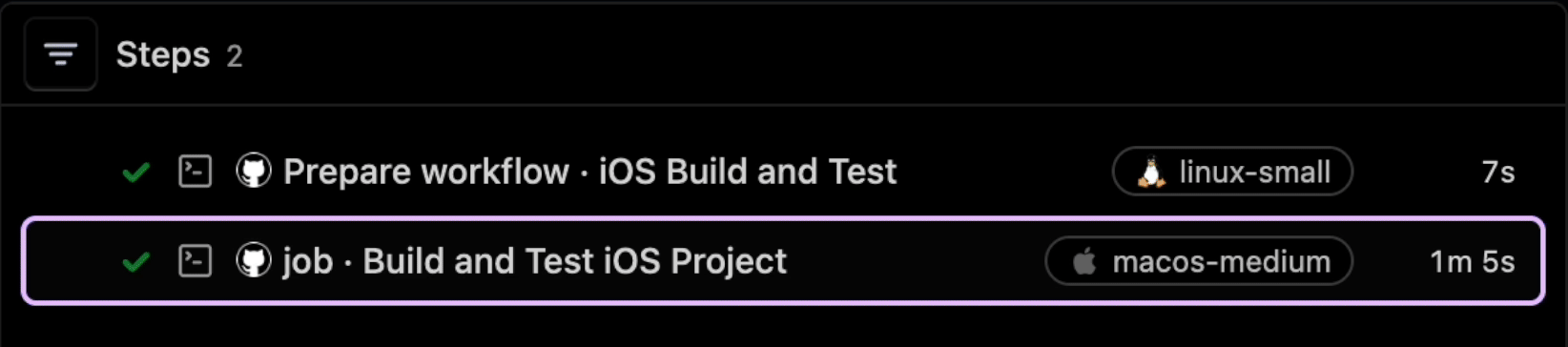
This process doesn't create a corresponding workflow run or runner in GitHub Actions. The workflow runs on Buildkite agents, with Buildkite Pipelines providing scheduling, logs, retries, cancellation, and status.
Requirements
The pipeline needs repository access, compatible queues in its cluster, and access to the secrets and external services its workflows use. Runner labels identify compatible platforms; they don't install GitHub-hosted runner images or guarantee the same tools.
Generated job requirements
Buildkite Pipelines resolves runs-on labels to compatible queues. Common mappings are:
| Workflow label | Buildkite hosted queue | ||
|---|---|---|---|
| Workflow label |
ubuntu-latest, ubuntu-24.04, or ubuntu-22.04
|
Buildkite hosted queue |
linux-medium, with the corresponding Ubuntu environment |
| Workflow label | macos-latest |
Buildkite hosted queue | macos-medium |
| Workflow label |
macos-14, macos-15, macos-26, or macos-27
|
Buildkite hosted queue | Matching macos-<version>-medium queue, falling back to macos-medium
|
| Workflow label |
windows-latest or windows-2022
|
Buildkite hosted queue |
windows-medium, when hosted Windows access and routing are enabled |
Queues must exist in the pipeline's cluster. A versioned macOS label that falls back to macos-medium doesn't guarantee that macOS version. All supported macOS jobs run on Apple silicon.
For iOS workflows, choose a queue base image that includes the required macOS, Xcode, and simulator versions:
- Open Agents and select the queue used by the workflow.
- Select Base image.
- Choose a compatible image and Xcode version.
- Select Save base image.
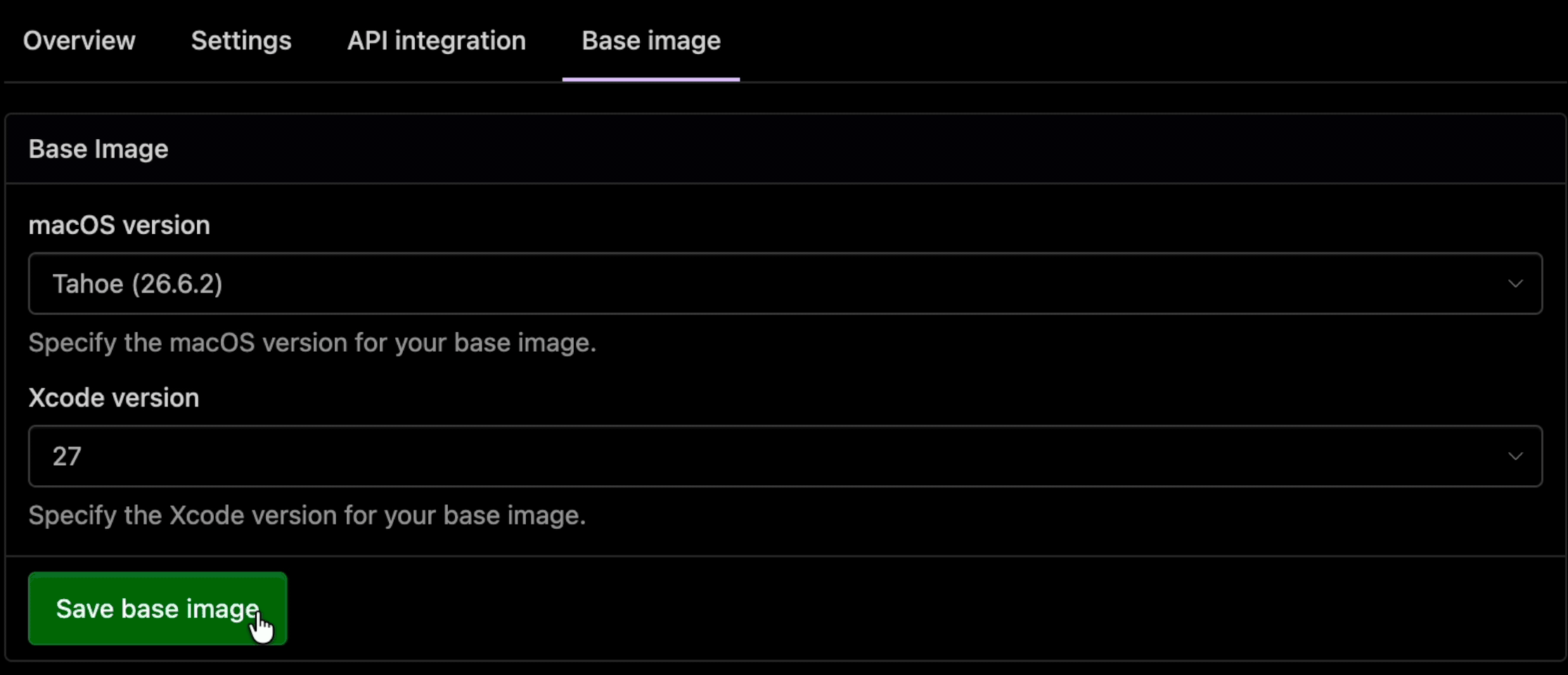
See the macOS hosted agent images and software for available versions. If a workflow needs custom labels or queue mappings, contact the Buildkite Support team rather than editing the generated jobs or adding plugin configuration.
Run Linux arm64 jobs
The runtime supports Linux arm64 jobs, but Linux arm64 labels don't have automatic queue resolution. Contact the Buildkite Support team to discuss the required queue mapping before using these labels in a GitHub Actions pipeline. A label alone doesn't provision a queue or enable x86-64 emulation.
Run Windows jobs
Buildkite hosted Windows agents are in private preview. Contact the Buildkite Support team to confirm access and routing. The pipeline's cluster needs an active hosted Windows AMD64 Medium queue named windows-medium.
Windows jobs run on Windows Server 2022 x86-64 and default to the pwsh shell. Containers, services, Docker actions, and the cmd shell aren't supported. See the Windows jobs reference for the complete requirements and limitations.
Supported functionality and limitations
GitHub Actions Compatibility supports a subset of GitHub Actions. Review the compatibility reference for supported workflow syntax, actions, expressions, event filters, and platform-specific behavior.
Common supported features include job dependencies, matrices, public JavaScript and composite actions, Linux Docker actions and containers, local and public reusable workflows, and supported revisions of checkout, artifact, and cache actions.
Important differences include:
- GitHub-hosted runner images and their installed tools aren't reproduced. Check the selected queue's environment.
- GitHub secrets aren't copied automatically. Buildkite secret access policies determine which jobs can read them.
- GitHub environment reviewer lists, wait timers, branch policies, and custom protection rules aren't reproduced. See the environment rules below.
- Matrix
strategy.fail-fastdoesn't cancel other matrix jobs when one fails. - Workflow
concurrency.cancel-in-progress: trueproduces a warning but doesn't cancel an older build. Don't substitute branch-wide cancellation for workflow concurrency in a server-dispatched pipeline. - GitHub Enterprise Server and private actions aren't supported. Private reusable-workflow source access isn't enabled by default.
- GitHub-issued OIDC claims and general GitHub service behavior aren't emulated.
Treat workflow code as build code
All steps in a job share a workspace, environment changes, processes, and credentials available to that job. Containers provide packaging, not a security boundary. Use whole-job isolation and review the security model before running untrusted contributions or granting write access.
Deployment environments and variables
Top-level jobs can declare a literal GitHub deployment environment. Buildkite Pipelines reads its protection rules, secret names, and variables from GitHub. The GitHub App installation needs Actions: read and Environments: read, plus Variables: read to resolve variables. If your installation predates these permissions, a GitHub organization owner must approve them.
Required reviewers become a Buildkite Pipelines block step. Any user who can unblock the pipeline can approve it. GitHub reviewer lists and self-review prevention aren't enforced. Unsupported wait timers, deployment branch policies, and custom protection rules cause compilation to fail. Builds don't create GitHub deployment records.
Environment secret names resolve to <ENVIRONMENT>_<NAME> in Buildkite secrets. For example, DEPLOY_KEY in production resolves to PRODUCTION_DEPLOY_KEY. See Deployment environments for naming and access rules.
${{ vars.NAME }} expressions read GitHub repository, organization, and applicable environment variables. These values are configuration, not secrets. Job plan artifacts contain their plaintext values, which anyone with access to the artifacts can read.
Credentials, secrets, and OIDC
Private checkout, workflow secrets, and GitHub access tokens have separate authorization boundaries. Private checkout requires Buildkite repository-provider Git credentials and authorization for the repository. Workflow secrets require a Buildkite secret access policy that allows the job to read them.
GitHub Actions pipeline creation enables Allow workflow-authorized GitHub access tokens by default. Disable this in the pipeline's GitHub settings if your workflow doesn't need secrets.GITHUB_TOKEN or github.token. Workflow access tokens require a job on a Buildkite hosted agent and a full-access GitHub repository connection.
Top-level workflow permissions determine token scope. Without that declaration, the token receives only contents: read; GitHub repository and organization defaults aren't inherited. The write-all alias is rejected. List required write permissions explicitly. Pull request builds and their descendants can't receive more than contents: read, and merge queue builds can't receive a token. See the GitHub token reference for the complete restrictions.
A user who can create a non-pull-request build at an arbitrary commit may choose code that requests the workflow's allowed permissions. Enable write tokens only when branch and manual build paths run trusted code.
For OIDC, declare id-token: write in the workflow job's permissions. Supported host JavaScript actions, including those called by composite actions, can then request Buildkite-issued tokens. Shell steps, Docker actions, and actions in job containers can't request these tokens. Your cloud provider must trust the Buildkite issuer and claims rather than the GitHub issuer.
Use OIDC with AWS
An AWS role that trusts only GitHub's OIDC issuer rejects Buildkite-issued tokens. To use a role from both systems:
- Register
https://agent.buildkite.comas an IAM OIDC provider with audiencests.amazonaws.com. - Add a trust-policy statement for the provider ARN
arn:aws:iam::AWS_ACCOUNT_ID:oidc-provider/agent.buildkite.com. - Match
agent.buildkite.com:audandagent.buildkite.com:sub. Restrict the subject to the intended organization and pipeline. - Keep the existing GitHub provider statement while workflows still run in both systems.
For example:
{
  "Effect": "Allow",
  "Principal": {
    "Federated": "arn:aws:iam::AWS_ACCOUNT_ID:oidc-provider/agent.buildkite.com"
  },
  "Action": "sts:AssumeRoleWithWebIdentity",
  "Condition": {
    "StringEquals": {
      "agent.buildkite.com:aud": "sts.amazonaws.com"
    },
    "StringLike": {
      "agent.buildkite.com:sub": "organization:ORGANIZATION_SLUG:pipeline:PIPELINE_SLUG:*"
    }
  }
}
This pattern matches the default Buildkite subject. Each workflow job using an action such as aws-actions/configure-aws-credentials must still declare id-token: write. No plugin configuration is required. For custom OIDC requirements, contact the Buildkite Support team.
See OIDC with AWS for IAM configuration and the OIDC claims reference for the full subject format.
Private reusable workflows
Local reusable workflows and public GitHub reusable workflows are supported. Fetching reusable workflow source from private repositories requires separate access and isn't enabled by default in the native setup. Contact the Buildkite Support team if your workflows require it. Enabling workflow-authorized GitHub tokens alone doesn't enable private source access. Private actions remain unsupported.
Troubleshooting
Start with Recent Deliveries for events that don't create builds. For a build that fails during workflow preparation or execution, read its annotation and expand Diagnostic detail for the workflow path, source location, and compatibility information.
No workflow jobs appear
Check that the workflow exists at the event's commit and declares a supported event with matching filters. A workflow containing only workflow_call doesn't run independently. For manual runs, check the manual-run requirements and dispatch limitation.
A push or pull request build can be created before path matching finishes. If no changed path matches, the workflow is skipped. Missing or uncertain diff evidence fails preparation rather than running the workflow more broadly. Manual builds don't provide the linked webhook evidence needed for path filters.
If a supported event doesn't appear in Recent Deliveries, check the repository webhook's event subscriptions. A webhook created before support for an event was added might not subscribe to it. Contact the Buildkite Support team with the workflow file and delivery details if needed.
GitHub Actions setup isn't available
The legacy new pipeline page and organizations requiring pipeline templates don't offer GitHub Actions setup. Contact the Buildkite Support team for help.
If the new pipeline page can't scan your repository, check that it is connected through the full-access GitHub repository provider and that the GitHub App installation can read the repository. GitHub (Limited Access) can't provide workflow discovery. If shown, select Manage GitHub access to review the installation's repository access.
If the page offers Try again, retry the scan after correcting repository access.
Repository discovery temporarily blocks the editor and submission controls. If discovery times out or fails, the regular editor becomes available so you can continue with native Buildkite Pipelines steps. Select Try again to retry workflow discovery instead. Your setup choice and entered YAML are preserved after validation errors.
GitHub variables can't be resolved
If the importer can't read GitHub variables, every workflow that references vars fails to compile with an E_VARIABLE_RESOLUTION diagnostic, while other workflows still upload. When the diagnostic includes a specific policy, permission, installation, or repository-access error, correct that cause. For example, confirm that the Buildkite GitHub App installation has the Variables: read permission. If it only reports GitHub variables could not be resolved, contact the Buildkite Support team at support@buildkite.com with the build URL.
Validate a workflow locally
Local validation is optional; normal pipeline setup doesn't require the CLI. Use the buildkite-gha CLI to check syntax and compatibility before running a workflow or to diagnose a failure:
buildkite-gha validate .github/workflows/ci.yml
For production policy checks against generated snapshots of every declared supported event:
buildkite-gha validate \
  --profile hosted \
  --all-events \
  .github/workflows/ci.yml
Validation doesn't execute workflow code or prove that all external services an action uses are compatible. A context-required result means the input lacks evidence needed to determine admission, such as a linked webhook and verified diff for path filters.
Next steps
- Check the GitHub Actions Compatibility reference for supported features and limits.
- Review the security model.
- Migrate GitHub Actions secrets.
- Follow the iOS workflow quick start for macOS setup.
- Translate workflows to native Buildkite Pipelines configuration when you're ready to migrate their syntax.