
Attributing AWS agent costs using Amazon EventBridge
Buildkite organizations running monorepos often need to attribute agent compute costs to specific teams. However, this is not straightforward—a single build can fan out across multiple self-hosted queues, each mapping to a separate Elastic CI Stack for AWS instance that may use different EC2 instance types.
This tutorial walks through setting up a data pipeline that ingests Buildkite Amazon EventBridge events into Amazon S3, making them queryable with Amazon Athena. The result lets you correlate queues to agents, agents to EC2 instances, and job duration to hourly AWS pricing.
This tutorial demonstrates feasibility. A production implementation would normalize the EventBridge fields into a proper schema rather than working around them with inline SQL. The Athena queries here are illustrative and would need real hourly pricing data from AWS.
Before you start
To complete this tutorial, you need:
- A Buildkite organization using the Elastic CI Stack for AWS with EC2 instances.
- An Amazon EventBridge notification service configured in your Buildkite organization settings.
- Terraform installed locally, and familiarity with using Terraform.
- An AWS account with permissions to create S3 buckets, Lambda functions, Amazon Data Firehose delivery streams, EventBridge rules, and Glue catalog resources.
How it works
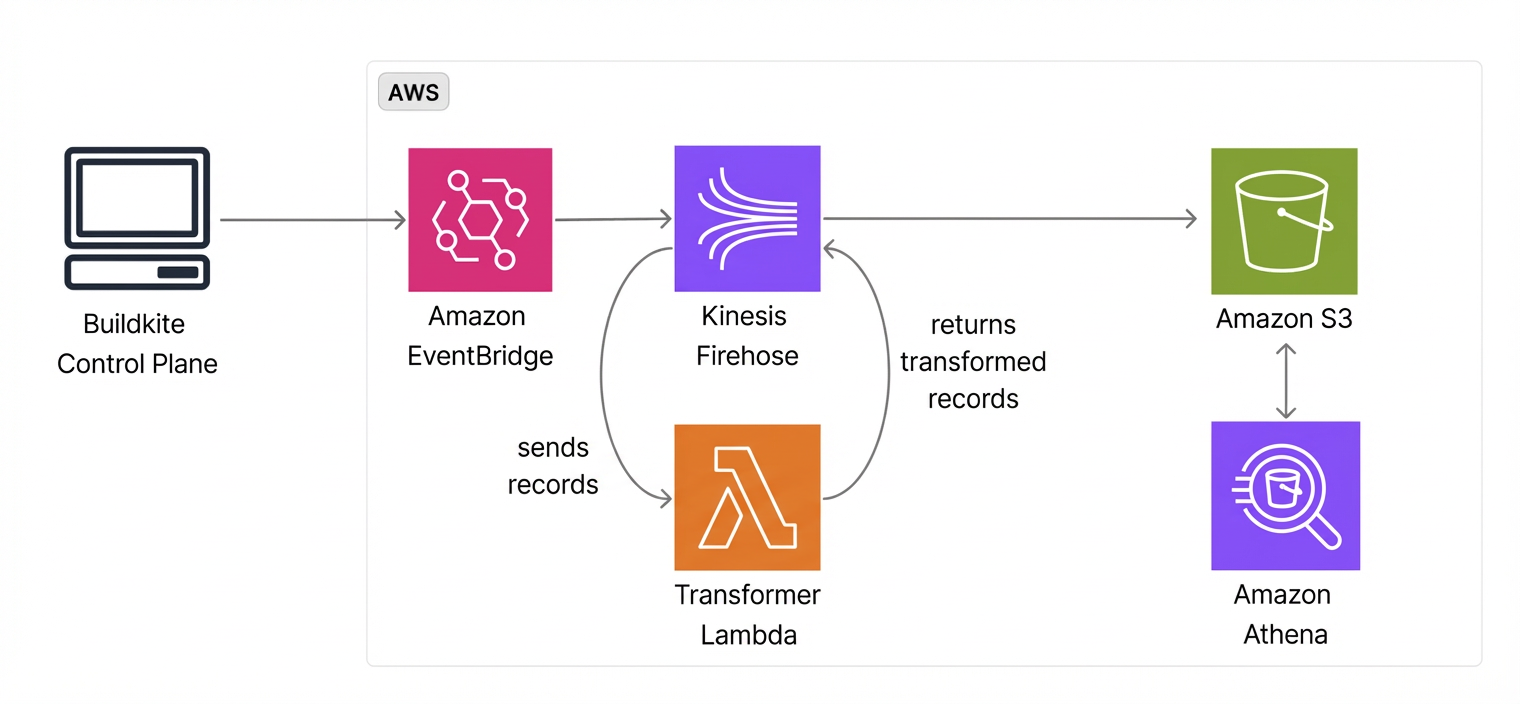
The pipeline streams Buildkite events from EventBridge to S3 through Amazon Data Firehose, making the raw data available to any analytics backend. If you already use ClickHouse, Redshift, or Snowflake data warehouse tools, you can configure these tools to access the same S3 bucket.
The data flow is:
- Buildkite publishes
Job Finished,Agent Connected, andAgent Disconnectedevents to the partner event bus. - EventBridge rules route matching events to an Amazon Data Firehose delivery stream (indicated by its former name Kinesis Firehose in the following diagram).
- Firehose invokes a transformer Lambda function to append newline delimiters for Athena compatibility.
- Firehose delivers the transformed records to S3.
- Glue catalog tables define the schema, letting Athena query the data with SQL.
This tutorial captures two event types:
-
Job Finished events: contain job duration, pipeline slug, and queue (from
agent_query_rules). These are the primary input for cost attribution. -
Agent Connected/Disconnected events: contain agent
meta_datasuch asaws:instance-idandaws:instance-type. Join these with job events onagent.uuidto map jobs to specific EC2 instances and their hourly rates.
This approach attributes compute cost at the queue level. Mapping queues to teams requires a lookup table based on your own Elastic CI Stack and queue naming conventions. Individual-level attribution (who triggered the build) is not available from EventBridge events, as the creator field is not included in EventBridge payloads. For individual attribution, the OpenTelemetry integration may be a better fit, since its events contain the build author.
Set up the infrastructure with Terraform
Create a new Terraform project directory with the following files.
Define variables
Create a variables.tf file to define the configurable inputs:
variable "aws_region" {
  description = "AWS region"
  type        = string
  default     = "us-east-1"
}

variable "buildkite_event_bus_arn" {
  description = "ARN of the Buildkite partner event bus"
  type        = string
}

variable "buildkite_event_source" {
  description = "Buildkite partner event source identifier"
  type        = string
}

variable "s3_bucket_name" {
  description = "S3 bucket name for Firehose destination"
  type        = string
  default     = "buildkite-cost-attribution"
}

variable "firehose_stream_name" {
  description = "Amazon Data Firehose delivery stream name"
  type        = string
  default     = "buildkite-cost-attribution"
}

variable "lambda_function_name" {
  description = "Lambda function name for Firehose record transformation"
  type        = string
  default     = "buildkite-firehose-transformer"
}
Set variable values
Create a terraform.tfvars file with your resource names. Replace the placeholder values with your own:
buildkite_event_bus_arn = "arn:aws:events:us-east-1:012345678901:event-bus/aws.partner/buildkite.com/your-org/your-uuid"
buildkite_event_source = "aws.partner/buildkite.com/your-org/your-uuid"
s3_bucket_name         = "your-buildkite-cost-attribution-bucket"
The partner event bus ARN and event source are created automatically when you configure the Amazon EventBridge integration in your Buildkite organization settings.
Create the Lambda transformer
Create a lambda/transformer.py file. Amazon Data Firehose batches multiple records together, but Athena expects newline-delimited JSON. This Lambda function appends a newline to each record:
import base64

def lambda_handler(event, context):
    output = []
    for record in event['records']:
        payload = base64.b64decode(record['data'])
        output.append({
            'recordId': record['recordId'],
            'result': 'Ok',
            'data': base64.b64encode(payload + b'\n').decode('utf-8')
        })
    return {'records': output}
Define the main configuration
Create a main.tf file containing the S3 bucket, Lambda function, Amazon Data Firehose delivery stream, EventBridge rules, and Glue catalog resources:
terraform {
  required_providers {
    aws = {
      source  = "hashicorp/aws"
      version = "~> 5.0"
    }
    archive = {
      source  = "hashicorp/archive"
      version = "~> 2.0"
    }
  }
}

provider "aws" {
  region = var.aws_region
}

data "aws_caller_identity" "current" {}

# ── S3 ──────────────────────────────────────────────────────

resource "aws_s3_bucket" "events" {
  bucket = var.s3_bucket_name
}

resource "aws_s3_bucket_public_access_block" "events" {
  bucket = aws_s3_bucket.events.id

  block_public_acls       = true
  block_public_policy     = true
  ignore_public_acls      = true
  restrict_public_buckets = true
}

# ── Lambda (Firehose record transformer) ────────────────────

data "archive_file" "transformer" {
  type        = "zip"
  source_file = "${path.module}/lambda/transformer.py"
  output_path = "${path.module}/lambda/transformer.zip"
}

resource "aws_lambda_function" "firehose_transformer" {
  function_name    = var.lambda_function_name
  filename         = data.archive_file.transformer.output_path
  source_code_hash = data.archive_file.transformer.output_base64sha256
  role             = aws_iam_role.lambda.arn
  handler          = "transformer.lambda_handler"
  runtime          = "python3.13"
  timeout          = 60
}

resource "aws_iam_role" "lambda" {
  name = "${var.lambda_function_name}-role"

  assume_role_policy = jsonencode({
    Version = "2012-10-17"
    Statement = [{
      Effect    = "Allow"
      Principal = { Service = "lambda.amazonaws.com" }
      Action    = "sts:AssumeRole"
    }]
  })
}

resource "aws_iam_role_policy" "lambda_logs" {
  name = "cloudwatch-logs"
  role = aws_iam_role.lambda.id

  policy = jsonencode({
    Version = "2012-10-17"
    Statement = [
      {
        Effect   = "Allow"
        Action   = "logs:CreateLogGroup"
        Resource = "arn:aws:logs:${var.aws_region}:${data.aws_caller_identity.current.account_id}:*"
      },
      {
        Effect = "Allow"
        Action = ["logs:CreateLogStream", "logs:PutLogEvents"]
        Resource = "arn:aws:logs:${var.aws_region}:${data.aws_caller_identity.current.account_id}:log-group:/aws/lambda/${var.lambda_function_name}:*"
      }
    ]
  })
}

# ── Amazon Data Firehose ───────────────────────────────────

resource "aws_kinesis_firehose_delivery_stream" "events" {
  name        = var.firehose_stream_name
  destination = "extended_s3"

  extended_s3_configuration {
    role_arn   = aws_iam_role.firehose.arn
    bucket_arn = aws_s3_bucket.events.arn
    prefix     = "eventbridge/"

    buffering_size     = 5
    buffering_interval = 60

    processing_configuration {
      enabled = true

      processors {
        type = "Lambda"

        parameters {
          parameter_name  = "LambdaArn"
          parameter_value = "${aws_lambda_function.firehose_transformer.arn}:$LATEST"
        }

        parameters {
          parameter_name  = "BufferSizeInMBs"
          parameter_value = "1"
        }

        parameters {
          parameter_name  = "BufferIntervalInSeconds"
          parameter_value = "60"
        }
      }
    }

    cloudwatch_logging_options {
      enabled         = true
      log_group_name  = "/aws/kinesisfirehose/${var.firehose_stream_name}"
      log_stream_name = "DestinationDelivery"
    }
  }
}

resource "aws_iam_role" "firehose" {
  name = "${var.firehose_stream_name}-role"

  assume_role_policy = jsonencode({
    Version = "2012-10-17"
    Statement = [{
      Effect    = "Allow"
      Principal = { Service = "firehose.amazonaws.com" }
      Action    = "sts:AssumeRole"
    }]
  })
}

resource "aws_iam_role_policy" "firehose_s3" {
  name = "s3-delivery"
  role = aws_iam_role.firehose.id

  policy = jsonencode({
    Version = "2012-10-17"
    Statement = [
      {
        Effect = "Allow"
        Action = [
          "s3:AbortMultipartUpload",
          "s3:GetBucketLocation",
          "s3:GetObject",
          "s3:ListBucket",
          "s3:ListBucketMultipartUploads",
          "s3:PutObject"
        ]
        Resource = [
          aws_s3_bucket.events.arn,
          "${aws_s3_bucket.events.arn}/*"
        ]
      },
      {
        Effect   = "Allow"
        Action   = ["lambda:InvokeFunction", "lambda:GetFunctionConfiguration"]
        Resource = "${aws_lambda_function.firehose_transformer.arn}:*"
      },
      {
        Effect = "Allow"
        Action = ["logs:PutLogEvents"]
        Resource = "arn:aws:logs:${var.aws_region}:${data.aws_caller_identity.current.account_id}:log-group:/aws/kinesisfirehose/${var.firehose_stream_name}:*"
      }
    ]
  })
}

# ── EventBridge ─────────────────────────────────────────────
#
# The Buildkite partner event bus is created automatically when
# you configure the AWS EventBridge integration in your
# Buildkite organization settings. Reference it by ARN here.

data "aws_cloudwatch_event_bus" "buildkite" {
  name = var.buildkite_event_bus_arn
}

resource "aws_cloudwatch_event_rule" "agent_connected_disconnected" {
  name           = "AgentConnectedAndDisconnected"
  event_bus_name = data.aws_cloudwatch_event_bus.buildkite.name

  event_pattern = jsonencode({
    source      = [var.buildkite_event_source]
    detail-type = ["Agent Connected", "Agent Disconnected"]
  })
}

resource "aws_cloudwatch_event_rule" "job_finished" {
  name           = "JobFinished"
  event_bus_name = data.aws_cloudwatch_event_bus.buildkite.name

  event_pattern = jsonencode({
    source      = [var.buildkite_event_source]
    detail-type = ["Job Finished"]
    detail = {
      job = { type = ["script"] }
    }
  })
}

resource "aws_cloudwatch_event_target" "agent_to_firehose" {
  rule           = aws_cloudwatch_event_rule.agent_connected_disconnected.name
  event_bus_name = data.aws_cloudwatch_event_bus.buildkite.name
  target_id      = "firehose"
  arn            = aws_kinesis_firehose_delivery_stream.events.arn
  role_arn       = aws_iam_role.eventbridge_to_firehose.arn
}

resource "aws_cloudwatch_event_target" "job_to_firehose" {
  rule           = aws_cloudwatch_event_rule.job_finished.name
  event_bus_name = data.aws_cloudwatch_event_bus.buildkite.name
  target_id      = "firehose"
  arn            = aws_kinesis_firehose_delivery_stream.events.arn
  role_arn       = aws_iam_role.eventbridge_to_firehose.arn
}

resource "aws_iam_role" "eventbridge_to_firehose" {
  name = "eventbridge-to-firehose-buildkite"

  assume_role_policy = jsonencode({
    Version = "2012-10-17"
    Statement = [{
      Effect    = "Allow"
      Principal = { Service = "events.amazonaws.com" }
      Action    = "sts:AssumeRole"
    }]
  })
}

resource "aws_iam_role_policy" "eventbridge_to_firehose" {
  name = "put-records"
  role = aws_iam_role.eventbridge_to_firehose.id

  policy = jsonencode({
    Version = "2012-10-17"
    Statement = [{
      Sid    = "ActionsForFirehose"
      Effect = "Allow"
      Action = ["firehose:PutRecord", "firehose:PutRecordBatch"]
      Resource = [aws_kinesis_firehose_delivery_stream.events.arn]
    }]
  })
}

# ── Athena / Glue ───────────────────────────────────────────

resource "aws_glue_catalog_database" "buildkite" {
  name = "buildkite"
}

resource "aws_glue_catalog_table" "job_finished" {
  name          = "buildkite_job_finished"
  database_name = aws_glue_catalog_database.buildkite.name
  table_type    = "EXTERNAL_TABLE"

  parameters = {
    "classification"  = "json"
    "compressionType" = "none"
  }

  storage_descriptor {
    location      = "s3://${var.s3_bucket_name}/eventbridge/"
    input_format  = "org.apache.hadoop.mapred.TextInputFormat"
    output_format = "org.apache.hadoop.hive.ql.io.HiveIgnoreKeyTextOutputFormat"

    ser_de_info {
      serialization_library = "org.openx.data.jsonserde.JsonSerDe"
      parameters = {
        "mapping.detailtype" = "detail-type"
        "mapping.eventtime"  = "time"
      }
    }

    columns { name = "version"    type = "string" }
    columns { name = "id"         type = "string" }
    columns { name = "detailtype" type = "string" }
    columns { name = "source"     type = "string" }
    columns { name = "account"    type = "string" }
    columns { name = "eventtime"  type = "string" }
    columns { name = "region"     type = "string" }
    columns {
      name = "detail"
      type = "struct<job:struct<uuid:string,type:string,label:string,step_key:string,agent_query_rules:array<string>,exit_status:int,signal_reason:string,passed:boolean,soft_failed:boolean,state:string,runnable_at:string,started_at:string,finished_at:string>,build:struct<uuid:string,number:int,commit:string,message:string,branch:string,state:string,source:string,started_at:string,finished_at:string>,pipeline:struct<uuid:string,slug:string,repo:string>,organization:struct<uuid:string,slug:string>,agent:struct<uuid:string>>"
    }
  }
}

resource "aws_glue_catalog_table" "agent_lifecycle" {
  name          = "buildkite_agent_lifecycle"
  database_name = aws_glue_catalog_database.buildkite.name
  table_type    = "EXTERNAL_TABLE"

  parameters = {
    "classification"  = "json"
    "compressionType" = "none"
  }

  storage_descriptor {
    location      = "s3://${var.s3_bucket_name}/eventbridge/"
    input_format  = "org.apache.hadoop.mapred.TextInputFormat"
    output_format = "org.apache.hadoop.hive.ql.io.HiveIgnoreKeyTextOutputFormat"

    ser_de_info {
      serialization_library = "org.openx.data.jsonserde.JsonSerDe"
      parameters = {
        "mapping.detailtype" = "detail-type"
        "mapping.eventtime"  = "time"
      }
    }

    columns { name = "version"    type = "string" }
    columns { name = "id"         type = "string" }
    columns { name = "detailtype" type = "string" }
    columns { name = "source"     type = "string" }
    columns { name = "account"    type = "string" }
    columns { name = "eventtime"  type = "string" }
    columns { name = "region"     type = "string" }
    columns {
      name = "detail"
      type = "struct<agent:struct<uuid:string,connection_state:string,name:string,version:string,ip_address:string,hostname:string,pid:string,priority:int,meta_data:array<string>,connected_at:string,disconnected_at:string,lost_at:string>,organization:struct<uuid:string,slug:string>,token:struct<uuid:string,description:string>>"
    }
  }
}

resource "aws_athena_workgroup" "buildkite" {
  name = "buildkite"

  configuration {
    result_configuration {
      output_location = "s3://${var.s3_bucket_name}/athena-results/"
    }
  }
}
Import existing resources
If your S3 bucket already exists, import it rather than letting Terraform create a new one:
terraform import aws_s3_bucket.events your-bucket-name
terraform import aws_s3_bucket_public_access_block.events your-bucket-name
Apply the configuration
Initialize and apply the Terraform configuration:
terraform init
terraform plan
terraform apply
Query the data with Athena
Once events start flowing (after builds run and agents connect), you can query the data using the Athena workgroup created by the Terraform configuration.
Both Glue tables point to the same S3 location, since all EventBridge event types are delivered together by a single Firehose stream to S3. Use WHERE detailtype = 'Job Finished' or WHERE detailtype = 'Agent Connected' in your queries to filter to the relevant events.
Verify events are arriving
Run a sanity check to confirm events are being ingested:
SELECT 'job_finished' AS table_name, detailtype, COUNT(*) AS event_count
FROM buildkite.buildkite_job_finished
GROUP BY detailtype

UNION ALL

SELECT 'agent_lifecycle' AS table_name, detailtype, COUNT(*) AS event_count
FROM buildkite.buildkite_agent_lifecycle
GROUP BY detailtype
Calculate job compute cost per pipeline and queue
The following query joins job events with agent lifecycle events to calculate estimated compute cost. This query maps instance types to hourly rates and multiplies by job duration:
WITH job_agent AS (
  SELECT
    j.detail.pipeline.slug AS pipeline,
    j.detail.job.uuid AS job_uuid,
    j.detail.job.started_at AS started_at,
    j.detail.job.finished_at AS finished_at,
    TRY(split(filter(a.detail.agent.meta_data, m -> m LIKE 'queue=%')[1], '=')[2])
      AS queue,
    TRY(split(filter(a.detail.agent.meta_data, m -> m LIKE 'aws:instance-type=%')[1], '=')[2])
      AS instance_type,
    TRY(split(filter(a.detail.agent.meta_data, m -> m LIKE 'aws:instance-life-cycle=%')[1], '=')[2])
      AS lifecycle
  FROM buildkite.buildkite_job_finished j
  JOIN buildkite.buildkite_agent_lifecycle a
    ON j.detail.agent.uuid = a.detail.agent.uuid
  WHERE j.detailtype = 'Job Finished'
    AND a.detailtype = 'Agent Connected'
    AND j.detail.job.passed = true
)

SELECT
    pipeline,
    queue,
    instance_type,
    lifecycle,
    COUNT(DISTINCT job_uuid) AS job_count,
    SUM(
      date_diff('second',
        parse_datetime(started_at, 'yyyy-MM-dd HH:mm:ss z'),
        parse_datetime(finished_at, 'yyyy-MM-dd HH:mm:ss z')
      )
    ) AS total_job_seconds,
    ROUND(
      SUM(
        date_diff('second',
          parse_datetime(started_at, 'yyyy-MM-dd HH:mm:ss z'),
          parse_datetime(finished_at, 'yyyy-MM-dd HH:mm:ss z')
        )
      ) / 3600.0
      * CASE instance_type
          WHEN 't3.micro'  THEN 0.0104
          WHEN 't3.small'  THEN 0.0208
          WHEN 't3.medium' THEN 0.0416
          WHEN 'm5.large'  THEN 0.096
          WHEN 'm5.xlarge' THEN 0.192
          ELSE 0
        END,
      6
    ) AS estimated_cost_usd
FROM job_agent
GROUP BY pipeline, queue, instance_type, lifecycle
ORDER BY estimated_cost_usd DESC;
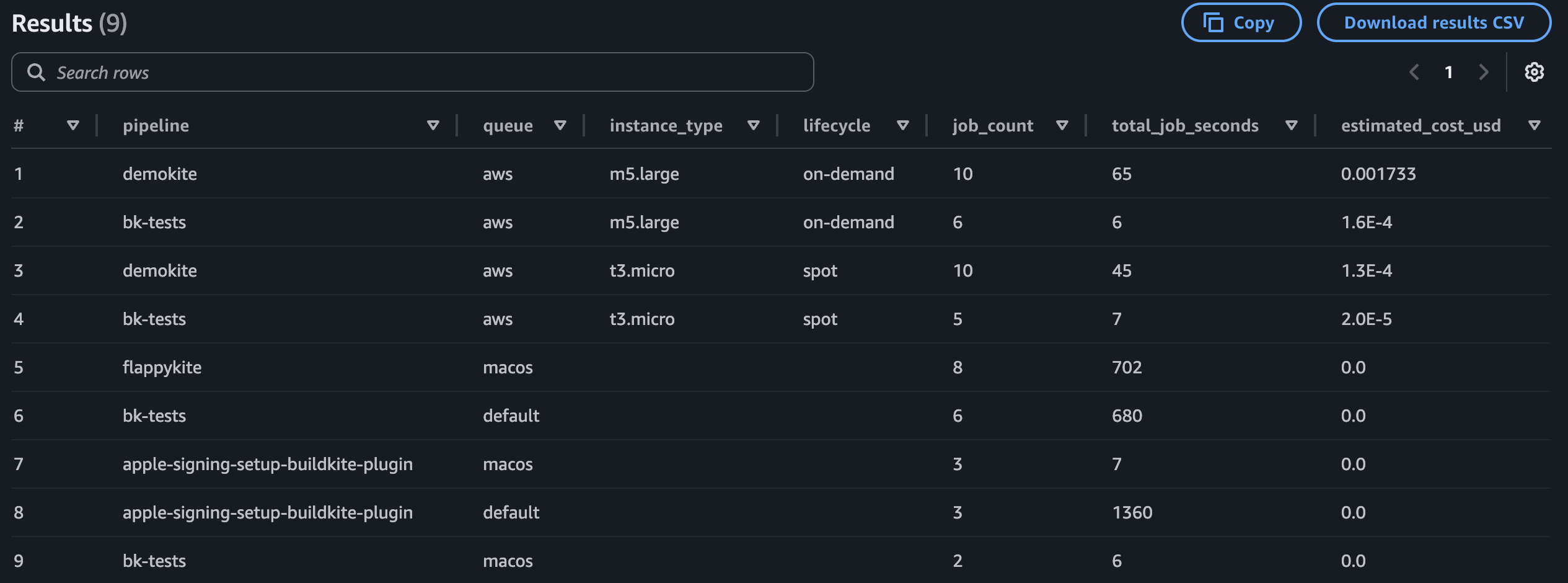
The CASE statement in this query uses example EC2 on-demand pricing (for example, ... THEN 0.0104). Replace these values with your actual rates, including any reserved instance or spot pricing you use. Jobs running on instance types not listed in the CASE statement will show 0 for estimated cost.
Example output:
Next steps
- To map queues to teams, create a lookup table based on your Elastic CI Stack and queue naming conventions, then join it with the query results.
- For a production implementation, consider moving field extraction upstream so that values like queue, instance type, and lifecycle are written as top-level columns during ingestion rather than parsed from nested JSON at query time.
- To capture more granular cost data, consider adding OpenTelemetry alongside EventBridge, which includes the build author in its events.
- For details on available EventBridge events and their payloads, see the Amazon EventBridge integration reference.