
Buildkite Pipelines architecture
Buildkite Pipelines schedules your builds through a hosted control plane. Your jobs run on agents, either on infrastructure you manage or on Buildkite-hosted infrastructure. Choose the build environment that fits your infrastructure, customization, and security requirements.
Choose your build environment
Both models use the same Buildkite Pipelines interface to configure pipelines and view results. The difference is who manages the infrastructure that runs your jobs.
| Requirement | Self-hosted agents | Buildkite-hosted agents | |||
|---|---|---|---|---|---|
| Requirement | Infrastructure management | Self-hosted agents | You provision, scale, and maintain the build machines | Buildkite-hosted agents | Buildkite provisions, scales, and maintains the build machines |
| Requirement | Build environment | Self-hosted agents | Your own cloud or on-premises infrastructure | Buildkite-hosted agents | Buildkite-managed infrastructure |
| Requirement | Typical use case | Self-hosted agents | You need control over machine configuration or access to your private network | Buildkite-hosted agents | You want to run builds without managing agent infrastructure |
| Requirement | Setup | Self-hosted agents | Install a self-hosted agent | Buildkite-hosted agents | Create a Buildkite-hosted queue |
To choose an agent setup for your workload, see Buildkite agent reference architectures. The patterns cover hosted, self-hosted, and combined setups, including scaling, caching, and isolation considerations.
For platform support, scaling options, and configuration differences, see Self-hosted and Buildkite-hosted agents compared.
How a build runs
The Buildkite Pipelines control plane coordinates the build. Agents execute its jobs:
- A source-control event or another build trigger starts a build.
- Buildkite Pipelines makes jobs available to agents in the targeted queues.
- An agent accepts a job, checks out the source code, and runs the job's commands.
- The agent streams logs, uploads configured artifacts, and reports the result.
Agents connect to the control plane over HTTPS. Self-hosted agents do not require inbound firewall access for this connection. For details, see How the agent works.
Self-hosted (hybrid) architecture
In a self-hosted, or hybrid, architecture, Buildkite Pipelines manages the control plane and you manage the agents. You choose the hardware, operating systems, installed tools, network access, and scaling strategy for your build environment.
The following diagram shows the split in Pipelines between its hosted control plane and the agents running on your infrastructure.
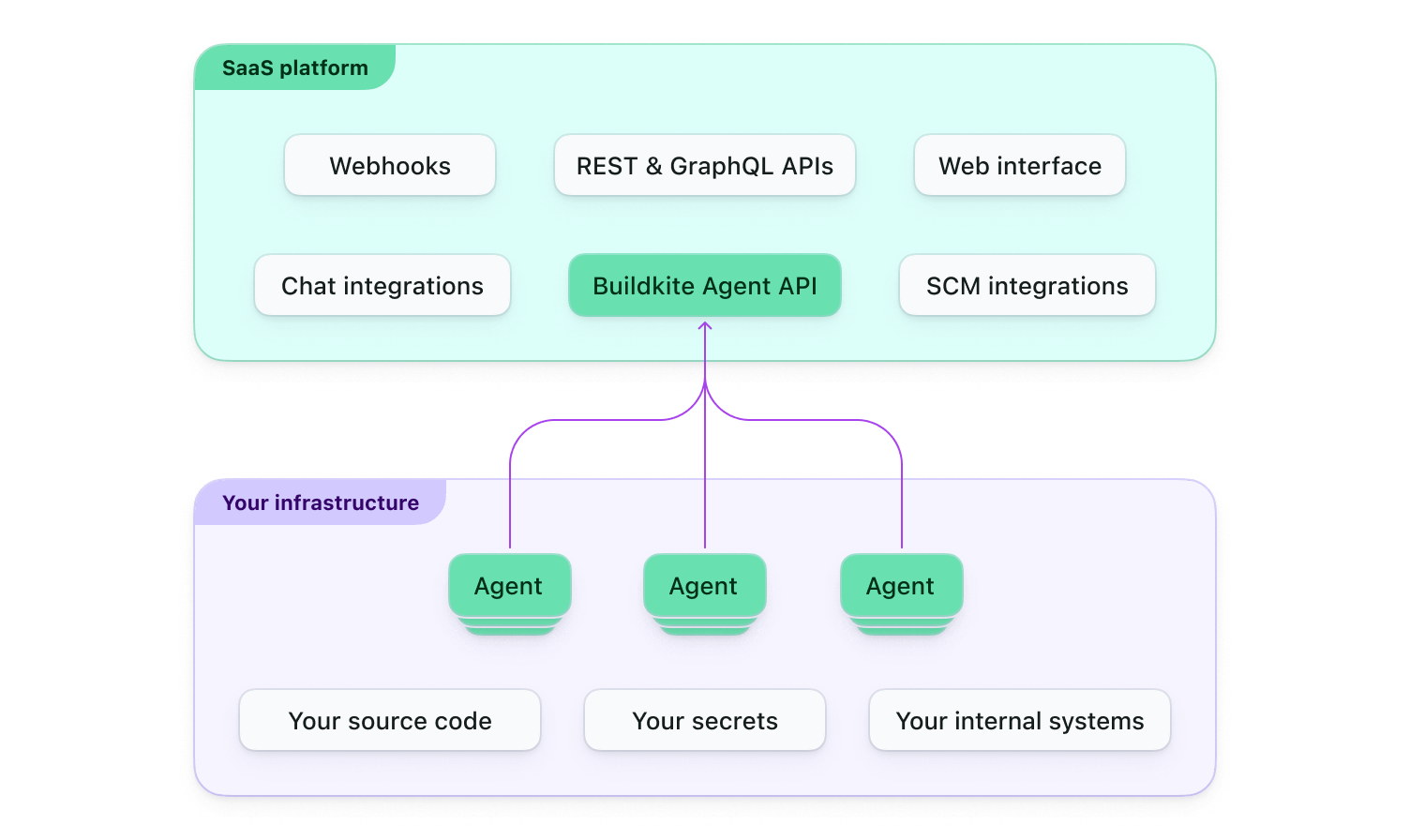
Your agents check out and execute source code in your environment. Agents send job logs and build results to Buildkite and upload artifacts to your configured storage. Source code or secrets included in those outputs can leave your environment. Review the shared security responsibilities to understand which data is transmitted and which controls your organization manages.
Unlike a fully self-hosted CI/CD system, you do not need to operate or update the control plane. You remain responsible for provisioning, securing, and maintaining your agent infrastructure.
Buildkite-hosted architecture
With Buildkite-hosted agents, Buildkite Pipelines provides both the control plane and the infrastructure that runs your jobs. Buildkite provisions and scales the build machines, then destroys each job's environment after the job finishes.
Your organization still configures its pipelines, agent images, source-code access, secrets, and network access. Hosted infrastructure reduces machine maintenance; it does not remove responsibility for the code your jobs run or the systems they can access.
Next steps
- Run a build: Follow Getting started with Pipelines to create and run your first pipeline.
- Route jobs to your infrastructure: Learn how to target a queue from a pipeline.
- Secure your setup: Follow Secure your first production pipeline for configuration steps and verification checks.