
Architecture of the Elastic CI Stack for AWS
The Elastic CI Stack for AWS provisions and manages the infrastructure required to run a scalable Buildkite agent cluster. This page aims to explain the internal components, resources, and mechanisms that make up the stack.
This diagram illustrates a standard deployment of Elastic CI Stack for AWS.
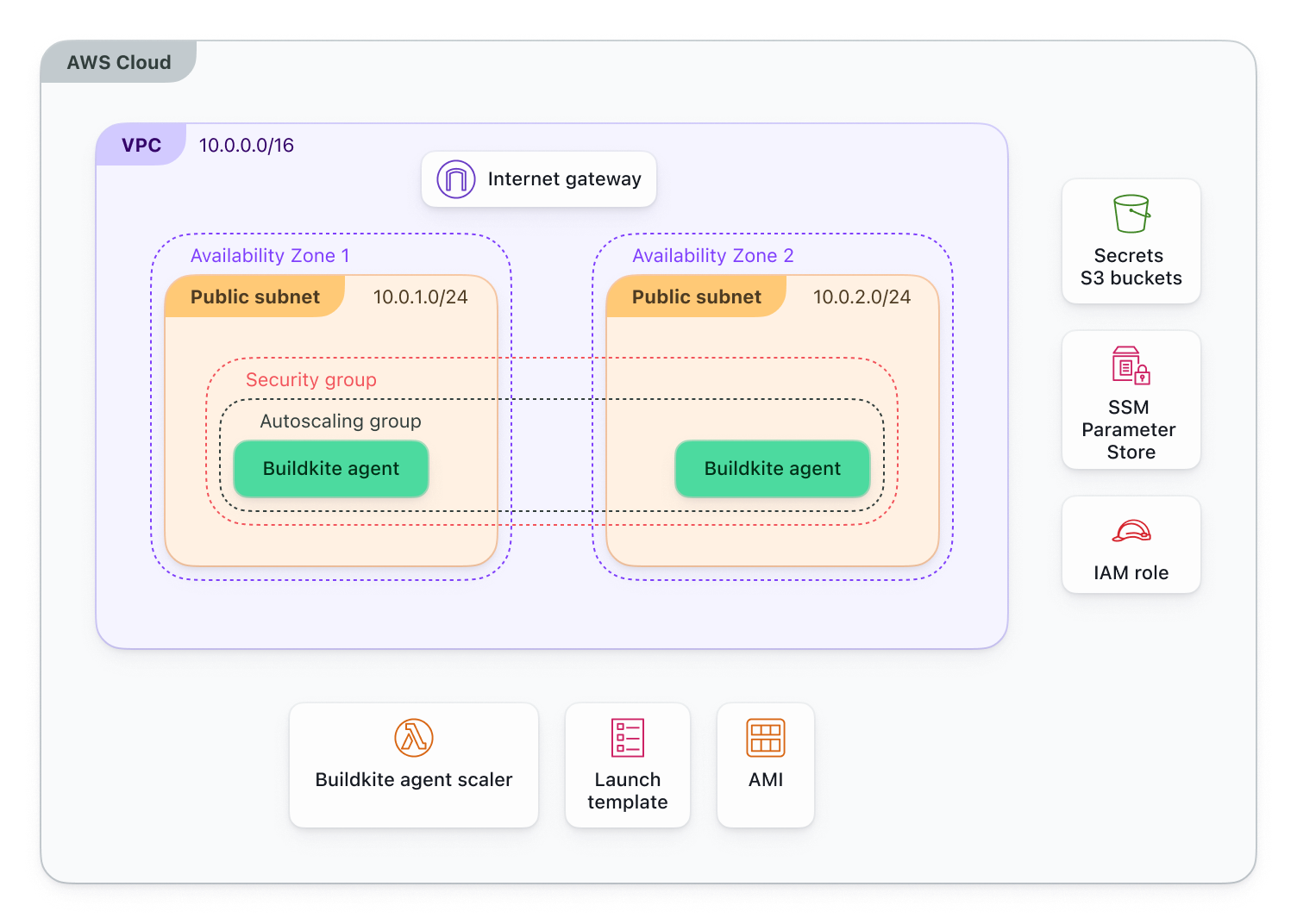
The primary layout of the stack is built around AWS autoscaling components, with an Auto Scaling group (ASG) being the center piece. The ASG manages the lifecycle of EC2 instances, ensuring that the cluster scales out to meet demand, and scales in to save costs.
The instances with the ASG are managed via a launch template; the launch template defines the configuration for EC2 instances launched via the ASG, the launch template will define configuration such as the AMI used, the instance type(s) available, security groups and user data scripts.
User data scripts are scripts that run at boot time on the instance to ensure the instance has environment variables propagated, and any additional tools via bootstrap scripts (which are user provided via input configuration) are correctly installed. Once the user data scripts are completed, the instance will be moved into a healthy state. If they fail, the instance will be marked as unhealthy in the ASG and subsequently terminated.
Now that the core architecture has been laid out, let's look into the specifics of the stack.
Software stack
The EC2 instances provisioned by the stack run using a pre-configured Amazon Machine Image (AMI) based on Amazon Linux 2023. The image comes with a suite of software to support your builds and manage the instance, these tools are used to manage the instance in a variety of ways and can be broken down into four subsections.
Core components
- The Buildkite agent - the main component.
- Docker - pre-installed to ensure that any containerized workflows function as intended, such as the Docker-Compose and Docker Buildkite plugins.
- Git - the Buildkite agent actively uses Git to checkout codebases ahead of builds.
AWS integration
- Amazon SSM Agent - enables remote management of instances, is used this from the Agent Scaler in order to kill Buildkite agent processes.
- CloudWatch Agent - for streaming to log groups.
- AWS CLI - for interacting with AWS Resources during build time; can be used within a pipeline.
- EC2 Instance Connect - can be used to connect to an instance via the AWS Console.
- cfn-bootstrap - helper scripts (
cfn-init,cfn-signal) are used within CloudFormation to provision the instance.
Helper utilities
- lifecycled - this daemon allows listening for Auto Scaling lifecycle hook events on the instance which trigger the graceful shutdown of the Buildkite agent when an instance is scheduled for termination.
- s3secrets-helper - is used to fetch and decrypt secrets from the stack's S3 bucket.
- jq - is used throughout scripts within the stack to parse JSON responses efficiently.
Buildkite plugins
- docker-login - is used for authentication with Docker Registries such as ECR.
- ecr - this helper is used for streamlining the ECR operations.
- secrets - this plugin is used for setting secrets as environment variables using the aforementioned
s3secrets-helper.
Bootstrap scripts
The stack uses EC2 user data to perform final configuration at boot time. The script for this is constantly evolving, so you will benefit from looking at the UserData Scripts used in our Terraform Module to get a better idea of what is happening under the hood.
For the most part, the User Data script is used to pass input configuration from the deployment method, whether that be AWS CloudFormation or Terraform, directly to the run time of the instance.
When a bootstrap script is defined within input configuration, this is ran after the initial User Data scripts have ran, using the bk-install-elastic-stack.sh script.
IAM and security
The stack creates several IAM roles to grant access to resources required for the stack to function as intended. For a detailed breakdown of the specific permissions and JSON policy examples, see IAM policy examples.
Custom IAM roles can be used, depending on how the stack is deployed. For Terraform, all roles created by the stack can be skipped in favour of a custom role. For AWS CloudFormation, an instance role can be provided to allow a shared role across all clusters created. See Using custom IAM roles for more information.
KMS keys
The stack optionally creates an AWS KMS key when the PipelineSigningKMSKey (AWS CloudFormation) or pipeline_signing_kms_key (Terraform) is selected to support pipeline signing.
Networking
The stack will create its own VPC to handle networking to ensure agents can reach Buildkite, AWS services, and external services such as GitHub.
VPC and subnets
By default, the stack creates a new Virtual Private Cloud (VPC) with the CIDR block 10.0.0.0/16 and two subnets, one subnet will use 10.0.1.0/24 and the other will use 10.0.2.0/24.
You can also deploy the stack into an existing VPC by providing your own VpcId (AWS CloudFormation) or vpc_id (Terraform) and Subnets (AWS CloudFormation) or subnets (Terraform).
Security groups
A security group is created and used by the agent instances. By default, it allows all outbound traffic (0.0.0.0/0) and limits all inbound traffic, which can be optionally set to allow port 22 for SSH access.
VPC endpoints
The stack creates VPC endpoints for AWS Systems Manager (SSM) and S3. This allows instances to communicate with these services within the boundary of the VPC, negating the requirement for outbound access.
Scaling mechanism
The stack uses a Lambda-based scaling approach rather than standard AWS target tracking policies. This results in quicker scaling based on Buildkite-specific metrics, opposed to resource usage.
Agent scaler lambda
The AgentScaler Lambda function is the main part of the autoscaling logic. It runs on a schedule ( every minute on default settings) and adjusts the Auto Scaling group's capacity based on real-time demand from Buildkite.
How it works:
- The Lambda polls the Buildkite API to retrieve the number of scheduled jobs waiting to run and the number of busy agents currently running jobs.
- Based on these metrics and your stack configuration (minimum size, maximum size, scale-out factor), it calculates the desired number of instances needed.
- If the desired capacity differs from the current capacity, it updates the Auto Scaling group to scale up or down accordingly.
The polling interval can be configured using the ScaleInIdlePeriod (CloudFormation) or scale_in_idle_period (Terraform) parameter. A shorter interval means faster response to demand, but may result in more frequent scaling operations. We recommend being careful with this setting as it could result in instance thrashing when there's a large number of jobs that complete quickly.
Scheduled scaling
You can configure scheduled scaling actions to adjust the minimum size of the cluster based on time of day. This is useful for predictable workload patterns, such as scaling up during business hours when builds are most frequent, and scaling down at night or on weekends to reduce costs.
Scheduled scaling is implemented using AWS Auto Scaling Scheduled Actions, which allow you to define:
- A target minimum size for the Auto Scaling group at specific times
- Recurring schedules using cron expressions
- Time zone specifications to ensure schedules match your team's working hours For example, you might configure a schedule that sets the minimum size to 5 instances at 8:00 AM on weekdays and back to 0 at 6:00 PM. The Agent Scaler Lambda will still handle demand-based scaling above the minimum, but scheduled scaling ensures you have a baseline number of instances ready when you need them.
This works alongside the demand-based scaling provided by the Agent Scaler Lambda. The scheduled actions set the minimum capacity floor, while the Lambda handles real-time scaling based on actual job demand.
Lifecycle hooks
The stack uses Auto Scaling lifecycle hooks to ensure graceful termination of agents. Without lifecycle hooks, AWS would immediately terminate instances when scaling in or rebalancing, which would interrupt any running builds and potentially cause failures or data loss.
Lifecycle hooks pause the termination process, giving the Buildkite agent time to complete its current job before the instance is destroyed. This is critical for maintaining build reliability and ensuring that your CI/CD pipelines don't experience unexpected interruptions.
Instance terminating hook
When an instance is scheduled for termination (due to scaling in or spot instance reclamation), the instance_terminating hook pauses the termination process on the autoscaling:EC2_INSTANCE_TERMINATING transition. This gives the Buildkite agent time to finish its current job and gracefully shut down before the EC2 instance is destroyed.
The lifecycled daemon running on the instance polls for this hook. When detected, it stops the Buildkite agent service, waiting for any running jobs to finish, and then signals the Auto Scaling group to proceed with termination. The default timeout for this process is 3600 seconds (1 hour), but this is configurable using the InstanceTerminationGracePeriod (CloudFormation) or instance_termination_grace_period (Terraform) parameter.
Lambda functions
The stack deploys several Lambda functions to manage automation and lifecycle events:
Agent scaler
The AgentScaler Lambda function calculates and applies scaling adjustments to the Auto Scaling group. It's triggered by an EventBridge Schedule that runs every minute (by default), polling the Buildkite API to determine how many instances are needed based on queued jobs and busy agents. This Lambda is used to ensure that instance count scales based on jobs waiting, opposed to instances only scaling when resources hit the scaling threshold.
Availability zone rebalancing suspender
The AzRebalancingSuspender Lambda function disables the AZRebalance process on the Auto Scaling group. AWS Auto Scaling normally attempts to balance instances evenly across Availability Zones, which can cause instances to be terminated while running builds. This function prevents that behavior by suspending the rebalancing process, ensuring that instances are only terminated when scaling in or when they become unhealthy. This Lambda is triggered during stack creation or update events.
StopBuildkiteAgents
The StopBuildkiteAgents Lambda function gracefully stops agents during stack updates or replacements. When the stack is updated, this function scales the old Auto Scaling group to zero and sends an SSM Run Command to running instances, instructing them to stop the buildkite-agent service gracefully. This allows current jobs to finish (within a configurable timeout) before the instance is terminated, preventing build interruptions during infrastructure updates. This Lambda is triggered during stack update events.
Storage
The stack creates and manages several S3 buckets for different purposes, from storing secrets to providing audit logs.
Secrets bucket
The stack creates a dedicated S3 bucket to store encrypted secrets (such as SSH keys and environment variables) used by the agents. Access to this bucket is restricted using IAM policies, ensuring that only authorized instances can retrieve secrets. The s3secrets-helper utility running on agent instances fetches and decrypts secrets from this bucket at run time, making them available to your builds without exposing them in your infrastructure as code.
Secrets logging bucket
The stack also creates a bucket for storing access logs from the secrets bucket. This provides an audit trail of all access to your secrets, which is to ensure security compliance and enables troubleshooting. The logs capture details about who accessed the secrets bucket, when they accessed it, and what operations were performed.
Lambda bucket
The Lambda bucket handling differs between deployment methods. When using AWS CloudFormation, the stack creates a Lambda bucket to store the Lambda function source code. This is necessary because AWS CloudFormation requires the Lambda code to be stored in an S3 bucket in the same region where you're deploying the stack.
When using Terraform, the stack does not create a Lambda bucket. Instead, it retrieves the Lambda function source code directly from a public S3 bucket managed by Buildkite.
Artifacts bucket
The stack does not create a bucket for build artifacts by default. You can optionally provide the name of an existing S3 bucket to be used for storing build artifacts. This allows you to use an existing bucket that may already have specific lifecycle policies, versioning, or replication configured according to your organization's requirements.
Systems manager parameter store
The stack uses AWS Systems Manager Parameter Store to securely manage agent tokens. This provides a centralized, encrypted location for sensitive information that instances need at boot time.
The Buildkite agent token is stored as a SecureString parameter, which encrypts the token at rest using AWS KMS. When EC2 instances launch, they retrieve this token from Parameter Store and use it to register with Buildkite.
Monitoring
The stack provides monitoring through AWS CloudWatch, capturing logs and optionally publishing metrics to help you understand cluster behavior and troubleshoot issues.
CloudWatch Logs
The CloudWatch Agent running on each EC2 instance streams logs to Amazon CloudWatch Logs, creating separate log groups for different types of output. This centralized logging approach means you can view agent activity and system events without needing to SSH into instances.
The stack creates several log groups to organize different types of logs, all prefixed with /buildkite/. The main log groups include /buildkite/buildkite-agent for agent process output (job execution, plugin output, and errors), /buildkite/system for operating system messages, /buildkite/docker-daemon for Docker-related logs, /buildkite/lifecycled for graceful shutdown events, and several others for bootstrap and initialization processes like /buildkite/cfn-init and /buildkite/cloud-init.
Each EC2 instance creates its own log stream within these log groups, identified by the instance ID. This makes it easy to filter logs for a specific instance when investigating issues. By default, logs are retained indefinitely, but you can configure a retention policy (such as 7, 30, or 90 days) to automatically delete older logs and reduce storage costs. You can search across all logs using CloudWatch Logs Insights to identify patterns or specific error messages.
CloudWatch metrics
The AgentScaler Lambda publishes custom CloudWatch metrics to the Buildkite namespace when enabled. These metrics track the queue's job counts that the scaling Lambda uses to make scaling decisions: ScheduledJobsCount (jobs waiting to be assigned to an agent), RunningJobsCount (jobs currently executing), and WaitingJobsCount (jobs waiting in the queue).
These metrics are published each time the Lambda runs (by default, every minute), giving you visibility into the queue activity that drives scaling decisions. You can use these metrics to create custom CloudWatch dashboards that visualize your queue's behavior over time, or set up alarms to notify you when certain thresholds are exceeded. For example, you might create an alarm that triggers when ScheduledJobsCount remains high for an extended period, indicating that your cluster may not be scaling up quickly enough to meet demand.