
Scoped agent tokens
Scoped agent tokens let you restrict what self-hosted agents and their jobs can do in Buildkite Pipelines. You can allow dynamic pipeline uploads only on trusted agents, run other jobs without step-editing permissions, or create a metrics-only token that cannot run jobs.
Each agent token has two independent controls:
- Permissions: the Agent API actions it allows. This allow list is the token's scope. Agents and jobs inherit permissions from the token used to register them.
- Queue access: the queues in its cluster where agents using the token can register and explicitly acquire jobs.
Configure these controls on the token, not in pipeline YAML. Jobs that need different permissions must use agents registered with different tokens.
Configure a token
Use an account with permission to manage the cluster and view its agent tokens, such as a cluster maintainer. New tokens default to all permissions and all queues. Remove access explicitly to create a restricted token.
- Select Agents > your cluster > Agent Tokens.
- Select New Token and enter a Description, or expand an existing token and select Edit.
- Under Queue access, choose All queues or Selected queues. All queues includes existing and future queues in the cluster. Choosing Selected queues without selecting any queues denies all new agent registrations.
- Expand Permissions and select the actions the token should allow. Keep Run jobs selected for agents that execute jobs. A metrics-only token needs only Read metrics.
- Select Create Token or Save Token. Copy and securely store a new token's value when shown; you cannot retrieve it later.
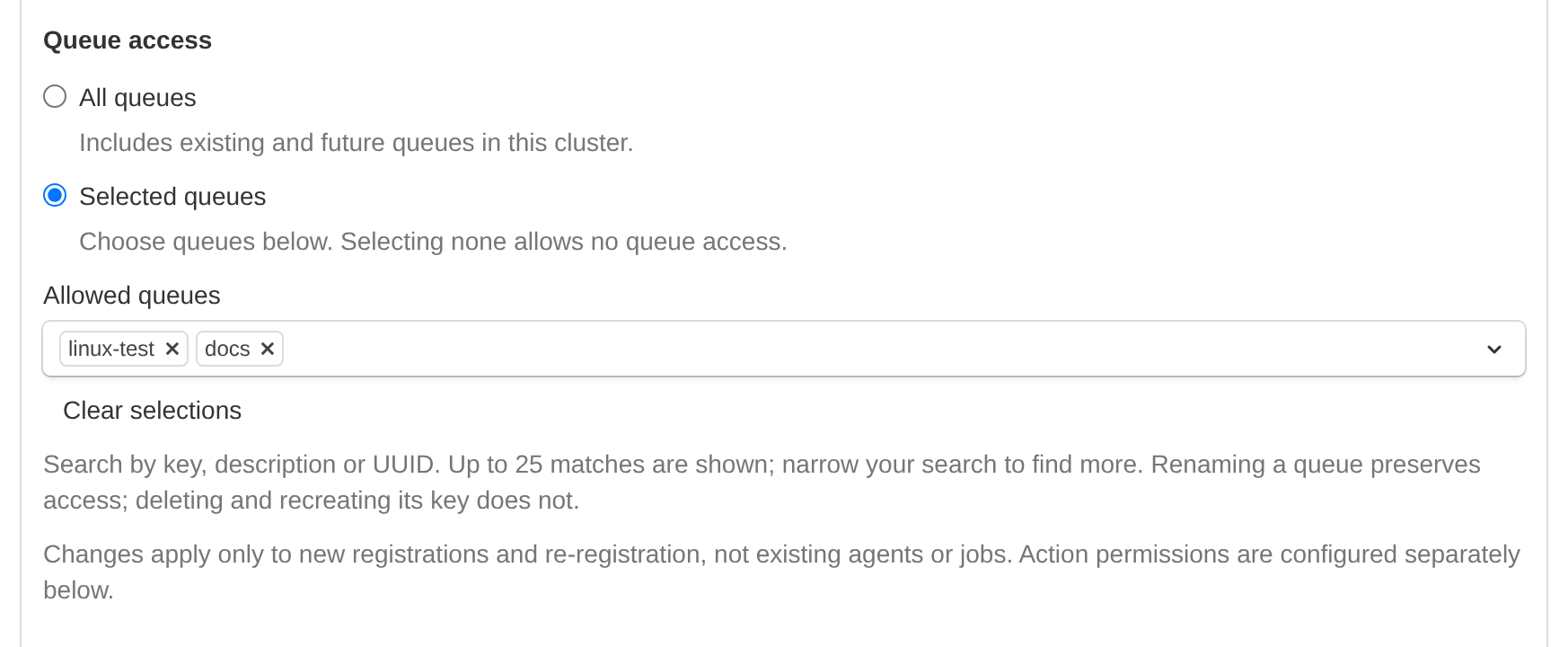
This token permits new registrations to linux-test and docs. Action permissions are configured separately.
Supply execution tokens to your agents using your existing token configuration, such as BUILDKITE_AGENT_TOKEN. Supply metrics-only tokens to your metrics client instead.
Separate pipeline uploaders from other jobs
Use a dedicated token and queue for trusted jobs that run buildkite-agent pipeline upload. Grant that token run_jobs, upload_steps, and the other permissions those jobs need.
Give lint, test, or documentation agents a separate token without upload_steps or write_steps. Those jobs cannot upload new steps or update existing steps through the Agent API. Bind each token to its intended queues, and keep the trusted token and its infrastructure inaccessible to restricted jobs.
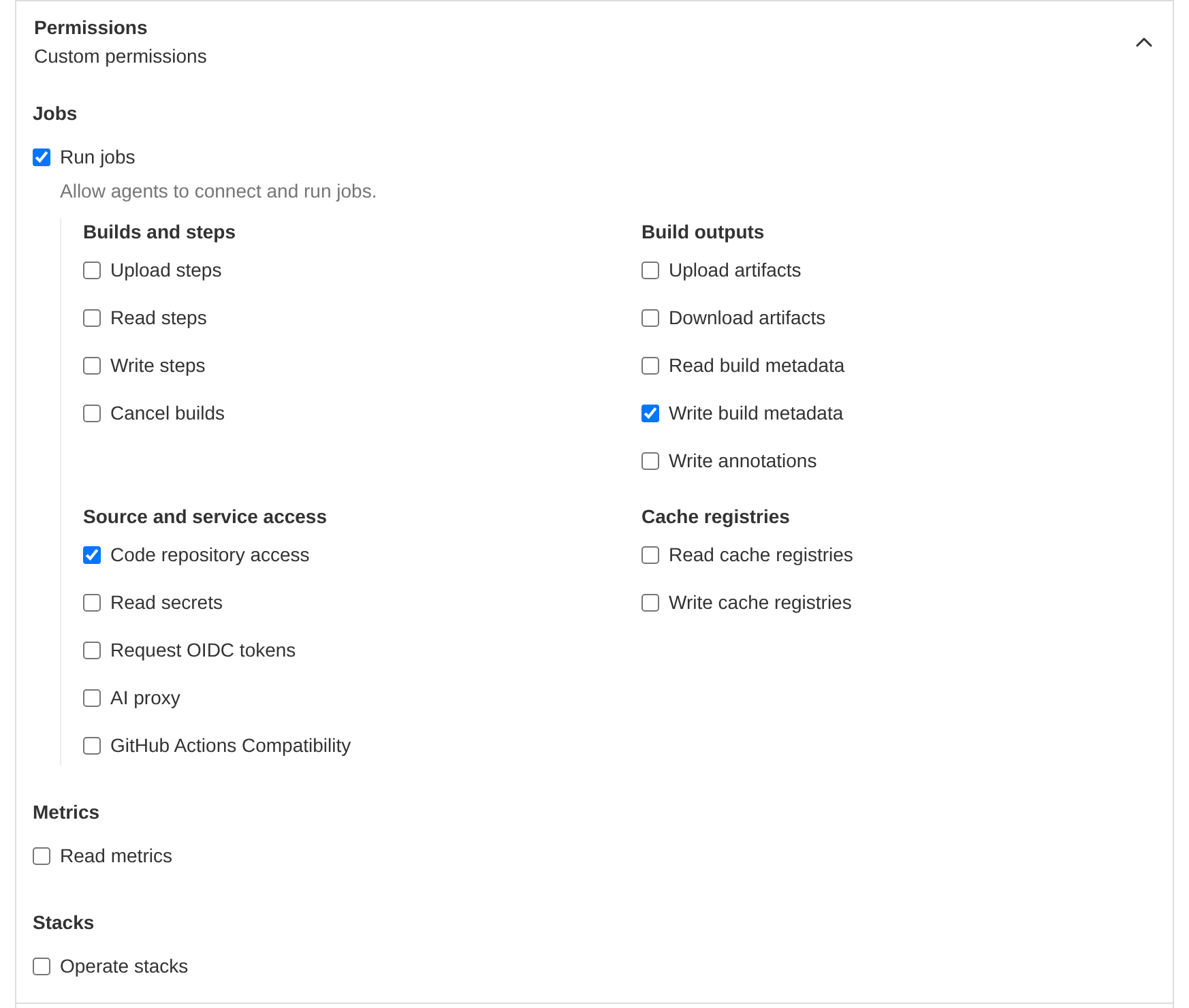
Run jobs remains selected; Upload steps and Write steps are cleared. This example also allows repository access and checkout metadata. Add the artifact, secret, cache, or other permissions your workload needs.
These controls restrict API actions. They do not sandbox job code or protect against a compromised job that legitimately has upload permission. Keep existing agent security controls in place.
Available permissions
Permissions are independent. Granting a write permission does not automatically grant its corresponding read permission. run_jobs allows agent registration and execution, but does not grant other job capabilities.
| Permission | Allows | ||
|---|---|---|---|
| Permission | run_jobs |
Allows | Register agents, run jobs, and report logs and job status. |
| Permission | upload_steps |
Allows | Upload dynamic pipeline steps and poll upload completion. |
| Permission | read_steps |
Allows | Read step configuration using step export. |
| Permission | write_steps |
Allows | Update or cancel steps. |
| Permission | cancel_builds |
Allows | Cancel builds. |
| Permission | upload_artifacts |
Allows | Upload and finalize artifacts. |
| Permission | download_artifacts |
Allows | Search for artifacts and obtain download URLs. |
| Permission | read_build_metadata |
Allows | Read build metadata keys and values, including existence checks. |
| Permission | write_build_metadata |
Allows | Set build metadata, including automatic checkout metadata. |
| Permission | write_annotations |
Allows | Create, update, or delete build annotations. |
| Permission | read_secrets |
Allows | Retrieve Buildkite Secrets, subject to existing secret access policies. |
| Permission | request_oidc_tokens |
Allows | Request OpenID Connect (OIDC) tokens. |
| Permission | code_repository_access |
Allows | Request repository credentials supplied through the Agent API. |
| Permission | ai_proxy |
Allows | Use the Agent API's AI provider proxy. |
| Permission | github_actions_compatibility |
Allows | Use GitHub Actions runner setup, environment and variable resolution, and Actions cache-token issuance. |
| Permission | read_cache_registries |
Allows | Look up and restore cache entries. |
| Permission | write_cache_registries |
Allows | Upload, publish, or delete cache entries. |
| Permission | read_metrics |
Allows | Read agent and queue metrics without running jobs. |
| Permission | operate_stacks |
Allows | Operate stack controllers, manage their jobs, and issue job acquisition tokens. |
Keep write_build_metadata if your agents need to report checkout commit information. Removing it can affect commit resolution and commit statuses. Cache-save workflows that perform lookups need both cache permissions.
Configure using the APIs
Use the agent-token REST API or the GraphQL cluster cookbook to automate token configuration. Authenticate management requests with an API access token, not an agent token.
REST uses permissions, allow_all_queues, and allowed_queue_ids. GraphQL uses permissions, allowAllQueues, and allowedQueueIds. The REST queue identifiers are UUIDs; GraphQL requires encoded ClusterQueue IDs.
Omitting permissions on creation grants all current permissions. Omitting them on update preserves the existing scope. An explicit array replaces the scope, and [] grants no permission-controlled actions. Queue access is independent: an empty queue selection with all-queues access disabled denies new registrations and explicit job acquisition in every queue.
The Terraform provider does not currently expose agent-token permissions or queue access.
Kubernetes
Agents and jobs registered using a job acquisition token (JAT) inherit the permissions of the stack's configured agent token. The Agent Stack for Kubernetes uses job acquisition tokens by default. Its source token needs operate_stacks, run_jobs, and the permissions its jobs require.
The stack does not currently support independently scoped controller and job tokens. Use separate stack deployments with different tokens for workloads that need different permissions. Configure each deployment's token and queue using the stack installation settings.
Adopt and change restrictions
Start with a new token and a small set of agents. Test checkout, hooks, plugins, and job commands before migrating a larger fleet. Confirm both that permitted actions succeed and that the actions you withheld are denied.
After a permission change is saved, subsequent requests from connected agents and running jobs use the updated permissions. Re-registration is not required. Removing run_jobs can interrupt logs, job completion, and connectivity. Drain agents before making that change.
Queue-access edits apply to new registrations, including registrations using previously issued job acquisition tokens, and to new stack batch JAT issuance. Explicit job acquisition, such as --acquire-job, also checks the source token's current queue bindings. Removing queue access after registration can prevent an already-registered agent from acquiring its job, including an agent registered using a JAT. Queue edits do not disconnect existing agents or cancel running jobs.
Bindings follow queue identity: renaming a queue preserves access, but deleting and recreating the same queue key does not.
The following limits also apply:
- Queue access does not restrict every subsequent API operation to those queues. Permissions retain existing resource boundaries; they do not add per-job, per-build, or per-repository isolation.
- These controls apply to agent tokens belonging to clusters. Legacy unclustered tokens and queue tokens are not restricted by these permissions. These settings do not configure scopes for Buildkite-hosted agents.
- Restrictions do not revoke previously issued repository credentials or artifact download URLs, or control credentials supplied separately to a job.
Troubleshooting
A missing action permission returns 403 and names the required permission. Check the source agent token, including the stack token for JAT-backed jobs.
A queue-access denial during registration returns 401. Check that the token permits the actual job or agent queue, including the default queue when none is specified. For a JAT-backed registration, the target job determines the queue, not tags supplied by the agent.
A queue-access denial during explicit job acquisition returns 404 from /acquire without assigning the job or returning its payload. This can happen after successful registration if queue access changes. Check that the source token still permits the job's queue before retrying.