- Resources
- /
- Changelog
Revoke OAuth access for your organization
During a suspected security incident, organization administrators can now revoke existing OAuth access and refresh tokens without contacting Support. Under Settings → Security → General, select Revoke OAuth access to review and confirm the action.
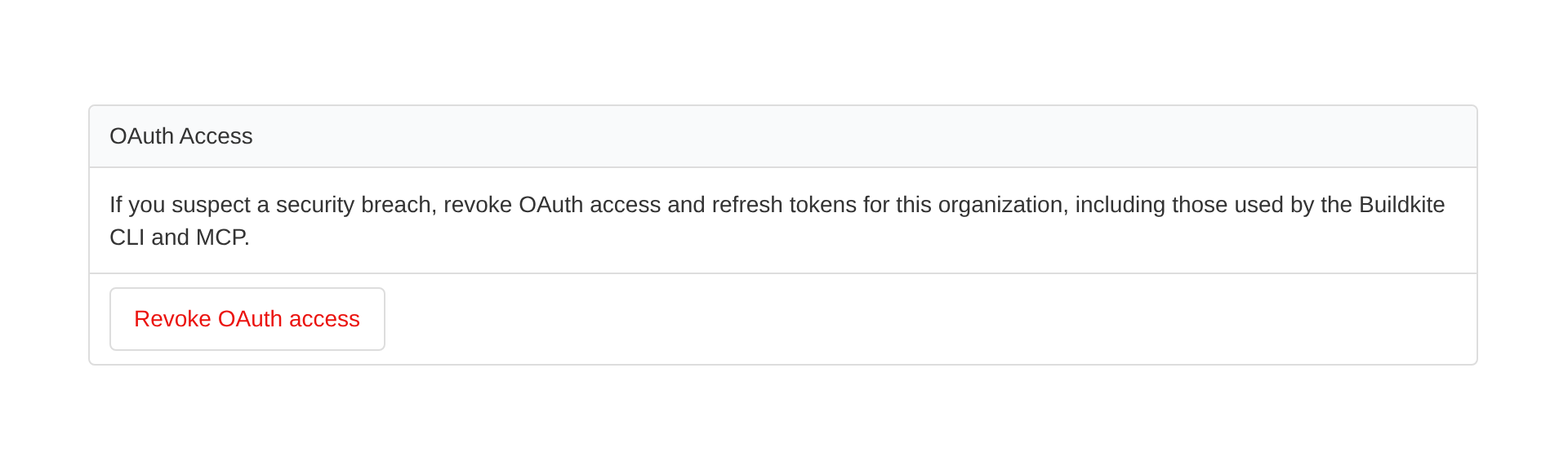
Revocation runs in the background and includes your own OAuth access, including connections used by the Buildkite CLI and remote MCP. Affected integrations stop working until users authorize them again.
Personal API access tokens, agent tokens, browser sessions, OAuth tokens issued without refresh tokens, and access to other organizations are unaffected. New authorizations after confirmation are also unaffected.
Learn how to revoke OAuth access for your organization.
Sorcha
More control and visibility for artifacts
Organization admins on plans with a maximum artifact retention period of 90 days or less can now choose a shorter retention period for Buildkite-hosted artifacts in Settings → Pipelines → Storage. Organizations with a fixed retention period set by Buildkite should contact support to request a change. Customer-owned buckets are unaffected.
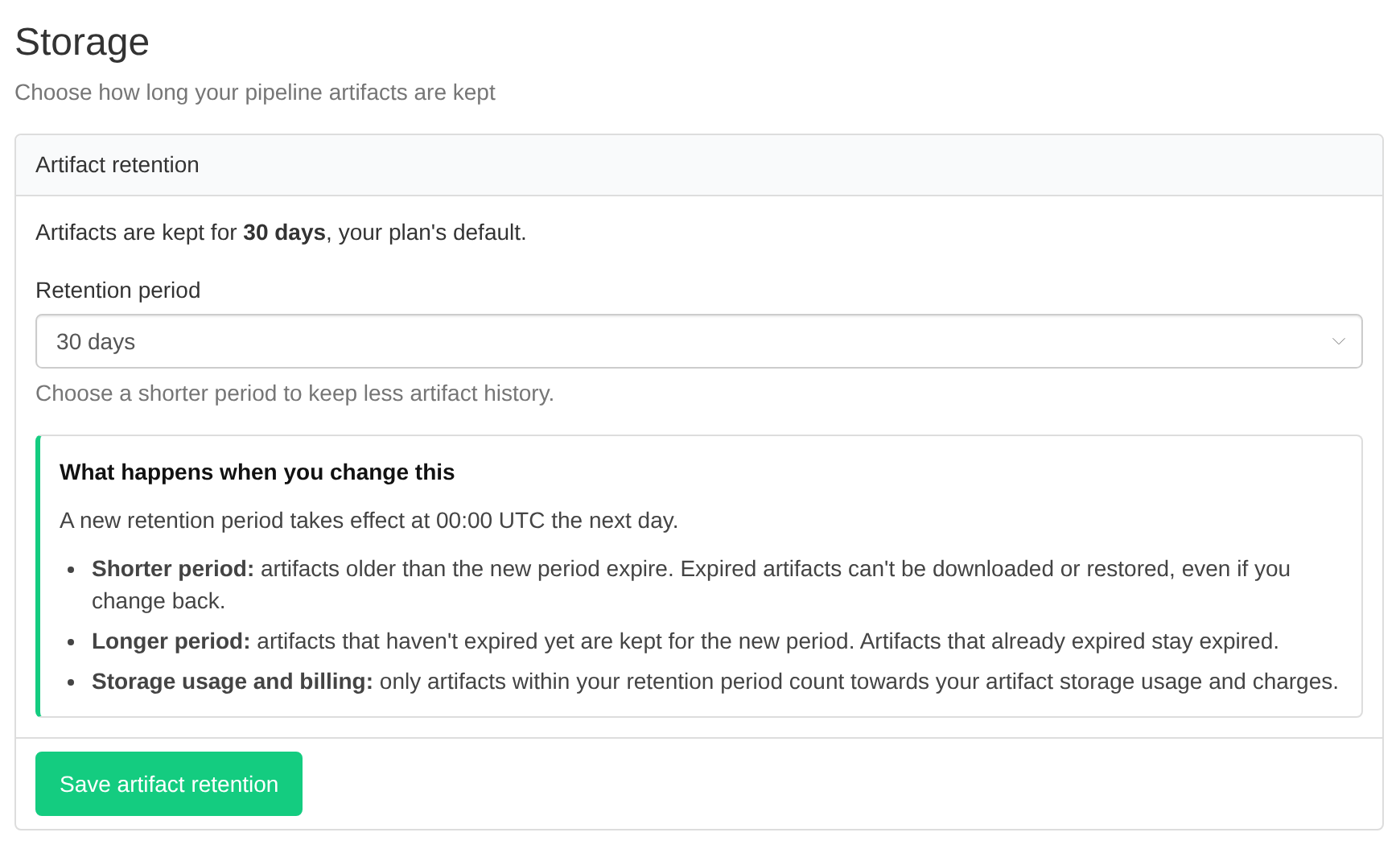
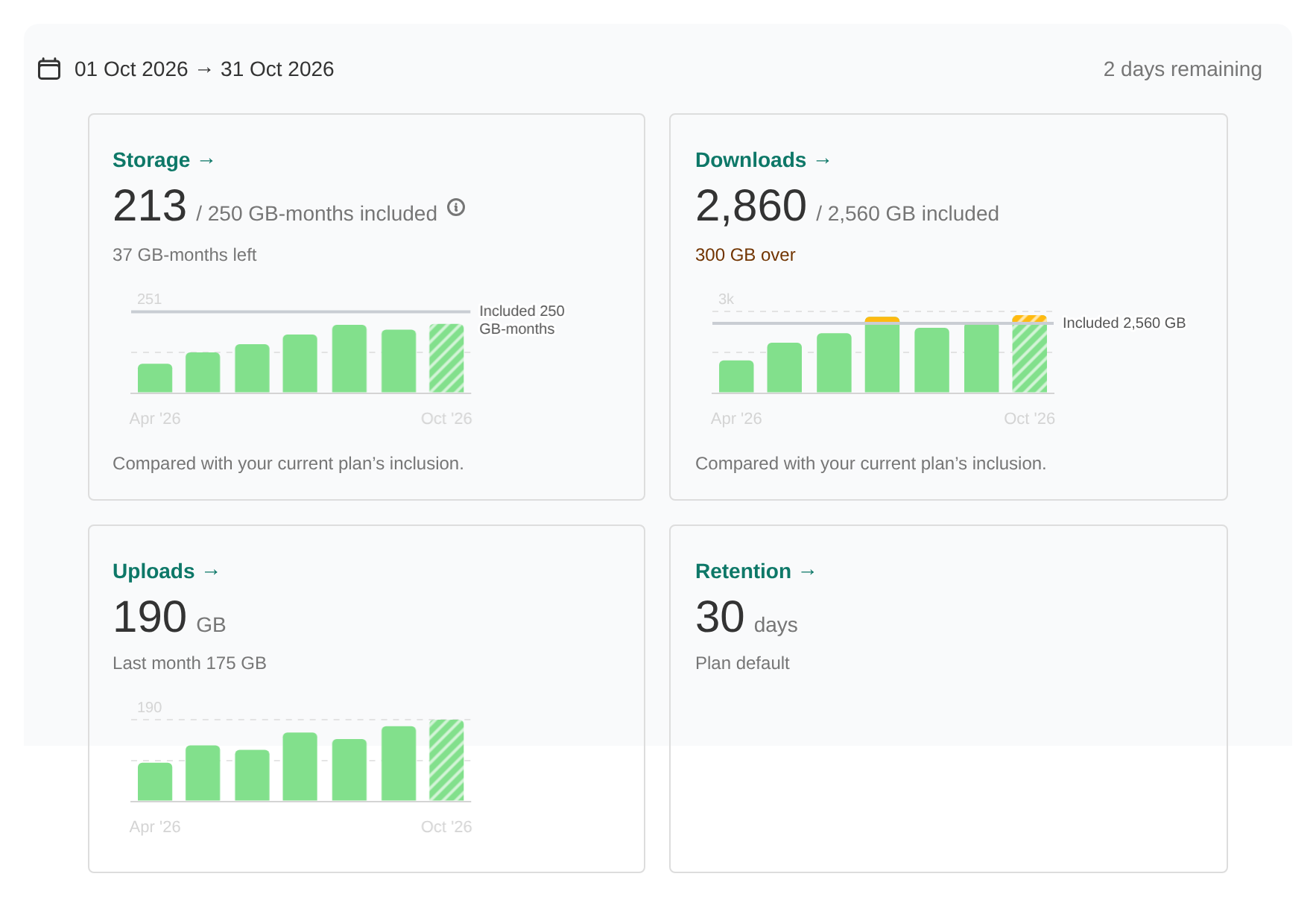
We’ve also updated Settings → Usage → Artifacts to make usage over time easier to understand. For plans with artifact storage or download inclusions, the page shows current-period usage against those inclusions, including how much is left or exceeded. For plans without inclusions, it shows usage totals and last-period comparisons without allowance meters. Historical charts and tables help both groups track usage over time; where inclusions apply, past usage is compared against your current plan’s inclusions.
The storage breakdown shows current storage, average storage over the selected period, and when your retention period changed.
Jason
Require SSO sign-in again for your organization
During a suspected security incident, organization administrators can now revoke their organization's SSO sessions without contacting Support. Under Settings → Security, select Require SSO sign-in again to review and confirm the action.
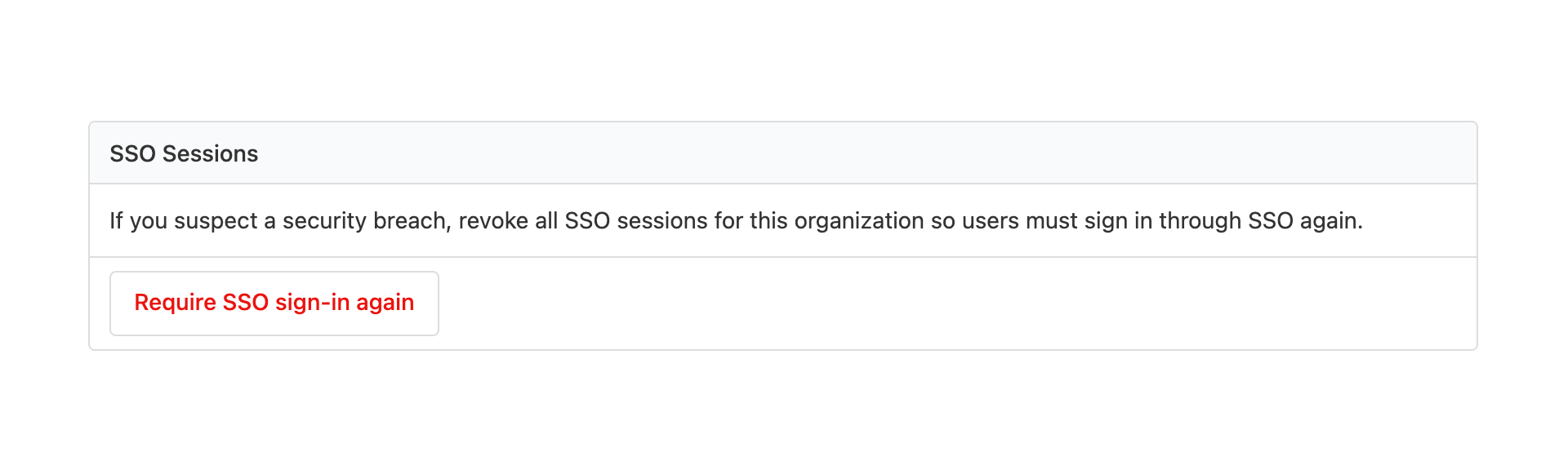
This revokes your organization's SSO sessions, including your own. Members who require SSO must sign in through your identity provider again before accessing the organization. Sessions for other organizations and SSO-exempt members are unaffected.
Existing API access tokens, agent tokens, and OAuth access and refresh tokens—including those used by the Buildkite CLI and remote MCP—are not revoked. Revoke compromised tokens separately.
Learn how to require SSO sign-in again for your organization.
Sorcha
Trace propagation across triggered builds
Agent spans across your multi-pipeline workflows can now share a single OpenTelemetry trace without contacting Support to enable propagation. Buildkite automatically passes trace context from a parent build to builds it triggers. This also works for internal trigger chains without externally supplied trace context.
HTTP traceparent header acceptance and Buildkite control-plane trace joining remain available on request.
To get started, configure an enabled OpenTelemetry notification service covering the relevant pipelines and enable tracing on your agents. Follow the trace propagation setup guide to connect agent spans across your triggered builds.
Sorcha
A changelog post about the changelog menu
We’ve added a changelog menu to Buildkite. This changelog post is to let you know about the changelog menu, and is available in the changelog menu for that purpose.
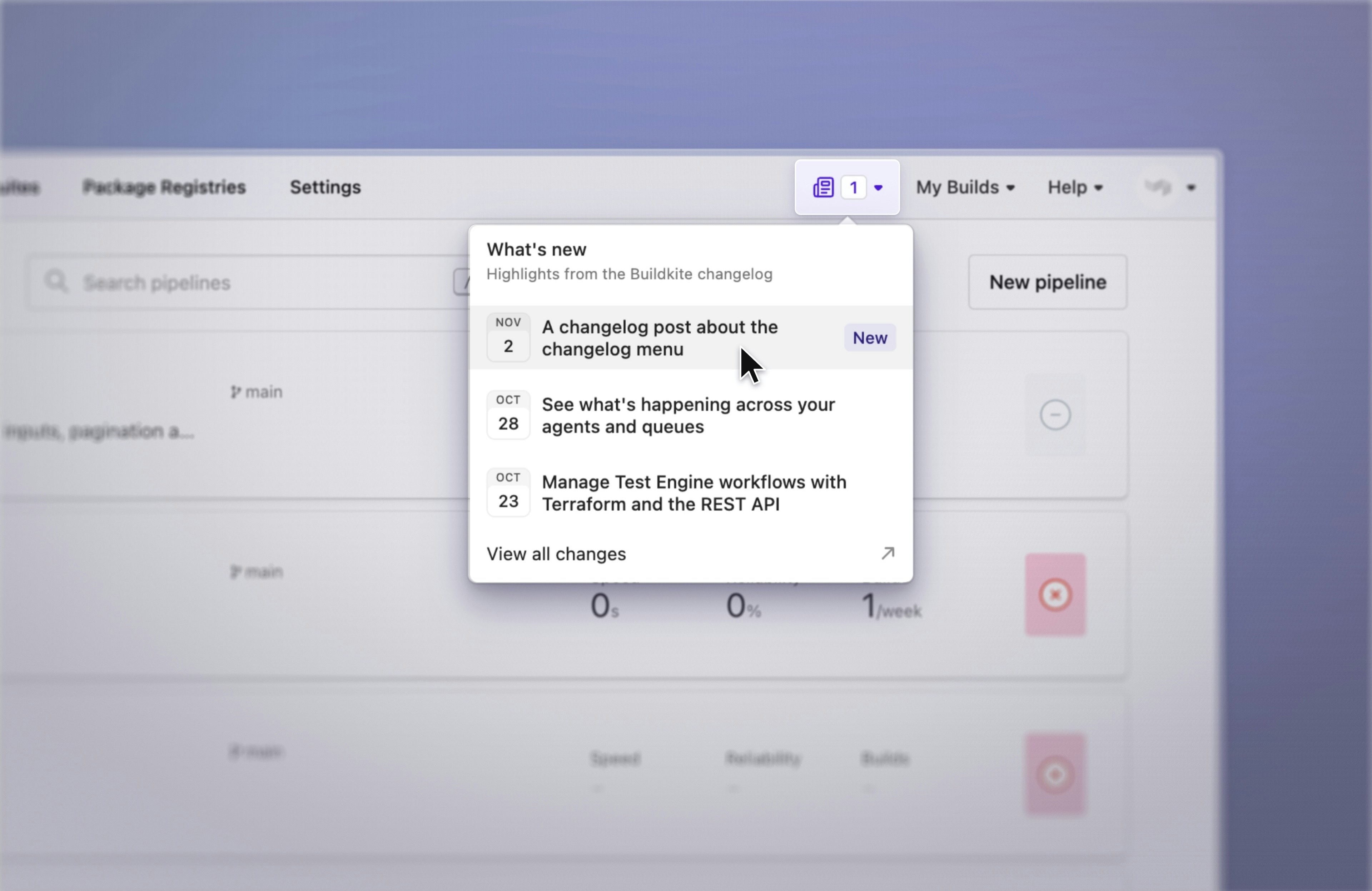
If you arrived at this changelog post through the changelog menu, you already know about the changelog menu. Please interpret this changelog post as confirmation that what you thought was the changelog menu was, in fact, the changelog menu.
If you arrived at this changelog post some other way, there is now a changelog menu. Open the changelog menu using the newspaper icon in the Buildkite header to see recent updates. A badge lets you know when there’s something new. One of those updates will be this changelog post. You don’t need to read it again, but you can if you want to.
To clarify: the changelog menu also contains changelog posts about things other than the changelog menu. We expect those to account for most of its contents.
The changelog menu is now available to everyone. Everyone should therefore be able to find this announcement explaining where to find this announcement.
Tom
Check out GitHub code without long-lived credentials on self-hosted agents
You can now check out private GitHub repositories on self-hosted agents without distributing and rotating SSH keys or personal access tokens across your fleet. Buildkite supplies temporary, read-only GitHub App tokens for checkout, so a new machine, container, or Kubernetes pod doesn't need its own repository credential.
The option is available to all customers and is off by default. In your self-hosted queue's Settings, enable Use GitHub App token for checkout and select Save Queue. You'll need Buildkite agent v3.63.1 or later and the full-access Buildkite GitHub App integration installed with access to your repositories. The Limited Access integration doesn't provide code access.
Each token grants read-only contents access to one requested repository and expires one hour after GitHub issues it. The agent retrieves credentials automatically: there's no GitHub App private key or token-generation hook to install on your agents. This supplies checkout credentials, not a token for pushing commits or general-purpose GitHub API access.
GitHub.com pipelines can keep their existing SSH repository URLs; checkout uses HTTPS automatically. GitHub Enterprise Server is supported too, with code read access enabled on its GitHub App and an HTTPS repository URL in the pipeline.
You can also manage the queue setting through the REST API, GraphQL, or Terraform (Buildkite provider v1.43.0 or later). On existing agents, record your Git configuration before enabling it: the credential helper and GitHub.com URL rewrite persist after jobs finish.
Try it on one self-hosted queue, run a build, and check that checkout succeeds over HTTPS. The self-hosted code access guide covers setup, token scope, and switching from existing credentials.
Al
See what's happening across your agents and queues
Queue pages now give platform and CI teams a clearer view of how agents and jobs are moving through each queue. When work backs up or your agent fleet behaves unexpectedly, you can see where capacity is going and what is holding jobs back.
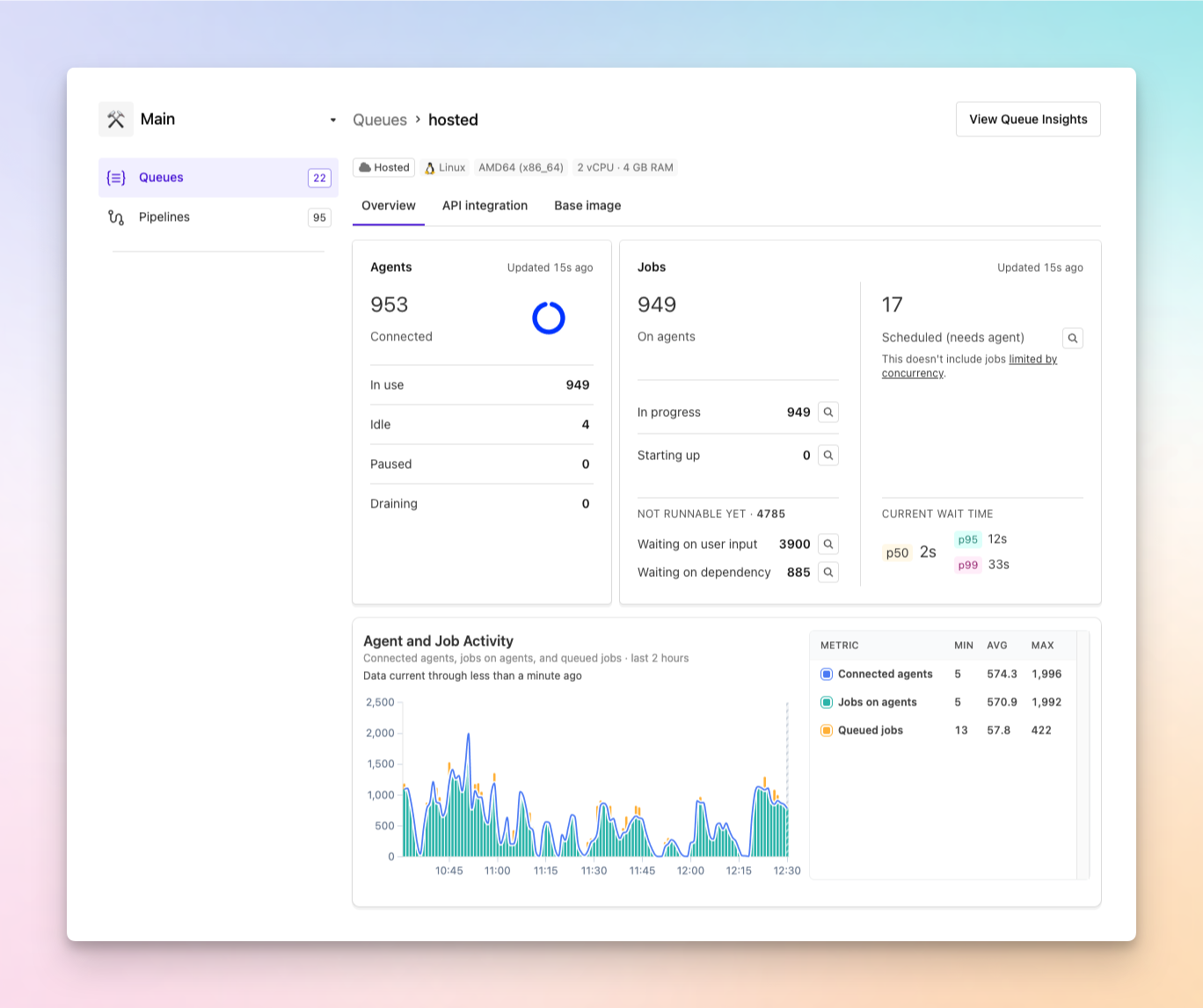
- Understand agent capacity: See how many agents are in use, idle, paused, or draining.
- See where jobs are: Distinguish jobs that are In progress, Starting up, Scheduled (needs agent), Waiting on user input, or Waiting on dependency.
- Spot unexpected changes: Compare connected agents, jobs on agents, and queued jobs over time in the Agent and Job Activity chart.
- Inspect the work behind the numbers: Inspect a sample of up to 25 jobs per state, even when the queue contains thousands of jobs.
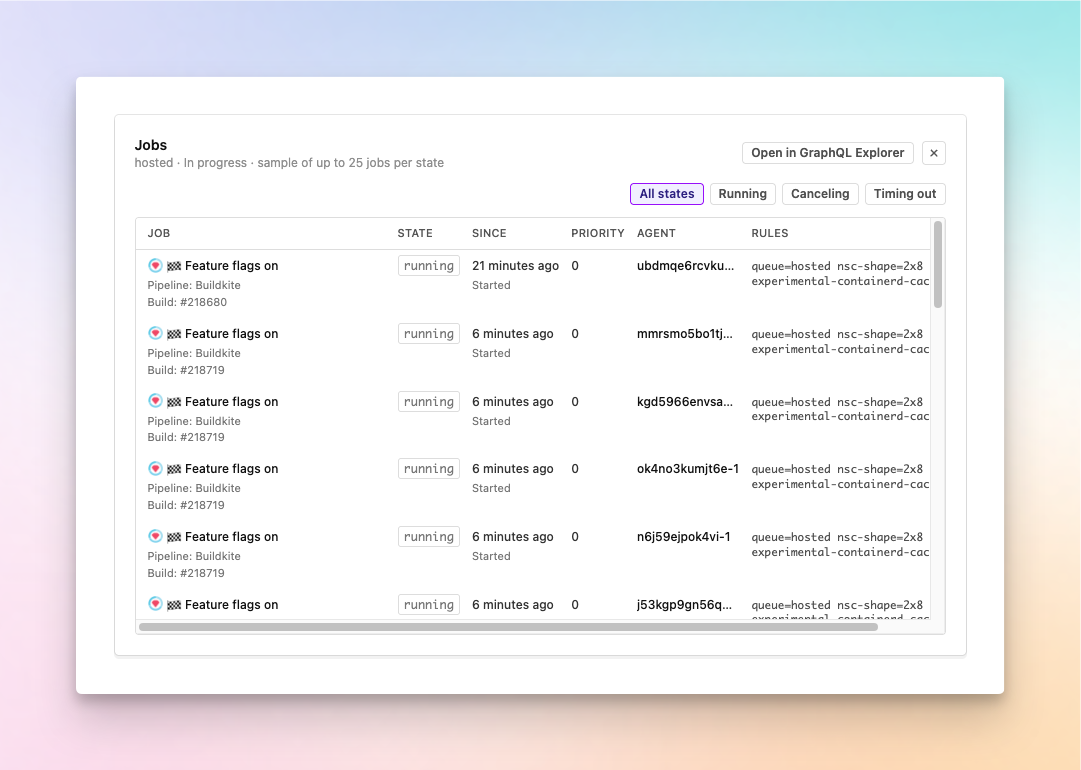
Need to investigate beyond the sample? Select Open in GraphQL Explorer to continue querying the jobs in that queue.
Behind the scenes, the activity chart now uses a more reliable source for agent and job counts. This reduces drift and makes the trends more dependable when you're investigating a queue.
Open any cluster queue to use the new breakdowns and activity chart, and see the queue metrics documentation for definitions of each metric.
Chris
Manage Test Engine workflows with Terraform and the REST API
You can now manage Test Engine workflows with Terraform and the REST API instead of configuring each one in the UI.
The new buildkite_test_suite_workflow resource in Buildkite Terraform provider v1.43.0 lets you define monitors, filters, and actions in code, and import existing workflows. For example, add a flaky label when a test becomes flaky and remove it when it recovers.
The REST API lets you list, create, update, and delete workflows. API access tokens need read_suites to read workflows and write_suites to make changes. Available monitors and actions depend on your plan.
Get started with the Terraform workflow resource or the Workflows REST API.
Meghan
Buildkite Cache is generally available
Buildkite Cache is now generally available on hosted and self-hosted agents. It gives every job a way to reuse work an earlier job already did, from a dependency download to an entire build command. It's built into the Buildkite agent as buildkite-agent cache commands you can call anywhere in a pipeline.
Save and restore anything
Define a cache in .buildkite/cache.yml, or any file you pass with --cache-config-file, with a key built from the inputs that matter, such as a lockfile checksum, the OS or the architecture. Run buildkite-agent cache restore before the work and buildkite-agent cache save after it.
steps:
  - label: "Install"
    command:
      - buildkite-agent cache restore --name npm
      - npm ci
      - buildkite-agent cache save --name npm
If there's no entry for the exact key, such as after a lockfile change, restore can fall back to a recent one. Mark a key part with fallback_limit, and restore takes the newest entry that matches every part up to it. A dependency bump then starts warm, and your package manager only fetches what changed. A cache miss doesn't fail the job. By default, save and restore skip per-cache errors unless you set --cache-fail-on-error. Configuration-loading errors and failures while cleaning or extracting into target paths still stop the job, because a failed restore may leave those paths partially modified.
Decide who can write to the cache
Every cluster has cache registries, and each registry has a policy. By default, every job in the cluster shares entries by key. Cache policies let your platform team control, in one place, which builds can restore what others have saved, so untrusted code, like a pull request from a fork, can't put anything into the cache your main and release builds rely on. Policies scope entries by pipeline, branch and build, and can add rules with CEL conditions, all from cluster settings without editing a single pipeline.
Skip work entirely with cache exec
buildkite-agent cache exec uses the same keys, stores and policies to cache the result of a whole command. Give the command a cache keyed on the files it reads, and list the files it writes:
caches:
  - name: frontend_build
    cache_key:
      - frontend_build
      - checksum: ["src/**", "index.html", "public/**", "package-lock.json", "vite.config.ts"]
    target_paths:
      - dist
Then wrap the command:
steps:
  - label: "Build"
    command: buildkite-agent cache exec --name frontend_build -- vite build
When src/, index.html, public/, the lockfile and the Vite config match an earlier successful run, vite build doesn't run at all. The agent restores dist/, replays the original log output, and the log group tells you how much time it saved. When they don't match, the command runs and its outputs and log are saved together for next time. Only an exact key match is replayed, and a failed run saves nothing.
Get started
Hosted agents have a cache store ready with no setup. Self-hosted agents use your own Amazon S3 or S3-compatible bucket. You need agent v4.0.3 or later, and v4.2.1 or later for cache exec.
Start with the dependency install your pipeline repeats most, then try cache exec on a build or check whose inputs rarely change. The Buildkite Cache guide walks through both.
Have questions or need help? Reach out to us at support@buildkite.com.
Sneha
Filter webhook job events by queue
Webhooks can now send job events for only the queues you choose. If your autoscaler, dashboard, or alerting only cares about one queue, it no longer has to receive every job event in your organization and throw most of them away. For example, a GPU autoscaler can now receive job.scheduled events only for jobs on your gpu queue.
When you add or edit a webhook in Notification Services, choose queues in the new Queues section, below Events. Each cluster has its own searchable dropdown. Once you select queues, the webhook sends job.scheduled, job.started, job.finished, job.activated, and job.promised_exit_status events only for jobs on those queues.
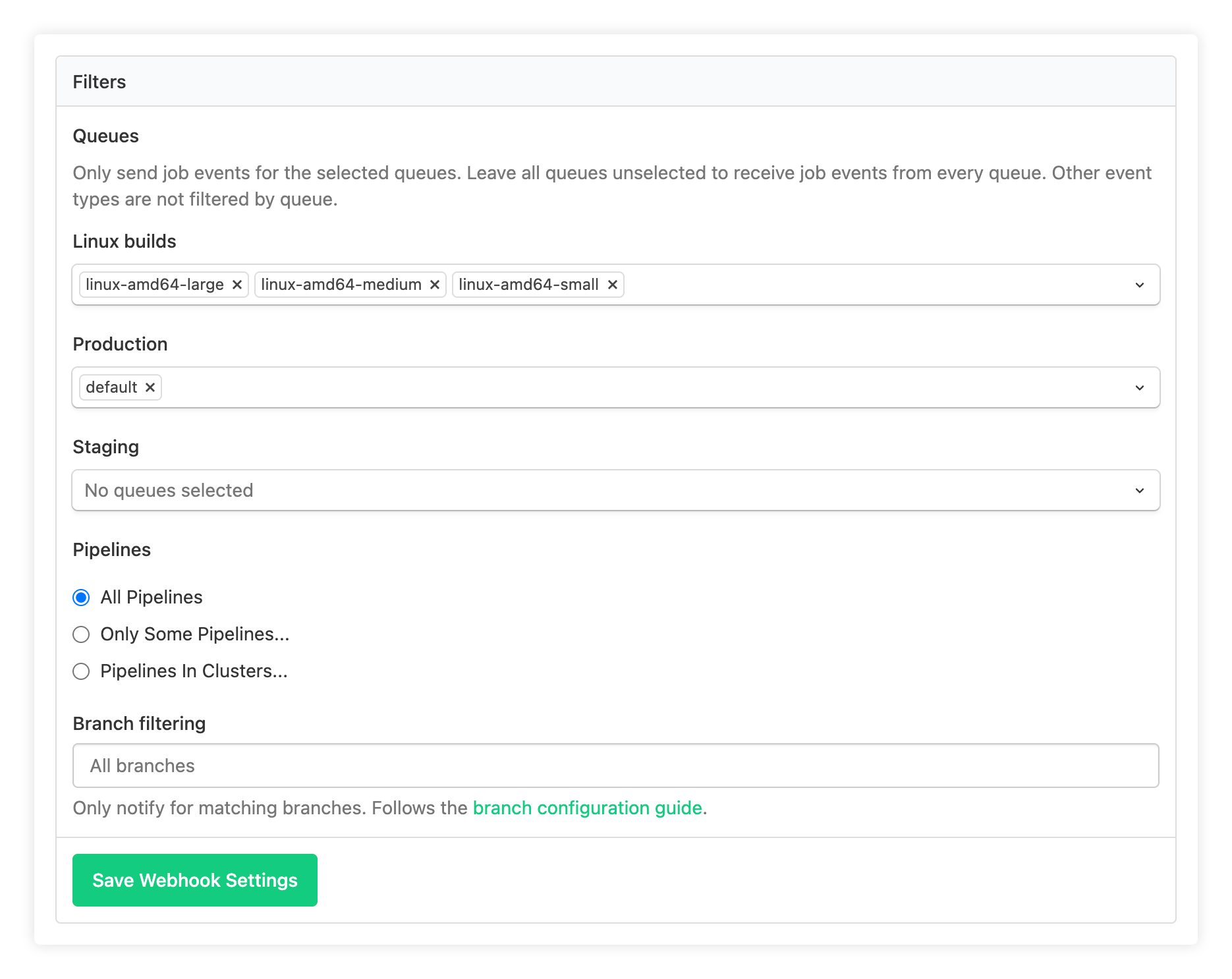
The queue filter applies on top of the webhook's existing Pipelines and Branch filtering settings. Build, agent, ping, and other events that aren't job events still arrive as before. If you leave every dropdown empty, the webhook sends job events for all queues, as it did before.
In the REST API, set the queue IDs in the webhook's cluster_queue_ids setting through the notification services API.
Narrow an existing webhook down to the queues its consumer actually uses, and see the webhooks documentation for the full list of job events.
Al
Configure OpenTelemetry at the cluster level
You can now turn on OpenTelemetry tracing for every agent in a cluster with one setting. Choose an OpenTelemetry notification service in the cluster's settings. Each agent that registers in the cluster then exports traces to that service's endpoint, using its headers, with no OTLP configuration on the agent.
Until now, each agent needed its own OTLP endpoint, headers, and tracing flag. On hosted agents, that meant building a custom image just to carry your collector's address and token. Now you set it once on the cluster, and hosted and self-hosted agents pick it up when they register.
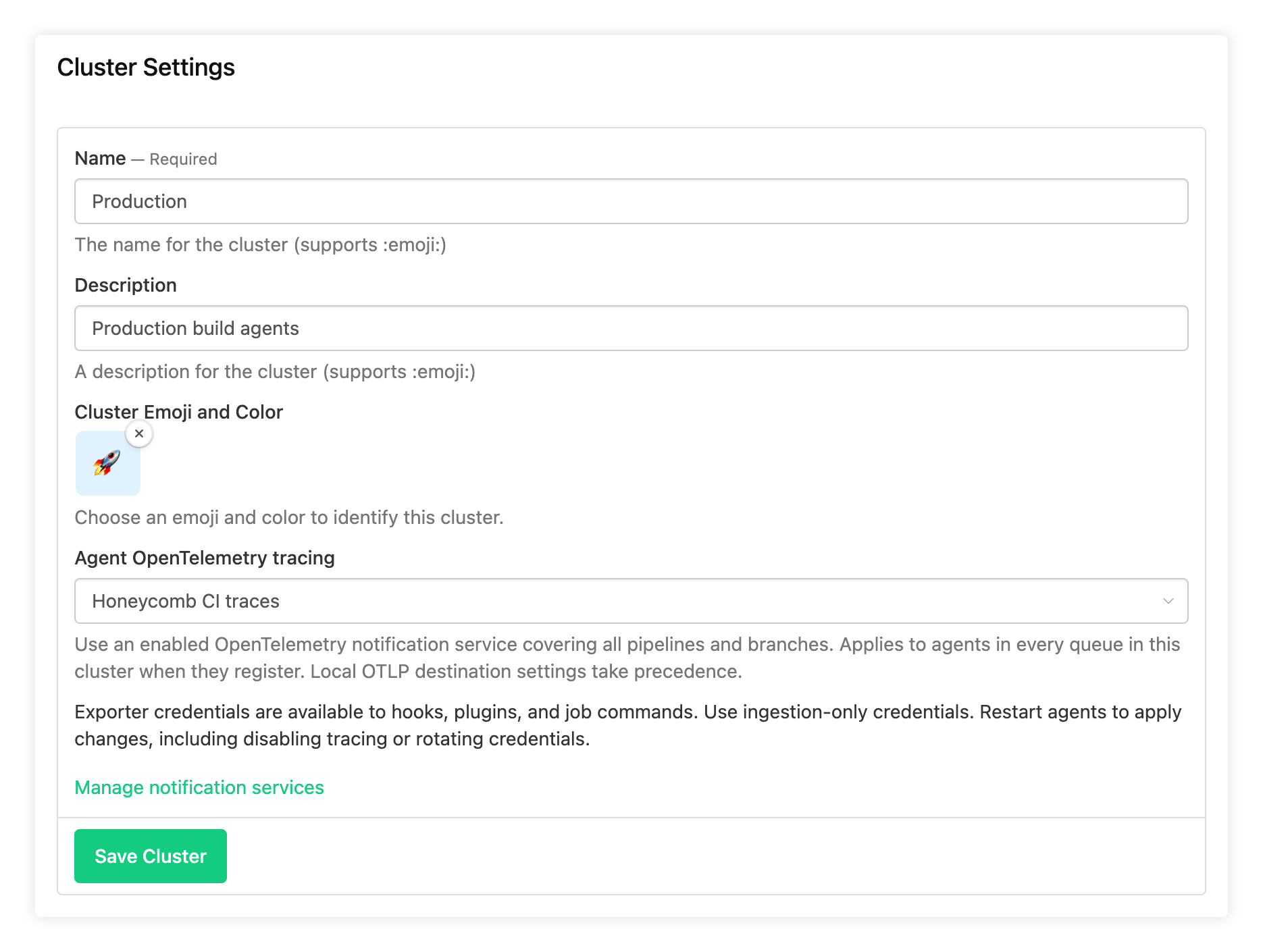
To set it up, open your cluster's Settings and choose a service under Agent OpenTelemetry tracing. You can choose any OpenTelemetry notification service that's enabled, covers all pipelines, and has no branch filter. Agents need version 3.136.1 or later. Running agents keep their current configuration until they restart or reconnect, and each agent logs the exporter it receives:
Control-plane tracing configuration applied: backend=opentelemetry, exporter=https://otel.example.comAgents that already set their own OTLP destination, such as with OTEL_EXPORTER_OTLP_ENDPOINT, keep sending traces there. So you can turn this on for a cluster without changing agents you've already configured.
Hooks, plugins, and job commands receive the exporter settings too, so OpenTelemetry tools in your jobs can send spans to the same collector. This also means any job on these agents can read the exporter's credentials, so use a token that can only send traces.
Changing the setting in the UI requires permission to manage both the cluster and notification services. You can also set it with agent_tracing_service_uuid in the REST API, agentTracingServiceUuid in the GraphQL API, or agent_tracing_service_uuid on the buildkite_cluster resource in the Buildkite Terraform provider (v1.40.0 or later).
Choose a tracing service for one cluster, restart one of its agents, and watch its traces arrive. For the details, see Automatically configure agent OpenTelemetry tracing for a cluster.
Al
Inspect matrix jobs directly on the build canvas
Matrix steps previously appeared as a single node on the build canvas, with individual jobs shown in a separate panel. Now you can expand them in place to see each job's status and duration, and navigate directly to the job.
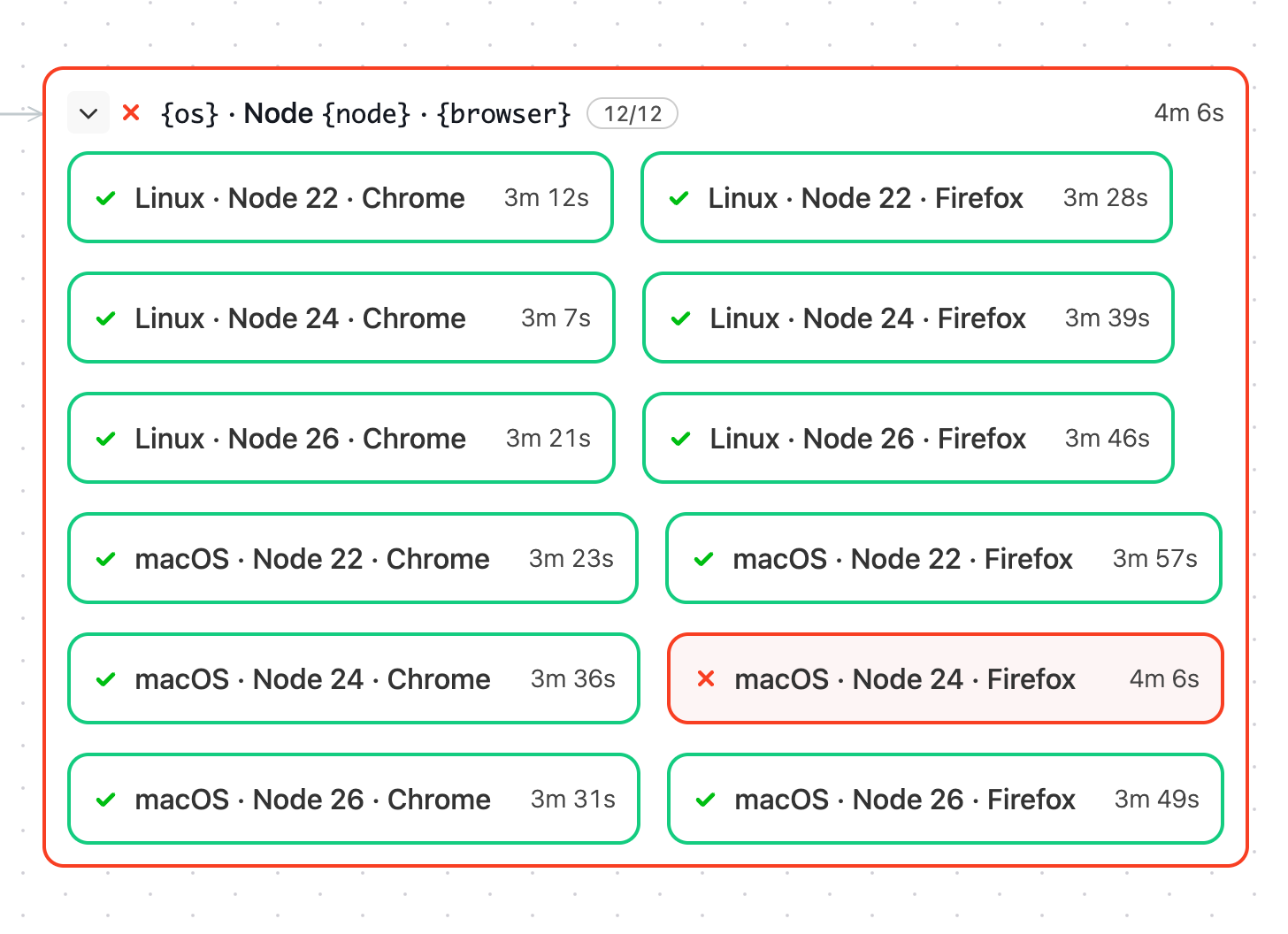
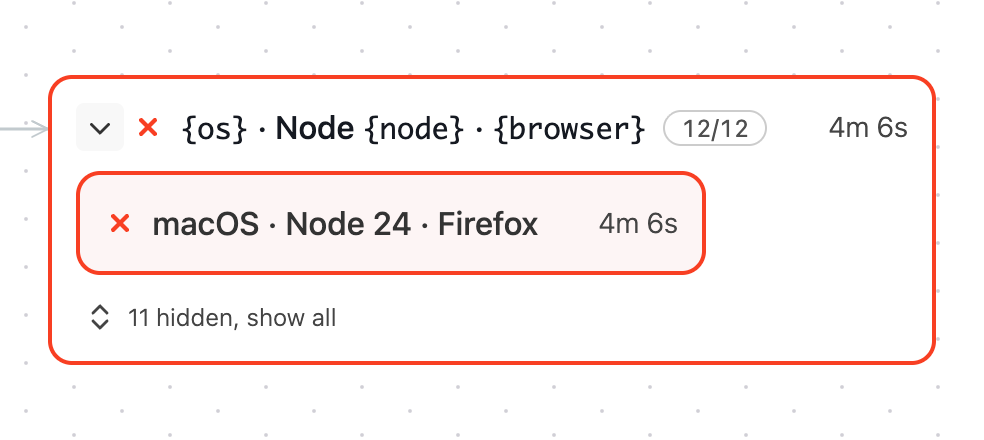
Similar to group steps, failed matrix steps now start expanded and focus on failed jobs. Click show all to reveal the remaining combinations.
Open a build that uses a matrix step and switch to Canvas to explore its jobs.
Chris
Spot slow and flaky tests faster from your test suite Summary
Your test suite's Summary page now brings together more of the data you need to keep your suite healthy and fast, so you can see where time is going and where reliability is slipping without digging through individual tests.
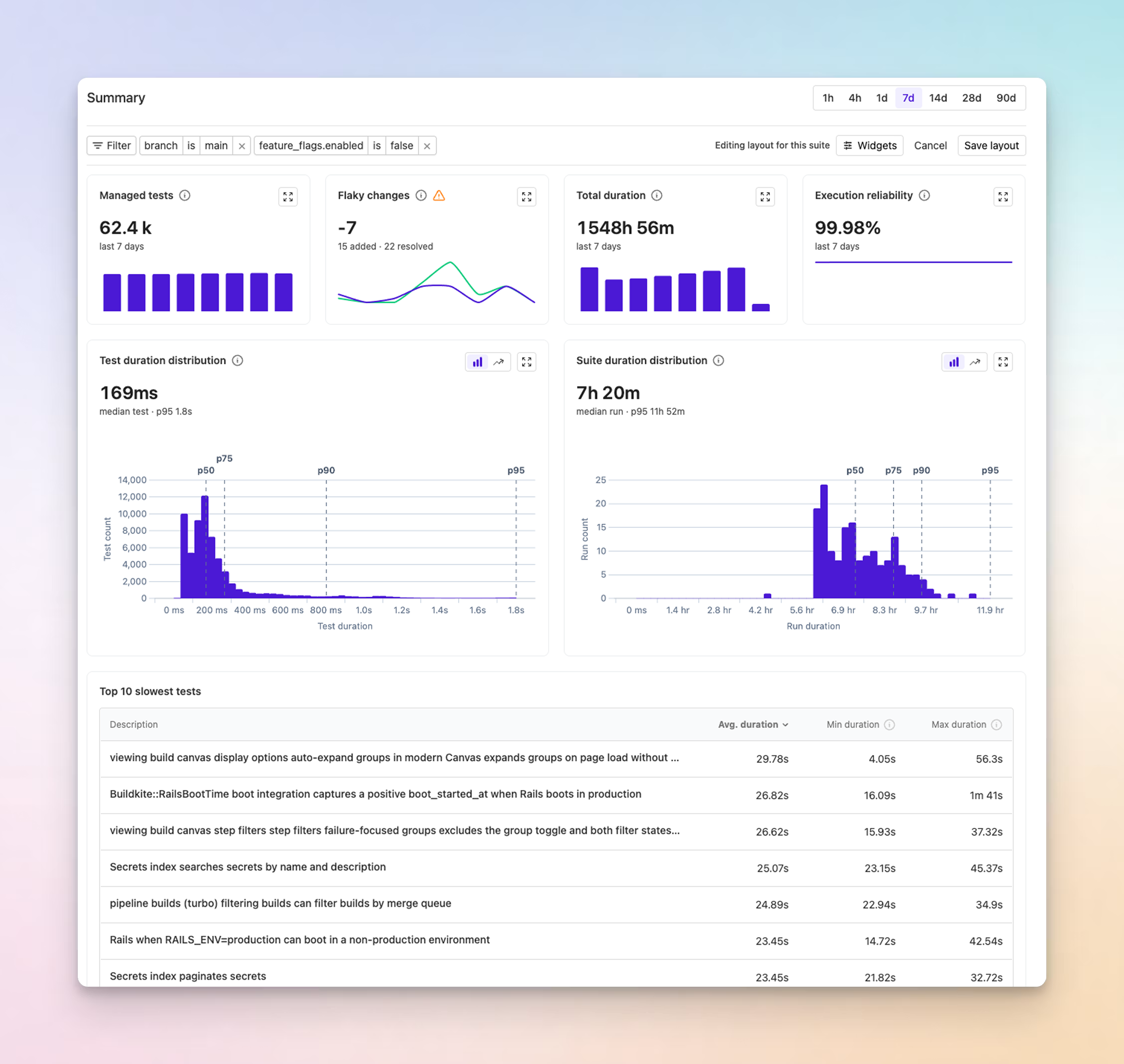
To find what's slowing your suite down, Slowest tests lists the 10 slowest tests in the selected period, and the suite and test duration distributions show how execution time is spread across runs and tests, with percentile markers. Values above p95 are omitted to keep the distributions readable.
To keep reliability on track, flaky test trends show how many tests were marked flaky or resolved and how many runs failed because of known flaky tests. Workflow activity shows how often each workflow raises alarms and how quickly they recover. Test statistics can now be grouped by any tag as well as by team, so you can see which parts of your codebase account for the most tests and execution time.
The new charts start hidden on existing suites. Anyone who can edit the suite can add them from Edit layout > Widgets and arrange the page around the data their team cares about most.
Learn more in the test suites documentation.
Andy
Know when the Buildkite CLI is done or needs you, without watching its tab
You can now see when bk preflight or bk build watch finishes or needs you, without switching back to its tab. From Buildkite CLI v3.64.0, bk tells your terminal what it's doing, so a terminal that supports it can show you while you work somewhere else.
bk reports its status using OSC 7501, a draft protocol that lets programs tell the terminal whether they're working, waiting on the user, done, or failed. Rex supports it today, showing a spinner on background tabs and marking sessions that have finished or need input.
bk build watchandbk preflightreport progress as jobs finish, then whether the command finished or failed.bk auth loginand confirmation prompts report that they're waiting on you, so a sign-in or "are you sure?" doesn't sit unnoticed behind another window.bk artifacts download,bk build download, andbk package pushreport when they've finished, or why they failed.
There's nothing to configure, and OSC 7501 is designed to be ignored by terminals that don't support it. By default, bk only sends status when stderr is a terminal, and not in CI or Buildkite jobs, so piped output, JSON output, and job logs don't change. To turn it off, set BUILDKITE_PROGRAM_STATUS=false.
OSC 7501 is still a draft, and we've adopted it early to learn whether it's useful in your workflow. Run bk update, leave a preflight running in a background tab, and tell us how it goes: which terminals and coding agents you'd like to see it in, which commands should report status next, and anything it breaks. We'll share feedback on the protocol with its authors.
Mark
Track your Pro plan spend and get alerted when it reaches a threshold
If your organization is on a monthly Pro plan, you can now see what your next invoice is shaping up to be before the billing period ends. Set a spend alert to get an email when the estimate reaches an amount you choose, so a busy month of builds doesn't become a surprise invoice.
The new Usage & spend tab in Settings > Billing shows your estimated spend and the days left in the billing period, followed by a line-by-line estimate of your next invoice. Each usage-based item shows how much of your plan's included amount you've used, plus any overage and what it costs.
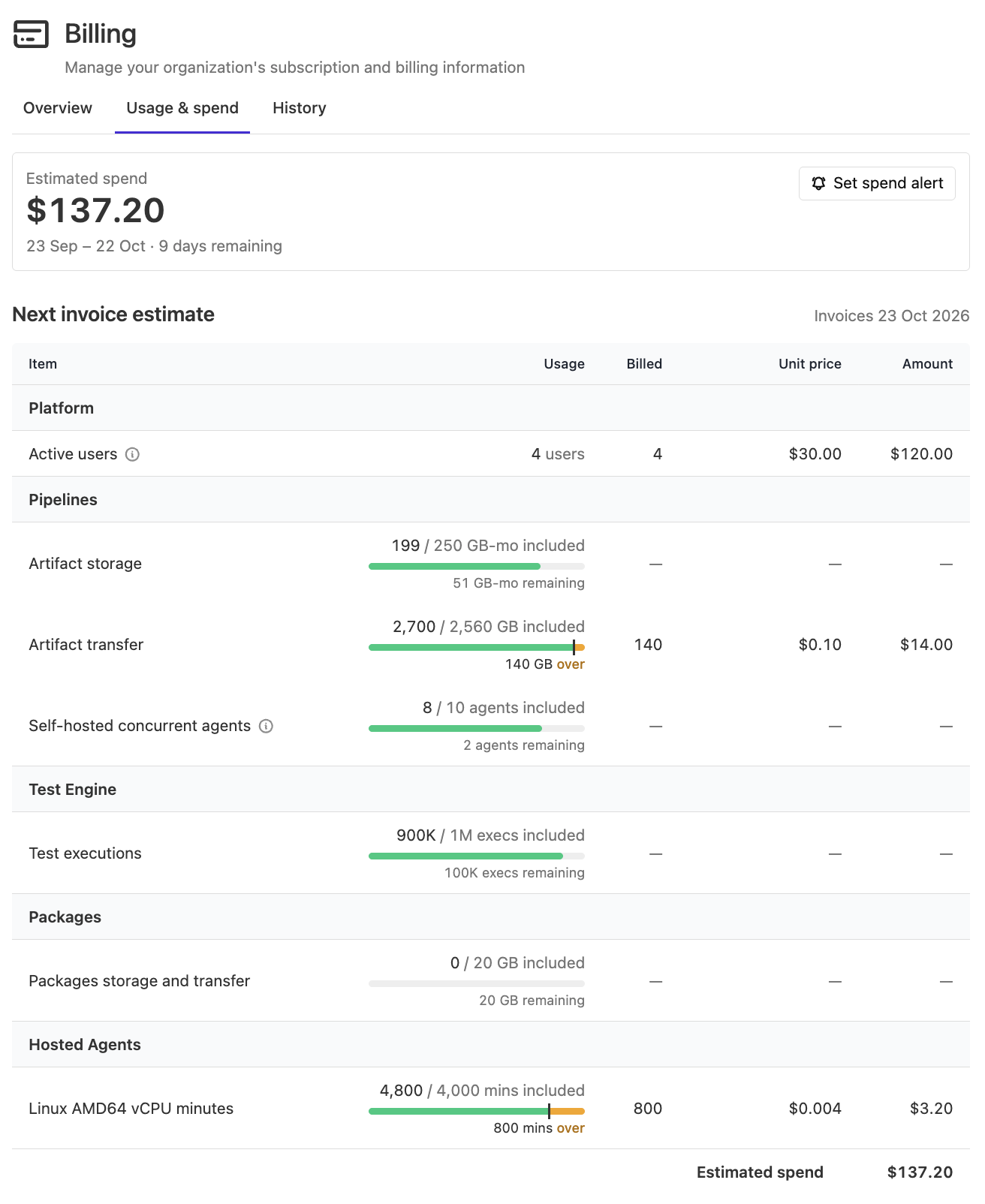
To set an alert, select Set spend alert on the Usage & spend tab or the Overview tab, then enter an Invoice threshold (USD).
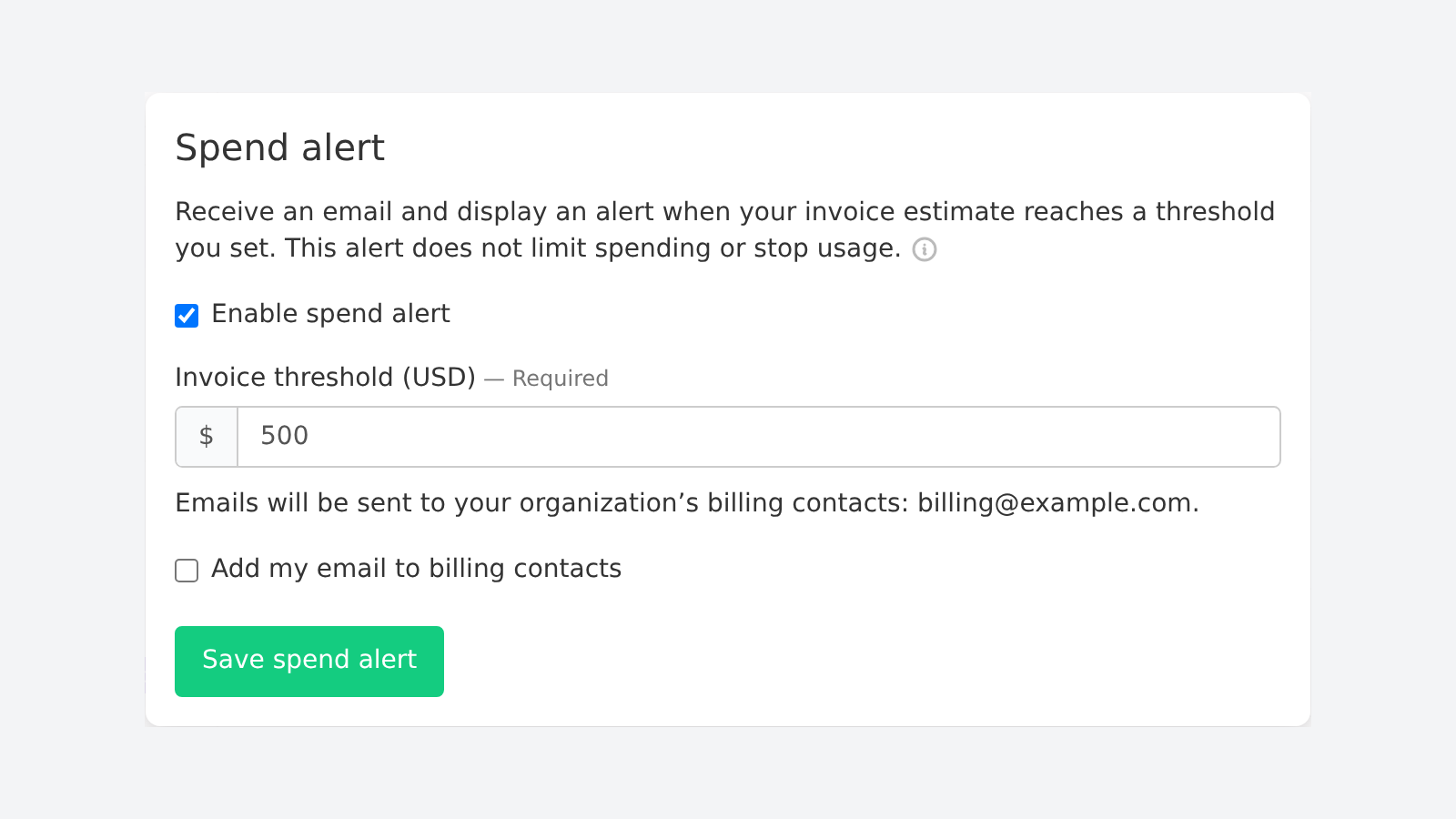
When the estimate reaches your threshold, Buildkite emails your organization's billing contacts and shows a banner to organization administrators. Alerts send at most one email per billing period. If no billing contact is set when the threshold is first reached, no email is sent for that period, so select Add my email to billing contacts if you want the email to come to you.
Spend alerts only notify you. They don't cap spending or stop builds. Estimates are based on usage reported so far, and reporting can be delayed.
Usage & spend and spend alerts are available to organization administrators on monthly Pro plans that renew automatically. Legacy Buildkite Pipelines plans aren't supported.
Check where this billing period's spend is heading on the Usage & spend tab, and learn more about alerts in the spend alerts documentation.
Amelia
Catch pipeline YAML errors before your first build with Buildkite MCP
Your AI agent can now check the pipeline YAML it writes before you commit or upload it. The Buildkite MCP Server includes validate_pipeline, a read-only tool that checks YAML syntax and structure against Buildkite's pipeline schema, without uploading the pipeline or starting a build.
Validation errors include paths and messages, giving your agent the information it needs to correct invalid step definitions and other schema errors. For example, ask your agent:
Validate
.buildkite/pipeline.ymlwithvalidate_pipelineand fix any YAML syntax or schema errors before I commit it.
This checks the YAML, not how the pipeline will run: it doesn't validate environment variable interpolation, plugin configuration, dependency references, or dynamically generated steps.
To try it, use Buildkite MCP Server v1.23.0 or later with the pipelines toolset enabled, and ask your agent to check your next pipeline change.
Ben
Keep your focus on failures within group steps on the build canvas
Failed groups on the build canvas now put more focus on child steps that need your attention. When a group is failing or has finished with failures, expanding it shows only its failed steps.
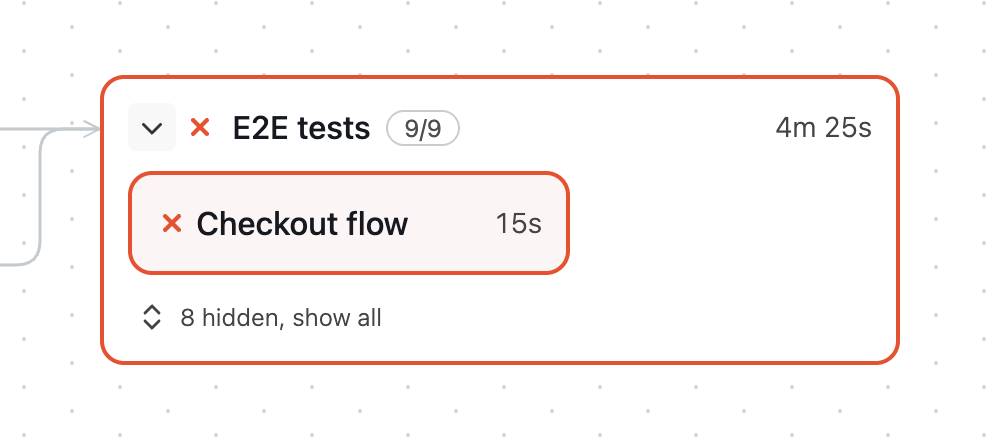
Click show all to reveal the hidden steps. Collapse and reopen the group to focus on failures again. State filters, such as Passed, still reveal matching steps.
Chris
Retry jobs with narrower API token permissions
Retry automation no longer needs the broader write_builds REST API scope. The new retry_builds scope allows a token to retry failed jobs in existing builds or individual eligible jobs, without granting access to the create-build or rebuild endpoints.
When creating or editing an API access token, select Build Retries (retry_builds). Your existing user and pipeline permissions still apply, and tokens with write_builds continue to work unchanged.
Retrying trigger jobs can create downstream builds. Full GraphQL access grants separate write permissions, so keep GraphQL access disabled or read-only if your automation should only perform retries.
To set up a token for your retry automation, see Managing API access tokens.
Ben
Buildkite MCP Server updates
Your agent can now do more of the work between a failed build and a green one. Here are the latest tool updates for the Buildkite MCP Server.
See what changed since the last green build
When a build fails, one of the first questions is what's different from the last one that passed. compare_builds answers it in a single call. It compares a build with the most recent earlier passing build on the same branch, or any build you choose, and reports which steps newly failed, recovered, or are still failing, along with changes in run time and retries. For up to three newly failing steps it includes the end of the job log, so your agent can start on the cause straight away.
Retry only the failures worth retrying
Ask your agent to retry the failed jobs in a build and it can now tell a lost agent from a broken test. retry_failed_jobs retries jobs that failed for infrastructure reasons, such as an expired job or an agent that was lost or stopped, and leaves real failures alone. It reports every job it retried or skipped, with the reason, so you know exactly what happened.
Want to check first? Ask for a dry run, and your agent will tell you what it would retry without touching the build.
Find your slowest tests
slowest_executions_for_build lists a build's slowest test executions across your Test Engine suites, and read_execution_trace shows where a single execution spent its time.
Connect a pipeline to GitHub
A pipeline without a GitHub webhook never starts a build when you push. create_pipeline_webhook adds the webhook to an existing pipeline, so your agent can fix it without recreating the pipeline. If the pipeline isn't connected through a compatible Buildkite GitHub App yet, the tool tells your agent how to finish the setup.
Manage Buildkite Cache registries
With Buildkite Cache in public preview, your agent can now set it up for you. The new cache_registries toolset lists, inspects, creates, and updates a cluster's cache registries, and can set the cluster's default. In read-only mode, only listing and inspecting are available.
Check your GitHub API quota
When builds that depend on GitHub slow down or fail, one cause can be the GitHub App behind your repository connection running out of API quota. Your agent can now check. list_repository_connections lists your organization's source control connections, and get_repository_connection shows a GitHub connection's quota: its limit, how much is used and remaining, and when it resets. This is GitHub's quota, separate from the Buildkite API rate limit. These tools require organization administrator access.
Try it
These tools are available in both the open-source MCP server and the Remote MCP Server. If you use the Remote MCP Server, sign in again from your MCP client to grant the permissions the new tools need.
Next time a build goes red, ask your agent to compare it with the last green one.
Found a gap or a bug? Open an issue on the buildkite-mcp-server repo and help us prioritise what to work on next.
Mark
Monitor billable active-user usage with the Buildkite API
You can now monitor your organization's billable active-user usage programmatically and compare it with your contracted allowance. Send the count to observability tools such as Datadog to track usage over time, or include it in internal license, billing, and compliance reporting.
The Average monthly active users figure shown on the Organization Usage page is available through both Buildkite APIs:
- REST:
GET /v2/organizations/{org}/usagereturns{ "active_users_count": <integer> }and requires theread_organizationsscope. - GraphQL: Query the
activeUsersCountfield onOrganization.
Both APIs require authorized membership of the organization and return the same value as the Usage page for its current summary period. For monthly subscriptions, that is the number of distinct users active in the current billing period. For annual subscriptions, it is the average of each calendar month's distinct active users across the current month and the previous six months.
The count includes billing-child organizations, with a user active in several of them counted once in each month.
To get started, see the organization usage REST API and the GraphQL organizations cookbook.
Buildkite
You deserve better CI.
Get started for free with a full month of our all-access trial.

