- Resources
- /
- Changelog
Inspect matrix jobs directly on the build canvas
Matrix steps previously appeared as a single node on the build canvas, with individual jobs shown in a separate panel. Now you can expand them in place to see each job's status and duration, and navigate directly to the job.
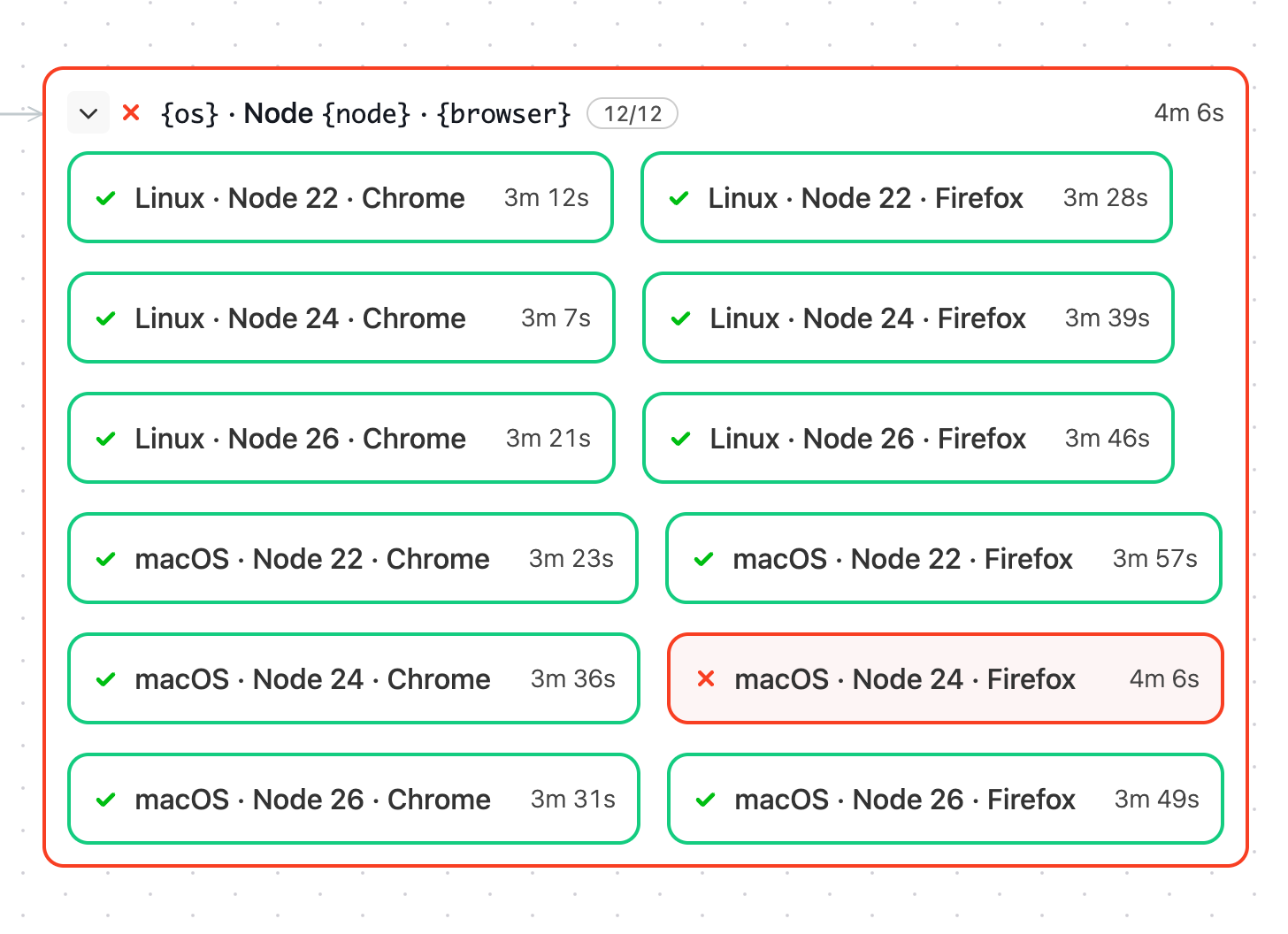
Similar to group steps, failed matrix steps now start expanded and focus on failed jobs. Click show all to reveal the remaining combinations.
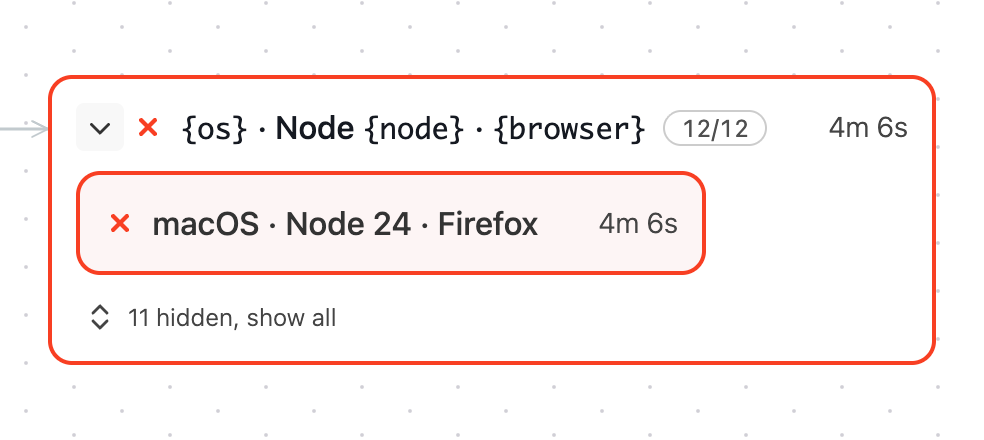
Open a build that uses a matrix step and switch to Canvas to explore its jobs.
Chris
Keep your focus on failures within group steps on the build canvas
Failed groups on the build canvas now put more focus on child steps that need your attention. When a group is failing or has finished with failures, expanding it shows only its failed steps.
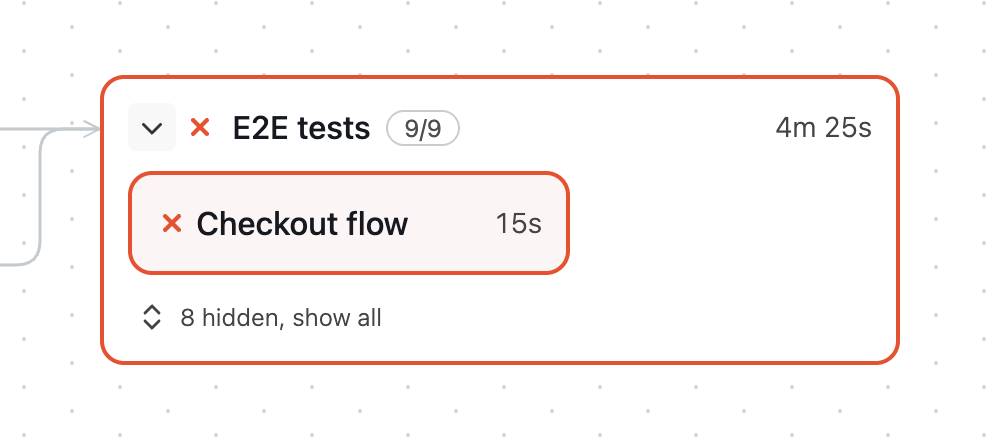
Click show all to reveal the hidden steps. Collapse and reopen the group to focus on failures again. State filters, such as Passed, still reveal matching steps.
Chris
Get notified about new macOS base image releases
You can now subscribe to RSS feeds for macOS base image releases on Buildkite hosted agents, making it easier to keep up with changes to your build environments.
For updates to stable base images used in production, add the stable RSS feed to your preferred RSS reader.
If your organisation wants access to the latest Xcode betas and runtimes, request a move to the canary channel. You can follow those releases with the canary RSS feed.
You can also explore the available macOS base images and see the Xcode versions, runtimes, and packages included in each image.
This is a first step towards giving you more control over release notifications. We’re also exploring configurable Slack notifications so you can choose the releases that matter most to your organisation.
Gabe
Choose the organization for each Remote MCP Server connection
If you belong to more than one Buildkite organization, you can now choose which one each Remote MCP Server connection uses. Add the organization's slug to the server URL:
https://mcp.buildkite.com/mcp?organization=your-organizationWhen your MCP client asks you to authorize, that organization is already selected.
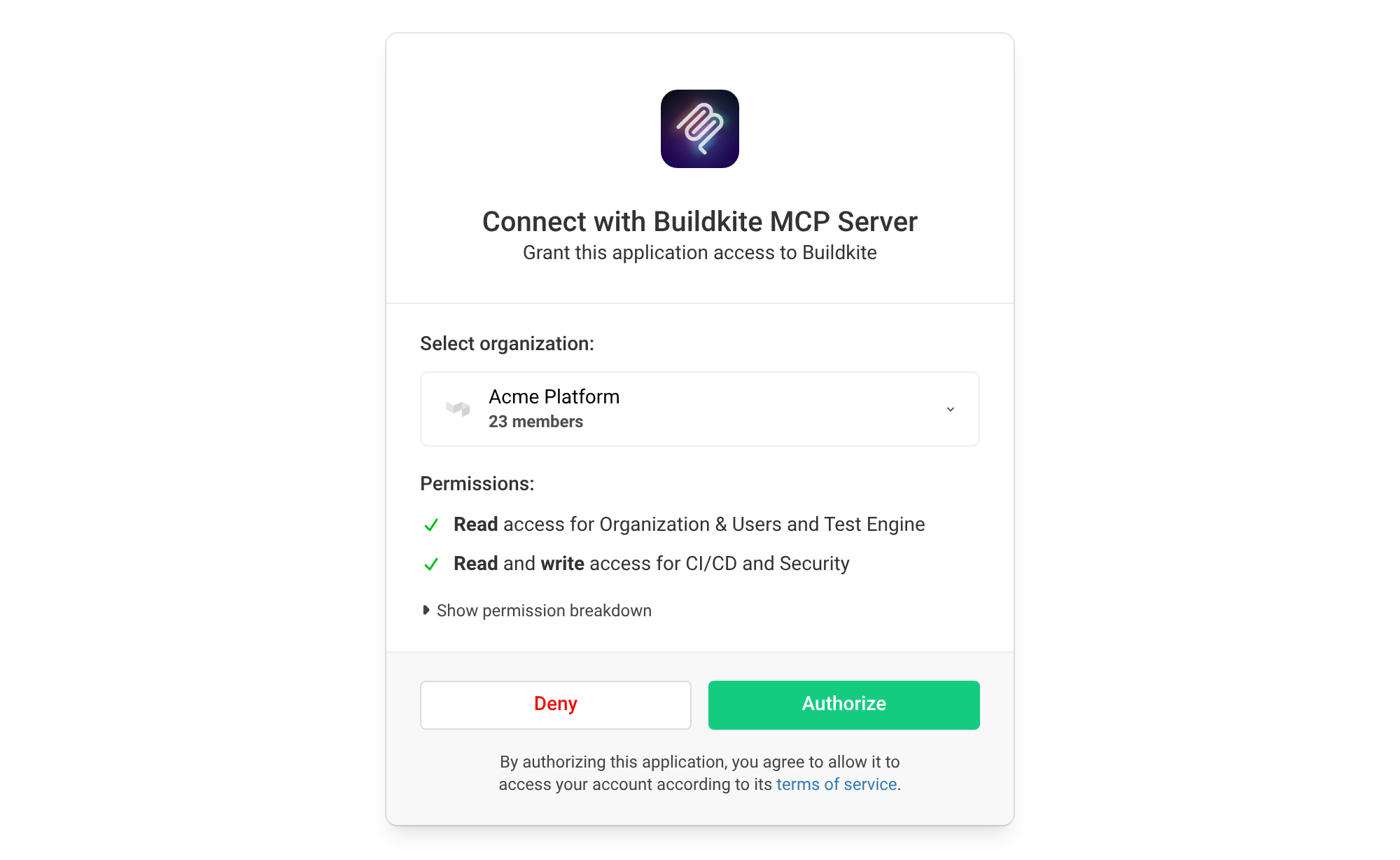
This also works with toolset and read-only URLs, such as https://mcp.buildkite.com/mcp/x/pipelines/readonly?organization=your-organization. It's optional: leave it off and you choose an organization when you authorize, just like before.
Working across several organizations? Add a connection for each one, and each connection sticks with the organization in its URL.
Add ?organization= to your MCP server URL and the right organization will be ready the next time you authorize. New to the Remote MCP Server? Get started here.
Samuel
See the important parts of job logs first
Job logs on the new build page are easier to scan now that Buildkite folds de-emphasized system groups into compact rows by default. Command output and the groups you usually need remain visible, while setup and other supporting output take up less space.
Select a folded row to reveal just that section in place. The job log toolbar also lets you Show system groups temporarily and hide them again, while Show all system groups in display options saves your preference for future job logs. The separate Expand groups and Collapse groups controls open or close the groups currently visible without revealing hidden system groups.
Buildkite automatically keeps relevant output in view:
- Groups explicitly opened in the log remain open
- Following a link to a specific line or range reveals its containing group
- Search includes folded groups and reveals matching output
Buildkite
Test your schedules with or without edits
Run a pipeline schedule as configured, or customize a one-off build without changing the schedule. Helpful when you need to validate your schedules before turning them on. Two actions on the schedule page make the choice clear:
- Run now asks for confirmation, then creates a build using the schedule's saved message, commit, branch, and environment variables. The build has source
schedule, just like an automatic scheduled run, and appears in the schedule's Recent Builds. Use it to test conditions and policies that depend on scheduled builds without waiting for the next run. - Run with edits opens the familiar, prefilled New Build form for an ad-hoc run. Try a different environment variable value for a one-off validation without updating the saved schedule. These builds keep source
ui, rather thanschedule.
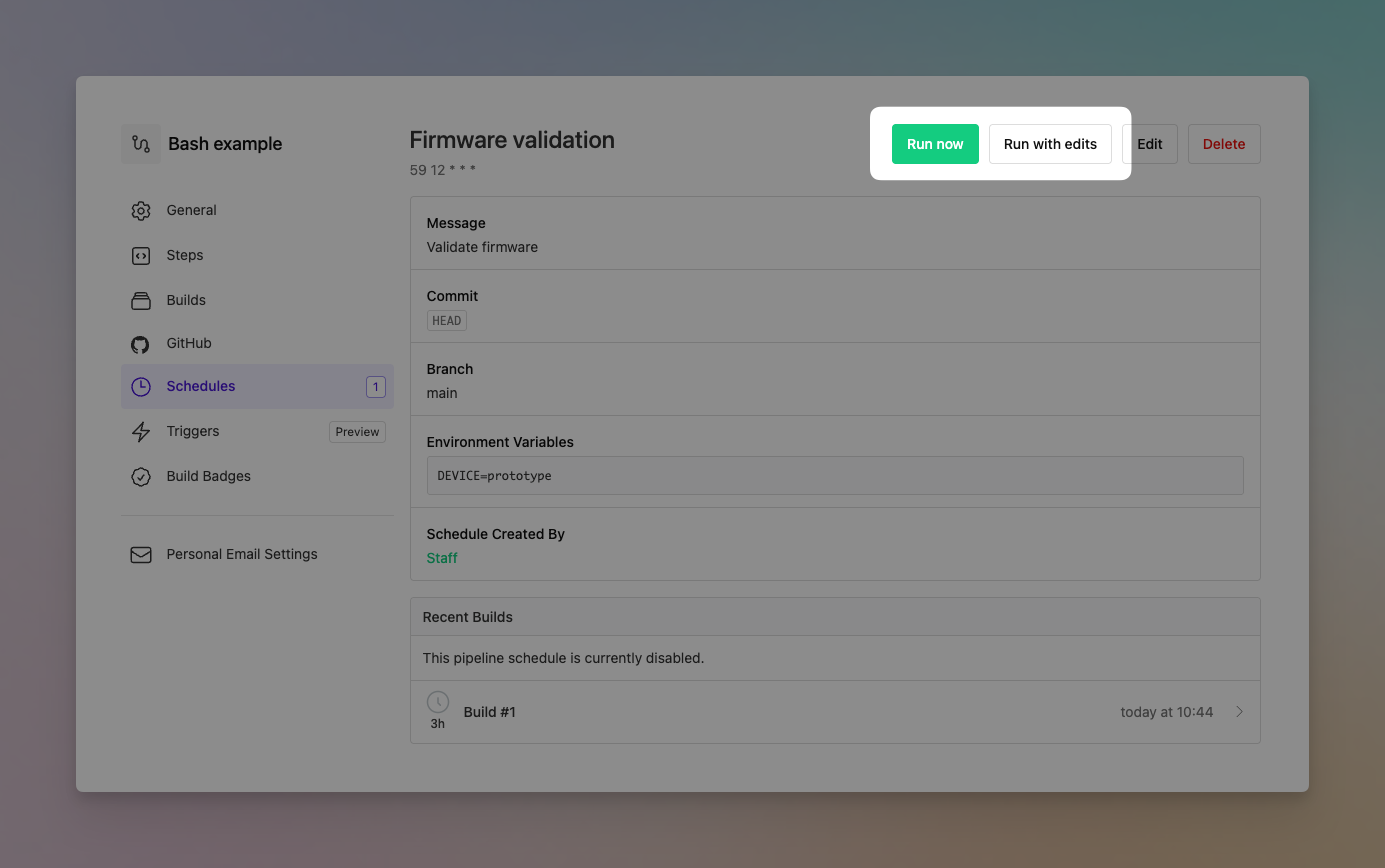
Neither action changes your saved configuration or the next scheduled run. You can also run a disabled schedule once without enabling it.
Chris
Job logs are limited to 1 GiB
Job logs are now limited to 1 GiB (1,024 MiB) by default. You can check your organization’s current log size limit on the Quotas page.
When a job log exceeds the limit, Buildkite cancels the job and adds a Log Size Limit Exceeded event to the timeline. Logs received prior to the limit being reached are retained.
If you need to produce output greater than 1GiB, consider a build artifact.
See the managing log output guide for more ways to trim output. Need a higher limit? We’d love to learn about your use case: support@buildkite.com.
Juanito
Don't be blocked by a block step
Block and input steps that need your attention now appear in their own Waiting for input group when grouped by state on the build page. This separates them from steps waiting on dependencies, which remain under Waiting, so it's easier to spot where a build needs action.
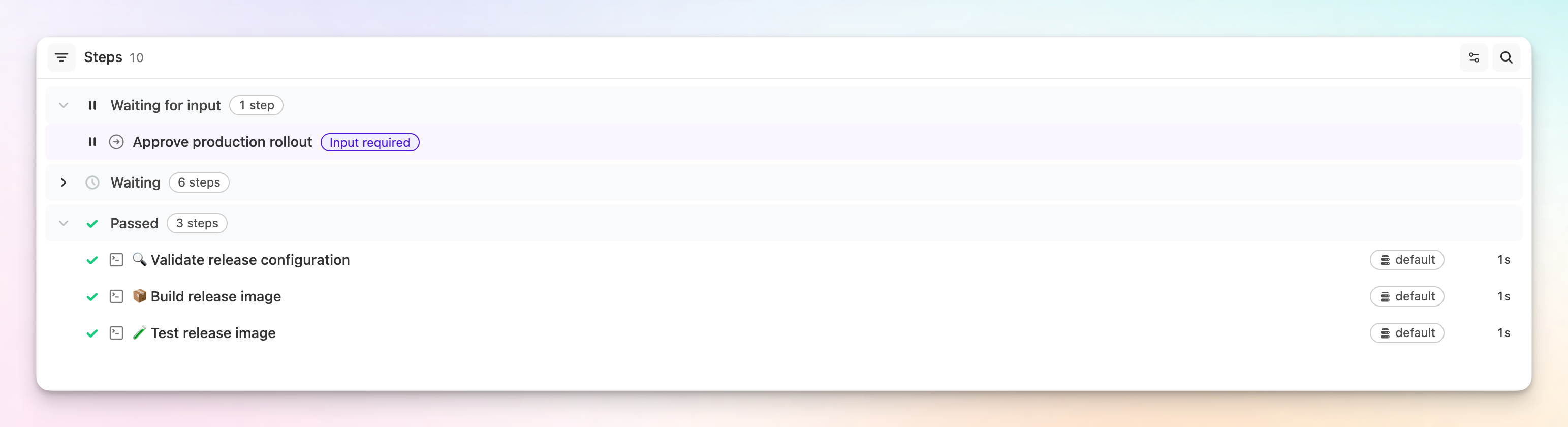
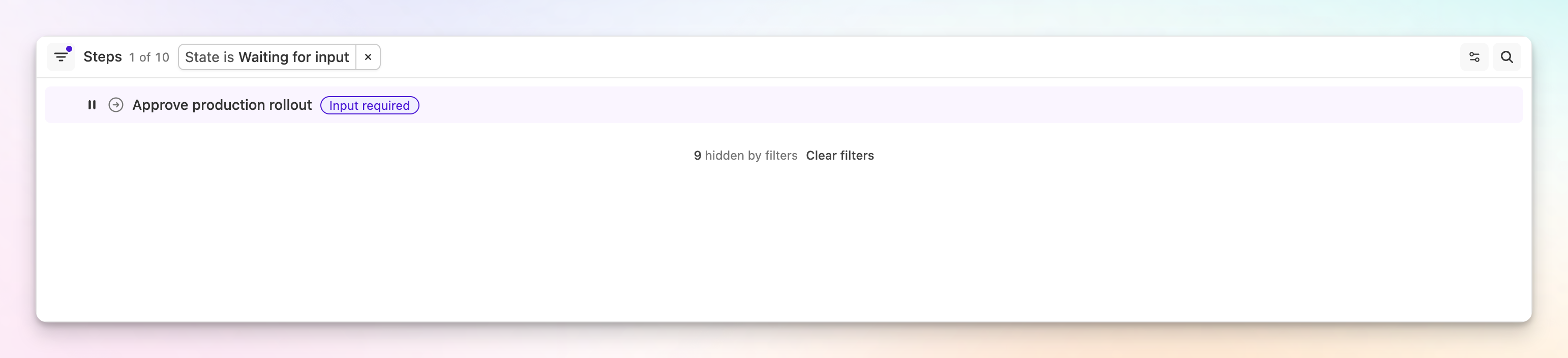
You can also now filter by Waiting for input in any build page view.
Chris
Search the audit log by pipeline, actor, and subject
Buildkite's audit log search was previously limited to type:, so answering "what happened to this pipeline?" or "what did this person change?" meant paging through everything else that happened in the last 90 days. We've added three more terms to help you find exactly what you're looking for.
pipeline:returns the events a pipeline is the subject of, by slug or UUID (for example,pipeline:my-app). The slug of a deleted pipeline still resolves, which is how you find the event that recorded the deletion. Events about the pipeline's schedules aren't included, since the schedule is the subject of those.actor:returns the events a person performed, by email address or user UUID (for example,actor:sam@example.com). This will also match members who have since been removed from your organization, so losing access doesn't hide what someone did. Only people match, so an event performed by an agent or an API application is neither returned byactor:nor excluded by-actor:.subject:returns the events performed on a kind of record (for example,subject:CLUSTER), covering every cluster the waypipeline:my-appcovers a single pipeline.
Every term is negatable with a - prefix, and they combine the way type: already did: up to three terms, repeating a key to match any of its values, mixing keys to match all of them. So type:PIPELINE_UPDATED pipeline:my-app returns the configuration changes made to one pipeline, and subject:SECRET -actor:sam@example.com returns everything done to a secret by someone other than Sam.
Alongside the existing event type list, Browse available subjects below the search bar lists the subjects you can filter on and adds one to the query when you click it.
We've also improved error handling for invalid searches. A query the search couldn't understand used to be ignored, which returned every event in the window and looked like a filter that had matched a lot. Free text, an unsupported term, and a term with no value now report the problem instead. A misspelled event type or subject names the closest match, so type:PIPLINE_UPDATED answers with Unknown event type "PIPLINE_UPDATED". Did you mean PIPELINE_UPDATED?, and a pipeline slug or email address that matches nothing is reported the same way.
Pete
See when GitHub rate limits delay CI status updates
When a build has finished but its status hasn't appeared on a pull request, it can be difficult to tell whether CI is still processing or GitHub is temporarily unable to accept the update.
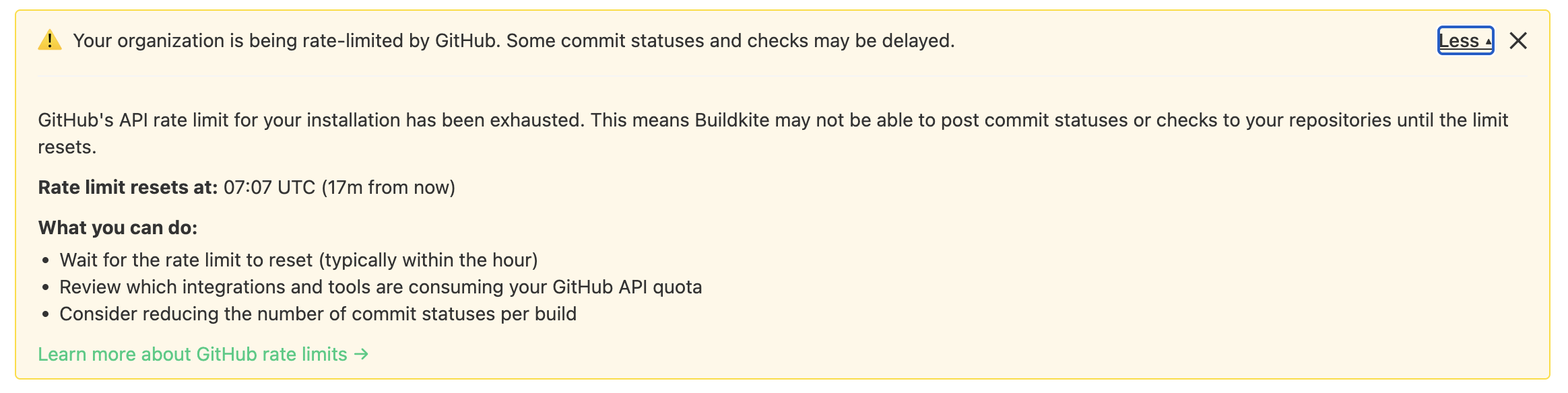
Buildkite now surfaces GitHub API rate-limit exhaustion directly in the UI, giving you clear visibility into what's delaying status updates and when normal delivery should resume.
What we're doing
We've added an organization-wide banner that appears when the API quota for your GitHub App installation is exhausted. It describes possible symptoms and shows the time when GitHub will reset the API request quota.
How it works
- The banner appears when GitHub begins rate-limiting the app installation.
- It lists symptoms you will experience, and shows the expected reset time.
- After the limit resets, the message remains temporarily while Buildkite retries outstanding status updates.
- Individual users can dismiss the notification once they understand the impact.
This makes it easier to distinguish a GitHub-side delivery constraint from a problem with your build—and spend less time investigating why a completed build is still blocking a pull request.
Owen
Analyze test reliability and performance with the Test Engine API
The Test Engine List tests API now returns aggregated reliability, duration, and execution metrics for each test. You can use these metrics to identify your flakiest or slowest tests.
The endpoint also supports:
- Filtering by branch, labels, owners, state, and tags
- Selecting a relative period or an explicit timestamp range
- Sorting by reliability or average, total, minimum, or maximum duration
- Paginating results using the response's
Linkheader
To use the updated response, include this header with your request:
Buildkite-Version: 2026-08-01The header is the only opt-in required. Requests without it continue to receive the existing response, so current integrations remain compatible.
Meghan
More Buildkite workflows are available through APIs
To make headless CI practical for AI agents and infrastructure tools, Buildkite now exposes more setup, governance, and troubleshooting operations through REST and GraphQL.
The new coverage spans pipeline creation, organization administration, notification services, hosted agent resources, and artifacts.
It also includes the previously announced REST infrastructure-failure diagnosis improvements, which give automation more context when troubleshooting failed jobs.
Create a valid pipeline sooner
- Pipeline creation through REST now rejects requests with missing or blank step configuration, returning actionable validation feedback before a pipeline is created.
- Organization administrators can list and inspect existing GitHub, GitHub Enterprise Server, Bitbucket Server, and GitLab Self-Managed repository connections.
- New pipeline endpoints inspect, enable, and disable incoming GitHub webhook processing for organizations enrolled in expanded webhook triggers.
Authorizing a new repository provider still starts in the Buildkite interface.
Automate organization administration
- New read-only endpoints list and inspect organization audit events using cursor pagination.
- Organization administrators can read and update pipeline defaults, manage hosted agent SSH access, public pipeline creation, build exports.
- Organization administrators can read and update API IP allowlists, inactive token revocation, and restrictions on user API token creation.
- A new endpoint enables Teams for an organization.
- Organization invitations can be listed, inspected, created, and revoked, including role, SSO mode, and team assignments.
- Organization member roles and SSO requirements can be updated through
PATCH /v2/organizations/{org.slug}/members/{user.uuid}.
Manage notifications and GitHub webhook processing
REST clients can list, inspect, create, update, delete, enable, and disable supported organization notification services.
Supported services include webhooks, Slack incoming webhooks, Amazon EventBridge, Datadog, and OpenTelemetry. Slack Workspace and Linear services can be managed through REST after browser-based authorization.
Configure Buildkite hosted agents from code
- Custom agent images can be listed, inspected, created, and deleted.
- Hosted-agent egress network ranges can be retrieved for firewall and network-policy automation.
- Cache volumes can be listed and deleted by tag.
- Hosted Git mirror and container cache settings can be read and updated through the clusters API.
These resources let infrastructure automation keep hosted agent images, network rules, and cache settings in sync.
Find the right artifacts faster
Build- and job-level REST artifact lists now support state and path filters before pagination. Path filters support exact matches and glob patterns, making it easier to find specific outputs in large artifact collections.
GraphQL clients can delete artifacts with the artifactDelete mutation.
API reference
- Pipeline setup: Pipelines and repository connections.
- Organization administration: Audit events, pipeline settings, API settings, invitations, members, and Teams.
- Notifications: Notification services.
- Hosted agents: Clusters, agent images, network ranges, and cache volumes.
- Artifacts: REST artifacts and
artifactDelete.
For a complete method and path index, see the REST API overview and GraphQL API reference.
Sarah
Filter REST API jobs by step or group key
The REST API's List Jobs endpoint now accepts optional step_key and group_key filters.
Use step_key to return the jobs for a specific step, including every job in a parallel step. Use group_key to return all jobs in a step group. These filters avoid fetching and filtering a build's full job list when you only need jobs from one step or group.
Buildkite
View previous job attempts in the build list
Retried jobs now show their previous attempts directly in the build list. Click the job, or expand it with the chevron, to inspect earlier attempts without leaving the page.
We've heard from customers that it should be easier to see when jobs have been retried and quickly inspect what happened across attempts. This update makes it faster to compare retries, understand what changed, and debug flaky or failed jobs.
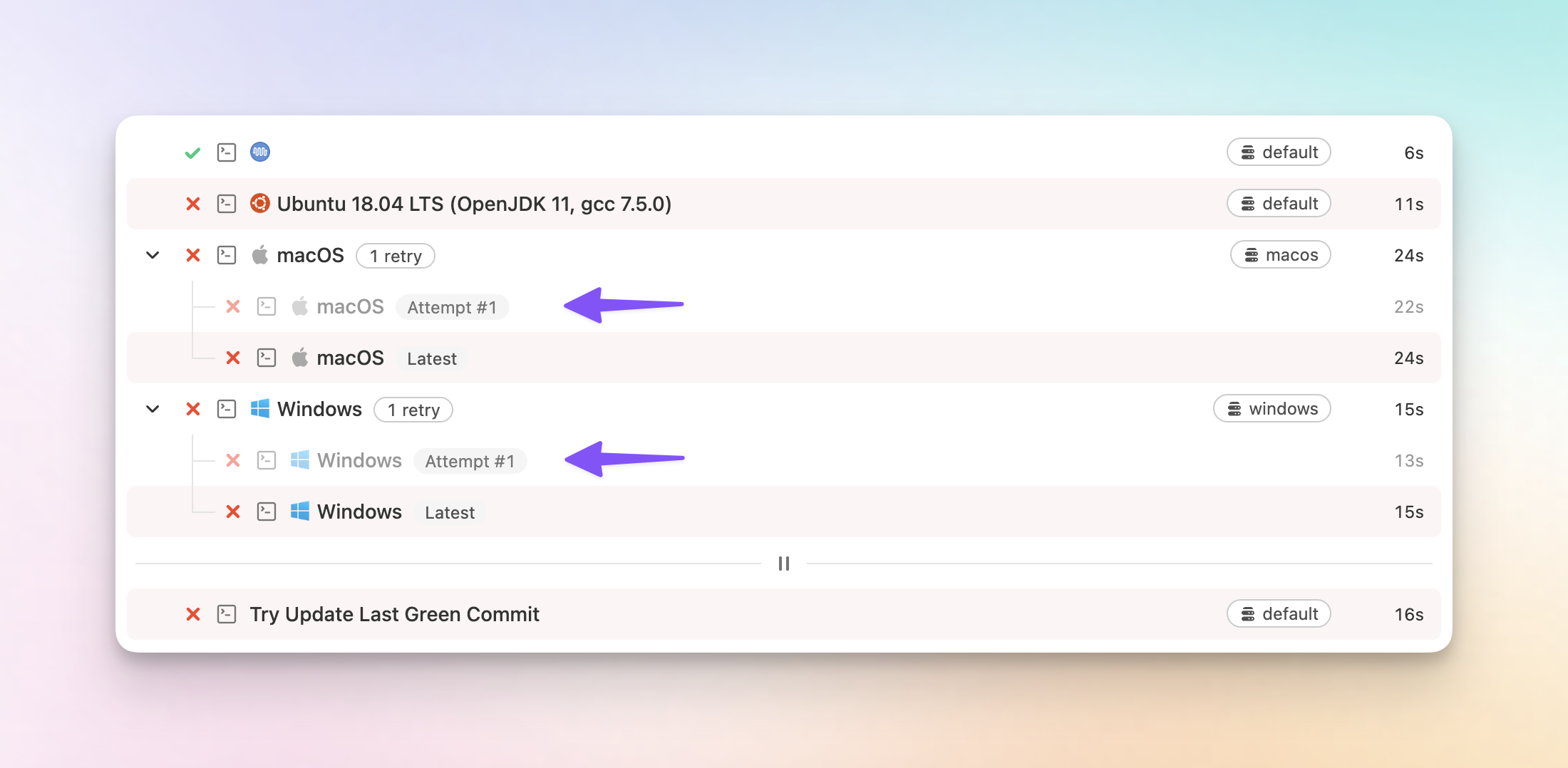
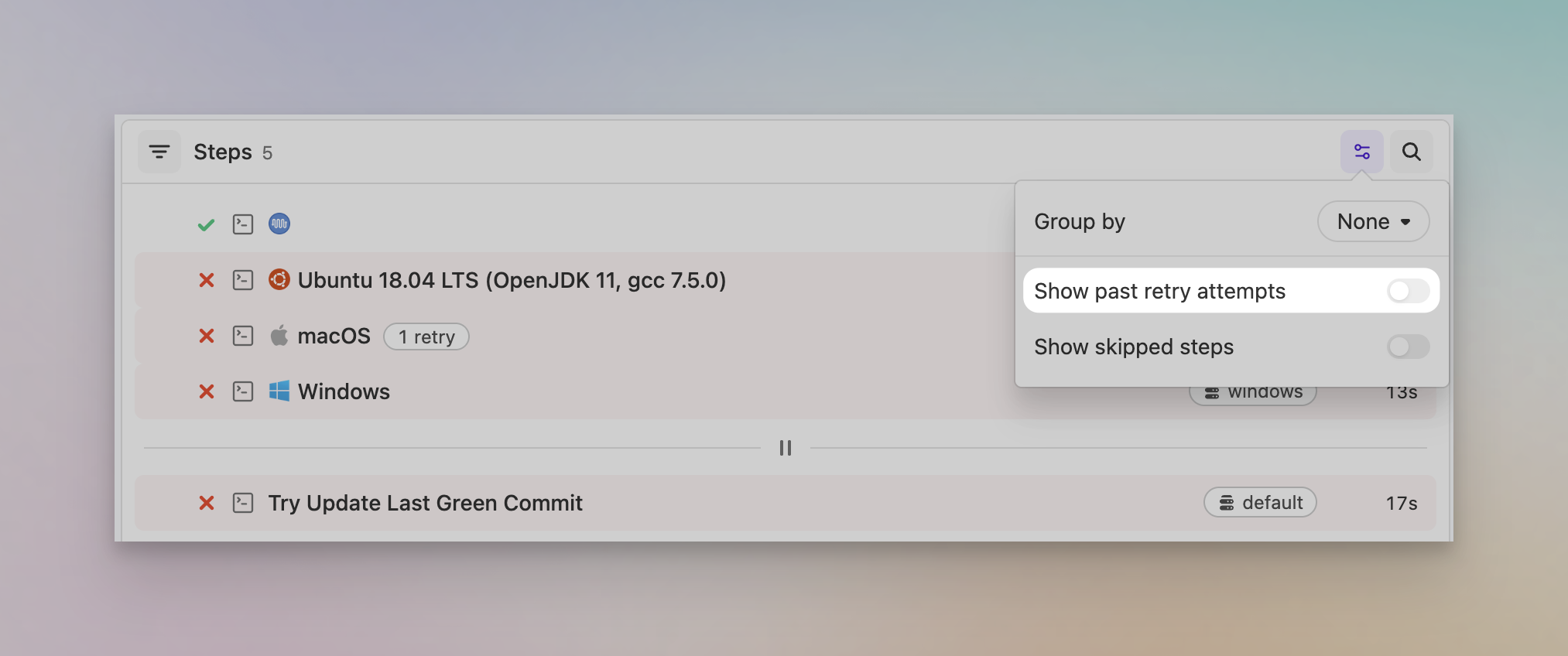
If you're not interested in previous job attempts, you can hide them by toggling off the Show past retry attempts display option.
Available now on the new Build page. If you haven't tried it yet, you can opt in from the Build page. Send feedback to support@buildkite.com.
Chris
Diagnose infrastructure-related job failures through the REST API
Buildkite's REST API now exposes more of the job and runner context that agents, CLI tools, and MCP clients need to tell infrastructure failures apart from code failures.
The REST job object now includes signal and signal_reason. When signal_reason is present, it explains why the Buildkite Agent terminated the job, such as agent_stop or process_run_error. That gives automated debugging loops a clearer signal that the runner or process failed, rather than the code under test.
REST agent objects now include runner environment and lifecycle fields: os_id, arch, queue, connected_at, disconnected_at, lost_at, and stopped_at. These fields are also available through the agent embedded in a job response, so tools investigating a failed job can stay on the same API path and still answer questions like "did this runner disappear just before the job failed?"
Together, these additions make it easier for the Buildkite CLI, MCP clients, and other agentic CI workflows to diagnose failed jobs without falling back to the Buildkite UI. An agent can see whether a job was terminated by runner infrastructure, whether the runner was lost or stopped around the time of failure, and avoid blindly retrying builds that are unlikely to pass without infrastructure intervention.
These are additive read-only fields, with no migrations or GraphQL schema changes.
Sarah
Improvements to log groups for running builds
We've made a few improvements to the way log groups render on the new build page. For a running job, the log group that's currently running stays open and on screen, and we've added live durations and sticky headers to make it easier to follow along.
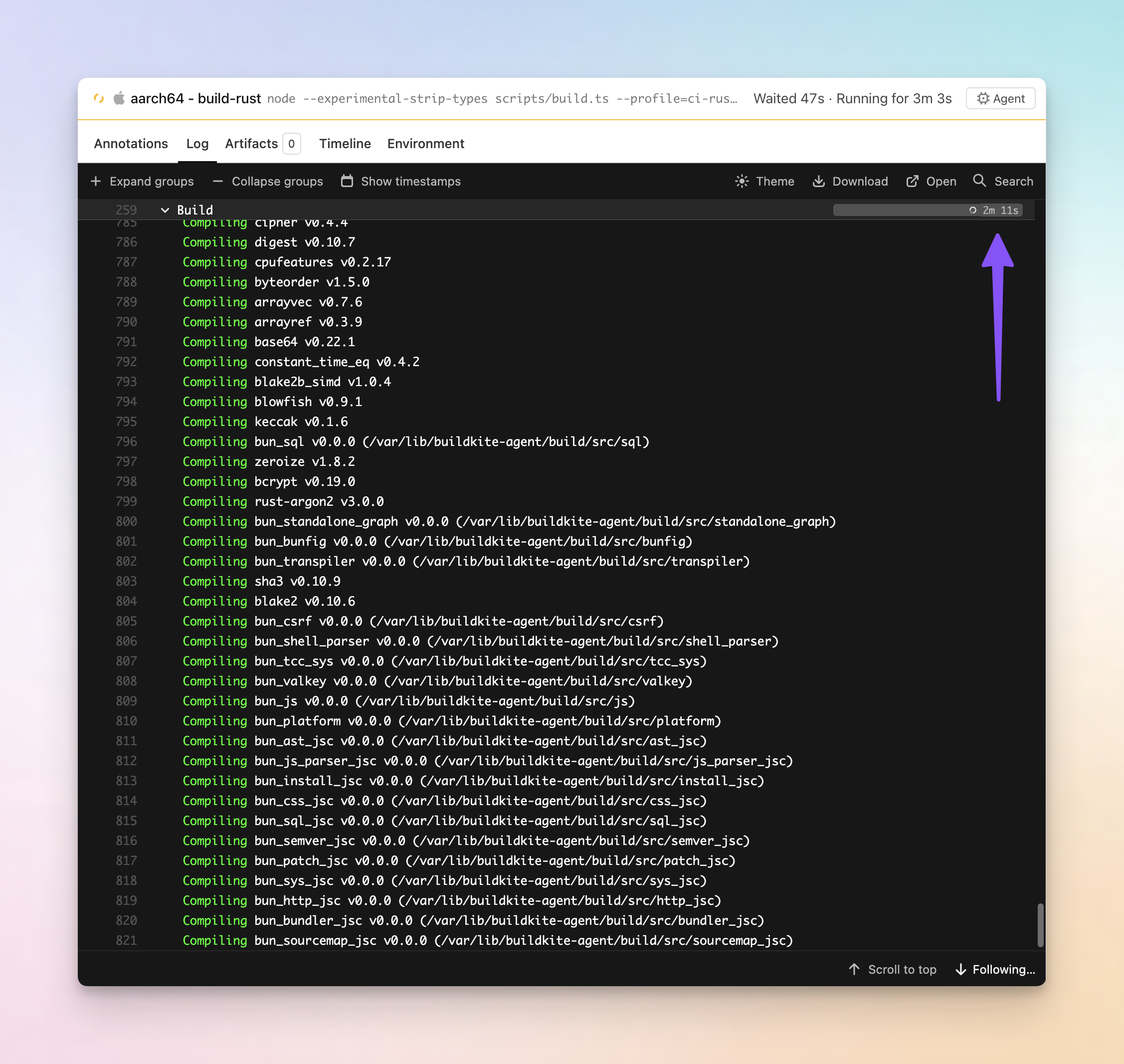
- See the duration of the running log group: The running log group now shows a ticking duration and a bar that grows in real time, instead of a spinner you stare at until the group finishes.
- Follow the output as it streams: The group that's currently running expands automatically so its output stays visible. When the job moves on, it folds back to how the step defined it and the next group opens.
- Never lose your place: Scroll deep into a long expanded group and its header sticks just below the toolbar, then hands off to the next group as you pass it.
We've also shipped some fixes along the way to log search highlighting, and the log scrollbar now matches your active theme.
These improvements are available on the new build page. Give it a try if you haven't by opting in on the build page and tell us what you think at support@buildkite.com.
Chris
A simpler build page layout with a new list view
Finding the job you care about on a busy build just got faster. The build page has a cleaner layout, a proper list view in place of the old sidebar, and less duplicated information getting between you and what you're actually trying to inspect.
- Find the job faster: Jobs are scannable at a glance, with room to breathe. Long step names are finally readable instead of truncated into uselessness.
- A cleaner layout: Pipeline and jobs on the left, the detail you're inspecting on the right. Less hunting, more space for the thing you care about.
- Works on your phone: The list view is fully responsive, so checking in on a cheeky build while you're AFK is no longer a pinch-and-zoom ordeal.
- Filter jobs by state: Something the old sidebar couldn't do at all. Find that one scheduled step inside a running group without scrolling.
- Groups stay grouped: When you filter or group by state, parallel, matrix and group steps keep their parent visible instead of flattening, so you never lose the context of where a job belongs.
- Less duplication: Repeated headers and metadata are gone, so the information you need stands out.
- Jump to anything, from anywhere: Search straight to a job or step from any view — including the canvas.
Available now for everyone on the new build page — turn it on from your user settings if you haven't already. Tell us what you think at support@buildkite.com.
Chris
Streaming job dispatch is now generally available
Agents running buildkite-agent start now receive jobs in sub-second time, with no configuration changes necessary. Agent v3.122.0 replaces the polling-based dispatch with a persistent streaming connection, enabled by default.
What changed
Agent v3.122.0 changes the default agent API endpoint to agent-edge.buildkite.com, a new Go-based edge service that maintains a ConnectRPC stream to each connected agent. When a job is dispatched, it's pushed to agents over this stream rather than waiting for the next poll.
Why this matters
Previously, agents checked for work by polling every 10 seconds, plus random jitter to avoid synchronized requests across fleets. A job dispatched right after a poll could wait up to 20 seconds before that agent checks in again. Across a pipeline with many steps, that wait compounds.
With streaming dispatch, job acceptance latency drops to under 1 second. For an average build, that can save minutes of unnecessary wait time - resulting in faster and more efficient builds.
Availability
This is now the default for all agents running buildkite-agent start, including those on the Elastic CI Stack for AWS.
Buildkite Hosted Agents, Agent Stack for Kubernetes, and workflows using --acquire-job use different dispatch mechanisms and don't benefit from this change.
Upgrade to Agent v3.122.0 to get streaming dispatch by default. We'd love to hear how it goes! Reach out to support@buildkite.com with any feedback.
Daniel
Run durations on canvas nodes
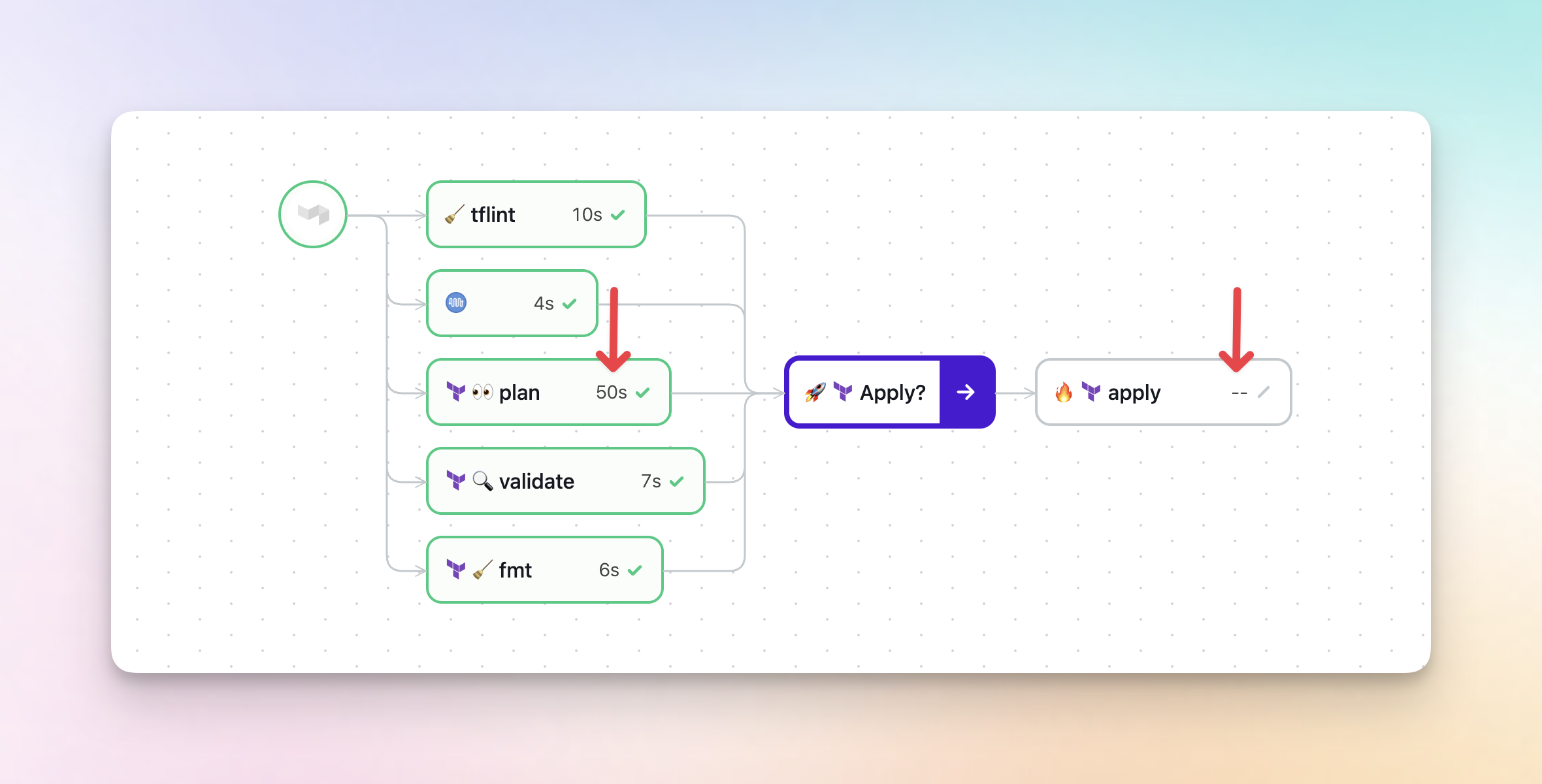
Steps on the build canvas now display their run duration directly on each node, so you can quickly spot slow steps and see the progress of running jobs without clicking into them. Steps that haven't started yet show a -- placeholder, so you can see at a glance which parts of your build are still waiting to run.
Chris
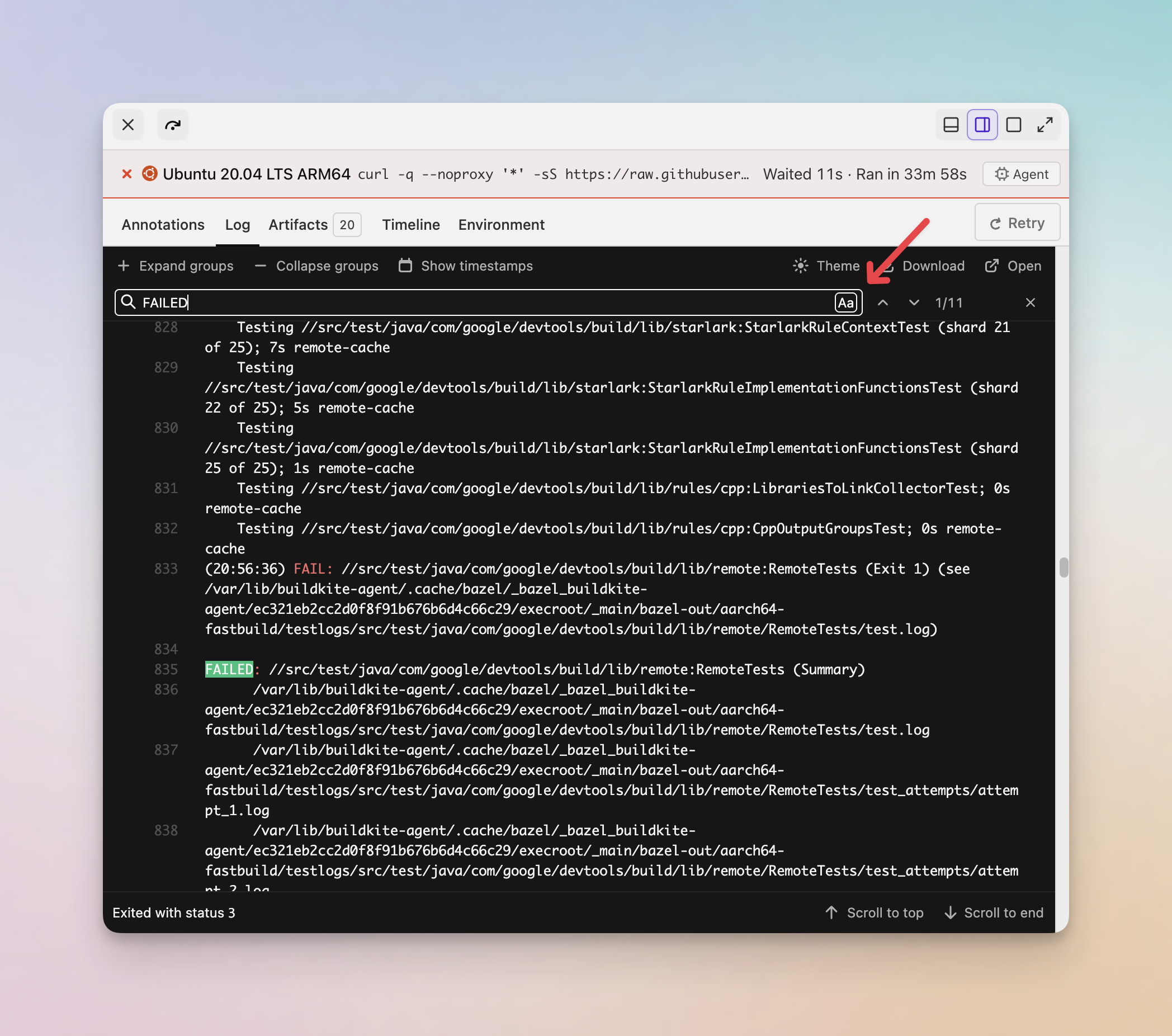
Case-sensitive search in build job logs
You can now toggle case-sensitive matching when searching through job logs on the new build page. Click the Aa button in the log search bar to switch between case-sensitive and case-insensitive search.
Chris
You deserve better CI.
Get started for free with a full month of our all-access trial.

