Summary
You can run supported GitHub Actions workflows for iOS on Buildkite without rewriting your workflow files. Buildkite's GitHub Actions Compatibility (buildkite-gha) reads the workflow files in your repository and runs them on Buildkite-hosted macOS agents.
In this guide, you'll create a pipeline, add your secrets, choose an Xcode version, and run an existing iOS workflow that builds your app and runs its unit tests.
Prerequisites
- A Buildkite organization with hosted macOS agents. Hosted macOS is available on the Pro and Enterprise plans. New sign-ups get a 30-day all-access trial with 3,000 vCPU Mac minutes.
- A GitHub repository with an iOS workflow that runs on push. Check the compatibility guide to confirm your workflow uses supported features.
Create a GitHub Actions pipeline
- Sign up for free with GitHub or email and create an organization.
- Select your repository on the New Pipeline page. Email signups connect GitHub first.
- Edit your pipeline name, description, and default branch.
- Click Create GitHub Actions pipeline.
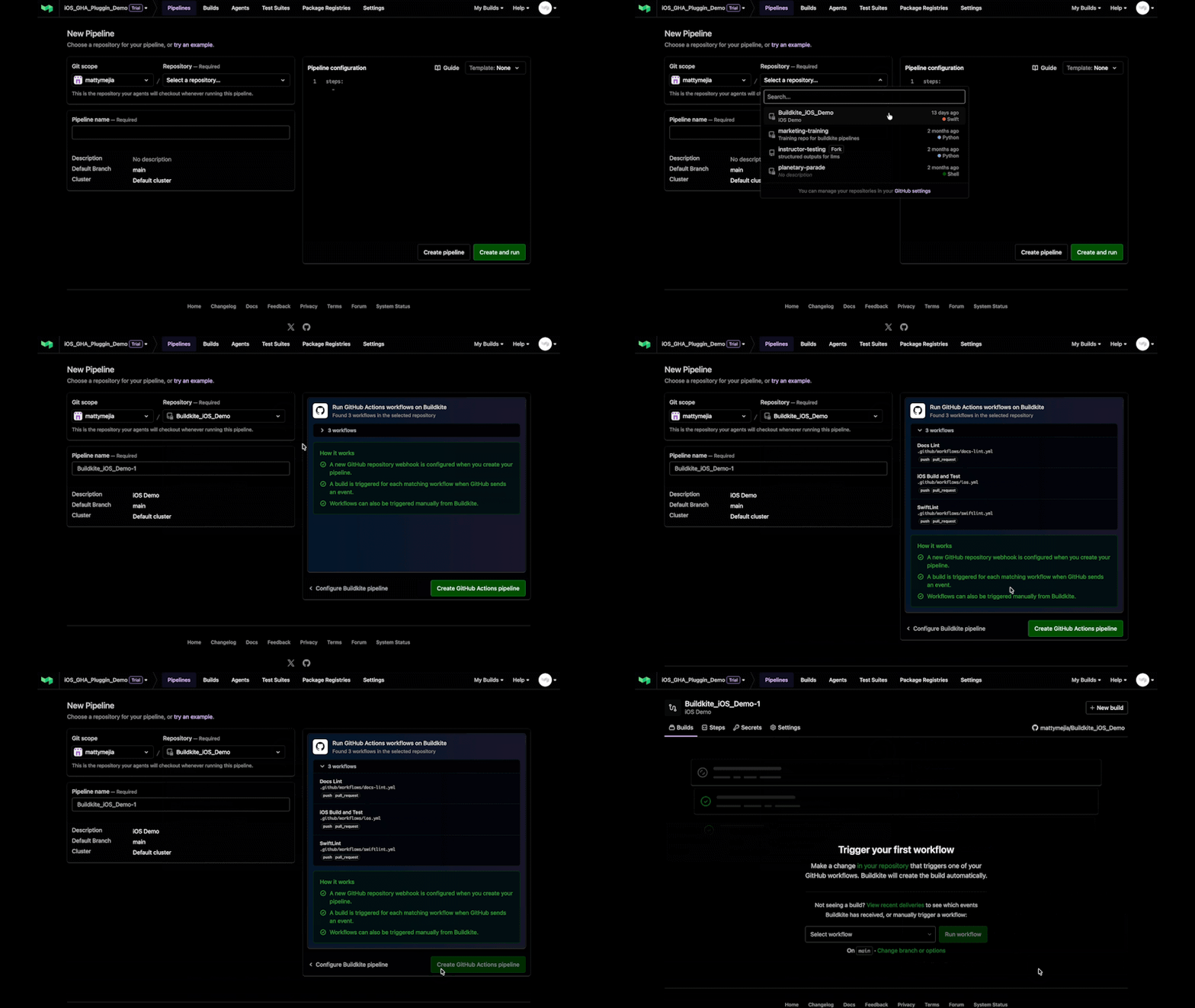
Creating a GitHub Actions pipeline
Add secrets
Buildkite doesn't copy your GitHub secrets. Add each secret your workflow uses before you run it:
- Select the Secrets tab.
- Click New secret, then enter the secret's Key and Value.
- Click Create secret.
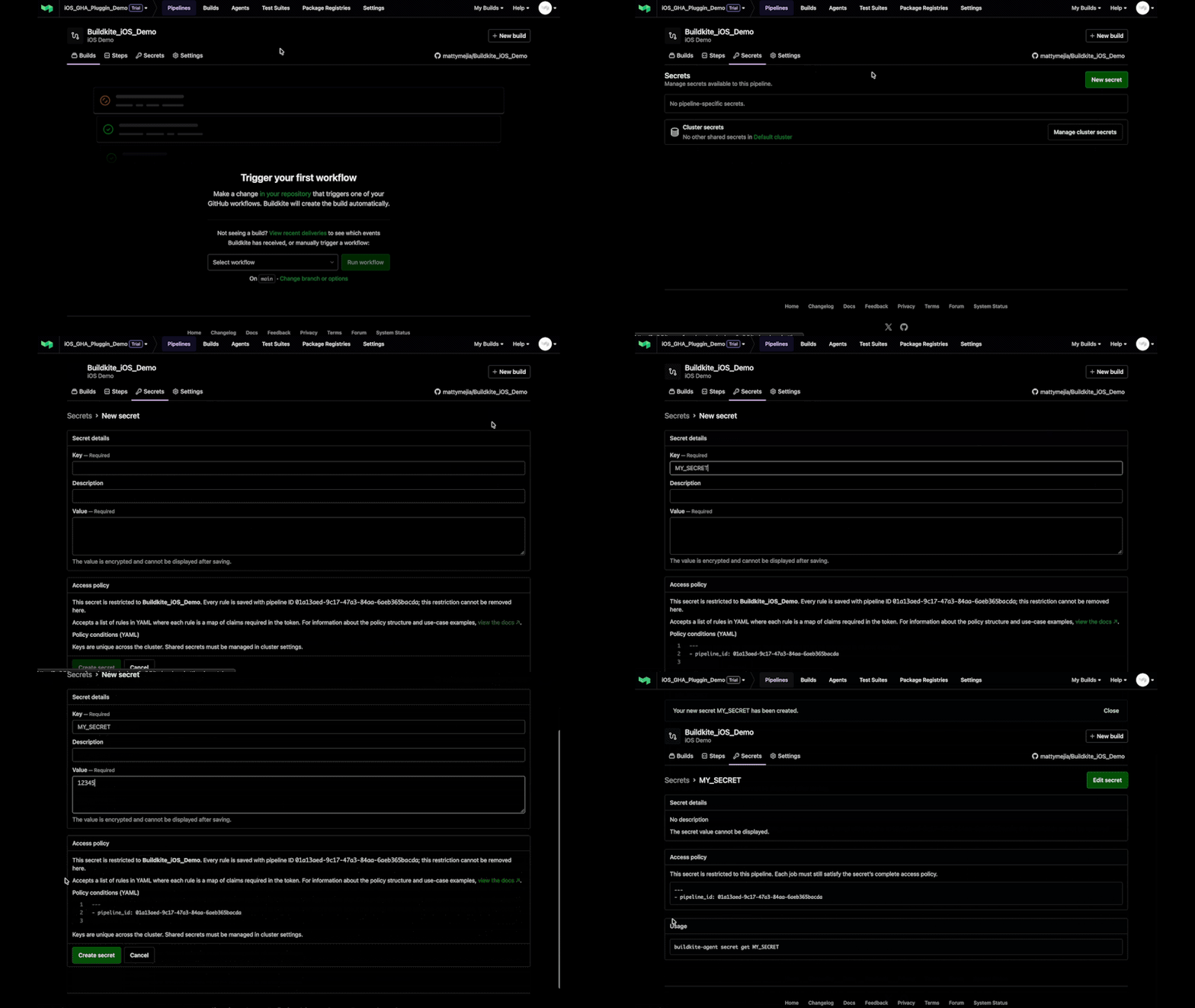
Adding a secret to a workflow
Choose your Xcode version
When you create a Buildkite organization, its Default cluster includes Buildkite-hosted macOS queues, so you don't need to set up or manage any Macs. Buildkite picks the queue from each job's runs-on label: macos-latest runs on the macos-medium queue.
Your iOS jobs use the macOS and Xcode versions configured on that queue’s base image. Buildkite’s current macOS 26 (Tahoe) images include Xcode 27 and the iOS 27 simulator runtime, but your queue may select an older Xcode by default.
If your project targets iOS 27, check the Mac hosted-agent image explorer to confirm your image includes Xcode 27 and the iOS 27 runtime. If it doesnt, open the macos-medium queue’s Base image settings.
- Go to the Agents tab and open the
macos-mediumqueue. - Select the Base image tab. If your current image doesn't include Xcode 27, select one that does.
- Under Xcode version, select 27.
- Click Save base image.
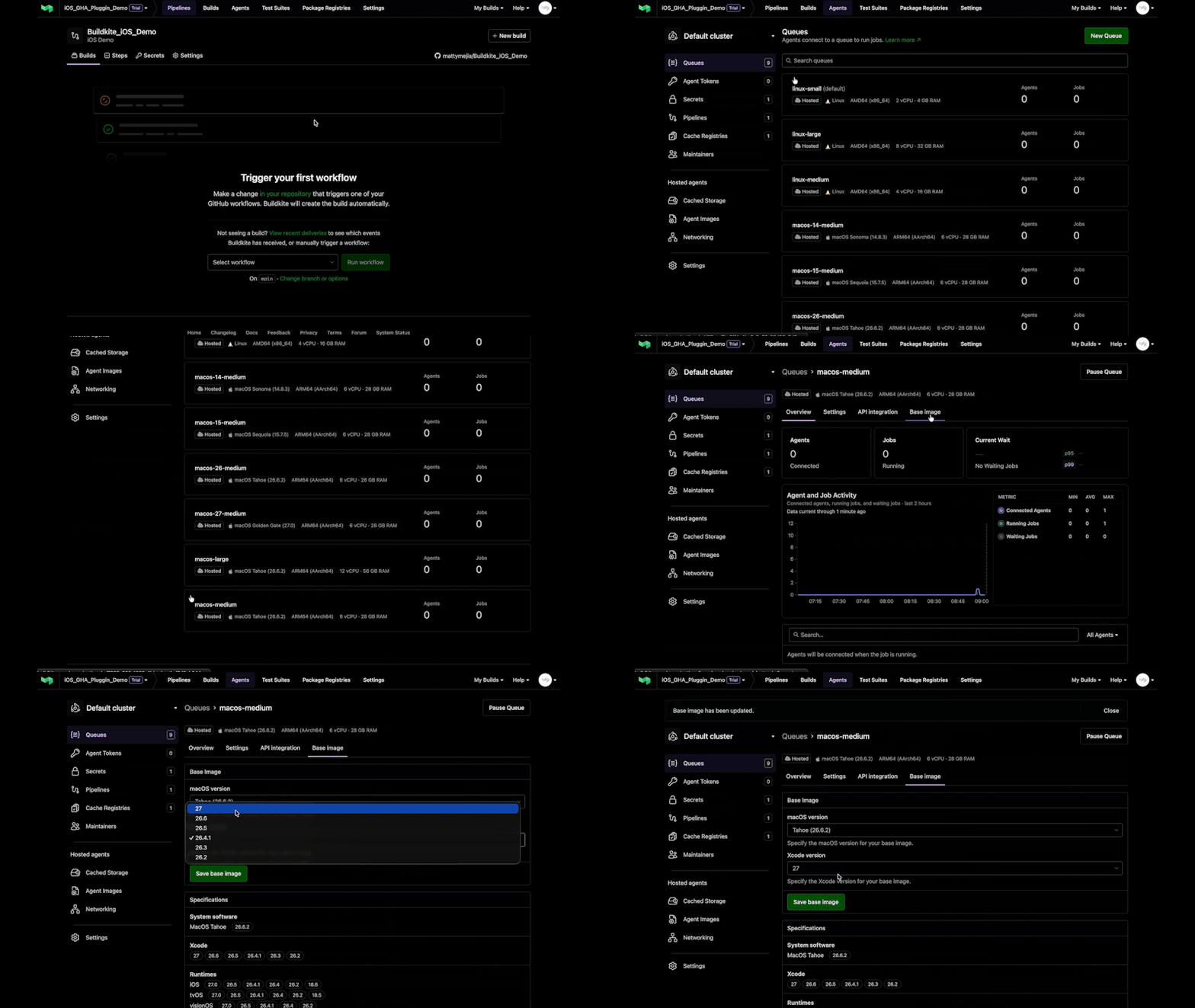
Selecting an Xcode version
Run your first workflow
Automatically run your workflow by pushing a change that matches its branch and path filters.
To run it manually:
- Select your workflow.
- Optinal: to change the branch, use a clean checkout, or set environment variables, click Change branch or options. Add environment variables under Options > Environment Variables in
KEY=valueformat. - Click Run workflow.
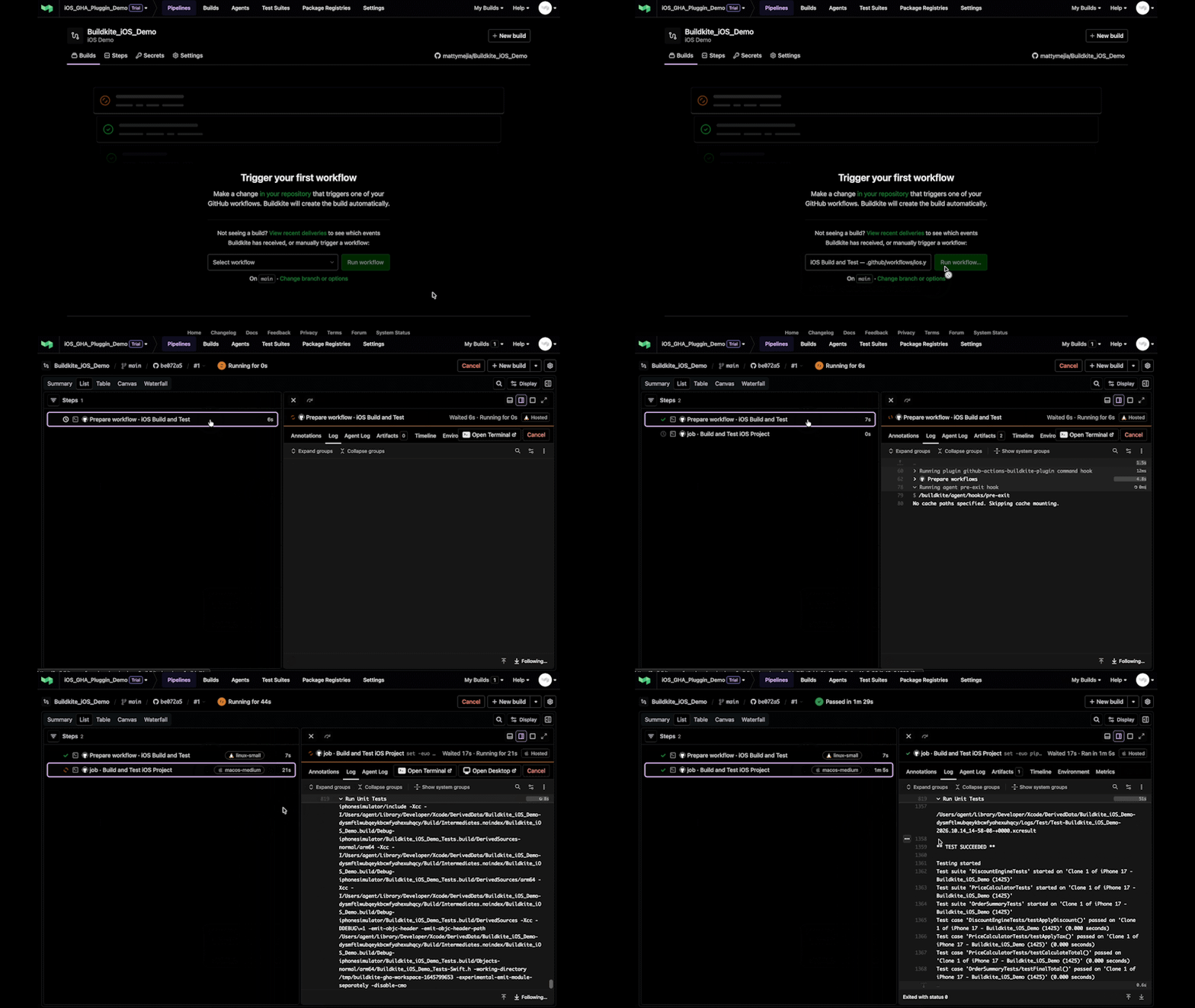
Running a workflow and viewing logs
Watch it run live — logs stream until the job finishes. Confirm in the logs the build used the Xcode version you selected. Once the Buildkite build passes, you can disable the GitHub workflow to avoid duplicate runs.
Note
Buildkite treats a manual build as a push event, not workflow_dispatch. Environment variables set in Options aren't dispatch inputs. Workflows that require dispatch inputs or a schedule trigger need extra setup.
Next steps
Move one workflow at a time and leave the rest on GitHub Actions for as long as you need.
- To learn how the runtime runs your workflows and which features it supports, see Run GitHub Actions workflows in Buildkite .
- When you’re ready for more than one workflow, see Migrate from GitHub Actions.
Get help
Contact Buildkite support and we'll help you. Send your workflow file and build logs, with any secrets removed.
Verison note: This guide was checked against buildkite-gha v0.102.5. The plugin uses the latest stable runtime release unless you pin a version. Some behavior may differ between versions.
Try Buildkite for free
Create an account and run your first pipeline in minutes.
Frequently asked questions
Which Xcode versions are available on Buildkite?
Available Xcode versions depend on your queue’s macOS image. Open the queue’s Base image settings to see or change its macOS and Xcode versions. Buildkite’s images may differ from GitHub-hosted runner images, so check that the selected Xcode version supports your workflow. The macOS agent docs list each image’s tools and simulator runtimes.
Will my iOS version matrix still work?
Yes, for supported matrix configurations. Each strategy.matrix entry becomes a separate Buildkite job. The matrix doesn’t install simulator runtimes: each iOS version you target needs a runtime available in your queue’s image and compatible with the selected Xcode. Check the image’s runtime list, then confirm availability with xcrun simctl list runtimes.
Jobs can run in parallel, subject to your organization’s hosted macOS capacity and configured concurrency limits. Additional jobs wait in the queue. In buildkite-gha, matrix fail-fast doesn’t cancel the other matrix jobs when one fails.
Do I need to manage my own Macs?
No, not when using Buildkite-hosted macOS agents. Buildkite manages the Apple silicon Macs and runs each job in an isolated macOS virtual machine. You choose the queue’s base image; Buildkite handles provisioning and cleanup. Hosted macOS is available on Pro and Enterprise plans and during the 30-day all-access trial.
Does Buildkite cache Xcode builds?
Yes. Buildkite supports caching Xcode build data and dependencies to help reduce build times. Caching isn’t enabled automatically and must be configured. Learn more in our caching guide.
Can I still run macOS 14 builds on Buildkite?
Yes. Buildkite currently offers macOS 14 (Sonoma) hosted agents through the macos-14-medium queue. Check that your chosen base image includes the Xcode version and dependencies your workflow needs.
Which GitHub Actions features work on Buildkite?
Buildkite’s GitHub Actions compatibility runtime supports workflow jobs, needs, matrices, reusable workflows, and JavaScript, composite, and Docker actions. Docker actions are supported on Linux only. Workflow jobs can run on Linux (x86-64 or arm64), macOS on Apple silicon, and Windows Server 2022 (x86-64), with platform-specific setup requirements. Review the compatibility guide for supported features and limitations before running your own workflow.
How does Buildkite run my GitHub Actions workflows?
The GitHub Actions compatibility runtime (buildkite-gha) turns each supported workflow job and matrix entry into a Buildkite job without requiring you to rewrite your workflow files. These jobs run on Buildkite agents, with Buildkite handling scheduling, logs, retries, and cancellation.
For iOS builds, jobs use Xcode and the other tools available in your queue’s macOS base image.
Can I combine imported workflows with Buildkite steps?
Yes. Imported workflows can run alongside native Buildkite steps in the same pipeline, so you can add Buildkite-specific steps as you need them.