# Test Engine overview

Test Engine is the testing layer of [Buildkite Pipelines](/docs/pipelines). It collects test results from the jobs your pipelines run, then provides tools to track, analyze, and act on those results across any testing framework. Test Engine also accepts results from non-Buildkite CI systems, so you can use it alongside an existing CI/CD setup while migrating to Buildkite Pipelines.

Use Test Engine to:

- Detect and quarantine flaky tests so they stop blocking builds.
- Split tests across parallel jobs to reduce build duration.
- Monitor test performance, reliability, and ownership over time.
- Surface the slowest and least reliable tests in each suite.

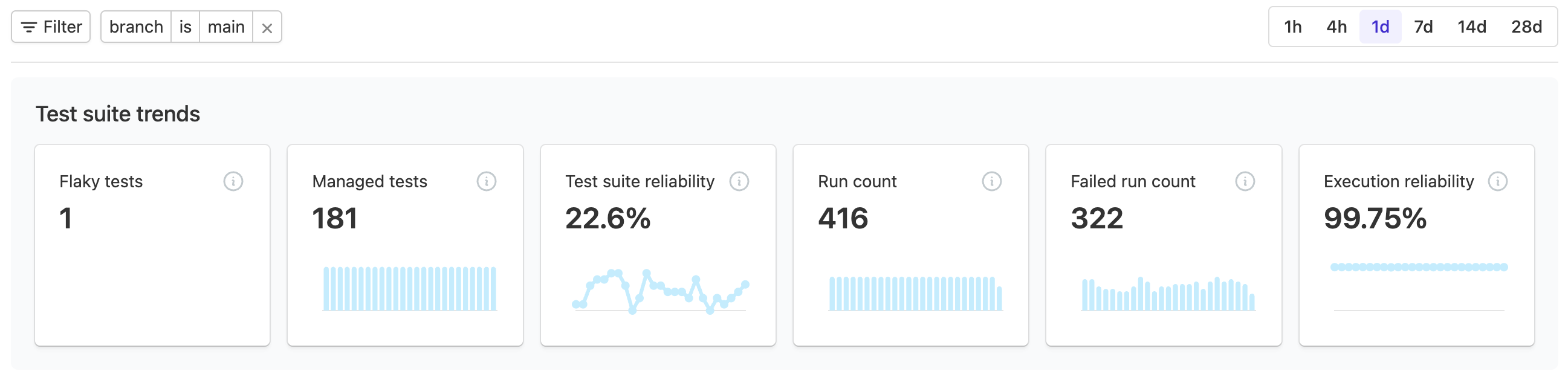
<div style="max-width: 2594px"><div class="responsive-image-container"><img alt="Screenshot of test suite trend showing six metrics over the last day" src="/docs/assets/overview-CCO132lw.png" /></div></div>

## Get started

The recommended way to set up a new test suite is to add the [Tests Buildkite plugin](https://buildkite.com/resources/plugins/buildkite-plugins/tests-buildkite-plugin/) to the step that runs your tests. Learn more in the [Test collection overview](/docs/pipelines/configure/tests/test-collection).

If you're looking for deeper framework insights, you can also add the test collector for your testing framework (also known as a _test runner_):

<div class="ButtonGroup">
  <a class="Button Button--default" href="/docs/pipelines/configure/tests/test-collection/ruby-collectors#rspec-collector">:rspec: RSpec</a>
  <a class="Button Button--default" href="/docs/pipelines/configure/tests/test-collection/ruby-collectors#minitest-collector">:ruby: minitest</a>
  <a class="Button Button--default" href="/docs/pipelines/configure/tests/test-collection/javascript-collectors#configure-the-test-framework-jest">:jest: Jest</a>
  <a class="Button Button--default" href="/docs/pipelines/configure/tests/test-collection/javascript-collectors#configure-the-test-framework-mocha">:mocha: Mocha</a>
  <a class="Button Button--default" href="/docs/pipelines/configure/tests/test-collection/javascript-collectors#configure-the-test-framework-cypress">:cypress: Cypress</a>
  <a class="Button Button--default" href="/docs/pipelines/configure/tests/test-collection/javascript-collectors#configure-the-test-framework-jasmine">:jasmine: Jasmine</a>
  <a class="Button Button--default" href="/docs/pipelines/configure/tests/test-collection/javascript-collectors#configure-the-test-framework-playwright">:playwright: Playwright</a>
  <a class="Button Button--default" href="/docs/pipelines/configure/tests/test-collection/javascript-collectors#configure-the-test-framework-vitest">:vitest: Vitest</a>
  <a class="Button Button--default" href="/docs/pipelines/configure/tests/test-collection/swift-collectors">:swift: Swift</a>
  <a class="Button Button--default" href="/docs/pipelines/configure/tests/test-collection/android-collectors">:android: Android</a>
  <a class="Button Button--default" href="/docs/pipelines/configure/tests/test-collection/python-collectors">:pytest: pytest</a>
  <a class="Button Button--default" href="/docs/pipelines/configure/tests/test-collection/golang-collectors">:golang: Go</a>
  <a class="Button Button--default" href="/docs/pipelines/configure/tests/test-collection/importing-junit-xml">:junit: JUnit</a>
  <a class="Button Button--default" href="/docs/pipelines/configure/tests/test-collection/dotnet-collectors">:dotnet: .NET</a>
  <a class="Button Button--default" href="/docs/pipelines/configure/tests/test-collection/elixir-collectors">:elixir: Elixir</a>
  <a class="Button Button--default" href="/docs/pipelines/configure/tests/test-collection/rust-collectors">:rust: Rust</a>
</div>

If a Buildkite test collector is not available for one of these test runners, you can use [other test collection](/docs/pipelines/configure/tests/test-collection/other-collectors) mechanisms instead.

### Manual setup

New to Test Engine? Work through the [Add a test suite](/docs/pipelines/getting-started#add-a-test-suite) section of the Pipelines getting started tutorial, which walks you through creating a [test suite](/docs/pipelines/configure/tests/test-suites), configuring a [test collector](/docs/pipelines/configure/tests/test-collection) for your project, and automating the test runner with Buildkite Pipelines.

## Core features

<section class="Tiles"><article class="TileItem"><h2 class="TileItem__title"><a class="TileItem__title-link" href="/docs/pipelines/configure/tests/test-suites#trends-and-analysis">Deep performance analysis</a></h2><p class="TileItem__desc">Automatic tracing across your test suite, deeply integrated with your programming language and test framework.</p><a class="TileItem__learn-more" href="/docs/pipelines/configure/tests/test-suites#trends-and-analysis">Learn more</a></article><article class="TileItem"><h2 class="TileItem__title"><a class="TileItem__title-link" href="/docs/pipelines/reduce-flaky-tests">Find and fix flaky tests</a></h2><p class="TileItem__desc">Quickly identify which tests are the most disruptive for your team, and get a head-start on fixing them.</p><a class="TileItem__learn-more" href="/docs/pipelines/reduce-flaky-tests">Learn more</a></article><article class="TileItem"><h2 class="TileItem__title"><a class="TileItem__title-link" href="/docs/pipelines/speed-up-builds-with-bktec">Reduce build times with bktec</a></h2><p class="TileItem__desc">Split tests evenly across agents to reduce overall pipeline build times, and skip and mute flaky tests.</p><a class="TileItem__learn-more" href="/docs/pipelines/speed-up-builds-with-bktec">Learn more</a></article></section>

> 📘 Data retention
> The execution data uploaded to Test Engine is stored in S3 and deleted after 120 days.

## API & references

Learn more about:

- The Test Engine [REST API endpoints](/docs/apis/rest-api/test-engine/suites), starting with test suites.
- The [Buildkite MCP server](/docs/apis/mcp-server) and its Test Engine-specific [tools](/docs/apis/mcp-server/tools#available-mcp-tools-test-engine) and [toolsets](/docs/apis/mcp-server/tools/toolsets#available-toolsets).
- Test Engine [webhooks](/docs/apis/webhooks/test-engine).
- Test Engine terms in the Pipelines [glossary](/docs/pipelines/glossary).