# Test Scheduler API

To distribute tests across Buildkite Pipelines jobs, use [`bktec pool run`](https://buildkite.com/docs/pipelines/configure/tests/bktec/installing-and-using-the-client.md#run-tests-with-test-scheduler) with the Test Engine Client. Supported runners are RSpec, pytest, Jest, and Playwright.

Use the Test Scheduler REST API directly only if you need to manage your own test orchestration, including how jobs request work and report results.

> 📘 Private preview feature
> The Test Scheduler API is in private preview and must be enabled for your Buildkite organization. To request access, contact Buildkite Support at [support@buildkite.com](mailto:support@buildkite.com). The API may change during the preview.

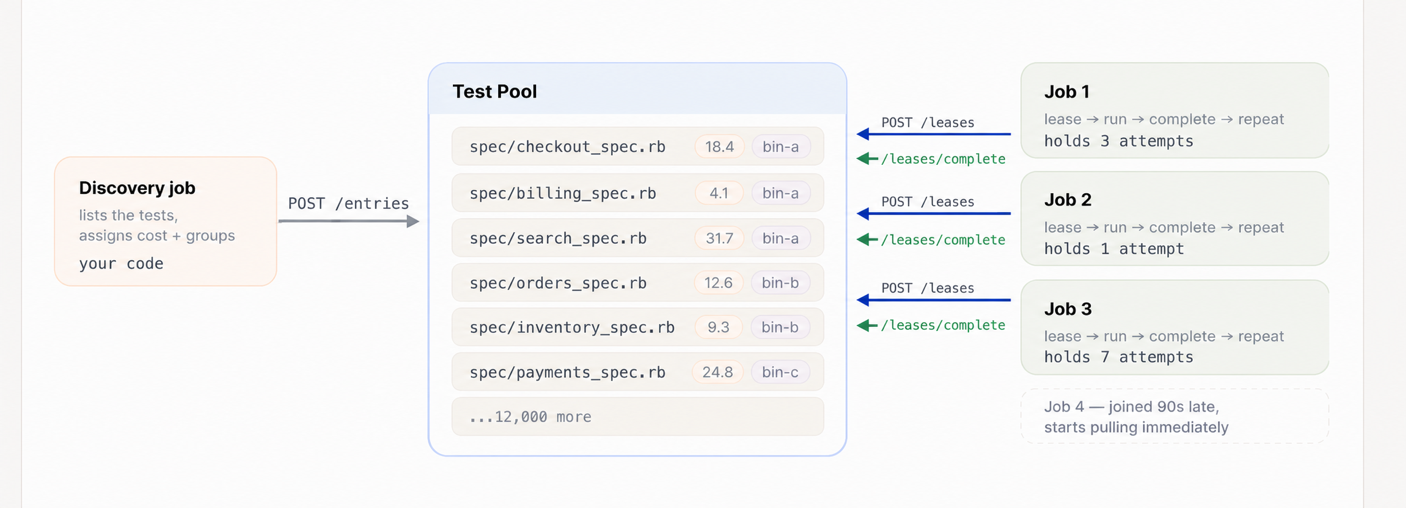
<div style="max-width: 703px"><div class="responsive-image-container"><img alt="Diagram showing a discovery job uploading test entries to a test pool and three jobs leasing and completing test attempts" src="/docs/assets/test-scheduler-overview-CPXuyeIk.png" /></div></div>

## Endpoints

The Test Scheduler API provides endpoints for creating and managing a Test Pool:

- Test Pools contain Entries, and each Entry has one or more Attempts.
- Leases assign Attempts to Buildkite Pipelines jobs for execution.

All endpoints on this page use the following base path:

```text
https://api.buildkite.com/v2/organizations/{org.slug}/test-scheduler
```

The Test Scheduler API provides these endpoints:

Method | Endpoint | Description
------ | -------- | -----------
GET | `/pools` | [List pools](https://buildkite.com/docs/apis/rest-api/test-engine/test-scheduler.md#list-pools)
GET | `/pools/{pool.id}` | [Get a pool](https://buildkite.com/docs/apis/rest-api/test-engine/test-scheduler.md#get-a-pool)
POST | `/pools` | [Create a pool](https://buildkite.com/docs/apis/rest-api/test-engine/test-scheduler.md#create-a-pool)
PATCH | `/pools/{pool.id}` | [Update a pool](https://buildkite.com/docs/apis/rest-api/test-engine/test-scheduler.md#update-a-pool)
POST | `/pools/{pool.id}/entries` | [Upload entries](https://buildkite.com/docs/apis/rest-api/test-engine/test-scheduler.md#upload-entries)
GET | `/pools/{pool.id}/entries` | [List entries](https://buildkite.com/docs/apis/rest-api/test-engine/test-scheduler.md#list-entries)
POST | `/pools/{pool.id}/leases` | [Create a lease](https://buildkite.com/docs/apis/rest-api/test-engine/test-scheduler.md#create-a-lease)
POST | `/pools/{pool.id}/leases/heartbeat` | [Heartbeat leases](https://buildkite.com/docs/apis/rest-api/test-engine/test-scheduler.md#heartbeat-leases)
POST | `/pools/{pool.id}/leases/complete` | [Complete attempts](https://buildkite.com/docs/apis/rest-api/test-engine/test-scheduler.md#complete-attempts)
POST | `/pools/{pool.id}/leases/release` | [Release attempts](https://buildkite.com/docs/apis/rest-api/test-engine/test-scheduler.md#release-attempts)
GET | `/pools/{pool.id}/metrics` | [Get pool metrics](https://buildkite.com/docs/apis/rest-api/test-engine/test-scheduler.md#get-pool-metrics)
GET | `/pools/{pool.id}/jobs/{job.id}` | [Get job failure participation](https://buildkite.com/docs/apis/rest-api/test-engine/test-scheduler.md#get-job-failure-participation)

## Authentication

Test Scheduler API requests accept an OpenID Connect (OIDC) token issued to a Buildkite job. [REST API access tokens](https://buildkite.com/docs/apis/managing-api-tokens.md) are also accepted for listing pools, getting a pool, and getting pool metrics. All other endpoints, including all writes, require OIDC authentication.

### OIDC authentication

First, create a suite or choose an existing suite. Set the [OIDC policy](https://buildkite.com/docs/pipelines/configure/tests/test-collection/oidc.md) through the suite's **Settings** page in the Buildkite interface, or using the [suites REST API](https://buildkite.com/docs/apis/rest-api/test-engine/suites.md) with the `oidc_policy` field on create or update.

```
- iss: "https://agent.buildkite.com"
  claims:
    organization_slug: "your-org"
    pipeline_slug:
      in:
        - "your-pipeline"
        - "another-pipeline"
  scopes:
    - "read_suites"
    - "write_uploads"
    - "read_test_pool"
    - "write_test_pool"
```

Request a token from within a Buildkite Pipelines job using [`buildkite-agent oidc request-token`](https://buildkite.com/docs/agent/cli/reference/oidc.md#request-oidc-token):

```bash
TEST_SUITE_SLUG="suite-slug"
SUITE_URL="https://buildkite.com/organizations/${BUILDKITE_ORGANIZATION_SLUG}/analytics/suites/${TEST_SUITE_SLUG}"
LIFETIME=300 # Lifetime of tokens in seconds, set to the expected duration of the longest job.
OIDC_TOKEN=$(buildkite-agent oidc request-token --audience "$SUITE_URL" --lifetime $LIFETIME --claim organization_id,pipeline_id,build_id,job_id)
export OIDC_TOKEN
```

The OIDC token must:

- Match the organization in the request URL, suite in the token audience, and pipeline and build in the request.
- Identify the job that owns a lease through the `job_id` claim. Another job cannot heartbeat, complete, or release that lease.
- Use the test suite URL as its audience: `https://buildkite.com/organizations/{org.slug}/analytics/suites/{suite.slug}`.
- Be permitted by the test suite's [OIDC policy](https://buildkite.com/docs/pipelines/configure/tests/test-collection/oidc.md) with the endpoints required scope, either `read_test_pool` or `write_test_pool`.
- Include the `organization_id`, `pipeline_id`, and `build_id` claims. Lease endpoints and the job failure participation endpoint also require the `job_id` claim.

### REST API authentication

The `GET /pools`, `GET /pools/{pool.id}`, and `GET /pools/{pool.id}/metrics` endpoints accept a REST API access token with the `read_test_pool` [scope](https://buildkite.com/docs/apis/managing-api-tokens.md#token-scopes). The token must include the organization in its organization access. The Buildkite user associated with the token must have access to both the pool's build through pipeline permissions and the pool's test suite. The token does not need additional `read_builds` or `read_suites` scopes.

To get a pool or its metrics, provide the pool's build UUID as the `build_id` query string parameter. Listing pools requires both `pipeline_id` and `build_id` UUIDs. The build must belong to that pipeline.

REST API access tokens can read expired pools while their history is retained. OIDC requests can only read pools that haven't expired.

Provide the token in the `Authorization` header. For example, to get a pool:

```bash
curl "https://api.buildkite.com/v2/organizations/{org.slug}/test-scheduler/pools/{pool.id}?build_id={build.id}" \
  --header "Authorization: Bearer $TOKEN"
```

## Core data model

Pools contain entries, entries have attempts, and leases temporarily assign attempts to Buildkite Pipelines jobs.

The Test Scheduler API uses these four resources:

- **Pool:** A build-scoped collection of entries. Its attempt policy controls how many attempts the scheduler creates for each entry and when the scheduler considers the entry finished. Its lease settings control the target cost and maximum attempts for every lease created from the pool.
- **Entry:** One unit of work, identified by a selector. An entry belongs to one pool and includes scheduling data such as cost, priority, affinity group, and metadata.
- **Attempt:** One execution of an entry. Creating an entry creates its initial attempts in the `waiting` state. When a job acquires an attempt through a lease, the attempt moves to `leased`. The job executes the work, completes the attempt, and reports its result. Releasing an unfinished attempt or allowing its lease to expire returns the attempt to `waiting`.
- **Lease:** A time-bounded claim by one Buildkite Pipelines job over a batch of waiting attempts. The job can extend the lease, complete attempts and report their results, or release unfinished attempts back to the pool.

### Pool lifecycle

Pools created with [Create a pool](https://buildkite.com/docs/apis/rest-api/test-engine/test-scheduler.md#create-a-pool) follow this lifecycle.

- `populating`: Entries can be added to the pool, and jobs can lease attempts. The pool remains in this state until the initial set of entries is marked as complete, even when no attempts are waiting or leased.
- `consuming`: All initial entries have been added. Jobs can continue to lease, complete, and release attempts.
- `consumed`: No attempts are waiting or leased. Lease requests return no work and identify the pool as consumed.

New pools start in the `populating` state. After adding the initial entries, [update the pool](https://buildkite.com/docs/apis/rest-api/test-engine/test-scheduler.md#update-a-pool) with `"populating": false`. The pool moves to `consuming` if unfinished attempts remain or directly to `consumed` if it is already drained. A `consuming` pool moves to `consumed` after its final attempts are completed and attempt-policy evaluation determines that no more attempts are needed.

## List pools

Returns a cursor-paginated list of pools for a pipeline and build. Results are ordered by pool UUID in descending order.

This endpoint accepts an OIDC token or a REST API access token with `read_test_pool`. Results include only pools whose test suites the user can access. The user must also have access to the build through pipeline permissions.

```bash
curl "https://api.buildkite.com/v2/organizations/{org.slug}/test-scheduler/pools?pipeline_id={pipeline.id}&build_id={build.id}&key=rspec-main" \
  -H "Authorization: Bearer $OIDC_TOKEN"
```

```json
{
  "items": [
    {
      "id": "0192f2fb-****-****-****-4a0d6a7c1000",
      "organization_id": "01234567-****-****-****-456789abcdef",
      "suite_id": "12345678-****-****-****-56789abcdef0",
      "pipeline_id": "23456789-****-****-****-6789abcdef01",
      "build_id": "3456789a-****-****-****-789abcdef012",
      "key": "rspec-main",
      "state": "populating",
      "attempt_policy": {
        "min_attempts": 1,
        "max_attempts": 1,
        "min_passed": 1,
        "max_passed": 1,
        "min_failed": null,
        "max_failed": 1,
        "parallel_attempts": 1,
        "initial_attempts": null
      },
      "lease": {
        "costs": {
          "custom": 25.0
        },
        "max_attempts": 100
      },
      "expires_at": "2026-07-20T09:00:00.000Z",
      "created_at": "2026-07-20T08:00:00.000Z"
    }
  ],
  "links": {
    "next": "https://api.buildkite.com/v2/organizations/example-org/test-scheduler/pools?pipeline_id=23456789-****-****-****-6789abcdef01&build_id=3456789a-****-****-****-789abcdef012&after=NEXT_CURSOR"
  }
}
```

Required query string parameters:

<table class="responsive-table">
<tbody>
  <tr>
    <th><code>pipeline_id</code></th>
    <td>The pipeline UUID. For OIDC authentication, the value must match the <code>pipeline_id</code> claim in the token.</td>
  </tr>
  <tr>
    <th><code>build_id</code></th>
    <td>The build UUID. The build must belong to the specified pipeline. For OIDC authentication, the value must match the <code>build_id</code> claim in the token.</td>
  </tr>
</tbody>
</table>

Optional query string parameters:

<table class="responsive-table">
<tbody>
  <tr>
    <th><code>key</code></th>
    <td>Filters pools by an exact, case-insensitive key match.<br><em>Example:</em> <code>rspec-main</code></td>
  </tr>
  <tr>
    <th><code>per_page</code></th>
    <td>The number of results per page. Must be between <code>1</code> and <code>100</code>.<br><em>Default:</em> <code>30</code></td>
  </tr>
  <tr>
    <th><code>after</code></th>
    <td>Returns results after this cursor. Use the <code>links.next</code> URL from the previous response to paginate forward.</td>
  </tr>
  <tr>
    <th><code>before</code></th>
    <td>Returns results before this cursor. Use the <code>links.prev</code> URL from the previous response to paginate backward. You cannot use <code>before</code> with <code>after</code>.</td>
  </tr>
</tbody>
</table>

When no pools match the request, `items` is an empty array.

Required scope: `read_test_pool`

Success response: `200 OK`

## Get a pool

Returns a pool using either OIDC authentication or REST API authentication with `read_test_pool`.

For OIDC authentication, the pool must belong to the suite, pipeline, and build identified by the token. The suite's OIDC policy must permit `read_test_pool`. No `build_id` query string parameter is required because the build context comes from the token claims:

```bash
curl "https://api.buildkite.com/v2/organizations/{org.slug}/test-scheduler/pools/{pool.id}" \
  --header "Authorization: Bearer $OIDC_TOKEN"
```

For REST API authentication, provide the pool's build UUID as `build_id`. The user must have access to both the build and suite, as described in [REST API authentication](https://buildkite.com/docs/apis/rest-api/test-engine/test-scheduler.md#authentication-rest-api-authentication):

```bash
curl "https://api.buildkite.com/v2/organizations/{org.slug}/test-scheduler/pools/{pool.id}?build_id={build.id}" \
  --header "Authorization: Bearer $TOKEN"
```

```json
{
  "id": "0192f2fb-****-****-****-4a0d6a7c1000",
  "organization_id": "01234567-****-****-****-456789abcdef",
  "suite_id": "12345678-****-****-****-56789abcdef0",
  "pipeline_id": "23456789-****-****-****-6789abcdef01",
  "build_id": "3456789a-****-****-****-789abcdef012",
  "key": "rspec-main",
  "state": "populating",
  "attempt_policy": {
    "min_attempts": 1,
    "max_attempts": 1,
    "min_passed": 1,
    "max_passed": 1,
    "min_failed": null,
    "max_failed": 1,
    "parallel_attempts": 1,
    "initial_attempts": null
  },
  "lease": {
    "costs": {
      "custom": 25.0
    },
    "max_attempts": 100
  },
  "expires_at": "2026-07-20T09:00:00.000Z",
  "created_at": "2026-07-20T08:00:00.000Z"
}
```

Required scope: `read_test_pool`

Success response: `200 OK`

## Create a pool

Creates a pool for a build. The combination of build and pool key must be unique.

```bash
curl "https://api.buildkite.com/v2/organizations/{org.slug}/test-scheduler/pools" \
  --request POST \
  --header "Authorization: Bearer $OIDC_TOKEN" \
  --header "Content-Type: application/json" \
  -d '{
    "suite": "example-suite",
    "pipeline": "example-pipeline",
    "build_id": "3456789a-****-****-****-789abcdef012",
    "key": "rspec-main",
    "ttl_seconds": 3600,
    "attempt_policy": {
      "min_attempts": 1,
      "max_attempts": 1,
      "min_passed": 1,
      "max_passed": 1,
      "min_failed": null,
      "max_failed": 1,
      "parallel_attempts": 1,
      "initial_attempts": null
    },
    "lease": {
      "costs": {
        "custom": 25
      },
      "max_attempts": 100
    }
  }'
```

```json
{
  "id": "0192f2fb-****-****-****-4a0d6a7c1000",
  "organization_id": "01234567-****-****-****-456789abcdef",
  "suite_id": "12345678-****-****-****-56789abcdef0",
  "pipeline_id": "23456789-****-****-****-6789abcdef01",
  "build_id": "3456789a-****-****-****-789abcdef012",
  "key": "rspec-main",
  "state": "populating",
  "attempt_policy": {
    "min_attempts": 1,
    "max_attempts": 1,
    "min_passed": 1,
    "max_passed": 1,
    "min_failed": null,
    "max_failed": 1,
    "parallel_attempts": 1,
    "initial_attempts": null
  },
  "lease": {
    "costs": {
      "custom": 25.0
    },
    "max_attempts": 100
  },
  "expires_at": "2026-07-20T09:00:00.000Z",
  "created_at": "2026-07-20T08:00:00.000Z"
}
```

Required [request body properties](https://buildkite.com/docs/api.md#request-body-properties):

<table class="responsive-table">
<tbody>
  <tr>
    <th><code>suite</code></th>
    <td>The slug or UUID of the test suite. The suite must match the OIDC token audience.<br><em>Example:</em> <code>example-suite</code></td>
  </tr>
  <tr>
    <th><code>pipeline</code></th>
    <td>The slug or UUID of the pipeline. The pipeline must match the <code>pipeline_id</code> claim in the OIDC token.<br><em>Example:</em> <code>example-pipeline</code></td>
  </tr>
  <tr>
    <th><code>build_id</code></th>
    <td>The build UUID. The value must match the <code>build_id</code> claim in the OIDC token.</td>
  </tr>
  <tr>
    <th><code>key</code></th>
    <td>A caller-defined identifier for the pool within the build.<br><em>Example:</em> <code>rspec-main</code></td>
  </tr>
</tbody>
</table>

Optional [request body properties](https://buildkite.com/docs/api.md#request-body-properties):

<table class="responsive-table">
<tbody>
  <tr>
    <th><code>ttl_seconds</code></th>
    <td>How long the pool remains available, in seconds. Must be an integer of at least <code>300</code> and no greater than the organization's pool time-to-live limit. Defaults to <code>86400</code> seconds, or the organization limit when it is lower.<br><em>Example:</em> <code>3600</code></td>
  </tr>
  <tr>
    <th><code>attempt_policy</code></th>
    <td>Controls how many attempts can run for each entry and when the entry finishes. Omit the object or any of its properties to use the corresponding defaults. See the Attempt policy for the fields of this object.</td>
  </tr>
  <tr>
    <th><code>lease</code></th>
    <td>Controls the size of every lease created from the pool. The settings cannot be changed after the pool is created. Omit this object or either of its properties to use the corresponding defaults.</td>
  </tr>
  <tr>
    <th><code>lease.costs.custom</code></th>
    <td>The target maximum combined custom cost for each lease. Must be a finite, non-negative number. The first selected attempt or affinity group is leased even when its cost exceeds this target. Later work is only added while it fits.<br><em>Default:</em> <code>1</code></td>
  </tr>
  <tr>
    <th><code>lease.costs.duration_p90_ms</code></th>
    <td>The target maximum combined 90th-percentile estimated duration for each lease, in milliseconds. Must be a finite, non-negative integer. The first selected attempt or affinity group may exceed the target.</td>
  </tr>
  <tr>
    <th><code>lease.costs.duration_p50_ms</code></th>
    <td>The target maximum combined 50th-percentile (median) estimated duration for each lease, in milliseconds. Must be a finite, non-negative integer. The first selected attempt or affinity group may exceed the target.</td>
  </tr>
  <tr>
    <th><code>lease.max_attempts</code></th>
    <td>The target maximum number of attempts in each lease. Accepts integers from <code>1</code> up to the organization's limit, subject to the scheduler's maximum. The first affinity batch can exceed the configured value.<br><em>Default:</em> <code>300</code>, or the allowed maximum if it is lower.</td>
  </tr>
</tbody>
</table>

Set at most one cost dimension in `lease.costs`: `custom`, `duration_p90_ms`, or `duration_p50_ms`. Omitting `lease.costs` or providing an empty object uses `custom` with a target of `1`. To budget leases by estimated median duration, set the following `lease` object when creating the pool:

```json
{
  "lease": {
    "costs": {
      "duration_p50_ms": 60000
    },
    "max_attempts": 100
  }
}
```

This configuration targets a combined median estimated duration of 60,000 milliseconds per lease. To use 90th-percentile estimates instead, replace `duration_p50_ms` with `duration_p90_ms`.

### Create a pool with multiple attempt policies

When multiple attempt policies are enabled for the organization, set `attempt_policy` to an object keyed by policy name to apply different policies to entries in the same pool. The object must include a `default` policy. Each policy supports the properties described in the [Attempt policy](https://buildkite.com/docs/apis/rest-api/test-engine/test-scheduler.md#attempt-policy) section.

Policy keys must meet these requirements:

- Include the exact key `default` and up to five additional keys.
- Start with a letter or number, contain only letters, numbers, hyphens, underscores, periods, and colons, and contain no more than 255 characters.
- Be unique regardless of letter case.

The following example creates a pool with a `default` policy that runs an entry once. The `alternate` policy runs an entry three times:

```bash
curl "https://api.buildkite.com/v2/organizations/{org.slug}/test-scheduler/pools" \
  --request POST \
  --header "Authorization: Bearer $OIDC_TOKEN" \
  --header "Content-Type: application/json" \
  --data '{
    "suite": "example-suite",
    "pipeline": "example-pipeline",
    "build_id": "3456789a-****-****-****-789abcdef012",
    "key": "rspec-main",
    "attempt_policy": {
      "default": {
        "max_attempts": 1
      },
      "alternate": {
        "min_attempts": 3,
        "max_attempts": 3,
        "min_passed": 3,
        "max_passed": 3,
        "max_failed": 3,
        "parallel_attempts": 3
      }
    }
  }'
```

For a pool with multiple policies, the `attempt_policy` property in the response is also keyed by policy name:

```json
{
  "attempt_policy": {
    "default": {
      "max_attempts": 1,
      "max_failed": 1,
      "max_passed": 1,
      "min_attempts": 1,
      "min_passed": 1,
      "min_failed": null,
      "parallel_attempts": 1,
      "initial_attempts": null
    },
    "alternate": {
      "max_attempts": 3,
      "max_failed": 3,
      "max_passed": 3,
      "min_attempts": 3,
      "min_passed": 3,
      "min_failed": null,
      "parallel_attempts": 3,
      "initial_attempts": null
    }
  }
}
```

Entries use the `default` policy when `entries[].attempt_policy` is omitted or set to `default`. To select another policy, set `entries[].attempt_policy` to that policy's key:

```bash
curl "https://api.buildkite.com/v2/organizations/{org.slug}/test-scheduler/pools/{pool.id}/entries" \
  --request POST \
  --header "Authorization: Bearer $OIDC_TOKEN" \
  --header "Content-Type: application/json" \
  --data '{
    "entries": [
      {
        "selector_type": "custom",
        "selector": {
          "file": "spec/models/user_spec.rb"
        }
      },
      {
        "selector_type": "custom",
        "selector": {
          "file": "spec/features/checkout_spec.rb"
        },
        "attempt_policy": "alternate"
      }
    ]
  }'
```

The create, get, list, and update pool responses use the keyed `attempt_policy` object for pools with multiple policies. Pools with only a default policy retain the flat `attempt_policy` response shown above.

When a pool has multiple policies, entry upload and list responses include the selected `attempt_policy` key for every entry, including entries that use `default`. An unknown policy key makes the entire entry upload fail.

## Attempt policy

An attempt policy defines how many attempts an entry should perform before determining the outcome of the entry. Every pool has a default policy and can have additional policies. The scheduler evaluates the policy selected for each entry.

Property | Type | Description | Validation
-------- | ---- | ----------- | ----------
`attempt_policy.max_attempts` | Integer | Terminal after this many completed attempts of any result. | At least `1` and no greater than the organization's maximum attempts per entry service quota, which defaults to `10`.
`attempt_policy.max_failed` | Integer | Terminal after this many failed completed attempts. | At least `1` and no greater than `max_attempts`.
`attempt_policy.max_passed` | Integer | Terminal after this many passed completed attempts. | At least `1` and no greater than `max_attempts`.
`attempt_policy.min_attempts` | Integer | Minimum completed attempts; terminal only when the other configured `min_` thresholds are also met. | At least `1` and no greater than `max_attempts`.
`attempt_policy.min_passed` | Integer or null | Minimum passed attempts; terminal only when the other configured `min_` thresholds are also met. `null` disables this threshold. | When set, at least `1` and no greater than `max_passed`. When both result minimums are set, their sum must be less than `max_attempts`.
`attempt_policy.min_failed` | Integer or null | Minimum failed attempts; terminal only when the other configured `min_` thresholds are also met. `null` disables this threshold. | When set, at least `1` and no greater than `max_failed`. When both result minimums are set, their sum must be less than `max_attempts`.
`attempt_policy.parallel_attempts` | Integer | Maximum number of waiting and leased attempts for the entry at one time. | At least `1` and no greater than `max_attempts`.
`attempt_policy.initial_attempts` | Integer or null | Number of attempts created for each entry during upload. `null` uses the lesser of `parallel_attempts` and `min_attempts`. | When set, at least `1` and no greater than `parallel_attempts`.

Each policy definition may contain only the properties listed in this table. For a pool with one policy, `attempt_policy` contains the policy definition directly. For a pool with multiple policies, `attempt_policy` contains policy definitions keyed by name. Policy properties and policy keys cannot be mixed in the same object.

### Policy behavior

- The policy may create multiple attempts for an entry and allow up to `parallel_attempts` attempts to be waiting or leased at one time.
- An explicit `initial_attempts` value controls the number of attempts created for uploaded entries. When `initial_attempts` is `null`, the lesser of `parallel_attempts` and `min_attempts` is created.
- The policy is evaluated whenever an attempt completes. Before all initial attempts complete, evaluation may make the entry terminal but will not create additional attempts.
- After all initial attempts complete, each completion that leaves the entry non-terminal may create attempts to fill the available `parallel_attempts` capacity, subject to `max_attempts`.
- A value of `null` disables `min_passed` or `min_failed`; `0` is invalid. All configured `min_` thresholds must be met before their minimum condition is terminal. If both result minimums are `null`, satisfying `min_attempts` alone does not make the entry terminal.
- Reaching any configured `max_` threshold makes the entry terminal.
- Once an entry is terminal, any remaining waiting attempts will be canceled.
- Omit `attempt_policy` for a pool with one policy, or omit properties from an individual policy definition, to use the corresponding defaults below.

### Evaluation order

The scheduler evaluates the policy in this order:

1. `max_passed` reached: the entry passes.
2. `max_failed` reached: the entry fails.
3. `max_attempts` reached: the entry passes only if it reached a configured `min_passed` threshold; otherwise, it fails.
4. All configured minimum thresholds reached: the entry passes when `min_passed` is configured; otherwise, it fails when `min_failed` is configured. If both result minimums are `null`, evaluation continues until a maximum is reached.

At `max_attempts`, a configured and satisfied `min_passed` threshold is the only path to a passed outcome. If `min_passed` is `null` or has not been reached, the entry fails regardless of whether `min_failed` is configured or reached. Omitting `min_passed` applies its default of `1`; omitting `min_failed` applies its default of `null`.

The default policy creates one attempt per entry and does not retry `failed` or `errored` attempt results.

```json
{
  "attempt_policy": {
    "min_attempts": 1,
    "max_attempts": 1,
    "min_passed": 1,
    "max_passed": 1,
    "min_failed": null,
    "max_failed": 1,
    "parallel_attempts": 1,
    "initial_attempts": null
  }
}
```

Policy evaluation determines the entry's terminal outcome as passed or failed.

### Configuring the attempt policy

The following example configurations cover common attempt policy scenarios:


| Scenario | `min_attempts` | `max_attempts` | `min_passed` | `max_passed` | `min_failed` | `max_failed` | `parallel_attempts` |
| --- | --- | --- | --- | --- | --- | --- | --- |
| **No retry**<br>Runs each entry once. A `passed` result passes the entry; a `failed` or `errored` result fails it. | `1` | `1` | `1` | `1` | `null` | `1` | `1` |
| **One retry**<br>Runs attempts sequentially and allows one additional attempt after a `failed` or `errored` result. The first `passed` result passes the entry. | `1` | `2` | `1` | `1` | `null` | `2` | `1` |
| **Parallel capacity of two**<br>Creates up to two waiting or leased attempts at once. The first `passed` result passes the entry; otherwise, the policy allows up to three completed attempts. | `1` | `3` | `1` | `1` | `null` | `3` | `2` |
| **All three must pass**<br>Runs three attempts sequentially and passes only when all three attempts pass. | `3` | `3` | `3` | `3` | `null` | `3` | `1` |


The policy determines the initial attempt allocation when an entry is uploaded and is evaluated after each attempt completes. When a selector represents a file or another group of tests, the policy uses the aggregate attempt result for the selector, not individual test results within it. While the entry remains unfinished, the scheduler creates attempts without exceeding `max_attempts` total attempts or `parallel_attempts` waiting and leased attempts.

Required scope: `write_test_pool`

Success response: `201 Created`

## Update a pool

Marks the initial entry upload as finished. Send `"populating": false` once the producer has uploaded all initial entries.

```bash
curl "https://api.buildkite.com/v2/organizations/{org.slug}/test-scheduler/pools/{pool.id}" \
  --request PATCH \
  --header "Authorization: Bearer $OIDC_TOKEN" \
  --header "Content-Type: application/json" \
  --data '{
    "populating": false
  }'
```

```json
{
  "id": "0192f2fb-****-****-****-4a0d6a7c1000",
  "organization_id": "01234567-****-****-****-456789abcdef",
  "suite_id": "12345678-****-****-****-56789abcdef0",
  "pipeline_id": "23456789-****-****-****-6789abcdef01",
  "build_id": "3456789a-****-****-****-789abcdef012",
  "key": "rspec-main",
  "state": "consuming",
  "attempt_policy": {
    "min_attempts": 1,
    "max_attempts": 1,
    "min_passed": 1,
    "max_passed": 1,
    "min_failed": null,
    "max_failed": 1,
    "parallel_attempts": 1,
    "initial_attempts": null
  },
  "lease": {
    "costs": {
      "custom": 25.0
    },
    "max_attempts": 100
  },
  "expires_at": "2026-07-20T09:00:00.000Z",
  "created_at": "2026-07-20T08:00:00.000Z"
}
```

Required [request body property](https://buildkite.com/docs/api.md#request-body-properties):

<table class="responsive-table">
<tbody>
  <tr>
    <th><code>populating</code></th>
    <td>Must be <code>false</code>. This marks the initial entry upload as finished.</td>
  </tr>
</tbody>
</table>

The pool moves from `populating` to `consuming` when unfinished attempts remain, including completed attempts awaiting policy evaluation. The pool moves directly to `consumed` when it is drained. This transition cannot be reversed or repeated.

Required scope: `write_test_pool`

Success response: `200 OK`

## Upload entries

Uploads a batch of entries to a pool. Each entry describes work that the producer and worker understand. The API creates initial attempts according to the entry's selected policy. When `initial_attempts` is `null`, it creates the lower of `min_attempts` and `parallel_attempts`.

Affinity groups require separate enablement for your Buildkite organization. To request access, contact [Buildkite Support](mailto:support@buildkite.com). Without access, omit `affinity_group` to upload entries without a group. A nonblank `affinity_group` returns `422 Unprocessable Entity` and the API creates no entries from that request.

```bash
curl "https://api.buildkite.com/v2/organizations/{org.slug}/test-scheduler/pools/{pool.id}/entries" \
  --request POST \
  --header "Authorization: Bearer $OIDC_TOKEN" \
  --header "Content-Type: application/json" \
  --header "Idempotency-Key: $IDEMPOTENCY_KEY" \
  --data '{
    "entries": [
      {
        "selector_type": "custom",
        "selector": {
          "file": "spec/models/user_spec.rb",
          "line": 42
        },
        "costs": {
          "custom": 12.5,
          "duration_p90_ms": 1500,
          "duration_p50_ms": 900
        },
        "priority": 5,
        "meta_data": {
          "team": "platform",
          "tags": ["ruby", "model"],
          "retry": 0
        }
      }
    ]
  }'
```

```json
{
  "entries": [
    {
      "id": "0192f2fc-****-****-****-600a780fd001",
      "pool_id": "0192f2fb-****-****-****-4a0d6a7c1000",
      "selector_type": "custom",
      "selector": {
        "file": "spec/models/user_spec.rb",
        "line": 42
      },
      "costs": {
        "custom": 12.5,
        "duration_p90_ms": 1500,
        "duration_p50_ms": 900
      },
      "priority": 5,
      "state": "pending",
      "result": null,
      "meta_data": {
        "team": "platform",
        "tags": ["ruby", "model"],
        "retry": 0
      },
      "created_at": "2026-07-20T08:01:00.000Z"
    }
  ]
}
```

Required [request body properties](https://buildkite.com/docs/api.md#request-body-properties):

<table class="responsive-table">
<tbody>
  <tr>
    <th><code>entries</code></th>
    <td>A non-empty array of entry objects. The default maximum is <code>100</code> entries per request.</td>
  </tr>
  <tr>
    <th><code>entries[].selector_type</code></th>
    <td>The selector format. Supported values are <code>custom</code> and <code>test_plan_test_case_v1</code>.</td>
  </tr>
  <tr>
    <th><code>entries[].selector</code></th>
    <td>A non-empty JSON object that identifies the work. For <code>custom</code>, the producer and worker define its structure. For <code>test_plan_test_case_v1</code>, use the structured object described below. The default maximum encoded size is <code>1024</code> bytes.</td>
  </tr>
</tbody>
</table>

Optional entry properties:

<table class="responsive-table">
<tbody>
  <tr>
    <th><code>entries[].attempt_policy</code></th>
    <td>The case-insensitive key of an attempt policy defined by the pool. Omit this property or set it to <code>default</code> to use the pool's default policy. Unknown keys fail the entire upload.</td>
  </tr>
  <tr>
    <th><code>entries[].costs.custom</code></th>
    <td>A finite, non-negative number used when selecting work for a lease. A missing or <code>null</code> value has an effective scheduling cost of <code>0</code>.</td>
  </tr>
  <tr>
    <th><code>entries[].costs.duration_p90_ms</code></th>
    <td>The entry's 90th-percentile estimated duration in milliseconds, supplied by the producer. Must be a finite, non-negative integer. Omit this property when no estimate is available; <code>null</code> is not accepted.</td>
  </tr>
  <tr>
    <th><code>entries[].costs.duration_p50_ms</code></th>
    <td>The entry's 50th-percentile (median) estimated duration in milliseconds, supplied by the producer. Must be a finite, non-negative integer. Omit this property when no estimate is available; <code>null</code> is not accepted.</td>
  </tr>
  <tr>
    <th><code>entries[].priority</code></th>
    <td>An integer from <code>-10</code> through <code>10</code>. Higher values are leased first.<br><em>Default:</em> <code>0</code></td>
  </tr>
  <tr>
    <th><code>entries[].affinity_group</code></th>
    <td>A string of up to 255 characters. Affinity groups must be enabled separately for your Buildkite organization. Test Scheduler groups initial attempts with the same affinity key and attempt index. Attempts created later by the attempt policy don't inherit the group. All entries in an affinity group must be included in the same upload request. A blank or <code>null</code> value means that the entry has no affinity group.</td>
  </tr>
  <tr>
    <th><code>entries[].meta_data</code></th>
    <td>A JSON object containing strings, integers, or arrays of strings. The default limits are 10 keys and <code>1024</code> encoded bytes.</td>
  </tr>
</tbody>
</table>

An entry can include multiple cost dimensions. The pool's `lease.costs` setting selects which dimension is used for scheduling. If an entry omits the selected dimension, its effective scheduling cost is `0`; the scheduler does not substitute another dimension.

For `test_plan_test_case_v1`, the selector object requires a `format` of `file`, `selector`, or `example`. A file requires a non-empty `path`. A selector requires a non-empty `value`. An example requires non-empty `scope` and `name`, and may include non-empty `path` and `identifier`. All formats accept non-negative integer `estimated_duration` and `timing_sample_size`. Other fields are rejected.

Use the optional `Idempotency-Key` header to prevent duplicate entries when retrying an upload. Set `IDEMPOTENCY_KEY` to a new UUIDv7 for each set of entries. Reuse the same `Idempotency-Key` value and send the same `entries` when retrying that batch. Without this header, retries can create duplicate entries.

The API validates all entries before creating any. If any entry fails validation, the API creates none. New entries can only be created while the pool is accepting entries, and has not transitioned to the `consuming` state.

The API remembers successful requests with an `Idempotency-Key` for five minutes. After the key expires, the API can create duplicates if the pool is still accepting entries.

Required scope: `write_test_pool`

Success responses:

- `201 Created`: The API created the entries and returns them in the response body shown above.
- `204 No Content`: The key and entries match a successful upload that the API still remembers. The API creates no additional entries or attempts and returns an empty response body.

Error responses with `Idempotency-Key`:

- `400 Bad Request`: The key is not a valid UUIDv7.
- `409 Conflict`: The key matches an earlier upload with different entries. Use a new key for a different batch.
- `409 Conflict`: An earlier request with this key is still in progress or has an unknown outcome. Retry with the same key and unchanged entries before the key expires.

## List entries

Returns a cursor-paginated list of a pool's entries in descending UUID order. Each entry includes its lifecycle state, terminal result, and attempt counts.

```bash
curl "https://api.buildkite.com/v2/organizations/{org.slug}/test-scheduler/pools/{pool.id}/entries?state=pending&per_page=2" \
  --header "Authorization: Bearer $OIDC_TOKEN"
```

```json
{
  "items": [
    {
      "id": "0192f2fc-****-****-****-600a780fd001",
      "pool_id": "0192f2fb-****-****-****-4a0d6a7c1000",
      "selector_type": "custom",
      "selector": {
        "file": "spec/models/user_spec.rb",
        "line": 42
      },
      "costs": {
        "custom": 12.5
      },
      "priority": 0,
      "affinity_group": "bin-a",
      "state": "pending",
      "result": null,
      "meta_data": {
        "team": "platform"
      },
      "created_at": "2026-08-04T01:00:00.000Z",
      "attempt_counts": {
        "states": {
          "waiting": 1,
          "leased": 0,
          "completed": 0,
          "canceled": 0
        },
        "results": {
          "passed": 0,
          "failed": 0,
          "errored": 0
        }
      }
    }
  ],
  "links": {
    "self": "https://api.buildkite.com/v2/organizations/example-org/test-scheduler/pools/0192f2fb-****-****-****-4a0d6a7c1000/entries?state=pending&per_page=2",
    "next": "https://api.buildkite.com/v2/organizations/example-org/test-scheduler/pools/0192f2fb-****-****-****-4a0d6a7c1000/entries?state=pending&per_page=2&after=NEXT_CURSOR"
  }
}
```

Each entry includes its overall state and result, along with counts for its individual attempts:

- `state`: The entry is `pending` until it has a terminal outcome. It is then `completed`.
- `result`: The result is `null` while the entry is pending. After completion, it is `passed` or `failed`.
- `attempt_counts.states`: The number of attempts in each state: `waiting`, `leased`, `completed`, and `canceled`.
- `attempt_counts.results`: The number of completed attempts with each result: `passed`, `failed`, and `errored`.

Optional query string parameters:

<table class="responsive-table">
<tbody>
  <tr>
    <th><code>state</code></th>
    <td>Filters by <code>pending</code> or <code>completed</code>.</td>
  </tr>
  <tr>
    <th><code>result</code></th>
    <td>Filters by <code>passed</code> or <code>failed</code>. You can use <code>result</code> alone or with <code>state=completed</code>. You cannot combine it with <code>state=pending</code>.</td>
  </tr>
  <tr>
    <th><code>per_page</code></th>
    <td>The number of results per page. Must be between <code>1</code> and <code>100</code>.<br><em>Default:</em> <code>30</code></td>
  </tr>
  <tr>
    <th><code>after</code></th>
    <td>Returns results after this cursor. Use the <code>links.next</code> URL from the previous response.</td>
  </tr>
  <tr>
    <th><code>before</code></th>
    <td>Returns results before this cursor. You cannot use <code>before</code> with <code>after</code>.</td>
  </tr>
</tbody>
</table>

Invalid filter values, an incompatible filter combination, invalid pagination, or using `after` and `before` together returns `400 Bad Request`. When no entries match, `items` is an empty array.

Required scope: `read_test_pool`

Success response: `200 OK`

## Create a lease

Claims a time-bounded batch of waiting attempts for the requesting job. Multiple jobs can lease from the same pool. Both `populating` and `consuming` pools can lease attempts. A consumed pool returns a successful response with no lease. The API rejects lease requests for expired or destroyed pools.

```bash
curl "https://api.buildkite.com/v2/organizations/{org.slug}/test-scheduler/pools/{pool.id}/leases" \
  --request POST \
  --header "Authorization: Bearer $OIDC_TOKEN" \
  --header "Content-Type: application/json" \
  --header "Idempotency-Key: $IDEMPOTENCY_KEY" \
  --data '{
    "lease_ttl_seconds": 120
  }'
```

The request body is optional. Send an empty JSON object or omit the body to use all defaults.

Optional [request body properties](https://buildkite.com/docs/api.md#request-body-properties):

<table class="responsive-table">
<tbody>
  <tr>
    <th><code>lease_ttl_seconds</code></th>
    <td>How long the lease is valid, in seconds. Must be an integer from <code>1</code> through <code>600</code> and cannot exceed the organization's maximum lease lifetime.<br><em>Default:</em> <code>60</code></td>
  </tr>
</tbody>
</table>

Optional request headers:

<table class="responsive-table">
<tbody>
  <tr>
    <th><code>Idempotency-Key</code></th>
    <td>A UUIDv7 that identifies this lease acquisition and makes it safe to retry. See <a href="https://buildkite.com/docs/apis/rest-api/test-engine/test-scheduler.md#create-a-lease-idempotent-lease-acquisition">Idempotent lease acquisition</a>.</td>
  </tr>
</tbody>
</table>

Test Scheduler prioritizes ready work by higher `priority`, then lower attempt index, then earlier queue order. This is not a guarantee that attempts run in upload order: work must be ready to lease, and multiple jobs can lease concurrently.

Initial attempts in the same affinity group can be leased together. Attempts created later by the attempt policy are scheduled individually, even if their entries belong to an affinity group.

The API applies the pool's selected lease cost dimension (`custom`, `duration_p90_ms`, or `duration_p50_ms`) and `lease.max_attempts` settings to each lease:

- The first batch can exceed the target cost or configured attempt limit. A separate maximum still applies to the total number of attempts the scheduler can lease at once.
- Each later batch is added only if the entire batch fits within both limits.
- Selection stops at the first later batch that does not fit. The API does not skip that batch to consider lower-priority work.

```json
{
  "lease": {
    "id": "0192f2fd-****-****-****-2c0f3f986001",
    "expires_at": "2026-07-20T08:04:00.000Z",
    "attempts": [
      {
        "id": "0192f2fe-****-****-****-700a780fd001",
        "pool_id": "0192f2fb-****-****-****-4a0d6a7c1000",
        "entry_id": "0192f2fc-****-****-****-600a780fd001",
        "attempt_index": 0,
        "initial": true,
        "selector_type": "custom",
        "selector": {
          "file": "spec/models/user_spec.rb",
          "line": 42
        },
        "costs": {
          "custom": 12.5
        },
        "priority": 5,
        "affinity_group": "database",
        "state": "leased",
        "result": null,
        "lease_id": "0192f2fd-****-****-****-2c0f3f986001",
        "lease_expires_at": "2026-07-20T08:04:00.000Z",
        "completed_at": null,
        "meta_data": {
          "team": "platform",
          "tags": ["ruby", "model"],
          "retry": 0
        },
        "created_at": "2026-07-20T08:01:00.000Z"
      }
    ]
  },
  "pool": {
    "id": "0192f2fb-****-****-****-4a0d6a7c1000",
    "state": "populating"
  }
}
```

Every successful response includes the pool ID and state. When no attempts are waiting, the endpoint still returns `200 OK`:

```json
{
  "lease": null,
  "pool": {
    "id": "0192f2fb-****-****-****-4a0d6a7c1000",
    "state": "populating"
  }
}
```

A consumed pool also returns `200 OK` with `"lease": null` and `"pool.state": "consumed"`. Clients can use this state to stop polling. If the pool is already expired or destroyed when the API looks it up, the request returns `404 Not Found`.

### Idempotent lease acquisition

Use the optional `Idempotency-Key` header to make lease acquisition safe to retry. When a request times out, the connection drops, or the API returns a 5xx response, the server may have already committed a lease even though the client never received it. Retrying with the same key returns the original lease instead of leasing more work.

The key must be a UUIDv7. Any other value returns `400 Bad Request` with the message `Idempotency-Key must be a UUIDv7`. A lease created by a keyed request uses the key as its `id`. Each key identifies one acquisition by one job in one pool.

Retrying with the same key, job, pool, and `lease_ttl_seconds` returns the original lease: the same `id`, the same attempts in the same order, and its original `expires_at` (the lease's leased time plus `lease_ttl_seconds`), even if heartbeats have since extended the lease. A retry never leases more attempts. This also applies to concurrent duplicate requests and to retries when the pool has no work left. An empty response (`"lease": null`) leases nothing and does not use up the key. Every new acquisition, including the same job's next lease, requires a new key.

If the key can't be replayed, the API returns `409 Conflict` with the following response body and leases nothing:

```json
{
  "message": "Lease can no longer be replayed",
  "code": "LEASE_NOT_REPLAYABLE"
}
```

Do not retry the request with that key. Start a new acquisition with a new key. The API ties each key to the details of its original request, so it returns this error when:

- The key was used by another job, or with a different `lease_ttl_seconds`.
- The lease is no longer active and unchanged: its original deadline or current expiry has passed, one of its attempts was completed or released, or the pool is no longer leasing.

If the pool is already expired or destroyed at lookup, the API returns `404 Not Found` instead. There is no separate key store: a key lasts as long as its lease and can only replay until the lease's original deadline.

Without the header, the API cannot recognize a retry. Clients that omit the header must not repeat a request whose outcome is unknown, such as one that timed out or lost its connection, because the server may have leased work the client never received.

Required scope: `write_test_pool`

Success response: `200 OK`

## Heartbeat leases

Extends one or more active leases owned by the requesting job.

```bash
curl "https://api.buildkite.com/v2/organizations/{org.slug}/test-scheduler/pools/{pool.id}/leases/heartbeat" \
  --request POST \
  --header "Authorization: Bearer $OIDC_TOKEN" \
  --header "Content-Type: application/json" \
  --data '{
    "lease_ids": [
      "0192f2fd-****-****-****-2c0f3f986001"
    ],
    "lease_ttl_seconds": 120
  }'
```

```json
{
  "leases": [
    {
      "lease_id": "0192f2fd-****-****-****-2c0f3f986001",
      "expires_at": "2026-07-20T08:05:00.000Z"
    }
  ]
}
```

Required [request body properties](https://buildkite.com/docs/api.md#request-body-properties):

<table class="responsive-table">
<tbody>
  <tr>
    <th><code>lease_ids</code></th>
    <td>An array containing from one to 100 unique lease UUIDs. For an active pool, each lease must be active and belong to the requesting job.</td>
  </tr>
</tbody>
</table>

Optional [request body properties](https://buildkite.com/docs/api.md#request-body-properties):

<table class="responsive-table">
<tbody>
  <tr>
    <th><code>lease_ttl_seconds</code></th>
    <td>The number of seconds from the heartbeat request time to the requested expiry. Must be an integer from <code>1</code> through <code>600</code> and cannot exceed the organization's maximum lease lifetime.<br><em>Default:</em> <code>60</code></td>
  </tr>
</tbody>
</table>

A heartbeat never shortens a lease and does not add the requested time to the current expiry. The expiry cannot move beyond the lease creation time plus the organization's maximum lease lifetime. The response preserves the order of `lease_ids` in the request.

While the pool is active, heartbeat requests are atomic. If any lease is unknown, expired, released, owned by another job, or already at its maximum lifetime, the API does not extend any lease in the request.

If the pool is already `consumed`, a valid heartbeat returns `200 OK` with the pool state and an empty `leases` array. The API does not renew any leases. Clients can stop sending heartbeats for that pool.

```json
{
  "pool": {
    "id": "0192f2fb-****-****-****-4a0d6a7c1000",
    "state": "consumed"
  },
  "leases": []
}
```

Required scope: `write_test_pool`

Success response: `200 OK`

## Complete attempts

Marks selected leased attempts as completed and records a result for each attempt.

```bash
curl "https://api.buildkite.com/v2/organizations/{org.slug}/test-scheduler/pools/{pool.id}/leases/complete" \
  --request POST \
  --header "Authorization: Bearer $OIDC_TOKEN" \
  --header "Content-Type: application/json" \
  --data '{
    "leases": [
      {
        "lease_id": "0192f2fd-****-****-****-2c0f3f986001",
        "attempts": [
          {
            "attempt_id": "0192f2fe-****-****-****-700a780fd001",
            "result": "passed"
          }
        ]
      }
    ]
  }'
```

```json
{
  "leases": [
    {
      "lease_id": "0192f2fd-****-****-****-2c0f3f986001",
      "attempts": [
        {
          "id": "0192f2fe-****-****-****-700a780fd001",
          "pool_id": "0192f2fb-****-****-****-4a0d6a7c1000",
          "entry_id": "0192f2fc-****-****-****-600a780fd001",
          "attempt_index": 0,
          "initial": true,
          "selector_type": "custom",
          "selector": {
            "file": "spec/models/user_spec.rb",
            "line": 42
          },
          "costs": {
            "custom": 12.5
          },
          "priority": 5,
          "affinity_group": "database",
          "state": "completed",
          "result": "passed",
          "lease_id": "0192f2fd-****-****-****-2c0f3f986001",
          "lease_expires_at": "2026-07-20T08:05:00.000Z",
          "completed_at": "2026-07-20T08:03:30.000Z",
          "meta_data": {
            "team": "platform",
            "tags": ["ruby", "model"],
            "retry": 0
          },
          "created_at": "2026-07-20T08:01:00.000Z",
          "completion_status": "completed"
        }
      ]
    }
  ],
  "pool": {
    "id": "0192f2fb-****-****-****-4a0d6a7c1000",
    "state": "consuming"
  }
}
```

Required [request body properties](https://buildkite.com/docs/api.md#request-body-properties):

<table class="responsive-table">
<tbody>
  <tr>
    <th><code>leases</code></th>
    <td>A non-empty array of leases containing attempts to complete.</td>
  </tr>
  <tr>
    <th><code>leases[].lease_id</code></th>
    <td>A unique lease UUID owned by the requesting job.</td>
  </tr>
  <tr>
    <th><code>leases[].attempts</code></th>
    <td>A non-empty array of attempts. A request can complete up to 5,000 attempts across all leases.</td>
  </tr>
  <tr>
    <th><code>leases[].attempts[].attempt_id</code></th>
    <td>A unique UUID for an attempt held by the specified lease.</td>
  </tr>
  <tr>
    <th><code>leases[].attempts[].result</code></th>
    <td>The attempt result: <code>passed</code>, <code>failed</code>, or <code>errored</code>.</td>
  </tr>
</tbody>
</table>

The API can process a completion request in batches. If a later batch fails, attempts completed by earlier batches stay completed. Duplicate lease or attempt IDs are rejected. Attempts omitted from the request remain leased. After completion, the scheduler evaluates each affected entry asynchronously and may create additional waiting attempts according to the pool's attempt policy.

The response contains the pool state before attempt-policy evaluation. Policy evaluation is triggered by completing an attempt. Completing the final attempt for the last unfinished entry can therefore return a pool state of `consuming`.

After a transient error, retry the same lease IDs, attempt IDs, and results from the same job. For attempts already completed with the same result, a successful retry returns `"completion_status": "already_completed"` without changing `completed_at`, even after the pool transitions to `consumed`. Repeating a completion with a different result returns `409 Conflict`. After the pool expires, completion requests return `404 Not Found`, including retries.

Required scope: `write_test_pool`

Success response: `200 OK`

## Release attempts

Returns selected leased attempts to the `waiting` state so they can be leased again. Omit `attempt_ids` to release all active attempts held by a lease.

```bash
curl "https://api.buildkite.com/v2/organizations/{org.slug}/test-scheduler/pools/{pool.id}/leases/release" \
  --request POST \
  --header "Authorization: Bearer $OIDC_TOKEN" \
  --header "Content-Type: application/json" \
  --data '{
    "leases": [
      {
        "id": "0192f2fd-****-****-****-2c0f3f986001",
        "attempt_ids": [
          "0192f2fe-****-****-****-700a780fd001"
        ],
        "reason": "Worker shutdown"
      }
    ]
  }'
```

```json
{
  "leases": [
    {
      "id": "0192f2fd-****-****-****-2c0f3f986001",
      "attempts": [
        "0192f2fe-****-****-****-700a780fd001"
      ]
    }
  ]
}
```

Required [request body properties](https://buildkite.com/docs/api.md#request-body-properties):

<table class="responsive-table">
<tbody>
  <tr>
    <th><code>leases</code></th>
    <td>A non-empty array containing up to 100 lease release objects.</td>
  </tr>
  <tr>
    <th><code>leases[].id</code></th>
    <td>A unique lease UUID owned by the requesting job.</td>
  </tr>
</tbody>
</table>

Optional [request body properties](https://buildkite.com/docs/api.md#request-body-properties):

<table class="responsive-table">
<tbody>
  <tr>
    <th><code>leases[].attempt_ids</code></th>
    <td>A non-empty array of attempt UUIDs held by this lease. Omit this property to release all active attempts held by the lease. A request can specify up to 50 attempt IDs across all leases.</td>
  </tr>
  <tr>
    <th><code>leases[].reason</code></th>
    <td>A string that explains why the attempts are being released.<br><em>Example:</em> <code>Worker shutdown</code></td>
  </tr>
</tbody>
</table>

The response groups released attempt IDs by lease. When `attempt_ids` is omitted, the API skips attempts that are already completed. Explicitly requesting a completed attempt returns `409 Conflict`.

Stop executing the attempts before requesting their release. The API can process a release request in batches. If a later batch fails, attempts released by earlier batches can already be available to other workers.

If a batched release fails with a transient error, retry the same request from the same job without changing the order of leases or attempts. For two minutes after each batch succeeds, the API can replay that batch's result and continue with the remaining batches. A release isn't generally idempotent. For example, retrying after the replay window can return `404 Not Found` if the lease no longer holds the attempts.

Required scope: `write_test_pool`

Success response: `200 OK`

## Get pool metrics

Returns a point-in-time snapshot of aggregate progress for a pool. Metrics may lag recent writes. This endpoint accepts either a Buildkite job OIDC token or a REST API access token with `read_test_pool`.

For REST API authentication, provide the pool's build UUID as `build_id`. The user must have access to both the build and suite, as described in [REST API authentication](https://buildkite.com/docs/apis/rest-api/test-engine/test-scheduler.md#authentication-rest-api-authentication):

```bash
curl "https://api.buildkite.com/v2/organizations/{org.slug}/test-scheduler/pools/{pool.id}/metrics?build_id={build.id}" \
  --header "Authorization: Bearer $TOKEN"
```

For OIDC authentication, the suite's OIDC policy must permit `read_test_pool`. The build context comes from the token claims, so no `build_id` query string parameter is required:

```bash
curl "https://api.buildkite.com/v2/organizations/{org.slug}/test-scheduler/pools/{pool.id}/metrics" \
  --header "Authorization: Bearer $OIDC_TOKEN"
```

```json
{
  "observed_at": "2026-07-20T08:03:00.000Z",
  "pool": {
    "id": "0192f2fb-****-****-****-4a0d6a7c1000",
    "state": "consuming",
    "drained": false,
    "expires_at": "2026-07-20T08:05:00.000Z"
  },
  "entries": {
    "total": 5
  },
  "attempts": {
    "total": 5,
    "states": {
      "waiting": {
        "count": 3,
        "costs": {
          "custom": 3.0
        }
      },
      "leased": {
        "count": 2,
        "costs": {
          "custom": 2.0
        }
      },
      "completed": {
        "count": 0,
        "costs": {
          "custom": 0.0
        }
      },
      "canceled": {
        "count": 0,
        "costs": {
          "custom": 0.0
        }
      }
    },
    "results": {
      "passed": 0,
      "failed": 0,
      "errored": 0
    }
  },
  "leases": {
    "active": {
      "count": 1,
      "attempt_count": 2
    },
    "expired": {
      "count": 0,
      "attempt_count": 0
    }
  },
  "timing": {
    "oldest_waiting_attempt_created_at": "2026-07-20T08:01:00.000Z",
    "oldest_active_lease_started_at": "2026-07-20T08:02:00.000Z",
    "oldest_expired_lease_started_at": null,
    "next_active_lease_expires_at": "2026-07-20T08:04:00.000Z"
  }
}
```

Required query string parameter for REST API authentication:

<table class="responsive-table">
<tbody>
  <tr>
    <th><code>build_id</code></th>
    <td>The pool's build UUID. The build must be accessible to the user associated with the token. Not required for OIDC authentication.</td>
  </tr>
</tbody>
</table>

The response includes:

<table class="responsive-table">
<tbody>
  <tr>
    <th><code>observed_at</code></th>
    <td>The time used to calculate the metrics.</td>
  </tr>
  <tr>
    <th><code>pool</code></th>
    <td>The pool ID, state, expiry, and whether the pool is drained. A pool is drained when it has no waiting or leased attempts and no completed attempts awaiting policy evaluation.</td>
  </tr>
  <tr>
    <th><code>entries.total</code></th>
    <td>The number of entries in the pool.</td>
  </tr>
  <tr>
    <th><code>attempts.total</code></th>
    <td>The total number of attempts across all entries.</td>
  </tr>
  <tr>
    <th><code>attempts.states</code></th>
    <td>Attempt counts and total costs in the pool's selected lease cost dimension, grouped by <code>waiting</code>, <code>leased</code>, <code>completed</code>, and <code>canceled</code> state.</td>
  </tr>
  <tr>
    <th><code>attempts.results</code></th>
    <td>Completed attempt counts grouped by <code>passed</code>, <code>failed</code>, and <code>errored</code> result.</td>
  </tr>
  <tr>
    <th><code>leases</code></th>
    <td>Active and expired lease counts, with the number of attempts in each group.</td>
  </tr>
  <tr>
    <th><code>timing</code></th>
    <td>The oldest waiting attempt, oldest active and expired leases, and next active lease expiry. A value is <code>null</code> when the corresponding attempt or lease does not exist.</td>
  </tr>
</tbody>
</table>

Entries and attempts are reported separately because an attempt policy can create multiple attempts for one entry. For each state in `attempts.states`, `costs` contains the sum in the pool's selected dimension: `custom`, `duration_p90_ms`, or `duration_p50_ms`. An entry contributes its selected cost once for each attempt in that state.

Required scope: `read_test_pool`

Success response: `200 OK`

## Get job failure participation

Returns the pool state and whether the requesting job participated in a terminal entry failure in that pool. `job.participated_in_terminal_failure` is `true` if the job or a previous job in its retry chain completed a failed or errored attempt for an entry that ultimately failed. If the entry is still pending or eventually passes, the attempt does not count. A `false` value does not mean the pool is finished or that all tests passed.

Use a job OIDC token. The `job.id` in the path must match the token's `job_id` claim, even when the API checks earlier jobs in the retry chain. REST API access tokens are not accepted.

The endpoint returns `404 Not Found` if the pool has expired or is no longer available to the job.

```bash
curl "https://api.buildkite.com/v2/organizations/{org.slug}/test-scheduler/pools/{pool.id}/jobs/{job.id}" \
  --header "Authorization: Bearer $OIDC_TOKEN"
```

```json
{
  "job": {
    "id": "0192f2ff-****-****-****-800a780fd001",
    "participated_in_terminal_failure": true
  },
  "pool": {
    "id": "0192f2fb-****-****-****-4a0d6a7c1000",
    "state": "consumed"
  }
}
```

Required scope: `read_test_pool`

Success response: `200 OK`

## Rate limits

Test Scheduler uses its own rate limits rather than the shared REST API limits. Each operation has an organization-wide limit. Operations on a specific pool also have a per-pool limit.

[Create a lease](https://buildkite.com/docs/apis/rest-api/test-engine/test-scheduler.md#create-a-lease) has an additional per-job limit for responses that contain no lease. Once a job exhausts that limit, the API can reject its lease requests without checking for available work.

On `429 Too Many Requests`, wait for the number of seconds in `Retry-After` before retrying. Prefer this header over the reset headers because it can include an extra delay to spread out retries. If `Retry-After` is absent, use the reset header for the exhausted limit: `RateLimit-Reset` for the organization, `RateLimit-Pool-Reset` for the pool, or `RateLimit-Job-Reset` for empty-lease polling.

## Error responses

Test Scheduler endpoints can return these errors:

Status | Description
------ | -----------
`400 Bad Request` | The request contains malformed JSON, is not a JSON object, omits a required query string parameter, or provides a malformed build or pipeline UUID for REST API authentication.
`401 Unauthorized` | Authentication is missing or invalid.
`403 Forbidden` | The token lacks the required scope or claim, or a request value does not match a token claim.
`404 Not Found` | The pool or lease does not exist or is not accessible to the token. For example, creating a lease for an already expired or destroyed pool returns this status.
`409 Conflict` | The requested operation conflicts with the current pool, lease, or attempt state. For example, an entry upload targets a pool that is no longer populating, or a completion changes an already-recorded result.
`429 Too Many Requests` | The API throttled the request. See [rate limits](https://buildkite.com/docs/apis/rest-api/test-engine/test-scheduler.md#rate-limits) for retry guidance.
`422 Unprocessable Entity` | A request property, UUID, limit, or state transition is invalid.
`503 Service Unavailable` | Test Scheduler storage or request retry tracking is temporarily unavailable. For an entry upload, retry with the same `Idempotency-Key` header and unchanged entries.

When listing pools, getting a pool, or getting pool metrics, a `404 Not Found` response can include a `code`. `test_scheduler_not_enabled` means Test Scheduler is not enabled for the organization. `test_scheduler_build_usage_not_found` means no Test Scheduler usage was found for the requested build.

## Breaking changes

Since August 14, 2026, the pool metrics endpoint requires a `build_id` query string parameter for REST API access-token requests. OIDC requests already include build context in the token claims and do not require this parameter.

Since August 13, 2026, lease configuration is set when creating a pool. The settings apply to every lease from that pool and cannot be changed after creation.

Use `lease.costs.custom` to set the target custom cost. Use `lease.max_attempts` to set the maximum number of attempts. Pool responses include both settings in a `lease` object. Existing pools use the defaults of `1` for custom cost and `300` attempts per lease.

The `target_cost_limit` property is no longer accepted when creating a lease. Requests that include it return `422 Unprocessable Entity`. To migrate, remove `target_cost_limit` from create-lease requests. Set the same custom cost in `lease.costs.custom` when creating the pool.

Since August 10, 2026, all entries that use the same non-empty `affinity_group` must be included in one upload request. After the request succeeds, later entry uploads to the same pool that reuse the affinity group return `409 Conflict`.

Create-lease responses now include a `pool` object containing `id` and `state`. A consumed pool now returns `200 OK` with a null lease instead of `409 Conflict`. Clients that treated 409 as the consumed signal must migrate to checking `pool.state == "consumed"` in successful responses.

Since August 19, 2026, use `null` instead of `0` to disable the `min_passed` or `min_failed` threshold. Configured values must be integers of at least `1`. When both thresholds are configured, their sum must be less than `max_attempts`.
