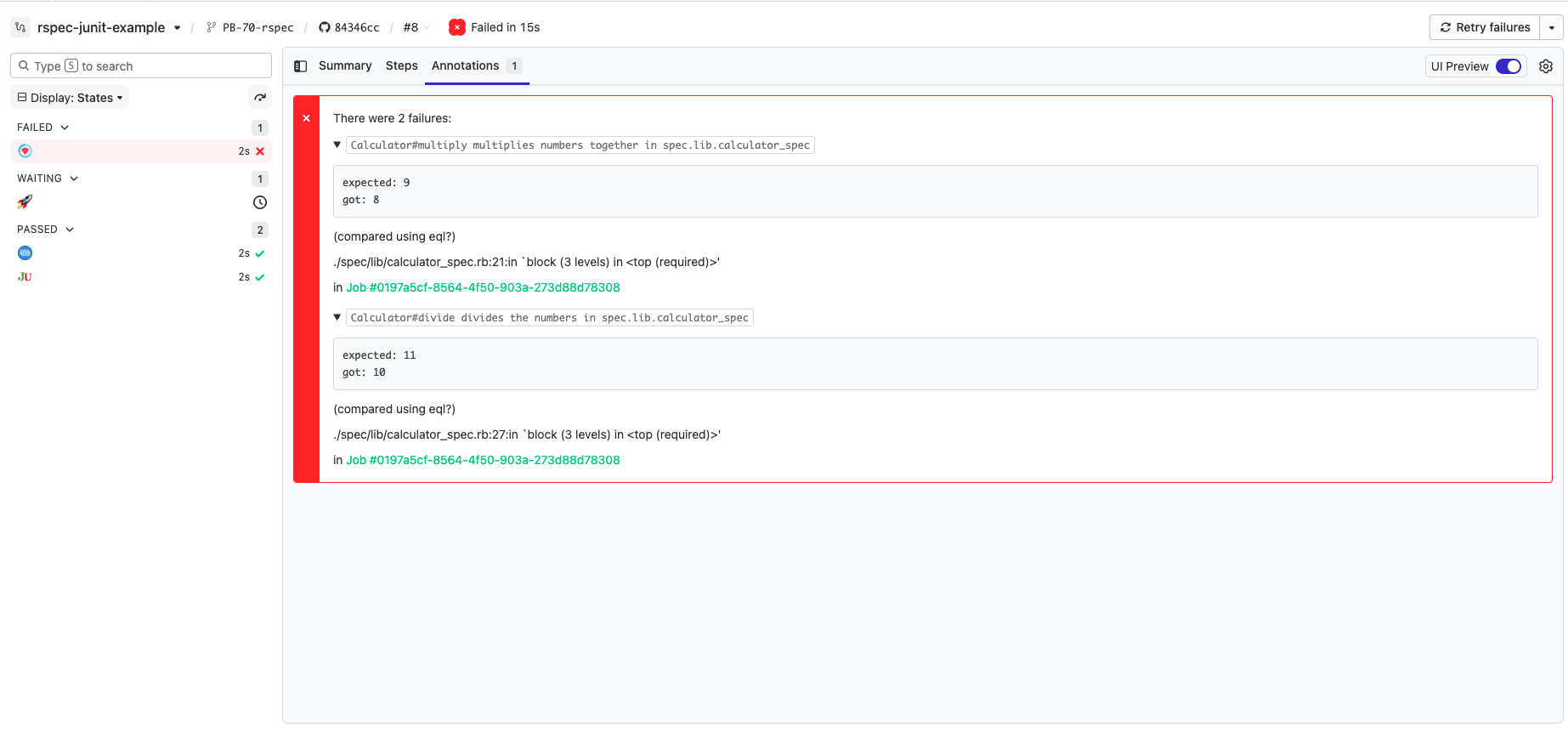
 ## How it works
This example demonstrates how to:
- Run RSpec tests that produce JUnit XML output
- Parse the JUnit report for failed tests
- Use the `buildkite-agent annotate` command to display those failures directly in the Buildkite UI
The annotation helps you quickly identify failing tests without digging through logs.
Test annotations use 2 features within Buildkite:
1. The `buildkite-agent annotate` command that allows you add arbiraty HTML and
Markdown to the top of a build page
2. A wait step with `continue_on_failure: true` which tells the pipeline to
continue in the event of a failed step
The `pipeline.yml` file can be seen here:
https://github.com/buildkite/rspec-junit-example/blob/master/.buildkite/pipeline.yml
Here's the first step:
```yaml
- label: ":rspec:"
artifact_paths: "tmp/rspec-*.xml"
commands:
- "bundle"
- "rspec --format progress --format RspecJunitFormatter --out tmp/rspec-$BUILDKITE_JOB_ID.xml"
plugins:
- docker#v1.0.0:
image: "ruby:2.4"
workdir: /app
```
This step runs our "rspec" command within a Ruby docker container, and stores
the JUnit XML data to an artifact at
"tmp/rspec-f59b96d7-5d75-42a6-ab9b-d4cea59db2b2.xml"
The next step:
```yaml
- wait: ~
continue_on_failure: true
```
Tells Buildkite that if there's a failure in the previous stage of the pipeline
(in this case, the "RSpec" tests) that it should continue the pipeline.
Usually, the `wait` step will fail the pipeline at this point since there was
an error - but this option changes that behaviour.
```yaml
- label: ":junit:"
commands:
- .buildkite/junit.sh
```
The last step is the one that parses our JUnit XML files, and turns them into a
Buildkite annotation. Here's the script that creates the actual annotation:
```bash
#!/bin/bash
set -euo pipefail
mkdir -p tmp
echo "--- :junit: Download the junits"
buildkite-agent artifact download tmp/rspec-*.xml tmp
echo "--- :junit::ruby: Processing the junits"
docker run --rm -v "$(pwd):/app" ruby:2.4 bash -c "cd /app && gem install nokogiri --quiet --silent && ruby /app/.buildkite/lib/junit.rb /app/tmp/*.xml" > tmp/annotation.md
echo "--- :buildkite: Creating annotation"
buildkite-agent annotate --context junit --style error < tmp/annotation.md
```
We wrote our JUnit XML parser in Ruby (you can write it in what ever language
you like), but all it does it parse all the `rspec-*.xml` files, grabs the
errors, and turns it some HTML that looks like this:
```html
## How it works
This example demonstrates how to:
- Run RSpec tests that produce JUnit XML output
- Parse the JUnit report for failed tests
- Use the `buildkite-agent annotate` command to display those failures directly in the Buildkite UI
The annotation helps you quickly identify failing tests without digging through logs.
Test annotations use 2 features within Buildkite:
1. The `buildkite-agent annotate` command that allows you add arbiraty HTML and
Markdown to the top of a build page
2. A wait step with `continue_on_failure: true` which tells the pipeline to
continue in the event of a failed step
The `pipeline.yml` file can be seen here:
https://github.com/buildkite/rspec-junit-example/blob/master/.buildkite/pipeline.yml
Here's the first step:
```yaml
- label: ":rspec:"
artifact_paths: "tmp/rspec-*.xml"
commands:
- "bundle"
- "rspec --format progress --format RspecJunitFormatter --out tmp/rspec-$BUILDKITE_JOB_ID.xml"
plugins:
- docker#v1.0.0:
image: "ruby:2.4"
workdir: /app
```
This step runs our "rspec" command within a Ruby docker container, and stores
the JUnit XML data to an artifact at
"tmp/rspec-f59b96d7-5d75-42a6-ab9b-d4cea59db2b2.xml"
The next step:
```yaml
- wait: ~
continue_on_failure: true
```
Tells Buildkite that if there's a failure in the previous stage of the pipeline
(in this case, the "RSpec" tests) that it should continue the pipeline.
Usually, the `wait` step will fail the pipeline at this point since there was
an error - but this option changes that behaviour.
```yaml
- label: ":junit:"
commands:
- .buildkite/junit.sh
```
The last step is the one that parses our JUnit XML files, and turns them into a
Buildkite annotation. Here's the script that creates the actual annotation:
```bash
#!/bin/bash
set -euo pipefail
mkdir -p tmp
echo "--- :junit: Download the junits"
buildkite-agent artifact download tmp/rspec-*.xml tmp
echo "--- :junit::ruby: Processing the junits"
docker run --rm -v "$(pwd):/app" ruby:2.4 bash -c "cd /app && gem install nokogiri --quiet --silent && ruby /app/.buildkite/lib/junit.rb /app/tmp/*.xml" > tmp/annotation.md
echo "--- :buildkite: Creating annotation"
buildkite-agent annotate --context junit --style error < tmp/annotation.md
```
We wrote our JUnit XML parser in Ruby (you can write it in what ever language
you like), but all it does it parse all the `rspec-*.xml` files, grabs the
errors, and turns it some HTML that looks like this:
```html
There were 3 failures:
Calculator#multiply multiplies numbers together in spec.lib.calculator_specexpected: 8
got: 6
(compared using eql?)
./spec/lib/calculator_spec.rb:21:in `block (3 levels) in '