# OpenTelemetry
[OpenTelemetry](https://opentelemetry.io/) is an open standard for instrumenting, processing and collecting observability data.
Buildkite supports sending [OpenTelemetry Traces](https://opentelemetry.io/docs/concepts/signals/traces/) directly from the Buildkite agent, and from the Buildkite dashboard, to your OTLP endpoint.
## OpenTelemetry tracing notification service
To provide a build-wide view of build performance, enable the OpenTelemetry Tracing Notification Service.
### Creating a new service
> 📘 Plan availability
> On the 2026 plans, the OpenTelemetry tracing notification service is an [Enterprise plan](https://buildkite.com/pricing/) feature. Organizations on legacy plans retain their existing access, including the ability to add new OpenTelemetry tracing notification services.
> This requirement does not apply to independently configured agent tracing.
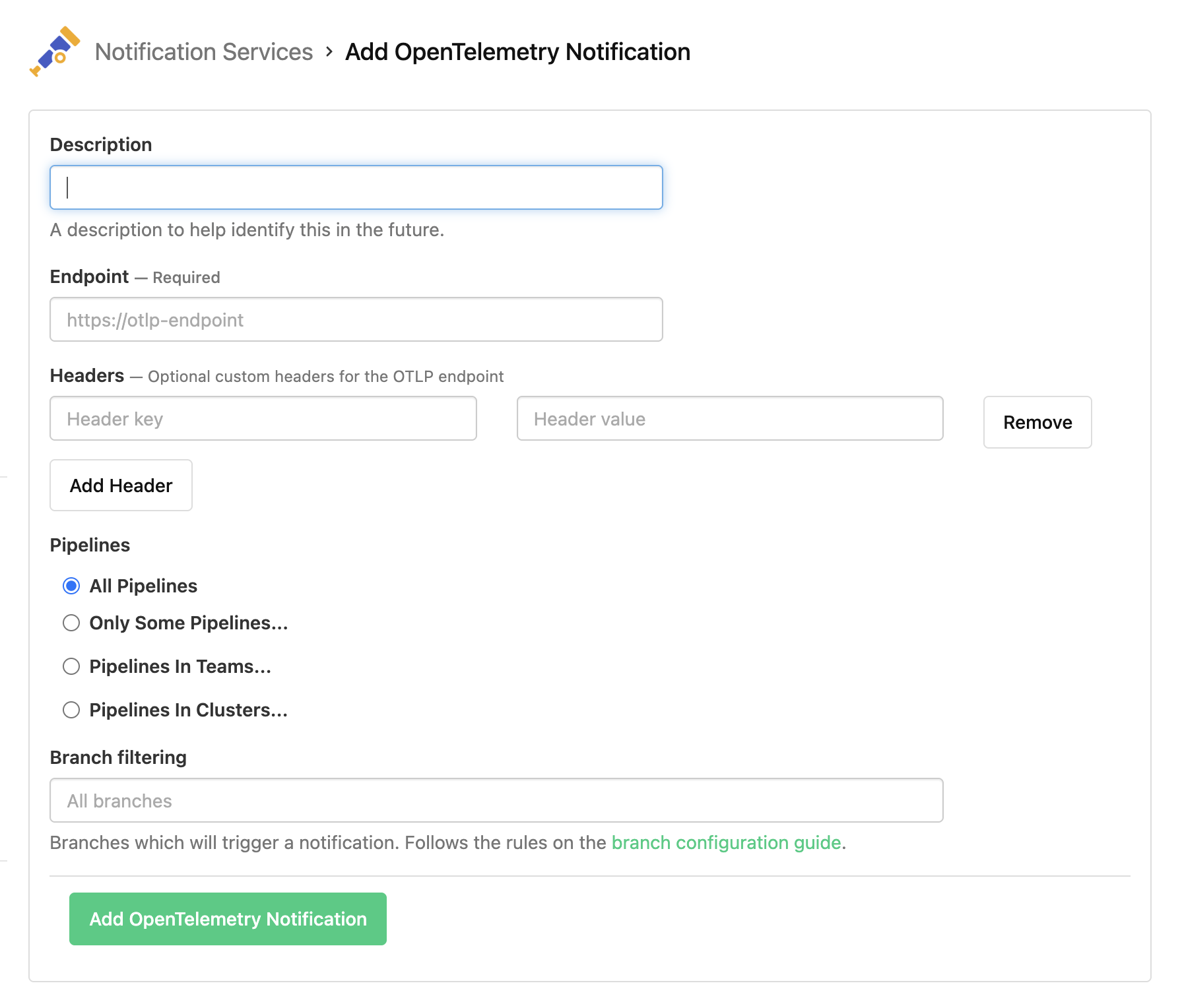
[Create a new OpenTelemetry Notification Service](https://buildkite.com/organizations/~/services/) in your organization's Notification Services settings (under Integrations).
### Endpoint
Please provide the base URL for your OTLP endpoint. Do not include the `/v1/traces` path as that is automatically appended by the Buildkite OpenTelemetry exporter.
#### Limitations
- We currently only support the [OTLP/HTTP](https://opentelemetry.io/docs/specs/otlp/#otlphttp) binary protobuf encoding.
- We currently only support sending [trace](https://opentelemetry.io/docs/concepts/signals/traces/) data, but may introduce other OpenTelemetry signals in the future.
- The endpoint must be accessible over the internet.
### Trace structure
OpenTelemetry traces from the Buildkite notification service follow a hierarchical span structure. All spans within a build share the same trace ID, allowing you to view the complete execution flow in your observability platform.
```
─ buildkite.build
└─ buildkite.build.stage
├─ buildkite.step
│ └─ buildkite.job
└─ buildkite.step.group
└─ buildkite.step
└─ buildkite.job
```
> 📘 Build stages
> Buildkite builds that have finished may be resumed at a later time, eg. by unblocking a `block` step, or manually retrying a failed job. To represent that in the OpenTelemetry format, we add an extra `buildkite.build.stage` span for each period of time that the build is in the `running`, `scheduled`, `canceling` or `failing` state. We also include a `buildkite.build.stage` span attribute to indicate how many times the build has been resumed.
The following attributes are included in OpenTelemetry traces from the Buildkite notification service:
#### Resource attributes
[Resource](https://opentelemetry.io/docs/concepts/resources/) attributes are included in all spans and provide context about the organization, pipeline, and build:
| Key | Description |
| ------------------------------- | ---------------------------------------------------- |
| `service.name` | Service name (configurable, defaults to `buildkite`) |
| `buildkite.organization.slug` | Organization slug |
| `buildkite.organization.name` | Organization name |
| `buildkite.organization.id` | Organization ID |
| `buildkite.pipeline.slug` | Pipeline slug |
| `buildkite.pipeline.name` | Pipeline name |
| `buildkite.pipeline.id` | Pipeline ID |
| `buildkite.pipeline.repo` | Pipeline repository URL |
| `buildkite.pipeline.graphql_id` | Pipeline GraphQL ID |
| `buildkite.pipeline.web_url` | Pipeline web URL |
| `buildkite.cluster.id` | Cluster ID (if pipeline uses a cluster) |
| `buildkite.cluster.name` | Cluster name (if pipeline uses a cluster) |
| `buildkite.cluster.graphql_id` | Cluster GraphQL ID (if pipeline uses a cluster) |
| `buildkite.build.pull_request.number` | Pull request number, as a string (if the build is associated with a pull request, including [GitHub merge queue](/docs/pipelines/tutorials/github-merge-queue) builds) |
| `buildkite.build.pull_request.url` | Pull request URL (if the source control provider can determine one) |
#### Span attributes
[Span attributes](https://opentelemetry.io/docs/concepts/signals/traces/#attributes) are specific to certain span types:
| Key | Spans | Description |
| ------------------------------------ | ---------------------------------------------------------------------------------- | ----------------------------------------------------------- |
| `buildkite.build.number` | All | Build number |
| `buildkite.build.commit` | All | Build commit SHA |
| `buildkite.build.message` | All | Build commit message |
| `buildkite.build.branch` | All | Build branch |
| `buildkite.build.source` | All | Build source (`ui`, `api`, `webhook`, etc.) |
| `buildkite.build.graphql_id` | All | Build GraphQL ID |
| `buildkite.build.web_url` | All | Build web URL |
| `buildkite.build.creator.id` | All (when build creator exists) | Build creator ID |
| `buildkite.build.creator.email` | All (when build creator exists) | Build creator email |
| `buildkite.build.creator.name` | All (when build creator exists) | Build creator name |
| `buildkite.build.creator.graphql_id` | All (when build creator exists) | Build creator GraphQL ID |
| `buildkite.build.state` | `buildkite.build`, `buildkite.build.stage` | Build state (running, passed, failed, etc.) |
| `buildkite.build.blocked_state` | `buildkite.build`, `buildkite.build.stage` (when blocked) | Build blocked state (if blocked) |
| `buildkite.build.stage` | `buildkite.build.stage`, `buildkite.job`, `buildkite.step.group`, `buildkite.step` | Build stage/phase number |
| `buildkite.step.id` | `buildkite.job`, `buildkite.step`, `buildkite.step.group` | Step ID |
| `buildkite.step.key` | `buildkite.job`, `buildkite.step`, `buildkite.step.group` | Step key |
| `buildkite.step.command` | `buildkite.job`, `buildkite.step` (command steps only) | Step command script |
| `buildkite.step.label` | `buildkite.job`, `buildkite.step`, `buildkite.step.group` | Step label |
| `buildkite.step.type` | `buildkite.step`, `buildkite.step.group` | Step type |
| `buildkite.step.matrix` | `buildkite.step`, `buildkite.step.group` (matrix steps) | Whether step uses matrix (true) |
| `buildkite.step.group.label` | `buildkite.step`, `buildkite.step.group` (group steps) | Group step label |
| `buildkite.step.group.key` | `buildkite.step`, `buildkite.step.group` (group steps) | Group step key |
| `buildkite.step.web_url` | `buildkite.step`, `buildkite.step.group` | Step web URL |
| `buildkite.job.id` | `buildkite.job` | Job ID |
| `buildkite.job.graphql_id` | `buildkite.job` | Job GraphQL ID |
| `buildkite.job.web_url` | `buildkite.job` | Job web URL |
| `buildkite.job.type` | `buildkite.job` | Job type (script, manual, waiter, etc.) |
| `buildkite.job.label` | `buildkite.job` | Job label/name |
| `buildkite.job.command` | `buildkite.job` | Job command |
| `buildkite.job.agent_query_rules` | `buildkite.job` | Job agent query rules |
| `buildkite.job.exit_status` | `buildkite.job` | Job exit status |
| `buildkite.job.passed` | `buildkite.job` | Whether job passed |
| `buildkite.job.soft_failed` | `buildkite.job` | Whether job soft failed |
| `buildkite.job.state` | `buildkite.job` | Job state |
| `buildkite.job.runnable_at` | `buildkite.job` | When job became runnable |
| `buildkite.job.started_at` | `buildkite.job` | When job started |
| `buildkite.job.finished_at` | `buildkite.job` | When job finished |
| `buildkite.job.wait_time_ms` | `buildkite.job` | Job wait time in milliseconds |
| `buildkite.job.concurrency_wait_time_ms` | `buildkite.job` (concurrency-group jobs only, omitted for incomplete waits and platform-limited jobs) | Time in milliseconds the job spent in its first concurrency-group wait (zero if the job was immediately promoted, omitted if the wait is incomplete or platform-limit wait cannot be separated) |
| `buildkite.job.priority.number` | `buildkite.job` | Job priority number |
| `buildkite.job.unblocked_by` | `buildkite.job` (when unblocked) | User who unblocked job (object with uuid, graphql_id, name) |
| `buildkite.job.retries_count` | `buildkite.job` | Integer. Number of retries preceding this attempt: `0` for the original job, `1` for its first retry, and so on. Includes both manual and automatic retries. |
| `buildkite.job.retried_in_job_id` | `buildkite.job` (when retried) | ID of retry job (if retried) |
| `buildkite.job.retry_source.job_id` | `buildkite.job` (when this attempt is a retry and the preceding job is available) | String. UUID of the immediately preceding job that was retried to create this attempt |
| `buildkite.job.retry_source.retry_type` | `buildkite.job` (when this attempt is a retry and the preceding job is available) | String. `manual` or `automatic`, describing the retry that created this attempt. `manual` includes retries triggered using the API, including automation |
| `buildkite.job.signal_reason` | `buildkite.job` (when terminated by signal) | Signal reason (if terminated by signal) |
| `buildkite.job.concurrency.group` | `buildkite.job` (when job uses a concurrency group) | Concurrency group name |
| `buildkite.job.concurrency.limit` | `buildkite.job` (when job uses a concurrency group) | Concurrency limit |
| `buildkite.job.matrix` | `buildkite.job` (matrix jobs only) | Job matrix configuration (JSON) |
| `buildkite.agent.name` | `buildkite.job` (when agent assigned) | Agent name |
| `buildkite.agent.id` | `buildkite.job` (when agent assigned) | Agent ID |
| `buildkite.agent.queue` | `buildkite.job` (when agent assigned) | Agent queue |
| `buildkite.agent.meta_data` | `buildkite.job` (when agent assigned) | Agent metadata |
| `error.type` | All (when error status) | Error type description |
The `buildkite.job.retry_source.job_id` and `buildkite.job.retry_source.retry_type` attributes are omitted for original jobs, and for retries where the preceding job is unavailable. No details about who triggered the retry are exported. The `buildkite.job.retried_in_job_id` attribute points in the opposite direction: to the next attempt, if one exists when the span is exported.
For example, after an automatic retry followed by a manual retry, the three attempts have `buildkite.job.retries_count` values of `0`, `1`, and `2`. The latter two attempts have `buildkite.job.retry_source.retry_type` values of `automatic` and `manual`, even if the last attempt passes.
Because `buildkite.job` spans require both a start and finish time to be exported, retries that never start are not represented in these attributes.
### Headers
Add any additional HTTP headers to the request. Depending on the destination, you may need to specify API keys or other headers to influence the behaviour of the downstream collector. Values for headers are always stored encrypted server-side.
Here are some common examples.
#### Bearer token
Key: `Authorization`
Value: `Bearer `
See [Bearer Token example](https://github.com/buildkite/opentelemetry-notification-service-examples/blob/main/collector-config/bearer-token-auth-debug.yml) for an example OpenTelemetry Collector configuration.
#### Basic auth
First, create a base64-encoded string of the username and password separated by a colon.
```bash
echo -n "${USER}:${PASSWORD}" | base64
```
Key: `Authorization`
Value: `Basic `
See [Basic Authentication example](https://github.com/buildkite/opentelemetry-notification-service-examples/blob/main/collector-config/basic-auth-debug.yml) for an example OpenTelemetry Collector configuration.
### Request log
> 📘 Private feature
> The Request Log for the OpenTelemetry Notification Service is in preview. Contact [Buildkite support](mailto:support@buildkite.com) to have it enabled for your organization.
Select **Load recent requests** to view the last 20 outbound trace export requests, which you can use to diagnose connectivity, authentication, and endpoint configuration issues. If the service hasn't sent any trace export requests yet, no requests are shown.
Each row displays the HTTP status code, request UUID, the exported span name (for example, `buildkite.job` or `buildkite.step`), and the request duration. Expanding a row shows:
- **Request**: Shows the request headers and body. Custom header values (such as API keys and bearer tokens) are redacted. The OTLP protobuf body is decoded into readable JSON, with trace and span IDs displayed in hexadecimal format.
- **Response**: Shows the response headers and body. If the collector returns a protobuf response (for example, a `partialSuccess` with rejected spans and an error message), the body is decoded into readable JSON.
If a request fails before it gets an HTTP response (for example, a connection timeout), the row shows `n/a` for the status code and no duration. Expanding the row still shows the **Request** tab as normal. The **Response** tab shows an **Error** message instead of response details.
### Honeycomb
Set the Endpoint to `https://api.honeycomb.io`, or `https://api.eu1.honeycomb.io ` if your Honeycomb team is in the EU instance.
Add the required header:
| Key | Value |
| ------------------ | --------------------- |
| `x-honeycomb-team` | `` |
For more information, see the honeycomb documentation: https://docs.honeycomb.io/send-data/opentelemetry/#using-the-honeycomb-opentelemetry-endpoint
### Datadog agent-less OpenTelemetry
> 🚧 Preview feature
> The Datadog OTLP traces intake endpoint is currently in preview. Contact your Datadog account representative to request access.
Set the endpoint to the OTLP traces intake base URL for your [Datadog site](https://docs.datadoghq.com/getting_started/site/). Do not include the `/v1/traces` path, as it is automatically appended. For example:
- US1: `https://otlp.datadoghq.com`
- US3: `https://otlp.us3.datadoghq.com`
- US5: `https://otlp.us5.datadoghq.com`
- EU1: `https://otlp.datadoghq.eu`
- AP1: `https://otlp.ap1.datadoghq.com`
Add the required headers:
| Key | Value |
| ---------------- | ------------------- |
| `dd-api-key` | `` |
| `dd-otlp-source` | `` |
The `dd-otlp-source` value is a specific identifier provided by Datadog after your organization is on the allowlist for the OTLP traces intake endpoint.
For more information, see [Datadog's OTLP traces intake documentation](https://docs.datadoghq.com/opentelemetry/setup/otlp_ingest/traces/).
### Datadog APM using OpenTelemetry collector
See [Bearer token Datadog example](https://github.com/buildkite/opentelemetry-notification-service-examples/blob/main/collector-config/bearer-token-auth-datadog.yml) for more information on forwarding traces to Datadog APM using the Datadog exporter.
### Computing metrics from OpenTelemetry traces
The OpenTelemetry collector can be used to process incoming trace spans and generate custom metrics on the fly using the [signaltometrics](https://github.com/open-telemetry/opentelemetry-collector-contrib/tree/main/connector/signaltometricsconnector) processor, which can be stored in metric stores like Prometheus or InfluxDB.
See [signaltometrics example](https://github.com/buildkite/opentelemetry-notification-service-examples/blob/main/collector-config/bearer-token-auth-signal-to-metrics-otlp.yml)
### OpenTelemetry collector
The OpenTelemetry collector is an open source service for collecting, exporting and processing telemetry signals.
See [collector-config](https://github.com/buildkite/opentelemetry-notification-service-examples/tree/main/collector-config) for examples of OpenTelemetry collector configuration.
If using the `otel/opentelemetry-collector-contrib` Docker image, you can configure the collector by mounting your config file at `/etc/otelcol-contrib/config.yaml` or by overriding the `command` to `--config=env:OTEL_CONFIG` and setting the `OTEL_CONFIG` environment variable to the _contents_ of your config file.
Consult the [Deployment](https://opentelemetry.io/docs/collector/deployment/) guide in the OpenTelemetry documentation for more information about hosting the collector.
The OpenTelemetry collector also supports many downstream data stores using [exporters](https://opentelemetry.io/docs/collector/configuration/#exporters) including StatsD, Prometheus, Kafka, Tempo, OTLP as well as many other observability tools and vendors. See the [OpenTelemetry registry](https://opentelemetry.io/ecosystem/registry/?s=&component=exporter&language=collector) for a more complete list of supported exporters.
#### References
- https://opentelemetry.io/docs/collector/
- https://github.com/open-telemetry/opentelemetry-collector
- https://github.com/open-telemetry/opentelemetry-collector-contrib
- https://opentelemetry.io/docs/collector/configuration/#authentication
- https://hub.docker.com/r/otel/opentelemetry-collector-contrib
#### Validating OpenTelemetry collector configuration
`otelcol validate` lets you validate your [collector configuration](https://opentelemetry.io/docs/collector/configuration/).
For example, to validate one of the example configuration files in [examples repository](https://github.com/buildkite/opentelemetry-notification-service-examples/tree/main/collector-config), say `basic-auth-debug.yml` you could run the following command:
```bash
docker run --rm -it -v $(pwd)/collector-config:/config otel/opentelemetry-collector-contrib validate --config=/config/basic-auth-debug.yml && echo "config valid"
```
Or for a configuration file like `bearer-token-auth-datadog.yml` that references environment variables, you would run the following command, noting the `-e` flags to provide the environment variables:
```bash
docker run --rm -e DD_API_KEY=abcd -e OTLP_HTTP_BEARER_TOKEN=example -it -v $(pwd)/collector-config:/config otel/opentelemetry-collector-contrib validate --config=/config/bearer-token-auth-datadog.yml && echo "config valid"
config valid
```
You can also use an online validation tool available at https://www.otelbin.io/.
### Propagating traces across triggered builds
When a build uses a [trigger step](/docs/pipelines/configure/step-types/trigger-step) to create another build, Buildkite Pipelines can automatically inject a W3C `TRACEPARENT` into the triggered build's environment. This links agent spans across builds in a single distributed trace in your observability platform.
Buildkite Pipelines resolves the `TRACEPARENT` to inject using the following precedence:
1. **Trigger step override**: If the trigger step sets `TRACEPARENT` in its `env:` block, that value is always used.
1. **Inherited TRACEPARENT**: If the parent build carries a valid `TRACEPARENT` in its environment—seeded via the [Create Build API](/docs/apis/rest-api/builds#create-a-build) or propagated from a build higher in the trigger chain—the triggered build inherits it and joins that existing trace.
1. **Derived TRACEPARENT**: If the parent build carries no valid `TRACEPARENT` but its pipeline is covered by an enabled OpenTelemetry notification service, a `TRACEPARENT` is derived from the parent build's UUID. This allows agent spans across internal trigger chains to share a trace even when no external trace context is provided.
For jobs that match an enabled OpenTelemetry notification service, the Buildkite agent uses the injected `TRACEPARENT` in its spans when OpenTelemetry tracing is enabled. See [OpenTelemetry tracing from Buildkite agent](#opentelemetry-tracing-from-buildkite-agent) for the required tracing configuration.
Joining Buildkite Pipelines control-plane spans across builds is a separate feature available on request. [Contact support](mailto:support@buildkite.com) to enable control-plane trace joining for your organization.
> 📘
> Setting `TRACEPARENT` in a triggered pipeline's top-level `env:` block has no effect on propagation. Set it in the trigger step's `env:` block instead.
### Propagating traces from external systems
> 📘 Preview feature
> Propagating an external trace into Buildkite Pipelines control-plane spans is available on request. [Contact support](mailto:support@buildkite.com) to have this enabled for your organization.
When you create a build using the REST API, you can pass a W3C [`traceparent`](https://www.w3.org/TR/trace-context/#traceparent-header) header to connect Buildkite Pipelines control-plane spans to your upstream distributed trace. When enabled, the `buildkite.build` span is nested under the caller's span. All control-plane spans (`buildkite.build`, `buildkite.job`, and `buildkite.step`) share the same trace ID as the upstream system.
To propagate your trace, include the `traceparent` header in your [create a build](/docs/apis/rest-api/builds#create-a-build) API request:
```bash
curl -H "Authorization: Bearer $TOKEN" \
-X POST "https://api.buildkite.com/v2/organizations/{org.slug}/pipelines/{pipeline.slug}/builds" \
-H "Content-Type: application/json" \
-H "traceparent: 00---01" \
-d '{
"commit": "HEAD",
"branch": "main",
"message": "My build"
}'
```
If the request body includes a `TRACEPARENT` value in the `env` object, that value takes priority over the HTTP header.
The Buildkite agent automatically propagates the trace through to agent-emitted spans when OpenTelemetry tracing is enabled. See [OpenTelemetry tracing from Buildkite agent](#opentelemetry-tracing-from-buildkite-agent).
## OpenTelemetry tracing from Buildkite agent
See [Tracing in the Buildkite agent](/docs/agent/self-hosted/monitoring-and-observability/tracing#using-opentelemetry-tracing).
### Automatic configuration through a cluster
Buildkite agents version 3.136.1 or later can automatically receive OpenTelemetry exporter settings from an OpenTelemetry notification service, without setting the flags and environment variables described below. Earlier agent versions don't receive these settings. To use this, associate the notification service with the [cluster](/docs/pipelines/security/clusters) the agents connect to. Learn more in [Automatically configure agent OpenTelemetry tracing for a cluster](/docs/pipelines/security/clusters/manage#automatically-configure-agent-opentelemetry-tracing-for-a-cluster).
Local OTLP destination settings, such as `OTEL_EXPORTER_OTLP_ENDPOINT`, take precedence over exporter settings received this way.
### Manual configuration with agent flags and environment variables
If you aren't using automatic configuration through a cluster, enable OpenTelemetry tracing and set the appropriate environment variables for your OpenTelemetry Collector. This propagates traces from the Buildkite Pipelines control plane through to the agent running the job.
| Flag | Environment variable | Value |
| -------------------------- | ---------------------------------- | -------------------------------------- |
| `--opentelemetry-tracing` | `BUILDKITE_OPENTELEMETRY_TRACING` | `true` |
| `--telemetry-service-name` | `BUILDKITE_TELEMETRY_SERVICE_NAME` | `buildkite-agent` (default) |
| | `OTEL_EXPORTER_OTLP_ENDPOINT` | `http://otel-collector:4317` |
| | `OTEL_EXPORTER_OTLP_HEADERS` | see the _Authentication_ section below |
| | `OTEL_EXPORTER_OTLP_PROTOCOL` | `grpc` (default) or `http/protobuf` |
| | `OTEL_RESOURCE_ATTRIBUTES` | `key1=value1,key2=value2` |
See [OpenTelemetry SDK documentation](https://opentelemetry.io/docs/specs/otel/configuration/sdk-environment-variables/) for more information on available environment variables.
#### Authentication
Authentication headers vary by provider. Below are the most commonly used authentication patterns. For specific requirements, consult the provider's documentation.
##### Bearer token
For [Honeycomb](https://docs.honeycomb.io/get-started/), [Lightstep](https://docs.lightstep.com/), and most other providers:
```bash
OTEL_EXPORTER_OTLP_HEADERS="Authorization=Bearer "
```
##### Basic authentication
[Grafana Cloud](https://grafana.com/docs/grafana-cloud/) requires Basic authentication with an instance ID and token, base64-encoded in the format `instance_id:token`:
```bash
OTEL_EXPORTER_OTLP_HEADERS="Authorization=Basic "
```
To encode the token in base64, run the following command:
```bash
echo -n "your-instance-id:your-token" | base64
```
##### Custom headers
Some providers (such as Honeycomb) also support custom headers:
```bash
OTEL_EXPORTER_OTLP_HEADERS="x-honeycomb-team="
```
##### Multiple headers
Multiple headers can be specified by separating values with commas:
```bash
OTEL_EXPORTER_OTLP_HEADERS="Authorization=Bearer ,x-custom-header=value"
```
### Propagating traces to Buildkite agents
The Buildkite agent automatically accepts trace context from the OpenTelemetry Notification service when OpenTelemetry tracing is enabled.
### Propagating traces from Buildkite agents to commands
Trace contexts are propagated automatically from a Buildkite agent to all its child processes. See [Tracing in the Buildkite agent](/docs/agent/self-hosted/monitoring-and-observability/tracing#using-opentelemetry-tracing-trace-context-propagation).
### Buildkite hosted agents
To export OpenTelemetry traces from Buildkite hosted agents, select an OpenTelemetry notification service in the cluster's **Settings**. Agents running version 3.136.1 or later receive the exporter settings when they register, without a custom image or local OTLP configuration. See [Automatically configure agent OpenTelemetry tracing for a cluster](/docs/pipelines/security/clusters/manage#automatically-configure-agent-opentelemetry-tracing-for-a-cluster) for setup instructions and credential security guidance.
Already registered agents keep their current configuration until they restart or reconnect. Local OTLP destination settings, including `OTEL_EXPORTER_OTLP_ENDPOINT` or `OTEL_EXPORTER_OTLP_HEADERS`, take precedence over the cluster configuration.
For manual configuration, you can instead use a custom Linux agent image with the following environment variables set. Create custom images in the cluster's **Settings**.
```dockerfile
# this is the same as --opentelemetry-tracing
ENV BUILDKITE_OPENTELEMETRY_TRACING="true"
# service name is configurable
ENV BUILDKITE_TELEMETRY_SERVICE_NAME="buildkite-agent"
# http/protobuf is also supported
ENV OTEL_EXPORTER_OTLP_PROTOCOL="grpc"
# the gRPC transport requires a port to be specified in the URL
ENV OTEL_EXPORTER_OTLP_ENDPOINT="http://otel-collector:4317"
# Authentication can vary by provider - see the authentication examples above
# Bearer is the most common method of Authentication:
ENV OTEL_EXPORTER_OTLP_HEADERS="Authorization=Bearer "
# For Grafana Cloud, use Basic Authentication instead:
ENV OTEL_EXPORTER_OTLP_HEADERS="Authorization=Basic "
```