# Deployment visibility with Backstage
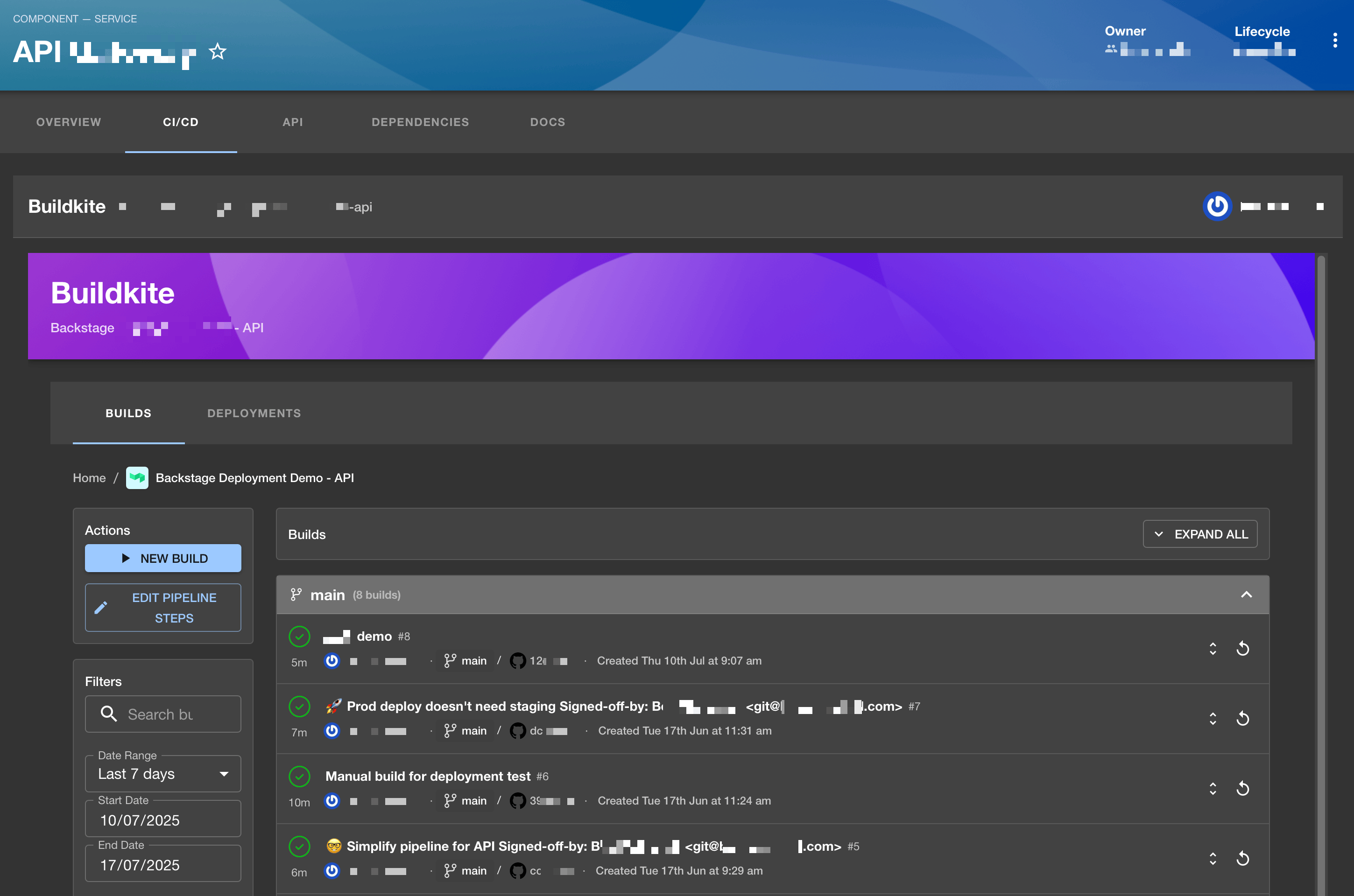
[Backstage](https://backstage.io/) is an open source framework for building developer portals that provide unified visibility into your infrastructure's tools, services, and documentation. By integrating your Buildkite pipelines with Backstage using the [Buildkite plugin for Backstage](/docs/pipelines/integrations/other/backstage), you can monitor the status of your pipelines and manage their builds from a single interface.
## Overview
The Buildkite plugin for Backstage transforms how your team manages deployments by providing:
- **Centralized pipeline monitoring**: view Buildkite pipeline status alongside your [Backstage Service Catalog](https://backstage.io/docs/features/software-catalog/), eliminating the need to switch between multiple tools.
- **Real-time build tracking**: monitor build progress with automatic status updates.
- **Build management**: trigger rebuilds directly from Backstage.
- **Detailed build information**: access build logs, timing metrics, and commit context.
## Setting up deployment visibility
To use Backstage for deployment visibility with Buildkite, you'll need to have:
- Admin access to both your Buildkite organization and Backstage instance.
- The [Buildkite plugin for Backstage](/docs/pipelines/integrations/other/backstage) [installed](/docs/pipelines/integrations/other/backstage#installation) and [configured](/docs/pipelines/integrations/other/backstage#plugin-configuration).
- A valid [Buildkite API access token](/docs/apis/managing-api-tokens) with the following permissions:
* `read_pipelines`
* `read_builds`
* `read_user`
* `write_builds` (for rebuild functionality)
- Existing deployment pipelines in Buildkite that you want to monitor.
- Deployment components annotated in your [Backstage Software Catalog](https://backstage.io/docs/features/software-catalog/).
- Your deployment pipelines configured for optimal visibility.
### Annotating deployment components
Connect your Backstage components to their corresponding Buildkite deployment pipelines by adding annotations to your [`catalog-info.yaml`](https://backstage.io/docs/features/software-catalog/descriptor-format/) files:
```yaml
apiVersion: backstage.io/v1alpha1
kind: Component
metadata:
name: my-production-service
annotations:
buildkite.com/pipeline-slug: my-org/production-deployment-pipeline
tags:
- production
- deployment
spec:
type: service
owner: platform-team
lifecycle: production
```
Note that the `pipeline-slug` must exactly match your Buildkite organization's slug and the pipeline slug.
It is also recommended to use descriptive tags to categorize and filter deployment components (for example, `production`or `deployment`).
### Organizing deployment pipelines
To maximize deployment visibility of your Buildkite pipelines in Backstage:
- Use consistent naming conventions for deployment pipelines (for example, `service-name-env-deploy`).
- Tag deployment builds with environment information using [build metadata](/docs/pipelines/configure/build-meta-data).
- Set up deployment-specific badges to visually identify deployment status.
## Monitoring your deployments
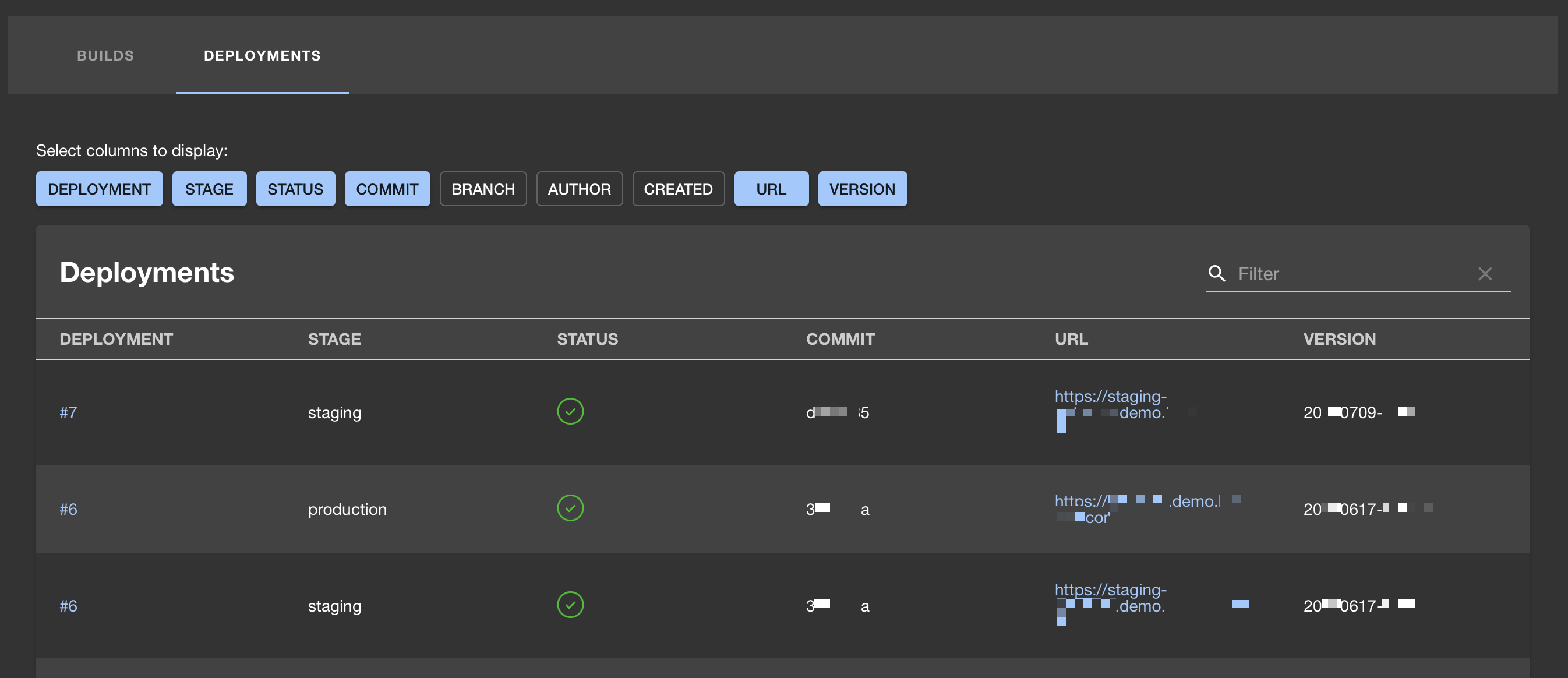
When properly configured, the Backstage integration provides environment overview, deployment metrics, and build artifact tracking.
## Best practices for deployment visibility
The following are some tips for optimizing your workflow in Buildkite Pipelines and Backstage for the best integration results.
### Structure your pipelines
When naming your pipelines, use descriptive and consistent naming conventions that can scale:
```
my-service-ci # Continuous integration
my-service-deploy-dev # Development deployment
my-service-deploy-prod # Production deployment
```
### Use deployment-specific metadata
Add metadata context to the configuration file of your deployment pipelines:
```yaml
steps:
- label: ":rocket: Deploy to Production"
command: deploy.sh
metadata:
environment: "production"
version: "$BUILDKITE_TAG"
deployed_by: "$BUILDKITE_BUILD_CREATOR"
```
### Implement deployment gates
Use [block steps](/docs/pipelines/configure/step-types/block-step) to create approval gates visible in Backstage:
```yaml
steps:
- block: ":hand: Deployment Approval"
prompt: "Deploy to production?"
fields:
- text: "Release notes"
key: "release-notes"
required: true
```
### Track deployment events
Configure your pipelines to emit deployment events that Backstage can consume:
```bash
# In your deployment script
buildkite-agent annotate "Deployed version ${VERSION} to ${ENVIRONMENT}" \
--style "success" \
--context "deployment-${ENVIRONMENT}"
```
## Monitoring and alerting
Use Backstage's deployment visibility to:
- Configure notifications for failed deployments to set up deployment alerts.
- Generate regular deployment performance reports.
- Monitor service level objectives for deployments.
## Troubleshooting deployment visibility
This section covers some common issues and the proposed mitigations for integration between Buildkite Pipelines and Backstage using the [Buildkite plugin for Backstage](/docs/pipelines/integrations/other/backstage).
### API access token issues
If you are experiencing authentication errors, verify that:
- Your [Buildkite API access token](/docs/apis/managing-api-tokens):
* Has [all required permissions](#setting-up-deployment-visibility).
* Is correctly set in your environment variables.
- The [proxy configuration in `app-config.yaml`](/docs/pipelines/integrations/other/backstage#plugin-configuration-add-proxy-configuration) is correct.
### Missing Buildkite deployments
If your Buildkite deployments aren't appearing in Backstage:
- Check that the annotation format is correct: `organization-slug/pipeline-slug`.
- Verify that the pipeline slug matches exactly what's shown in your Buildkite URL.
- Verify that your pipeline annotation exactly matches the deployment pipeline you're expecting to see.
- Ensure the component has been properly registered in your [Backstage Software Catalog](https://backstage.io/docs/features/software-catalog/).
- Ensure the builds exist within the selected time range.
- Confirm that all filters are set correctly.
- Check that your Buildkite API access token has [sufficient permissions](/docs/apis/managing-api-tokens#token-scopes) (`read_pipelines`, `read_builds`, `read_user`, and `write_builds`, for rebuild functionality).
- Confirm your deployment builds are [properly tagged with deployment metadata](/docs/pipelines/deployments/deployment-visibility-with-backstage#best-practices-for-deployment-visibility-use-deployment-specific-metadata).
### Incomplete deployment information
To improve deployment data quality and make the deployment information complete:
- Add comprehensive [build metadata](/docs/pipelines/integrations/other/backstage#deployment-tracking-using-the-metadata) and [deployment metadata](/docs/pipelines/deployments/deployment-visibility-with-backstage#best-practices-for-deployment-visibility-use-deployment-specific-metadata).
- Use consistent environment naming (for example, `production`, `staging`, `dev`) and avoid variations like, for example, `prod-east` and `production-us-east-1` for the same environment type.
- Include version information in all deployment builds.
### Missing real-time updates
If your Buildkite deployments show up in Backstage correctly, but you are experiencing issues with the synchronization of updates, do the following:
- Verify that your web browser tab is active as the updates pause in background tabs.
- Check your network connectivity.
- Ensure that the Buildkite API access token you are using hasn't expired.
### Build logs are not loading
If you are experiencing an issue with loading logs from Buildkite deployments in Backstage:
- Check that the build exists and is accessible.
- Ensure the Buildkite API access token has `read_builds` permission.
- Verify that your [proxy configuration](/docs/pipelines/integrations/other/backstage#plugin-configuration-add-proxy-configuration) can handle log requests.