# Manual test selection
Manual test selection runs only the tests you list, instead of the full test suite. You decide which tests a build needs, for example, the specs related to the files changed on a feature branch, and the Test Engine Client ([bktec](/docs/pipelines/configure/tests/bktec/installing-and-using-the-client)) passes that list to Test Engine with the test plan request.
bktec still discovers the full suite and sends it to Test Engine as the set of _candidates_. Test Engine keeps the candidates that match your list, then splits the selected tests across your parallel jobs using historical timing data. You can [review the selection on the build's Orchestration page](#review-selection-in-orchestration).
Manual test selection requires bktec v3.2.0 or later, and works with every runner that bktec supports.
## Set up manual test selection
The recommended setup uses two steps. The first step generates the list of tests to run and saves it as an [artifact](/docs/pipelines/configure/artifacts). The second step downloads the list and passes it to `bktec run`, so that every parallel job uses the same list.
1. Create a `.buildkite/select-tests.sh` script that writes the tests to run to `tests-to-run.txt`, one path per line. The following example selects the RSpec spec files changed on the current branch. Replace the `git diff` command with your own selection logic:
```bash
#!/usr/bin/env bash
set -euo pipefail
base_branch="${BUILDKITE_PULL_REQUEST_BASE_BRANCH:-main}"
git fetch origin "${base_branch}"
# Select the spec files that were added or changed on this branch
git diff --name-only --diff-filter=d --relative \
"origin/${base_branch}...HEAD" -- '*_spec.rb' > tests-to-run.txt
```
List paths relative to the directory that bktec runs in, without a location prefix. If bktec runs in a subdirectory, such as `backend` in a monorepo, replace `--relative` with `--relative=backend`.
1. Create a `.buildkite/run-selected-tests.sh` script that downloads the list and runs bktec with the `manual` selection strategy:
```bash
#!/usr/bin/env bash
set -euo pipefail
buildkite-agent artifact download tests-to-run.txt .
if ! grep -q '[^[:space:]]' tests-to-run.txt; then
echo "No tests selected for this build"
exit 0
fi
"${BUILDKITE_TEST_ENGINE_CLIENT_PATH:-bktec}" run \
--selection-strategy manual \
--selection-param "files=$(cat tests-to-run.txt)"
```
Keep the double quotes around the `--selection-param` value, so that the newlines between paths are preserved.
1. Add both steps to your `pipeline.yml` file. Use the [Tests Buildkite plugin](https://buildkite.com/resources/plugins/buildkite-plugins/tests-buildkite-plugin/) on the test step to install bktec, authenticate with OIDC, and upload results:
```yaml
steps:
- label: "Select tests"
key: "select-tests"
command: ".buildkite/select-tests.sh"
artifact_paths: "tests-to-run.txt"
- label: "Run selected tests"
depends_on: "select-tests"
command: ".buildkite/run-selected-tests.sh"
parallelism: 10
plugins:
- tests#v1.0.0:
test-runner: rspec
result-path: tmp/rspec-result.json
```
If none of the listed paths match a test that bktec discovers, bktec runs no tests. When fewer tests are selected than there are parallel jobs, the remaining jobs exit without running tests. To size the step to the selected tests, [use dynamic parallelism](#use-manual-selection-with-dynamic-parallelism).
## Use manual selection with dynamic parallelism
To size the test step to the selected tests, pass the same selection flags to `bktec plan`, and set a maximum parallelism and target time. bktec creates the test plan, then uploads the test step with the parallelism needed to reach the target time. Learn more in [Dynamic parallelism](/docs/pipelines/configure/tests/bktec/installing-and-using-the-client#dynamic-parallelism).
```yaml
steps:
- label: "Select tests"
key: "select-tests"
command: ".buildkite/select-tests.sh"
artifact_paths: "tests-to-run.txt"
- label: "Plan selected tests"
key: "plan-selected-tests"
depends_on: "select-tests"
command: ".buildkite/plan-selected-tests.sh"
plugins:
- tests#v1.0.0:
test-runner: rspec
result-path: tmp/rspec-result.json
max-parallelism: 10
target-time: 2m
```
{: codeblock-file="pipeline.yml"}
The planning script runs `bktec plan` with the selected tests:
```bash
#!/usr/bin/env bash
set -euo pipefail
buildkite-agent artifact download tests-to-run.txt .
if ! grep -q '[^[:space:]]' tests-to-run.txt; then
echo "No tests selected for this build"
exit 0
fi
"${BUILDKITE_TEST_ENGINE_CLIENT_PATH:-bktec}" plan \
--selection-strategy manual \
--selection-param "files=$(cat tests-to-run.txt)" \
--pipeline-upload .buildkite/selected-tests-template.yml
```
{: codeblock-file=".buildkite/plan-selected-tests.sh"}
The pipeline template runs the `.buildkite/run-selected-tests.sh` script from the [setup steps](#set-up-manual-test-selection) with the plan that `bktec plan` created:
```yaml
steps:
- label: "Run selected tests"
command: ".buildkite/run-selected-tests.sh"
depends_on: "plan-selected-tests"
parallelism: ${BUILDKITE_TEST_ENGINE_PARALLELISM}
plugins:
- tests#v1.0.0:
test-runner: rspec
result-path: tmp/rspec-result.json
plan-identifier: ${BUILDKITE_TEST_ENGINE_PLAN_IDENTIFIER}
```
{: codeblock-file=".buildkite/selected-tests-template.yml"}
## Check the selection in the job log
bktec prints a planning summary at the start of each job, showing the selection this job requested and the selection that Test Engine applied:
```
Requested
Selection strategy: manual
files = <3 nonblank entries; 92 bytes>
Parallelism: 10 (fixed)
Selection summary
Applied strategy: manual
Selected: 3 of 412 test selectors (0.7%)
Estimated compute: 72.4s of 2304s (3.1%)
Candidate timing coverage: 96%
```
Test Engine caches each test plan, so retrying a job reuses the original selection, even if the list has changed. The summary then shows `Using existing plan`. Start a new build to select tests again.
## Git metadata
When a selection strategy is set, bktec also sends git metadata with the test plan request, including the full `git diff` against the base branch, which contains your source changes. Manual selection doesn't need this metadata. To turn it off, set `BUILDKITE_TEST_ENGINE_COLLECT_GIT_METADATA` to `false` in the pipeline-level `env`.
## Review selection in Orchestration
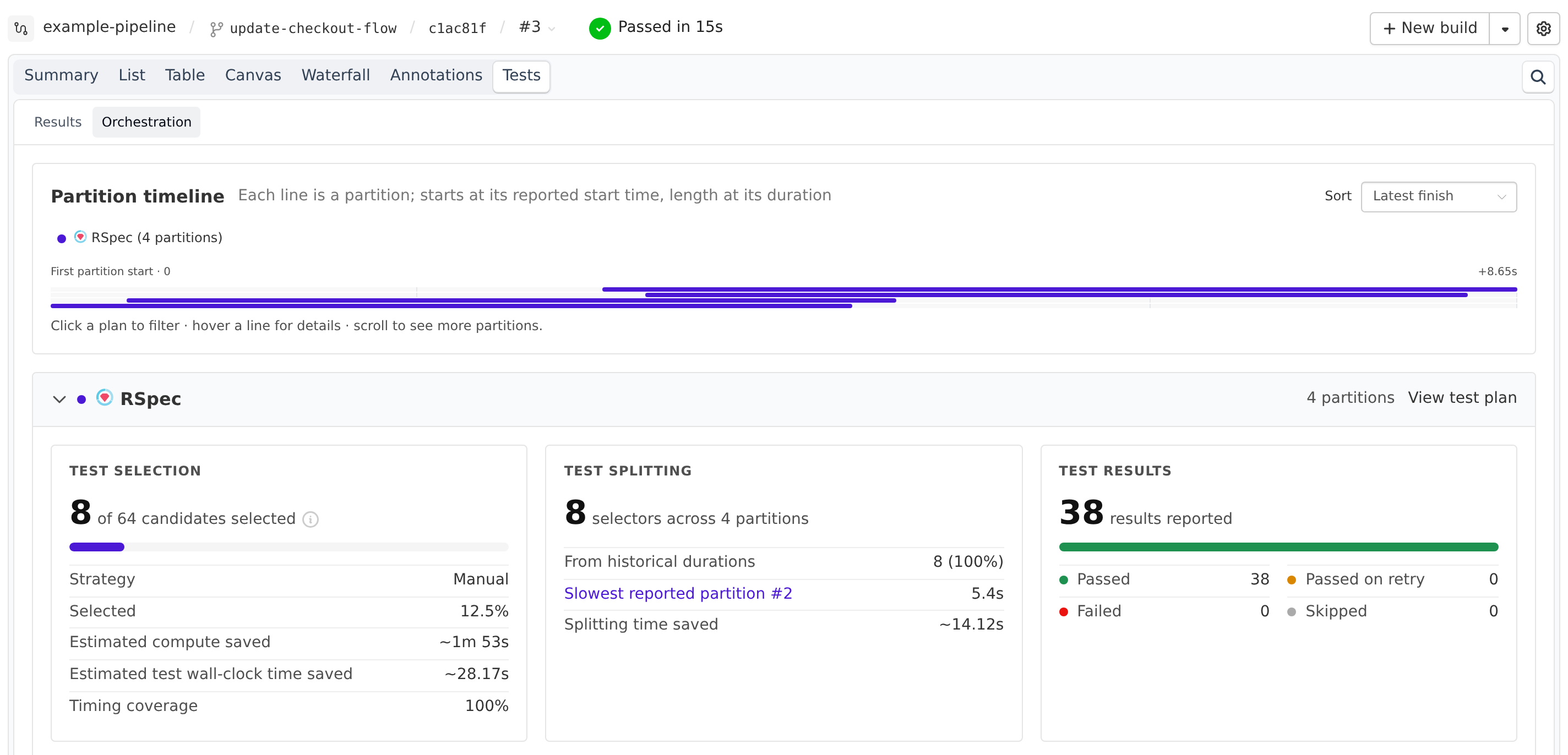
Each build page's **Tests** tab includes an **Orchestration** page, which shows how bktec selected and split the tests in each test plan used in the build. To open it, select the build's **Tests** tab, then select **Orchestration**. A test plan appears once a job using it finishes.
The estimated time saved rows on the **Test selection** card only appear when at least half of the candidates have timing history. **Estimated test wall-clock time saved** only appears for steps with a fixed parallelism.
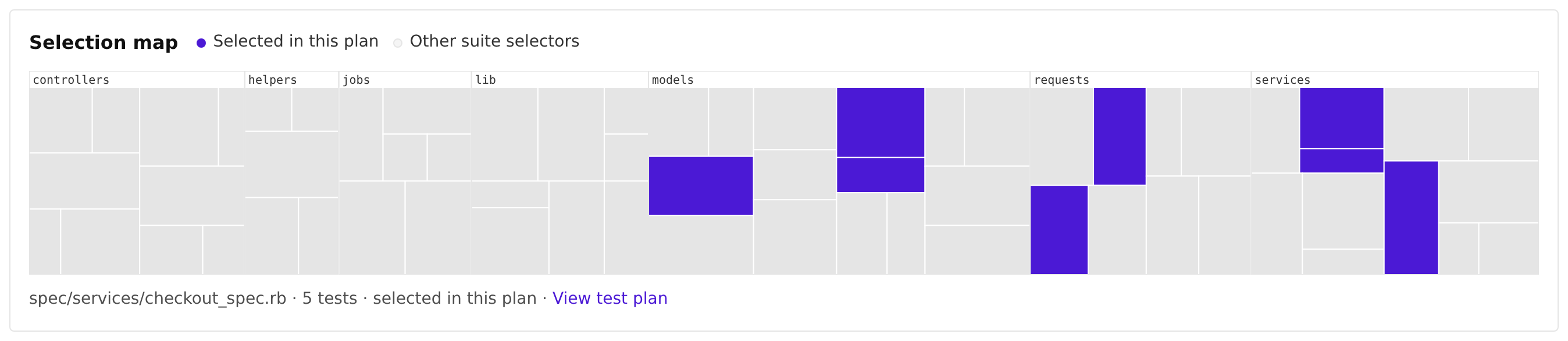
When at least one test was selected, the panel also shows a **Selection map** of the suite's test files, with the selected files in purple. Plans that mix test files or selectors with individual tests show **Coverage map unavailable for plans with mixed test formats** instead.