# Using conditionals
Using conditionals, you can run builds or steps only when specific conditions are met. Define [boolean conditions using C-like expressions](#variable-and-syntax-reference).
You can define conditionals at the step level in your `pipeline.yml` or at the pipeline level in your Buildkite version control provider settings.
## Conditionals in pipelines
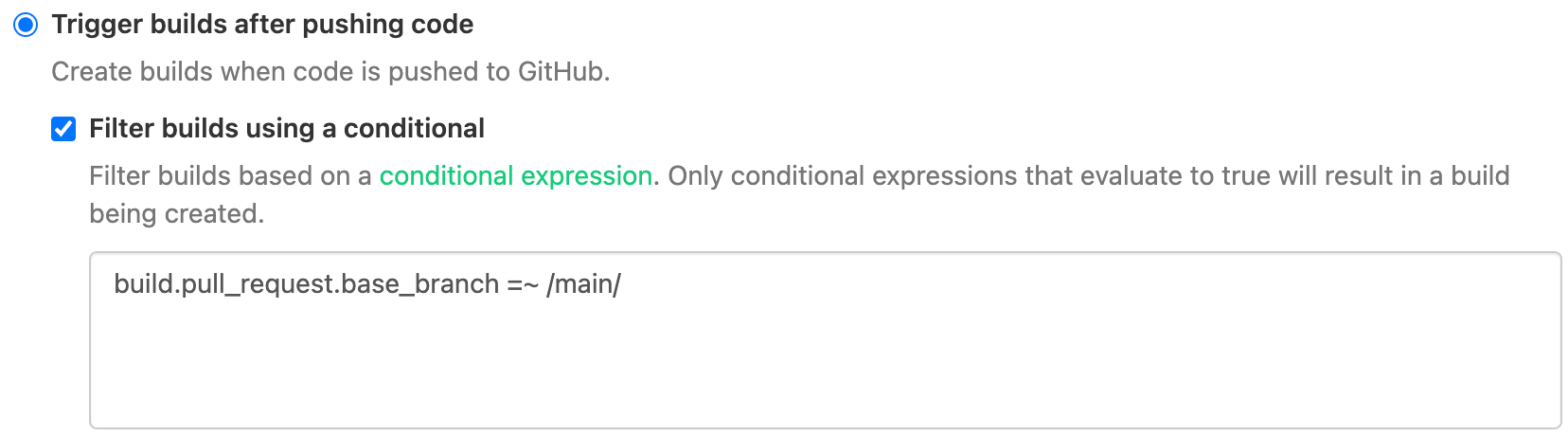
You can have complete control over when to trigger pipeline builds by using conditional expressions to filter incoming webhooks. You need to define conditionals in the pipeline's **Settings** page for your repository provider to run builds only when expressions evaluate to `true`. For example, to run only when a pull request is targeting the main branch:
Pipeline-level build conditionals are evaluated before any other build trigger settings. If both a conditional and a branch filter are present, both filters must pass for a build to be created – first the pipeline-level limiting filter and then the conditional filter.
Conditionals are supported in [Bitbucket](/docs/pipelines/source-control/bitbucket), [Bitbucket Server](/docs/pipelines/source-control/bitbucket-server), [GitHub](/docs/pipelines/source-control/github), [GitHub Enterprise](/docs/pipelines/source-control/github-enterprise), [GitLab](/docs/pipelines/source-control/gitlab) (including GitLab Community and GitLab Enterprise), and [Origin](/docs/pipelines/source-control/origin). You can add a conditional on your pipeline's **Settings** page in the Buildkite interface or using the REST API.
> 📘 Evaluating conditionals
> Conditional expressions are evaluated at pipeline upload, not at step runtime.
## Conditionals in steps
Use the `if` attribute in your step definition to conditionally run a step.
In the below example, the `tests` step will only be run if the build message does not contain the string "skip tests".
```yml
steps:
- command: ./scripts/tests.sh
label: tests
if: build.message !~ /skip tests/
```
{: codeblock-file="pipeline.yml"}
The `if` attribute can be used in any type of step, and with any of the supported expressions and parameters. However, it cannot be used at the same time as the `branches` attribute.
Be careful when defining conditionals within YAML. Many symbols have special meaning in YAML and will change the type of a value. You can avoid this by quoting your conditional as a string.
```yml
steps:
- command: ./scripts/tests.sh
label: tests
if: "!build.pull_request.draft"
```
{: codeblock-file="pipeline.yml"}
Multi-line conditionals can be added with the `|` character, and avoid the need for quotes:
```yml
steps:
- command: ./scripts/tests.sh
label: tests
if: |
// Do not run when the message contains "skip tests"
// and
// Only run on feature branches
build.message !~ /skip tests/ &&
build.branch =~ /^feature\//
```
{: codeblock-file="pipeline.yml"}
Since `if` conditions are evaluated at the time of the pipeline upload, it's not possible to use the `if` attribute to conditionally run a step based on the result of another step.
> 🚧 Plugin execution and shell conditionals
> A shell `if` statement inside a step's `command` controls only the commands inside that statement. It does not control whether the step's plugins run. [Plugin hooks](/docs/agent/hooks#job-lifecycle-hooks) such as `environment` and `pre-command` run before the step's command, so they can execute even when the shell condition is false.
>
> This is different from the YAML `if` attribute on a step, which Buildkite Pipelines evaluates when the pipeline is uploaded to decide whether the step runs.
>
> To conditionally run a step and its plugins, use the step's YAML `if` attribute. For conditions that can only be checked at runtime, conditionally upload the steps containing the plugins using a [dynamic pipeline upload](#conditionally-running-plugins-with-dynamic-uploads).
To run a step based on the result of another step, upload a new pipeline based on the `if` condition set up in the [command step](/docs/pipelines/configure/step-types/command-step) like in the example below:
```yml
steps:
- label: "Validation check"
command: ./scripts/validation_tests.sh
key: "validation-check"
- label: "Run regression only if validation check is passed"
depends_on: "validation-check"
command: |
if [ $$(buildkite-agent step get "outcome" --step "validation-check") == "passed" ]; then
cat <<- YAML | buildkite-agent pipeline upload
steps:
- label: "Run Regression"
command: ./scripts/regression_tests.sh
YAML
fi
```
{: codeblock-file="pipeline.yml"}
## Conditional notifications
To trigger [Build notifications](/docs/pipelines/configure/notify#conditional-notifications) only under certain conditions, use the same `if` syntax as in your [Steps](/docs/pipelines/configure/conditionals#conditionals-in-steps).
For example, the following email notification will only be triggered if the build passes:
```yaml
notify:
- email: "dev@acmeinc.com"
if: build.state == "passed"
```
{: codeblock-file="pipeline.yml"}
Note that conditional expressions on the build state are only available at the pipeline level. You can't use them at the step level.
## Conditionally running plugins with group steps
To apply one condition to several steps and their plugins, put the steps in a [group](/docs/pipelines/configure/step-types/group-step) and set the YAML `if` attribute on the group.
```yaml
steps:
- group: "Docker Build"
if: build.env("DOCKER_PASSWORD") != null
steps:
- label: "Build and push image"
command: "docker build -t myapp ."
plugins:
- docker#v5.13.0:
image: "docker:latest"
- docker-login#v3.0.0:
username: myuser
password-env: DOCKER_PASSWORD
```
{: codeblock-file="pipeline.yml"}
## Conditionally running plugins with dynamic uploads
For complex conditional logic, use dynamic pipeline uploads with conditional logic running in a shell script before the steps with plugins are uploaded:
```yaml
steps:
- label: "Docker Build"
command: |
if [ -n "$${DOCKER_PASSWORD}" ]; then
echo "Docker credentials found, uploading build steps..."
cat < 🚧 Formatting regular expressions
> When using regular expressions in conditionals, the regular expression must be on the right hand side, and the use of the `$` anchor symbol must be escaped to avoid [environment variable substitution](/docs/agent/cli/reference/pipeline#environment-variable-substitution). For example, to match branches ending in `"/feature"` the conditional statement would be `build.branch =~ /\/feature$$/`.
> 🚧 Unsupported regular expression syntax
> Regular expressions in conditionals do not support lookahead, lookbehind, or backreferences such as `\1`.
>
> To exclude a value, combine a match with a separate `!~` check: `build.branch =~ /^release/ && build.branch !~ /-rc$$/`.
>
> Patterns are limited to 4096 characters and repetition counts of 100 or fewer. Other unsupported constructs include atomic groups, possessive quantifiers, named groups (use `(...)` instead), and conditional expressions within a pattern.
### Variables
The following variables are supported by the `if` attribute. Note that you cannot use [Build Meta-data](/docs/pipelines/configure/build-meta-data) in conditional expressions.
> 🚧 Unverified commits
> Note that GitHub accepts unsigned commits, including information about the commit author and passes them along to webhooks, so you should not rely on these for authentication unless you are confident that all of your commits are trusted.
| `build.author.email` | `String` | The **[unverified](#unverified-commits)** email address of the user who authored the build's commit |
| --- | --- | --- |
| `build.author.id` | `String` | The **[unverified](#unverified-commits)** ID of the user who authored the build's commit |
| `build.author.name` | `String` | The **[unverified](#unverified-commits)** name of the user who authored the build's commit |
| `build.author.teams` | `Array` | An **[unverified](#unverified-commits)** array of the team/s which the user who authored the build's commit is a member of |
| `build.branch` | `String` | The branch on which this build is created from |
| `build.commit` | `String` | The commit number of the commit the current build is based on |
| `build.creator.email` | `String` | The email address of the user who created the build. The value differs depending on how the build was created: **Buildkite dashboard:** Set based on who manually created the build. **GitHub webhook:** Set from the **[unverified](#unverified-commits)** HEAD commit. **Webhook:** Set based on which user is attached to the API Key used. For conditionals to use this variable, the user set must be a verified Buildkite user. |
| `build.creator.id` | `String` | The ID of the user who created the build. The value differs depending on how the build was created: **Buildkite dashboard:** Set based on who manually created the build. **GitHub webhook:** Set from the **[unverified](#unverified-commits)** HEAD commit. **Webhook:** Set based on which user is attached to the API Key used. For conditionals to use this variable, the user set must be a verified Buildkite user. |
| `build.creator.name` | `String` | The name of the user who created the build. The value differs depending on how the build was created: **Buildkite dashboard:** Set based on who manually created the build. **GitHub webhook:** Set from the **[unverified](#unverified-commits)** HEAD commit. **Webhook:** Set based on which user is attached to the API Key used. For conditionals to use this variable, the user set must be a verified Buildkite user. |
| `build.creator.teams` | `Array` | An array of the teams which the user who created the build is a member of. The value differs depending on how the build was created: **Buildkite dashboard:** Set based on who manually created the build. **GitHub webhook:** Set from the **[unverified](#unverified-commits)** HEAD commit. **Webhook:** Set based on which user is attached to the API Key used. For conditionals to use this variable, the user set must be a verified Buildkite user. |
| `build.env()` | `String`, `null` | This function returns the value of the environment passed as the first argument if that variable is set, or `null` if the environment variable is not set. `build.env()` works with variables you've defined, and the following `BUILDKITE_*` variables: `BUILDKITE_BRANCH` `BUILDKITE_TAG` `BUILDKITE_MESSAGE` `BUILDKITE_COMMIT` `BUILDKITE_PIPELINE_SLUG` `BUILDKITE_PIPELINE_NAME` `BUILDKITE_PIPELINE_ID` `BUILDKITE_ORGANIZATION_SLUG` `BUILDKITE_ORIGIN_EVENT` `BUILDKITE_ORIGIN_REVIEW_ID` `BUILDKITE_ORIGIN_REVIEW_VERDICT` `BUILDKITE_TRIGGERED_FROM_BUILD_ID` `BUILDKITE_TRIGGERED_FROM_BUILD_NUMBER` `BUILDKITE_TRIGGERED_FROM_BUILD_PIPELINE_SLUG` `BUILDKITE_REBUILT_FROM_BUILD_ID` `BUILDKITE_REBUILT_FROM_BUILD_NUMBER` `BUILDKITE_REPO` `BUILDKITE_PULL_REQUEST` `BUILDKITE_PULL_REQUEST_BASE_BRANCH` `BUILDKITE_PULL_REQUEST_LABELS` `BUILDKITE_PULL_REQUEST_REPO` `BUILDKITE_MERGE_QUEUE_BASE_BRANCH` `BUILDKITE_MERGE_QUEUE_BASE_COMMIT` `BUILDKITE_GITHUB_DEPLOYMENT_ID` `BUILDKITE_GITHUB_DEPLOYMENT_TASK` `BUILDKITE_GITHUB_DEPLOYMENT_ENVIRONMENT` `BUILDKITE_GITHUB_DEPLOYMENT_PAYLOAD` `BUILDKITE_GITHUB_ACTION` `BUILDKITE_GITHUB_CHECK_RUN_CONCLUSION` `BUILDKITE_GITHUB_COMMENT_ID` `BUILDKITE_GITHUB_CHECK_RUN_NAME` `BUILDKITE_GITHUB_DEPLOYMENT_STATUS_ENVIRONMENT` `BUILDKITE_GITHUB_DEPLOYMENT_STATUS_STATE` `BUILDKITE_GITHUB_EVENT` `BUILDKITE_GITHUB_ISSUE_NUMBER` `BUILDKITE_GITHUB_PULL_REQUEST_STACK_BASE_BRANCH` `BUILDKITE_GITHUB_PULL_REQUEST_STACK_POSITION` `BUILDKITE_GITHUB_PULL_REQUEST_STACK_SIZE` _Pull request stack variables are only available in step-level `if` conditions._ `BUILDKITE_GITHUB_RELEASE_DRAFT` `BUILDKITE_GITHUB_RELEASE_PRERELEASE` `BUILDKITE_GITHUB_RELEASE_TAG` `BUILDKITE_GITHUB_REVIEW_ID` `BUILDKITE_GITHUB_REVIEW_STATE` |
| `build.id` | `String` | The ID of the current build |
| `build.message` | `String`, `null` | The current build's message |
| `build.number` | `Integer` | The number of the current build |
| `build.pull_request.base_branch` | `String`, `null` | The base branch that the pull request is targeting, otherwise `null` if the branch is not a pull request |
| `build.pull_request.id` | `String`, `null` | The number of the pull request, otherwise `null` if the branch is not a pull request |
| `build.pull_request.draft` | `Boolean`, `null` | If the pull request is a draft, otherwise `null` if the branch is not a pull request or the provider doesn't support draft pull requests |
| `build.pull_request.labels` | `Array` | An array of label names attached to the pull request |
| `build.pull_request.label` | `String`, `null` | The name of the specific label that was added or removed in a GitHub or Origin `labeled` or `unlabeled` pull request event, otherwise `null`. This is the changed label from the webhook, not the current label collection |
| `build.pull_request.repository` | `String`, `null` | The repository URL of the pull request, otherwise `null` if the branch is not a pull request |
| `build.pull_request.repository.fork` | `Boolean`, `null` | If the pull request comes from a forked repository, otherwise `null` if the branch is not a pull request |
| `build.merge_queue.base_branch` | `String`, `null` | If a merge queue build, the target branch which the merge queue build will be merged into |
| `build.merge_queue.base_commit` | `String`, `null` | If a merge queue build, the [merge base](https://git-scm.com/docs/git-merge-base) of the proposed merge commit (`build.commit`) |
| `build.source` | `String` | The source of the event that created the build _Available sources:_ `ui`, `api`, `webhook`, `trigger_job`, `schedule` |
| `build.source_event` | `String`, `null` | The GitHub webhook event type or [mapped Origin event type](/docs/pipelines/source-control/origin#configure-build-triggers-conditional-filtering) that triggered the build (for example, `push`, `pull_request`, `release`). `null` for non-webhook builds |
| `build.source_action` | `String`, `null` | The GitHub webhook action or mapped Origin action (for example, `opened`, `labeled`, `submitted`). `null` for non-webhook builds or events without an action |
| `build.state` | `String` | The state the current build is in _Available states:_ `started`, `scheduled`, `running`, `passed`, `failed`, `failing`, `started_failing`, `blocked`, `canceling`, `canceled`, `skipped`, `not_run` |
| `build.tag` | `String`, `null` | The tag associated with the commit the current build is based on |
| `pipeline.default_branch` | `String`, `null` | The default branch of the pipeline the current build is from |
| `pipeline.id` | `String` | The ID of the pipeline the current build is from |
| `pipeline.repository` | `String`, `null` | The repository of the pipeline the current build is from |
| `pipeline.slug` | `String` | The slug of the pipeline the current build is from |
| `pipeline.started_failing` | `Boolean` | Whether the pipeline transitioned from a passing state to a failing state with the current build. Only available in [build-level notification](/docs/pipelines/configure/notify#conditional-notifications) conditionals |
| `pipeline.started_passing` | `Boolean` | Whether the pipeline transitioned from a failing state to a passing state with the current build. Only available in [build-level notification](/docs/pipelines/configure/notify#conditional-notifications) conditionals |
| `organization.id` | `String` | The ID of the organization the current build is running in |
| `organization.slug` | `String` | The slug of the organization the current build is running in |
> 🚧 Using `build.env()` with custom environment variables
> To access custom environment variables with the `build.env()` function, ensure that the YAML pipeline steps editor has been enabled in the Pipeline Settings menu.
The following step variables are also available for conditional notifications only.
| `step.id` | `String` | The ID of the current step |
| --- | --- | --- |
| `step.key` | `String`, `null` | The key of the current step |
| `step.label` | `String`, `null` | The label of the current step |
| `step.type` | `String` | The type of the current step _Available types:_ `command`, `wait`, `input`, `trigger`, `group` |
| `step.state` | `String` | The state of the current step _Available states:_ `ignored`, `waiting_for_dependencies`, `ready`, `running`, `failing`, `finished` |
| `step.outcome` | `String` | The outcome of the current step _Available outcomes:_ `neutral`, `passed`, `soft_failed`, `hard_failed`, `errored` |
## Example expressions
To run only when the branch is `main` or `production`:
```js
build.branch == "main" || build.branch == "production"
```
To run only when the branch is not `production`:
```js
build.branch != "production"
```
To run only when the branch starts with `features/`:
```js
build.branch =~ /^features\//
```
To run only when the branch ends with `/release-123`, such as `feature/release-123`:
```js
build.branch =~ /\/release-123\$/
```
To run only when building a tag:
```js
build.tag != null
```
To run only when building a tag beginning with a `v` and ends with a `.0`, such as `v1.0`:
```js
// Using the tag variable
build.tag =~ /^v[0-9]+\.0\$/
// Using the env function
build.env("BUILDKITE_TAG") =~ /^v[0-9]+\.0\$/
```
To run only if the message doesn't contain `[skip tests]`, case insensitive:
```js
build.message !~ /\[skip tests\]/i
```
To run only if the build was created from a schedule:
```js
build.source == "schedule"
```
To run when the value of `CUSTOM_ENVIRONMENT_VARIABLE` is `value`:
```js
build.env("CUSTOM_ENVIRONMENT_VARIABLE") == "value"
```
To run when the **[unverified](#unverified-commits)** build creator is in the `deploy` team:
```js
build.creator.teams includes "deploy"
```
To run only non-draft pull requests:
```js
!build.pull_request.draft
```
To run only on merge queue builds targeting the `main` branch:
```js
build.merge_queue.base_branch == "main"
```