# Workload identity federation
_Workload identity federation_ lets a workload, such as a job running on a Buildkite agent or a workload on AWS, call the [Buildkite REST API](/docs/apis/rest-api) without a stored API access token. The workload exchanges the [OpenID Connect (OIDC)](https://openid.net/developers/how-connect-works/) token from your identity provider for a short-lived [Buildkite API access token](/docs/apis/managing-api-tokens). There's no secret to create, store, rotate, or leak.
Access is denied by default. An administrator creates a _workload identity_, which works as a rule: OIDC tokens from this issuer, with claims that match these conditions, can reach these pipelines with these scopes. A new workload identity's tokens can't reach any pipelines until an administrator [selects them](#choose-pipeline-access).
Workload identity federation is only as secure as the identity provider that signs the OIDC tokens and the workload identity that accepts them.
Use workload identity federation when the workload can get OIDC tokens from an identity provider. Use [OAuth Token Exchange](/docs/apis/oauth-token-exchange) when your own service signs assertions with a private key, or must act on behalf of a specific user. To use the OIDC tokens of Buildkite agents to access other services, such as AWS, see [OIDC in Buildkite Pipelines](/docs/pipelines/security/oidc).
## How it works
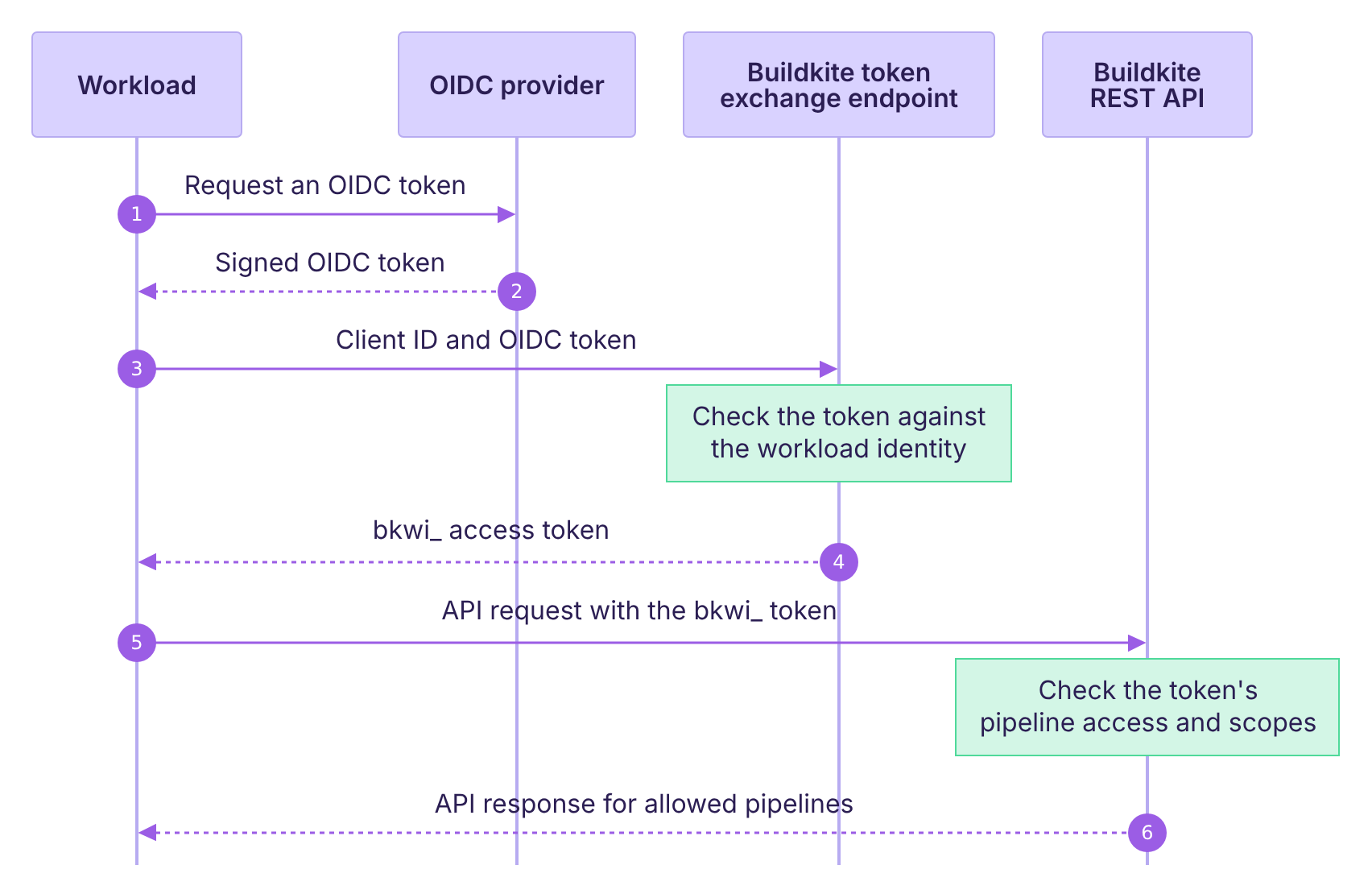
An administrator [creates a workload identity](#create-a-workload-identity) before the workload connects. Each token exchange then works as follows:
1. The workload requests an OIDC token from its identity provider, using the audience configured on the workload identity.
1. The identity provider returns a signed OIDC token that contains claims about the workload, such as its Buildkite organization, pipeline, and branch.
1. The workload sends the workload identity's client ID and the OIDC token to the Buildkite token exchange endpoint, `https://buildkite.com/oauth/token`.
1. Buildkite checks the token against the workload identity, as described in [OIDC token requirements](#oidc-token-requirements), and returns a short-lived API access token. The access token acts as the workload identity, not as a person.
1. The workload uses the access token to call the Buildkite REST API.
1. Buildkite returns the API response if the token's [pipeline access](#choose-pipeline-access) and scopes allow the request.
## Create a workload identity
> 📘 Private preview feature
> Workload identity federation is currently in private preview and is only available to Buildkite customers on the [Enterprise](https://buildkite.com/pricing) plan. To have it enabled for your Buildkite organization, contact the Buildkite Support team at [support@buildkite.com](mailto:support@buildkite.com).
You need to be a Buildkite organization administrator to create a workload identity. You can also create and manage workload identities with the [workload identities REST API](/docs/apis/rest-api/organizations/workload-identities). For the settings to use on a specific platform, follow [Working with Buildkite agents](/docs/apis/workload-identity-federation/buildkite-agents) or [Working with AWS](/docs/apis/workload-identity-federation/aws).
To create a workload identity:
1. Navigate to your organization's [**Workload Identities**](https://buildkite.com/organizations/~/workload-identities) settings, and select **New Workload Identity**.
1. In **Details**, enter a **Name** and **Description**.
1. In **Trust Policy**, describe the OIDC tokens that Buildkite trusts:
* **Provider:** Select the **Buildkite Agents**, **AWS**, **GitHub Actions**, or **Custom** OIDC configuration.
* **OIDC issuer:** The token's `iss` claim.
* **OIDC audience:** The token's `aud` claim. Keep the default, which is unique to your Buildkite organization.
* **OIDC subject:** The token's `sub` claim. Accepts `*` wildcards, but keep it as specific as possible.
* **Claims** (optional): Claims that must have exact values, to lock the workload identity to tokens from one owner. Learn more in [Lock tokens to an owner with claims](#lock-tokens-to-an-owner-with-claims).
* **Claim conditions** (optional): An expression for any other check on the token's claims. Learn more in [Write claim conditions](#write-claim-conditions).
* **JWKS override** (optional, under **Advanced settings**): If the issuer doesn't support OIDC discovery, add a [JSON Web Key Set (JWKS)](https://datatracker.ietf.org/doc/html/rfc7517) URL or inline JWKS JSON.
**Note:** A trust policy that's too broad is a serious security risk, because it lets workloads that you didn't intend mint API access tokens for your Buildkite organization. Make the **OIDC subject** as restrictive as possible, and use claims and claim conditions to narrow it further.
1. In **Resource Access**, restrict which pipelines tokens can reach. By default, tokens can't reach any pipelines. Learn more in [Choose pipeline access](#choose-pipeline-access).
1. Expand **Grantable Scopes**, and select the maximum [REST API scopes](/docs/apis/managing-api-tokens#token-scopes) that a token can have. A token exchange request can ask for any subset of these scopes. **Resource Access** doesn't limit the `read_organizations` and `write_organizations` scopes, which let a token read your Buildkite organization and manage its members.
1. Expand **Default Scopes**, and select the scopes that a token gets when the request doesn't specify any. Default scopes must be a subset of the grantable scopes.
1. In **Security**, set the following:
* **Maximum token lifetime (seconds):** From 30 to 3,600 seconds (one hour), which is the default. A token can expire sooner. Learn more in [Token lifetime](#exchange-an-oidc-token-token-lifetime).
* **Allowed IPs for token exchange requests** (optional, recommended): Space-separated CIDR ranges that can exchange tokens.
* **Allowed IPs for minted token usage** (optional, recommended): Space-separated CIDR ranges that can use minted tokens.
1. Select **Create Workload Identity**.
The workload identity's page shows the **Client ID**, **Token endpoint**, and **OIDC audience** that the workload needs to [exchange an OIDC token](#exchange-an-oidc-token). These values aren't secrets, so you can store them in CI variables or commit them to your repository.
A workload identity trusts one OIDC issuer and one audience. Create one for each platform that your workloads run on.
## Lock tokens to an owner with claims
**Claims** lock a workload identity to OIDC tokens from one owner, such as your Buildkite organization. The field holds a JSON object. Each key names a top-level claim in the token, and each value is the exact value that the claim must have:
```json
{
"organization_id": "00000000-0000-4000-8000-000000000001"
}
```
Buildkite agents in every Buildkite organization share the same issuer. A workload identity for Buildkite agents must therefore have an `organization_id` or `organization_slug` claim.
Buildkite compares claims as follows:
- **JSON types:** Values must match exactly, including their JSON type, so the string `"42"` doesn't match the number `42`.
- **Missing claims:** The token doesn't match.
- **Nested and array claims:** Keys only name top-level claims, and a claim whose value is an array or an object never matches. Use [claim conditions](#write-claim-conditions) for these claims.
**Claims** can hold up to 20 claims, and can't include `iss`, `aud`, `sub`, `exp`, `iat`, `nbf`, or `jti`, which Buildkite checks separately.
## Write claim conditions
**Claim conditions** hold a [Common Expression Language (CEL)](https://cel.dev/) expression for any check that claims can't make, such as a list of allowed values, a branch prefix, or alternatives across several claims. The expression reads the token's claims from the `claims` variable. Buildkite only mints an API access token when the expression returns `true`.
For example, this expression on a Buildkite agent's OIDC token accepts builds of release branches, except `release/legacy`, from two pipelines:
```text
claims.pipeline_id in ["00000000-0000-4000-8000-000000000002",
"00000000-0000-4000-8000-000000000003"]
&& claims.build_branch.startsWith("release/")
&& claims.build_branch != "release/legacy"
```
The following expressions show common checks:
Check | Expression
----- | ----------
Equals one of several values | `claims.step_key in ["deploy-staging", "deploy-production"]`
Doesn't equal a value | `claims.build_branch != "release/legacy"`
Starts with a prefix | `claims.build_branch.startsWith("release/")`
Matches a regular expression | `claims.build_branch.matches("^release/v[0-9]+$")`
Matches either of two checks | claims.build_branch == "main" || claims.build_source == "schedule"
Checks a claim that a token might not have | `has(claims.build_tag) && claims.build_tag.startsWith("v")`
Checks a nested claim | `claims["https://sts.amazonaws.com/"].aws_account == "123456789012"`
{: class="responsive-table"}
When the expression reads a claim that the token doesn't have, it fails, and Buildkite refuses the token. Use `has()` to check for an optional claim first. Comparisons check JSON types, as they do for claims.
Buildkite won't save an expression that:
- Is longer than 4,096 bytes
- Reads any variable other than `claims`
- Uses a macro that loops over a list, such as `all()`, `exists()`, `map()`, or `filter()`
- Returns something other than a boolean
- Returns `true` for a token with no claims, such as `true` or `!has(claims.environment)`
## Choose pipeline access
The **Pipelines** setting in **Resource Access** limits which pipelines a workload identity's tokens can reach:
- **None:** No pipelines. A new workload identity starts with this option.
- **Selected:** Up to 20 pipelines that you choose.
- **All:** Every pipeline in your Buildkite organization, including pipelines created later.
For other pipelines, the REST API returns `404 Not Found`. A token keeps the pipeline access that the workload identity had when the token was minted. To remove access from existing tokens, disable the workload identity, which revokes them.
> 🚧 Limited API support
> Workload identity federation currently supports Buildkite Pipelines only, with a subset of REST API endpoints and scopes. See [Supported APIs and scopes](/docs/apis/workload-identity-federation/supported-endpoints) for the supported operations, including organization access. Support for additional endpoints and scopes is being added.
## Exchange an OIDC token
A workload gets an OIDC token, exchanges it for an API access token, and then calls the REST API:
```bash
# 1. Get an OIDC token, for example from a Buildkite agent.
OIDC_TOKEN="$(buildkite-agent oidc request-token \
--audience "$BUILDKITE_AUDIENCE")"
# 2. Exchange it for a short-lived Buildkite API access token.
BUILDKITE_API_TOKEN="$(curl -sSf https://buildkite.com/oauth/token \
-d "grant_type=client_credentials" \
-d "client_id=$BUILDKITE_CLIENT_ID" \
-d "client_assertion_type=urn:ietf:params:oauth:client-assertion-type:jwt-bearer" \
-d "client_assertion=$OIDC_TOKEN" | jq -r .access_token)"
# 3. Call the REST API with the access token.
curl -sSf -H "Authorization: Bearer $BUILDKITE_API_TOKEN" \
https://api.buildkite.com/v2/organizations/acme-inc/builds
```
Set `BUILDKITE_CLIENT_ID` and `BUILDKITE_AUDIENCE` to the workload identity's **Client ID** and **OIDC audience**. How the workload gets its OIDC token depends on the platform. Learn more in [Working with Buildkite agents](/docs/apis/workload-identity-federation/buildkite-agents) and [Working with AWS](/docs/apis/workload-identity-federation/aws).
### Request parameters
Parameter | Description
--------- | -----------
`grant_type` | Must be `client_credentials`.
`client_id` | The workload identity's **Client ID**.
`client_assertion_type` | Must be `urn:ietf:params:oauth:client-assertion-type:jwt-bearer`.
`client_assertion` | The OIDC token from the workload's identity provider.
### Response
A successful response returns an API access token with the workload identity's default scopes. The `expires_in` value is the token's lifetime in seconds:
```json
{
"access_token": "bkwi_...",
"token_type": "Bearer",
"expires_in": 299,
"scope": "read_builds"
}
```
The token only works for your Buildkite organization, and only with the REST API.
### Token lifetime
An API access token never outlives the OIDC token that it was exchanged for. The access token expires at the earliest of:
- The OIDC token's expiry, from its `exp` claim
- The exchange time plus the workload identity's **Maximum token lifetime**
- The exchange time plus the request's `expires_in` value, if set
To get a shorter-lived token, add an `expires_in` parameter to the request, in seconds.
Exchange an OIDC token soon after the workload requests it, because the access token only lasts as long as the OIDC token has left.
Cache the access token and reuse it until it's close to expiry, instead of exchanging a token for every API request. To keep calling the API after that, such as in a long-running job, request a new OIDC token and exchange it.
### Get a new OIDC token for each exchange
A workload identity accepts each OIDC token only once. Until the OIDC token expires, Buildkite refuses to exchange it again, and returns an `invalid_client` error. Someone who copies an OIDC token after the workload exchanged it can't use it to mint API access tokens.
Request a new OIDC token for every exchange, including retries. For example, a retry after a network error fails if Buildkite accepted the first request.
Buildkite identifies OIDC tokens by their `jti` (JWT ID) claim. Buildkite agent, GitHub Actions, and AWS STS tokens have a unique `jti` claim. A workload can exchange an OIDC token without a `jti` claim more than once, until it expires.
## OIDC token requirements
Buildkite only mints a token when all of the following are true:
- The workload identity is enabled.
- The request comes from an IP address that the workload identity's **Allowed IPs for token exchange requests** and the organization's [API IP allowlist](/docs/apis/managing-api-tokens#restricting-api-access-by-ip-address) allow, if set.
- The OIDC token's `iss` claim exactly matches the **OIDC issuer**.
- The OIDC token's `aud` claim equals the **OIDC audience**, or is an array that contains it.
- The OIDC token's `sub` claim matches the **OIDC subject**.
- The OIDC token is signed with RS256, RS384, RS512, PS256, PS384, PS512, ES256, ES384, or ES512, and the signature matches a key from the issuer or the **JWKS override**.
- The OIDC token hasn't expired, and its `iat` and `nbf` claims are no more than 60 seconds in the future.
- The OIDC token's lifetime (its `exp` claim minus its `iat` claim) is one hour or less.
- The OIDC token's claims match **Claims**, and the **Claim conditions** expression returns `true`.
- If the OIDC token has a `jti` claim, the claim is a non-empty string that the workload identity hasn't already accepted.
Buildkite agent, GitHub Actions, and AWS STS tokens last five minutes by default, and [CircleCI](https://circleci.com/docs/guides/permissions-authentication/openid-connect-tokens/) tokens last one hour. [GitLab CI/CD](https://docs.gitlab.com/ci/secrets/id_token_authentication/) tokens last as long as the job timeout, and fail this check when the timeout is longer than one hour. Request OIDC tokens that last no longer than the workload needs.
By default, Buildkite finds the issuer's signing keys with OIDC discovery, from the `jwks_uri` in the issuer's discovery document. If you set the **JWKS override** to an HTTPS URL, Buildkite fetches the keys from that URL instead. Buildkite caches fetched keys for up to one hour, so providers can rotate keys without changes to the workload identity. You can also add the JWKS inline as JSON. Inline keys never refresh, so update them before the provider signs tokens with a new key.
## Troubleshooting
The token endpoint returns [RFC 6749 §5.2](https://datatracker.ietf.org/doc/html/rfc6749#section-5.2) error responses with an `error` code and, for some errors, an `error_description`:
```json
{
"error": "invalid_scope",
"error_description": "Requested scopes exceed grantable scopes"
}
```
### Common errors
`error` | `error_description` | Fix
------- | ------------------- | ---
`invalid_client` | A description of the problem, or none | Fix what the description names. Otherwise, learn more in [Find why a token exchange failed](#troubleshooting-find-why-a-token-exchange-failed).
`invalid_request` | "Missing required parameter: …" | Add the named parameter to the request.
`invalid_request` | "`expires_in` exceeds maximum allowed TTL of … seconds" | Lower `expires_in` to the workload identity's **Maximum token lifetime** or less, or omit it.
`invalid_scope` | "No scopes requested and no default scopes configured" | Select **Default Scopes** on the workload identity.
### Find why a token exchange failed
Buildkite returns an `invalid_client` error for every verification failure. When the OIDC token is expired, reused, or malformed, or its claims don't match the workload identity, the `error_description` says so. Buildkite doesn't describe other failures, such as a wrong client ID, issuer, audience, or signature, a disabled workload identity, or a request from an IP address that isn't allowed. Failed exchanges don't appear in the audit log.
To find the cause of a failure without a description, decode the OIDC token in the workload. Decoding doesn't need a key:
```bash
# The header, which holds the signing algorithm (alg) and key ID (kid)
echo "$OIDC_TOKEN" | jq -R 'split(".")[0] | gsub("-"; "+") | gsub("_"; "/") | @base64d | fromjson'
# The payload, which holds the claims
echo "$OIDC_TOKEN" | jq -R 'split(".")[1] | gsub("-"; "+") | gsub("_"; "/") | @base64d | fromjson'
```
Print only the decoded header and payload, never the token itself, because someone else could exchange it before it expires.
Compare the result with the [OIDC token requirements](#oidc-token-requirements). Common causes are:
- The `iss` claim and the **OIDC issuer** differ by a trailing `/`.
- The **OIDC subject** doesn't match the whole `sub` claim. Use `*` for the parts that change between runs, such as the commit and step key in a Buildkite agent token.
- A claim has the wrong JSON type, such as `"123456789"` for a claim of `123456789`.
- A claim condition reads a claim that the token doesn't have. Check for the claim with `has()` first.
- The request uses the wrong client ID, the workload identity is disabled, or the request comes from an IP address that isn't allowed.
- The workload sent an OIDC token that the workload identity had already accepted, for example in a retry. Learn more in [Get a new OIDC token for each exchange](#exchange-an-oidc-token-get-a-new-oidc-token-for-each-exchange).
### Fix API requests that return 404
A REST API request returns `404 Not Found` for an existing pipeline, build, or job when the token can't reach that pipeline. Add the pipeline to the workload identity's **Resource Access** setting, then exchange a new OIDC token.